
Insight Works

About
Documents
Videos
Ask a Question
News & Articles

Factsheet

Insight Works is a leading Independent Software Vendor (ISV) dedicated to creating apps exclusively for Microsoft Dynamics 365 Business Central. Insight Works specializes in the manufacturing and distribution industries and provides innovative solutions that streamline operations and enhance productivity for businesses worldwide. With a vast reseller network comprising over 800 global Microsoft Partners, Insight Works ensures its apps are accessible and supported wherever businesses operate. Headquartered in Canada, Insight Works also maintains a regional office in the Netherlands, strengthening its global reach and commitment to localized support. 

Learn more at https://insight-works.com 

Insight Works Head Office
Suite #102, 5661 99 Street NW
Edmonton, Alberta, Canada T6E 3N8

Insight Works European Office
Kingsfordweg 151
1043 GR Amsterdam, The Netherlands

Videos

Ask a Question

CAPTCHA

This question is for testing whether you are a human visitor and to prevent automated spam submissions.

CAPTCHA

Press Releases

Insight Works Releases Three New Mobile Interface Views for Warehouse Insight on Microsoft Dynamics 365 Business Central

Insight Works Releases Three New Mobile Interface Views for Warehouse Insight on Microsoft Dynamics 365 Business Central

Built in response to customer feedback, the new views give handheld scanners, wearables, and forklift-mounted tablets each an interface suited to the worker and the device.

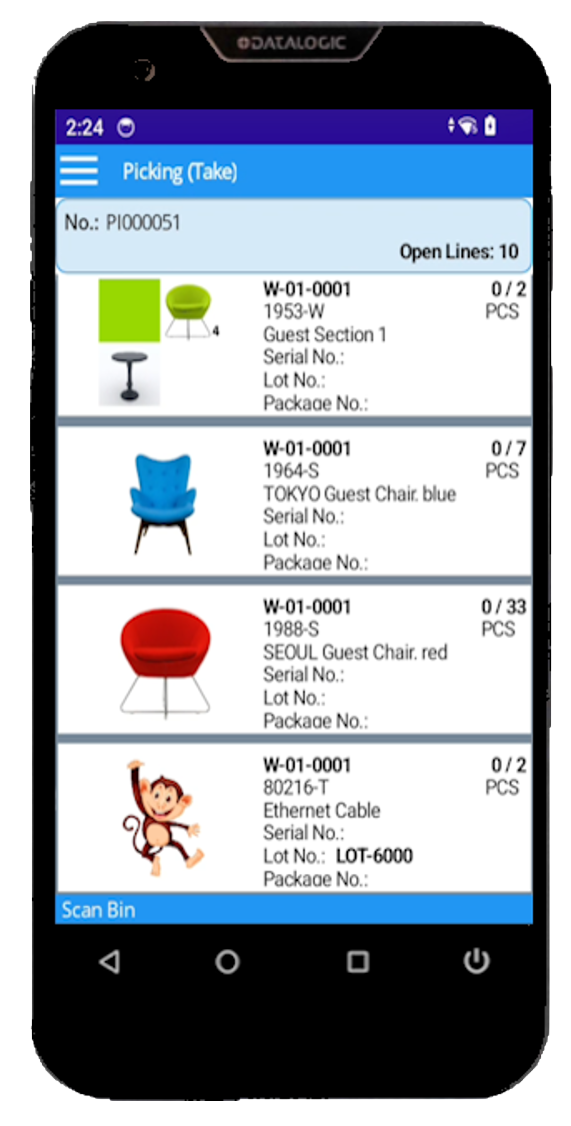
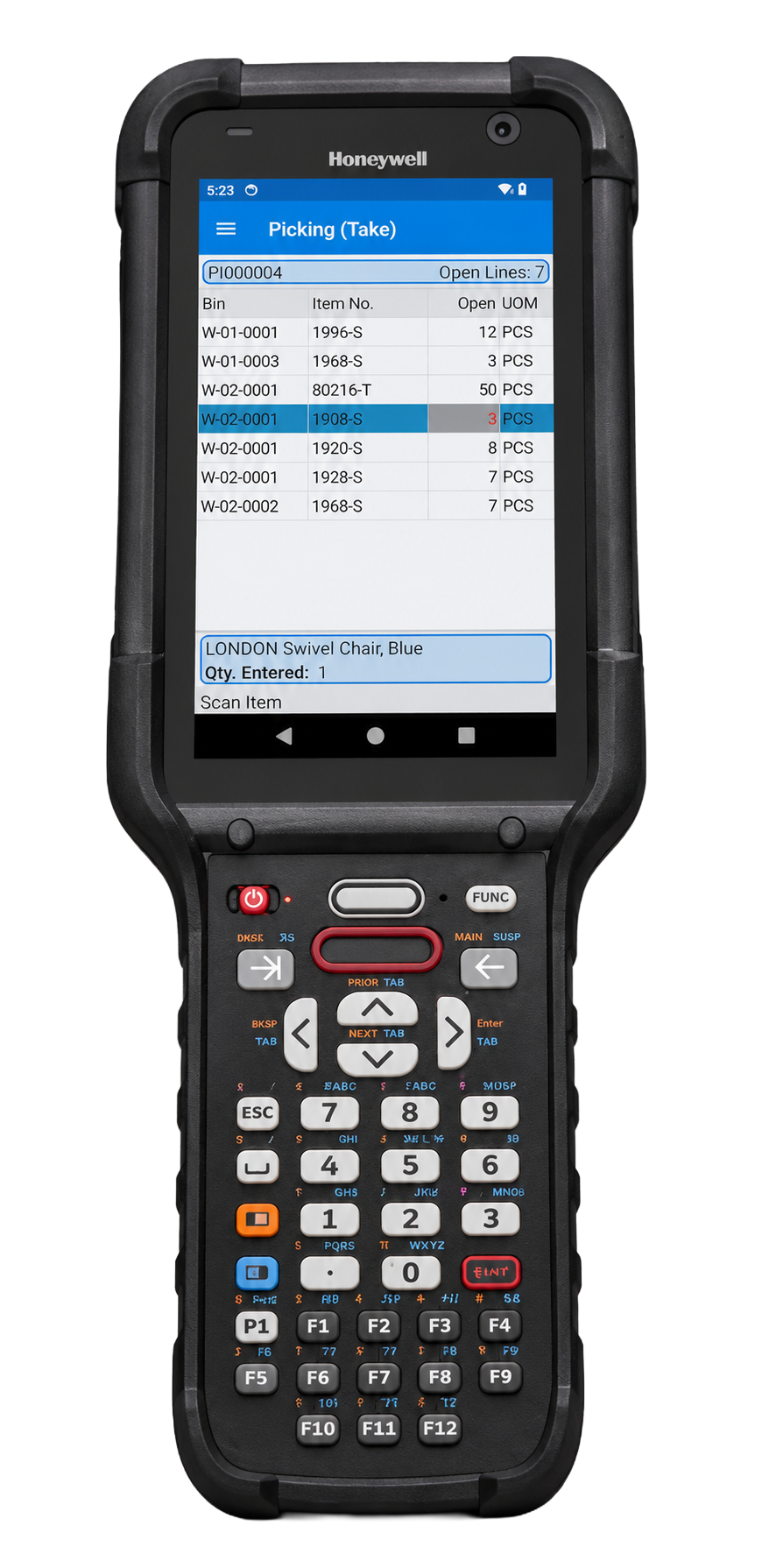
Insight Works has released three configurable mobile interface views for Warehouse Insight, its warehouse management app for Microsoft Dynamics 365 Business Central. The new views, named Rich Tile View, Directed Card View, and Compact Grid View, were built in response to customer feedback from users running multiple device types on the warehouse floor. Each view is suited to a specific device and a specific role.
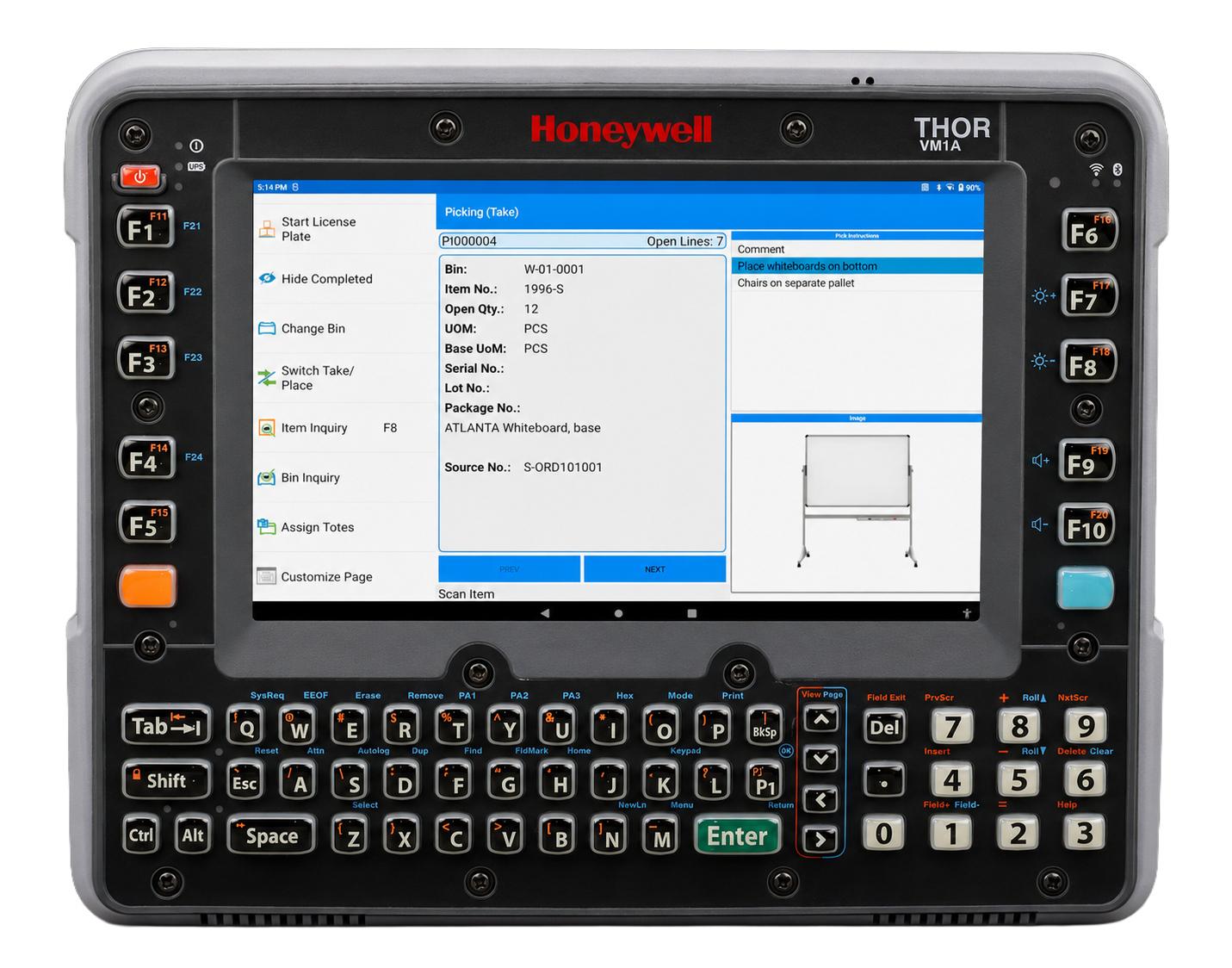

Warehouse Insight Directed Card View


Warehouse Insight Rich Tile View


Warehouse Insight Compact Grid View

The request came from customers directly. Warehouse teams running Warehouse Insight told Insight Works that one mobile interface does not fit every device or every job. A single operation rarely runs one kind of device. Receiving may use compact handheld scanners, pickers may wear ring scanners on wearables, and forklift operators work from vehicle-mounted tablets. Pushing all of them through the same interface is a compromise. Too much detail crowds a small screen and slows an experienced picker, while a dense list is the wrong tool for someone handling one pallet at a time on a forklift.

Each of the three new views answers a different version of that problem. Rich Tile View shows each document line as a tile with the fields a worker checks before scanning and per-row color rules to flag priorities or exceptions, suited to picking, receiving, and shipping on Android handhelds. Directed Card View presents one task at a time in a full-detail panel, with side factboxes for instructions and reference, built for forklift-mounted tablets and wearables where a focused, single-step display matches the physical work. Compact Grid View shows the full document as a high-density list with on-device column sorting, for experienced workers on smaller scanner screens who move through large pick lists quickly.

A supervisor assigns a view to a device configuration inside Business Central. Hence, a forklift fleet and a handheld fleet in the same warehouse each get the interface that fits, with no setup required on the floor. Fields, color rules, factboxes, and view assignment are all managed in Business Central, with no separate configuration tool.

"These views came straight from our customers. Teams running handhelds, wearables, and forklift tablets kept telling us that one interface could not serve all of them well," said Brian Neufeld, Director of Marketing at Insight Works. "So we built three, each for a different device and role, and kept the configuration inside Business Central, so there is nothing extra to manage on the floor. That is how we work: customers tell us where the friction is, and we go solve it."

Warehouse Insight is available for Microsoft Dynamics 365 Business Central. Watch the on-demand demo at dmsiworks.com/apps/warehouse-insight or talk to your Microsoft Partner.

About Warehouse Insight

Warehouse Insight is a Microsoft-certified mobile warehouse management app for Microsoft Dynamics 365 Business Central. It connects handheld scanners, wearable computers, and vehicle-mounted tablets to Business Central for receiving, picking, packing, shipping, inventory counts, and bin movements, with support for barcodes, lot numbers, and serial numbers, and works with any location configuration.

About Insight Works

Insight Works is a leading Independent Software Vendor (ISV) dedicated to creating apps exclusively for Microsoft Dynamics 365 Business Central. The company specializes in the manufacturing and distribution industries, providing innovative solutions that streamline operations and enhance productivity for businesses worldwide. With a vast reseller network comprising over 750 global Microsoft Partners, Insight Works ensures its apps are accessible and supported wherever businesses operate. Headquartered in Canada, Insight Works also maintains a regional office in the Netherlands, strengthening its global reach and commitment to localized support. Learn more at dmsiworks.com.
Vendor

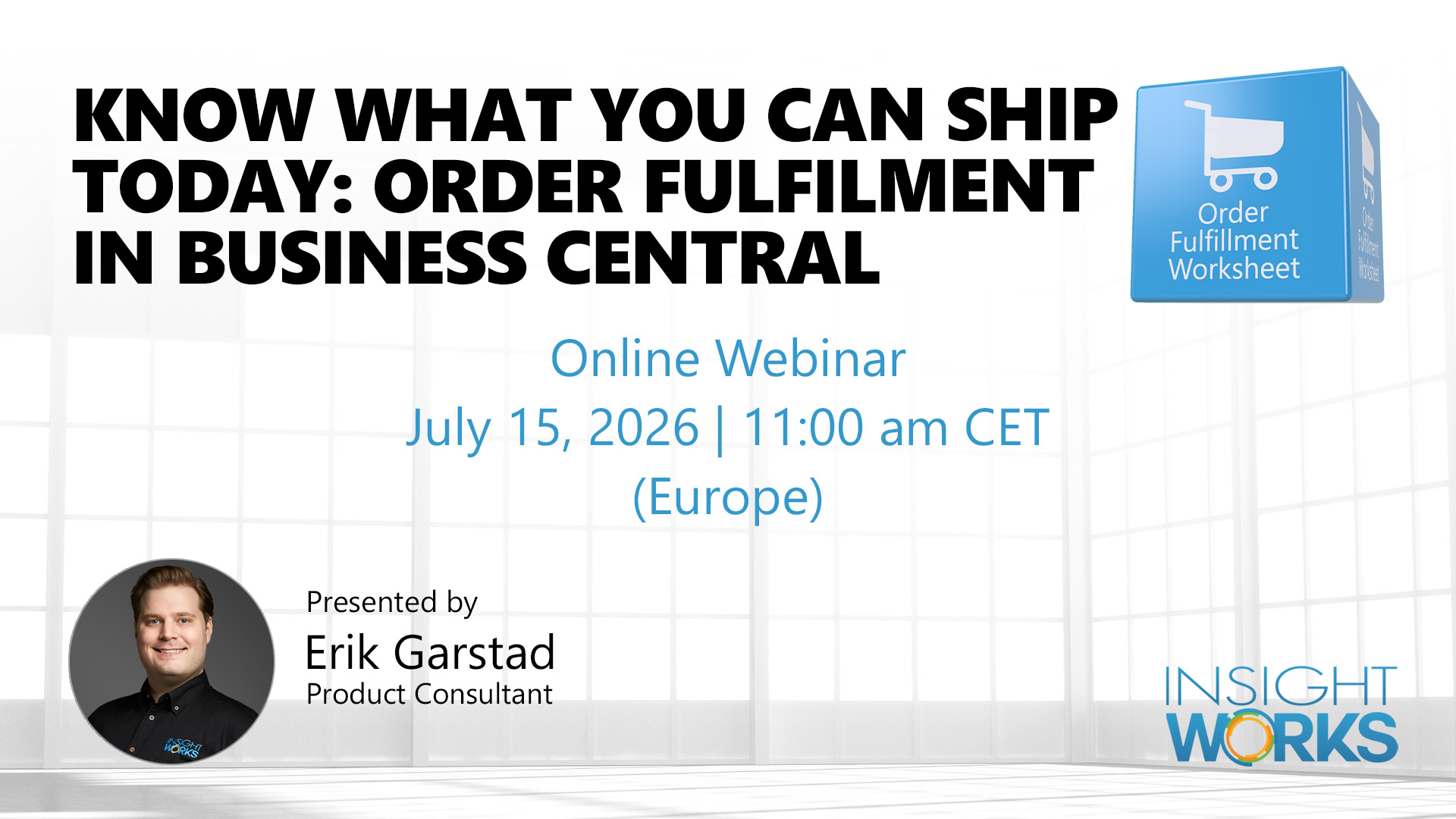
Webinar: Know What You Can Ship Today: Order Fulfilment in Business Central

Webinar: Know What You Can Ship Today: Order Fulfilment in Business Central

When orders are piling up and your team is manually cross-checking sales orders against inventory, time spent figuring out what can ship is time not spent actually shipping. Business Central’s native tools give you inventory visibility, but they don’t give you a clear, prioritised picture of which orders are ready to fulfil right now.

Date & Time: July 15, 2026 @ 11:00 am  CET (Europe)

Register: https://dmsiworks.com/events/business-central-fixing-order-fulfillment-gaps

This webinar introduces the Order Fulfillment Worksheet, a Business Central app that surfaces real-time availability status across all your open orders, automates pick and shipment creation, and helps you manage backorders without the guesswork.

What You’ll Learn:

  • Know what you can ship today with real-time order availability status in Business Central
  • Prioritise and group orders by customer, carrier, region, or shipment date
  • Generate warehouse picks and shipments for ready orders in a few clicks
  • Manage inventory allocation manually or let the worksheet calculate it automatically
  • Identify and act on backorders as soon as new stock arrives
  • Understand where native Business Central fulfilment tools fall short and how to close the gap

Register now to secure your spot. Can’t attend live? Register anyway, and we’ll send you the recording.

Know What You Can Ship Today: Order Fulfilment in Business Central


Vendor

As AI Agents Speed Up Order Intake in Business Central, Order Fulfillment Worksheet Answers What Can Ship Today

As AI Agents Speed Up Order Intake in Business Central, Order Fulfillment Worksheet Answers What Can Ship Today

AI agents in Business Central are speeding up order entry, but more orders arriving faster does not tell your warehouse what it can actually ship today. The Order Fulfillment Worksheet calculates availability across every open order, allocates inventory only once, and creates the shipments and picks for what your team can fulfill now. Find out how to keep fulfillment in step with automated order intake.

Microsoft Dynamics 365 Business Central is moving order entry toward automation with the AI agents introduced in its 2026 release wave 1, including a generally available Sales Order Agent. Insight Works is using the moment to remind warehouse and operations teams of a question that automation upstream does not resolve: when more orders arrive faster, which of today's orders can you actually ship? The Order Fulfillment Worksheet, an Insight Works app for Business Central, was built to answer exactly that.

Microsoft's 2026 release wave 1, with features rolling out from April 2026 through September 2026, advances what the company describes as agentic ERP, with AI agents that automate sales and purchase scenarios. As order entry becomes faster and more hands-off, the volume of orders reaching the warehouse can grow without a matching increase in staff. The decision of what to pick and ship still falls to a supervisor.

That decision is where time is lost today. When a supervisor faces a large backlog, standard Business Central slows down the review: it sorts only on one column at a time. It does not dynamically deduct availability across competing orders. The result is a manual, order-by-order check of what is in stock, often using a clipboard or spreadsheet to track backorders on the side.

Order Fulfillment Worksheet replaces that manual process. It calculates availability from the top down and allocates inventory only once across competing orders, so the same units are never promised to two orders at the same time. It supports multi-criteria sorting and filtering so that teams can work by shipment date, customer, order value, shipping agent, or other fields. It works with any warehouse configuration, including locations with no bins or warehouse documents, and it creates the warehouse shipments and picks for the orders a team chooses to fulfill. Backorders are handled automatically: when stock arrives, the worksheet recognizes it and flags the orders that can now ship.

The app can also run unattended via the Business Central job queue, generating picks on a set schedule for available-to-ship orders. In an environment where orders are entered automatically, this lets fulfillment keep pace with intake without requiring someone to watch the screen.

"Microsoft is making it faster to get orders into Business Central, and that is good for our customers. But a faster front door means more orders waiting at the warehouse, and the question of what can actually ship today does not answer itself," said Brian Neufeld, Director of Marketing at Insight Works. "That is what the Order Fulfillment Worksheet takes off the supervisor's plate. It calculates availability across every open order, allocates inventory once so the same stock is never promised twice, and tells the team what to pick and ship right now."

The Order Fulfillment Worksheet is available on the Microsoft Dynamics 365 Business Central Microsoft Marketplace. To learn more, visit FulfillmentForDynamics.com or talk to your Business Central partner.

About Order Fulfillment Worksheet

Optimize your order fulfillment operations with the Order Fulfillment Worksheet. This dynamic tool provides real-time insight into what can be shipped today, automating warehouse shipments and pick creation. It prevents wasted time on orders held back by stock unavailability. Prioritize orders, manage backorders effectively, and gain comprehensive order details. It's your compact solution for a streamlined, proactive order fulfillment process.

About Insight Works

Insight Works is a leading Independent Software Vendor (ISV) dedicated to creating apps exclusively for Microsoft Dynamics 365 Business Central. The company specializes in the manufacturing and distribution industries, providing innovative solutions that streamline operations and enhance productivity for businesses worldwide. With a vast reseller network comprising over 750 global Microsoft Partners, Insight Works ensures its apps are accessible and supported wherever businesses operate. Headquartered in Canada, Insight Works also maintains a regional office in the Netherlands, strengthening its global reach and commitment to localized support. Learn more at dmsiworks.com.
Vendor

Insight Works Addresses Warehouse Connectivity Gaps for Microsoft Dynamics 365 Business Central Users

Insight Works Addresses Warehouse Connectivity Gaps for Microsoft Dynamics 365 Business Central Users

Network problems in a warehouse do not all look the same, and a one-size-fits-all solution leaves gaps. Warehouse Insight runs natively inside Business Central and handles dead zones, full outages, and high-volume scan sessions as the separate problems they are. Find out how each connectivity scenario is addressed without disrupting your team's workflow.

Insight Works, a developer of warehouse and manufacturing productivity applications for Microsoft Dynamics 365 Business Central, has detailed how Warehouse Insight addresses the full range of connectivity challenges facing warehouse operations, from brief Wi-Fi dead zones to complete network outages.

Most warehouse management systems treat connectivity failure as a single problem with a single solution. In practice, a mid-aisle dead spot, a full network outage, and a high-speed serial number scan session create three distinct failure modes. Addressing only one leaves the others unresolved, and the consequences are familiar: workers stop scanning and wait, revert to paper, or continue working and absorb the errors later.

Warehouse Insight, which runs as a native extension inside Business Central, separates these scenarios into three distinct operating modes. In standard operation, the system posts every scan to Business Central in real time, delivering immediate validation feedback directly on the scanning device. Wrong item, mismatched lot number, quantity exceeded: the error appears before the worker moves on. When a worker enters a dead zone or a high-volume scan operation outpaces the server's response time, the store-and-forward engine automatically activates, queuing scans on the device and forwarding them to Business Central when the connection stabilizes. The worker takes no action. The transition is invisible.

When connectivity is lost entirely, full offline mode engages. Cached documents remain accessible on the device, and workers can open documents, scan items, enter quantities, and complete transactions without a network connection. When connectivity is restored, the data is uploaded to Business Central, and a supervisor or worker reviews exceptions before posting. For situations where no document exists at the time of the outage, the Scratchpad application captures ad-hoc entries across receiving, shipping, pick, put-away, and inventory count, holding them on the device until they can be matched and processed. Teams with custom requirements can also build offline-capable applications using the App Designer's offline application framework.

"One of the most common questions in a WMS evaluation is what happens when the connection drops," said Brian Neufeld, Director of Marketing, Insight Works. "The honest answer is that it depends on what kind of connectivity problem you're dealing with. Warehouse Insight handles all three scenarios differently because they are different problems. That's an answer partners can take into a sales conversation, and end users can rely on in daily operations."

For Business Central users and Microsoft Partners evaluating WMS options, more information is available at WMSforDynamics.com.

About Insight Works

Insight Works is a leading Independent Software Vendor (ISV) dedicated to creating apps exclusively for Microsoft Dynamics 365 Business Central. The company specializes in the manufacturing and distribution industries, providing innovative solutions that streamline operations and enhance productivity for businesses worldwide. With a vast reseller network comprising over 750 global Microsoft Partners, Insight Works ensures its apps are accessible and supported wherever businesses operate. Headquartered in Canada, Insight Works also maintains a regional office in the Netherlands, strengthening its global reach and commitment to localized support. Learn more at dmsiworks.com.
Vendor

Item Configuration in Business Central Is a Persistent Problem. Insight Works Is Part of How the Industry Solves It.

Item Configuration in Business Central Is a Persistent Problem. Insight Works Is Part of How the Industry Solves It.

Being chosen to present at Community Summit North America 2026 is no accident: when Business Central experts need answers to item data structure questions, they turn to Insight Works for leadership.

For organizations using Microsoft Dynamics 365 Business Central, few decisions have more impact than how inventory items are identified, described, and documented. Get the numbering logic wrong, and teams spend years working around it. Write descriptions that serve the warehouse but not the customer, or the customer but not production, and every order becomes a small translation exercise. These are not fringe problems; they surface in virtually every Business Central implementation that handles configurable or build-to-order items.

Insight Works stands at the forefront of these decisions. That's exactly why Senior Solution Advisor Mark Hamblin will take the stage at Community Summit North America 2026, the largest independent event for the Microsoft Dynamics and Power Platform world. Happening in Nashville October 12-15, this is where industry leaders gather.

This session, "Configuring Item Identity in Business Central: Strategies for Item Numbers, Descriptions, and Extended Text," was selected from more than 2,350 submissions for a program that accepted 600. The attendees in that room will be Business Central end users, resellers, and implementation partners from across North America; the same audience that Insight Works' products serve globally.

What the Session Covers

Insight Works covers essential strategies for creating effective item numbers, descriptions, and extended text in Business Central. Attendees will learn how to select scalable numbering patterns, write descriptions that support both operations and customers, and use extended text to enhance clarity without causing confusion. Participants will gain actionable methods to improve item data accuracy, streamline order processing, and avoid common pitfalls in Business Central implementations.

This session is tailor-made for those facing these challenges now or living with the results of past decisions. Attendees will walk away with ready-to-use frameworks, whether rolling out new implementations or optimizing existing ones.

A Niche Market, and a Concentrated One

Community Summit North America brings together the expert professionals who keep Business Central running daily: end users pushing adoption, resellers and partners driving innovation, and independent software vendors expanding the platform's possibilities. Participating in this event isn't just about marketing; it's about sharing game-changing knowledge where the Business Central community seeks proven, real-world solutions

Insight Works apps are used by distribution and manufacturing companies globally. The challenges Hamblin will address in Nashville are the same ones showing up in implementations across industries and geographies, wherever companies are managing complex item catalogs in Business Central. Don't miss this opportunity to gain practical strategies, plan to attend Hamblin's session at Community Summit North America 2026. Visit dmsiworks.com to learn more or connect with our team. For those planning to attend, please use Promo Code InsightWor15 for 15% off your registration for Community Summit 2026!

About Insight Works

Insight Works is a leading Independent Software Vendor (ISV) dedicated to creating apps exclusively for Microsoft Dynamics 365 Business Central. The company specializes in the manufacturing and distribution industries, providing innovative solutions that streamline operations and enhance productivity for businesses worldwide. With a vast reseller network comprising over 750 global Microsoft Partners, Insight Works ensures its apps are accessible and supported wherever businesses operate. Headquartered in Canada, Insight Works also maintains a regional office in the Netherlands, strengthening its global reach and commitment to localized support. Learn more at dmsiworks.com.

Vendor

Insight Works Expands Global Reseller Network with 10 New Microsoft Partners in May 2026

Insight Works Expands Global Reseller Network with 10 New Microsoft Partners in May 2026

New partnerships extend Business Central expertise across Europe, North America, the Middle East, Africa, and Australia.

Insight Works, an independent software vendor that builds apps for Microsoft Dynamics 365 Business Central in the manufacturing and distribution industries, has added 10 new Microsoft Partners to its global reseller network in May 2026. The new partners span eight countries across five regions, extending local Business Central support into both established and emerging markets.

In Europe, Oseberg Solutions AS of Tønsberg, Norway, is a Microsoft Solutions Partner focused on Business Central, Dynamics 365 Sales, and the Power Platform, with added retail expertise through LS Central. Velika SRL of Cuneo, Italy, part of the SYS-DAT Group, delivers ERP, MES, and warehouse management solutions on Business Central for the food and beverage, agribusiness, fashion, and manufacturing sectors. Sherpas Group AB of Skellefteå, Sweden, helps organizations modernize their data and systems across Business Central, Dynamics 365 Finance and Supply Chain Management, and Power BI.

In North America, DataInvent Systems Corp of Mississauga, Ontario, brings a broad Microsoft practice spanning Business Central, the Power Platform, and Azure, with vertical solutions for construction and the public sector. Massive IT of Tampa, Florida, pairs Dynamics 365 consulting with managed IT, cloud, and cybersecurity services for clients across North America and Europe. CKS Cloud LLC of Stamford, Connecticut, specializes in Business Central and Dynamics 365 Finance and Operations, with focused offerings for life sciences, manufacturing and distribution, and retail. DL & Associates LLC, a Chicago-area firm in Schaumburg, Illinois, brings deep financial systems and accounting software experience, including data migration and inventory and shop-floor tools.

Insight Works also welcomed partners in three more regions. El Haceb S.A.L. serves Lebanon and Saudi Arabia with ERP, CRM, cloud, and cybersecurity services, broadening Business Central coverage in the Middle East. Braintree (Pty) Ltd. of Johannesburg, South Africa, is a Microsoft Solutions Partner that builds its own Business Central add-ons, including regional tax-compliance tools for neighboring markets. Adept Technology Pty Ltd of Hadfield, Victoria, is a Business Central implementation specialist in Australia with an established focus on warehouse and mobile data collection, a natural fit for warehouse-centered operations.

Brian Neufeld, Director of Marketing at Insight Works, said the geographic spread is what stands out this month. "These partners reach businesses from the Nordics to Australia to the Middle East," he said. "Customers do their best work when they have someone nearby who understands their market and can help them set up and run Business Central. Bringing on partners across this many regions means more companies can get that support close to home."

Each partnership gives Business Central customers in these markets a local contact for implementation, configuration, and ongoing support.

About Insight Works

Insight Works is a leading Independent Software Vendor (ISV) dedicated to creating apps exclusively for Microsoft Dynamics 365 Business Central. The company specializes in the manufacturing and distribution industries, providing innovative solutions that streamline operations and enhance productivity for businesses worldwide. With a vast reseller network comprising over 750 global Microsoft Partners, Insight Works ensures its apps are accessible and supported wherever businesses operate. Headquartered in Canada, Insight Works also maintains a regional office in the Netherlands, strengthening its global reach and commitment to localized support. Learn more at dmsiworks.com.

Vendor

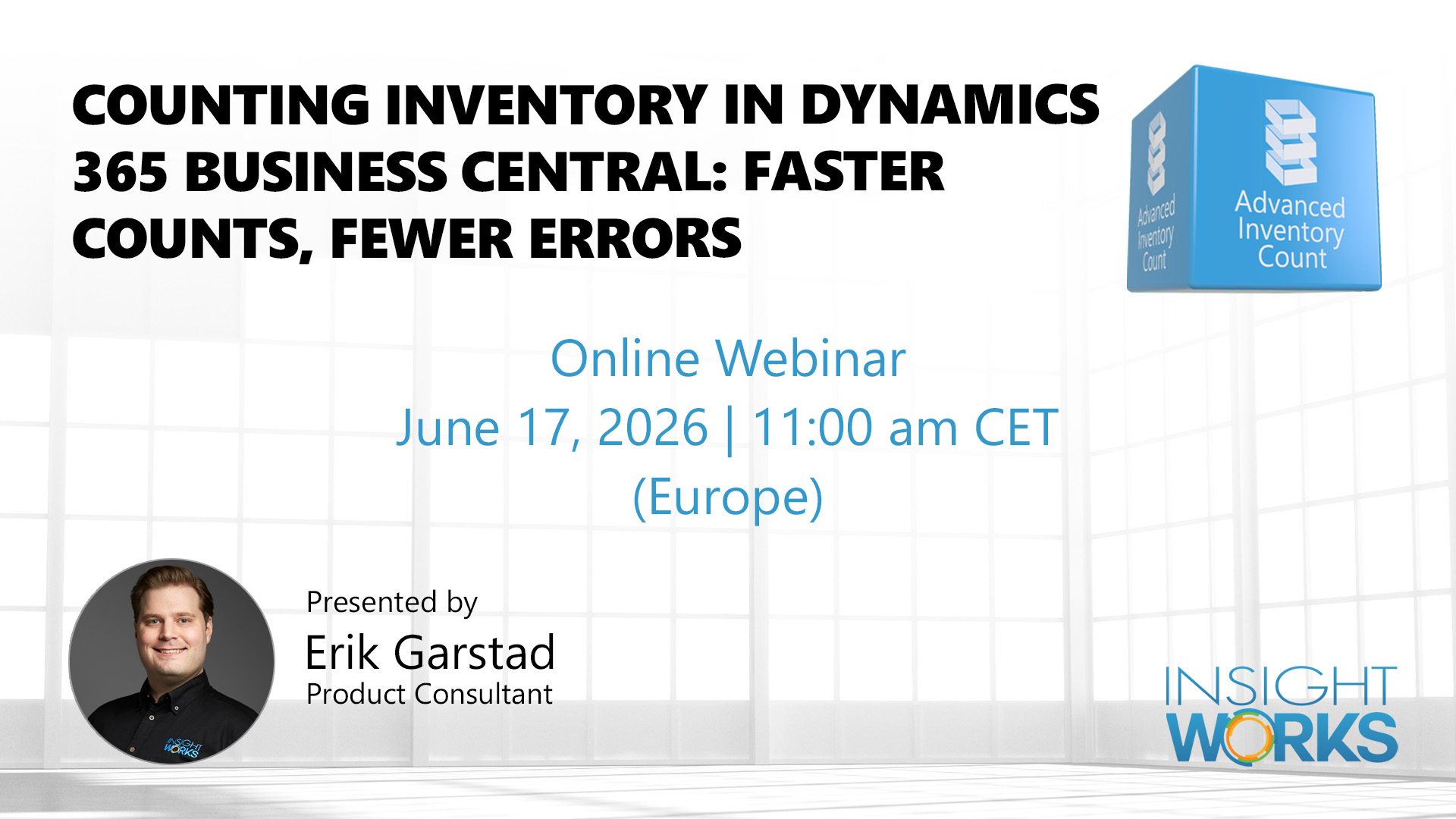
EU Webinar: Counting Inventory in Dynamics 365 Business Central: Faster Counts, Fewer Errors

EU Webinar: Counting Inventory in Dynamics 365 Business Central: Faster Counts, Fewer Errors

Physical inventory counts in Business Central often stall because the native tools weren't built for operations with multiple count teams, complex bin setups, or items tracked by lot and serial number. Coordinating paper sheets, chasing down uncounted items, and manually reconciling discrepancies can stretch a count across days that should take hours.

Date and Time: June 17, 2026 | 11:00 am CET (Europe)

Register: https://dmsiworks.com/events/counting-inventory-eu

This webinar walks through how Advanced Inventory Count extends Business Central to handle the full count process, from configuring flexible count sheets and enabling simultaneous multi-user entry to running reconciliation reports and posting adjustments with confidence.

What You'll Learn

  • Automate data collection by integrating barcode scanning with count sheets
  • Configure count sheets grouped by location, bin, shelf, or item criteria
  • Enable multiple users to enter count data simultaneously across sheets
  • Identify uncounted items before and after a count to avoid posting gaps
  • Reconcile lot and serial number discrepancies automatically
  • Use the Count Difference Analysis report to locate and resolve count errors
  • Validate journal entries before posting to catch blocking issues early

Register to join us live for a walkthrough you can apply directly to your next count cycle. Can't attend live? Register anyway, and we'll send you the recording.

Counting Inventory in Dynamics 365 Business Central: Faster Counts, Fewer Errors

Vendor

Webinar: Faster Data Migration in Business Central with Import Export PowerTool

Webinar: Faster Data Migration in Business Central with Import Export PowerTool

Data migration is one of the most reliable ways to derail a Business Central go-live. RapidStart is slow on large datasets, cannot write to protected tables like item ledger entries or G/L entries, and has no way to suppress the change log during bulk operations, leaving teams with thousands of audit entries that describe nothing useful. 

This webinar covers the Import Export PowerTool, a completely free app from Insight Works for Business Central, and walks through how it handles imports, exports, bulk updates, and direct table writes for common scenarios that RapidStart simply was not designed for. 

Date and time: June 17, 2026 | 1:00 pm EDT (North America)

Register: https://dmsiworks.com/events/business-central-data-migration


What You’ll Learn: 

  • Identify why RapidStart fails on bulk updates, ledger imports, and iterative migrations 
  • Import and export data across any Business Central table, including protected tables 
  • Control change log behavior during bulk operations to avoid performance and audit noise 
  • Handle lot numbers, serial numbers, and dimensions in item journal imports automatically 
  • Perform scoped bulk updates and deletions with field-level validation and confirmation prompts 
  • Evaluate the tool’s fit for opening balance loads, sandbox-to-production copies, and post-go-live cleanup 

Register to attend live and see the Import Export PowerTool applied to real migration scenarios in Business Central. 

Can’t attend live? Register anyway, and we’ll send you the recording. 


Faster Data Migration in Business Central with Import Export PowerTool


Vendor

Webinar: Counting Inventory in Business Central: Faster Counts, Fewer Errors

Webinar: Counting Inventory in Business Central: Faster Counts, Fewer Errors

Physical inventory counts in Business Central often stall because the native tools weren't built for operations with multiple count teams, complex bin setups, or items tracked by lot and serial number. Coordinating paper sheets, chasing down uncounted items, and manually reconciling discrepancies can stretch a count across days that should take hours.

Date & Time: June 10, 2026 | 1:00 pm EDT (North America)

Register: https://dmsiworks.com/events/inventory-counting-business-central

This webinar walks through how Advanced Inventory Count extends Business Central to handle the full count process, from configuring flexible count sheets and enabling simultaneous multi-user entry to running reconciliation reports and posting adjustments with confidence.

What You'll Learn

  • Automate data collection by integrating barcode scanning with count sheets
  • Configure count sheets grouped by location, bin, shelf, or item criteria
  • Enable multiple users to enter count data simultaneously across sheets
  • Identify uncounted items before and after a count to avoid posting gaps
  • Reconcile lot and serial number discrepancies automatically
  • Use the Count Difference Analysis report to locate and resolve count errors
  • Validate journal entries before posting to catch blocking issues early

Register to join us live for a walkthrough you can apply directly to your next count cycle. Can't attend live? Register anyway, and we'll send you the recording.

Counting Inventory in Business Central: Faster Counts, Fewer Errors

Vendor

Insight Works Releases Product Configurator v4.1 for Microsoft Dynamics 365 Business Central

Insight Works Releases Product Configurator v4.1 for Microsoft Dynamics 365 Business Central

Insight Works has released Product Configurator v4.1 for Business Central, introducing context-aware rule logic, inherited sub-configuration values, and configurable production order status. The update also resolves sub-configuration cost inconsistencies and improves lookup speed for teams managing complex configure-to-order workflows.
 

Insight Works has released Product Configurator v4.1 for Microsoft Dynamics 365 Business Central, delivering improvements to rule-building logic, sub-configuration cost handling, and interface performance. The update targets manufacturers and distributors that rely on configure-to-order workflows, where gaps in rule precision or inconsistent cost calculations lead to downstream errors in production planning and order management.

Two of the most significant changes in v4.1 address how configurations share data and how rules respond to context. Sub-configurations can now copy or inherit values from a parent configuration, eliminating the manual re-entry that previously slowed complex product builds and introduced transcription errors. Alongside this, rules can now reference variables directly from the record that triggers them — for example, identifying a specific choice code when a rule runs from an option choice. This context-aware logic allows the rule builder to behave more precisely across product hierarchies, reducing the need for workaround configurations or hardcoded values. For teams managing products with dozens of configurable options and nested sub-assemblies, these changes meaningfully reduce both setup effort and the risk of invalid outputs reaching production.

Version 4.1 also corrects cost inconsistencies that affected sub-configurations and choice-level pricing. Sub-configurations now correctly apply the calculated standard cost setting when created or updated from a parent, ensuring cost figures remain coherent across the full product hierarchy. Unit price, unit cost, net weight, and gross weight for child choices now update correctly when the update-on-when-used setting is active. On the scheduling side, users can specify the exact production order status, such as firm planned or released, when generating orders from sales orders in Business Central, giving planning teams direct control over where a new order enters the production queue. The release also improves interface speed: option choice lookups and choice variables for rule editing load significantly faster, and obsolete page fields have been removed to reduce visual noise and improve overall application performance.

"The rule-building changes in this release address something our users run into frequently: rules that need to behave differently depending on where they're triggered from," says Brian Neufeld, Director of Marketing at Insight Works. "That kind of context-awareness was difficult to achieve before v4.1. The sub-configuration cost corrections are equally important. If the numbers don't roll up correctly through a product hierarchy, you're solving an accounting problem instead of shipping product." For more information about Product Configurator, visit CPQforDynamics.com. Businesses looking to implement or upgrade can connect with any of Insight Works' 750+ global Microsoft Partners.

About Insight Works

Insight Works is a leading Independent Software Vendor (ISV) dedicated to creating apps exclusively for Microsoft Dynamics 365 Business Central. The company specializes in the manufacturing and distribution industries, providing innovative solutions that streamline operations and enhance productivity for businesses worldwide. With a vast reseller network comprising over 750 global Microsoft Partners, Insight Works ensures its apps are accessible and supported wherever businesses operate. Headquartered in Canada, Insight Works also maintains a regional office in the Netherlands, strengthening its global reach and commitment to localized support. Learn more at dmsiworks.com.

Vendor