Handling Refunds and Replacements Efficiently in Business Central Counter Operations
Listen to the Podcast
The Complexity of Managing Refunds and Replacements at the Counter
Counter staff often face situations where a customer requests both a refund and an immediate replacement for returned items. This creates a multi-step process requiring separate handling of return documents, refunds, and new sales orders.
Staff must repeatedly enter customer and item information, navigate between multiple documents, and track which parts of the transaction have been completed manually. This fragmentation slows down service, especially during busy periods, leading to longer wait times and increased potential for posting errors.
Training new staff to handle these return scenarios is challenging because the workflow is non-intuitive and breaks the usual flow of transactions. Experienced employees frequently depend on informal workarounds that risk inconsistent records and audit gaps.
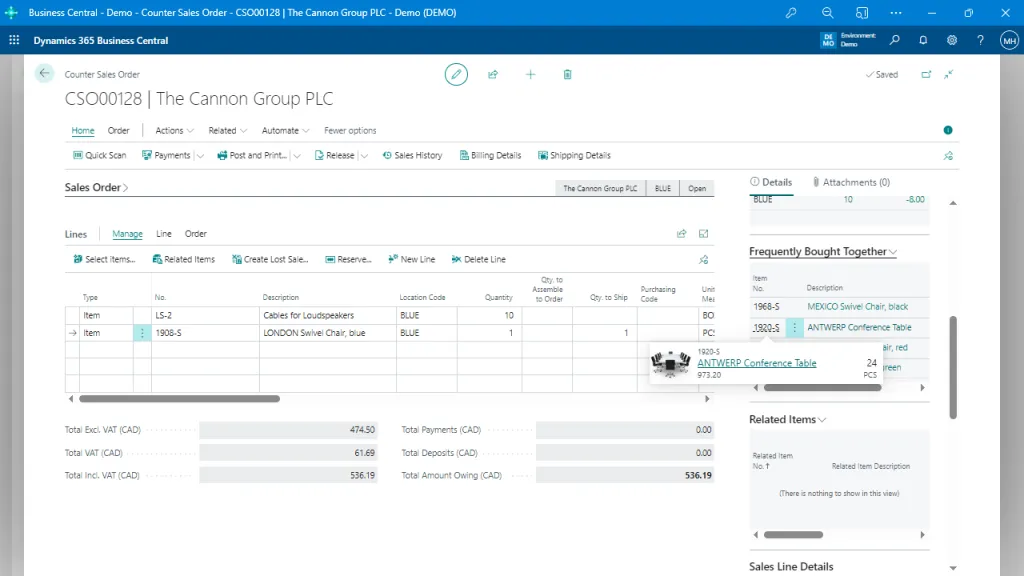
The Sales Order interface provides detailed line-item management, with options for related items, frequently bought-together suggestions, and item availability. This feature enhances order accuracy and promotes upselling opportunities, optimizing the sales process.
Why Fragmented Return and Replacement Workflows Persist
Standard Business Central workflows separate financial transactions such as refunds from fulfillment actions like issuing replacements. This separation requires staff to manually coordinate multiple documents and steps rather than completing the exchange in one process.
The system design places responsibility on users to track progress across documents without integrated guidance or automation. Counter environments, with frequent returns and customer interactions, often prioritize speed over strict adherence, resulting in informal process deviations.
Manual reconciliation between refund and replacement documents often occurs post-transaction, increasing the risk that errors or omissions go unnoticed until later, perpetuating reliance on workarounds and reducing confidence in record accuracy.
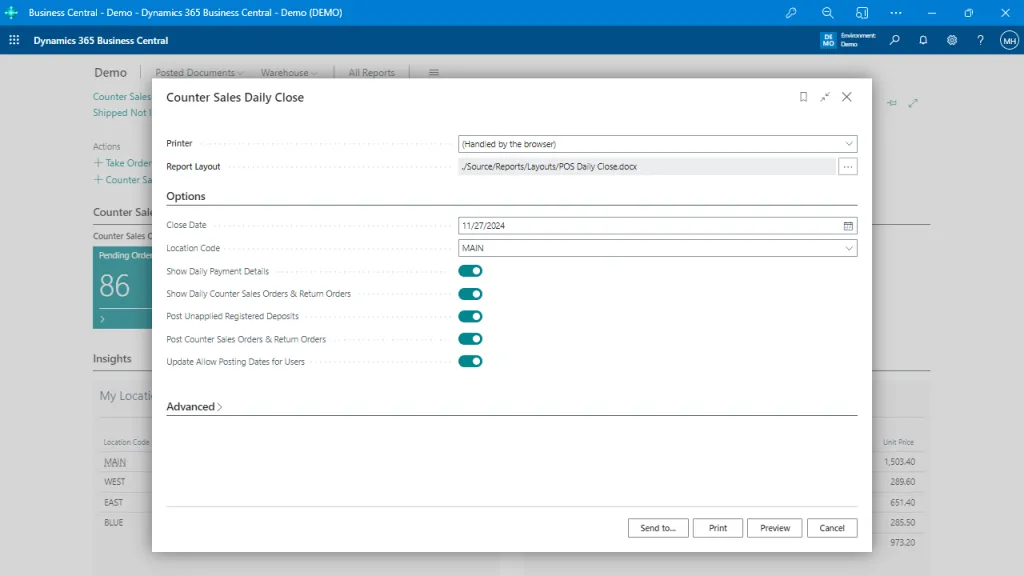
The Daily Close interface allows users to finalize daily transactions by selecting relevant options, such as posting sales orders and return orders or reconciling deposits. It provides a structured end-of-day report, ensuring accuracy and consistency in financial records.
Streamlined Return and Replacement Processing in Daily Counter Activities
When the workflow supports handling refunds and replacements together, counter staff can complete an entire return-exchange transaction in one continuous process.
Manual duplication of customer and item entry is eliminated, and users no longer need to switch between multiple documents to complete a single customer interaction.
The process becomes more consistent between different shifts and team members, increasing confidence that records accurately reflect the full transaction. This supports smoother service during peak periods and reduces the mental load on staff managing complex returns.
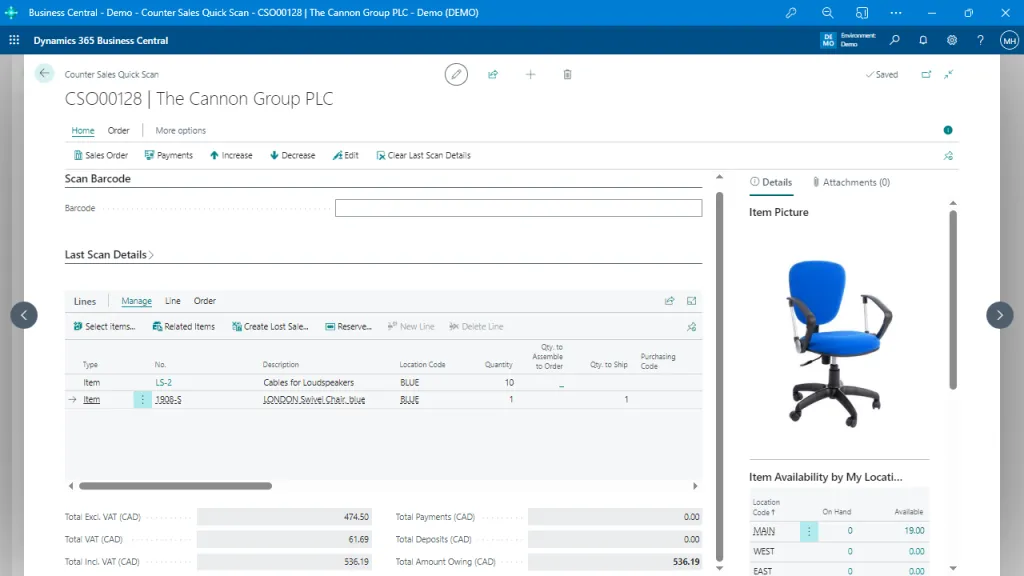
The Quick Scan feature facilitates rapid order processing by allowing users to scan barcodes directly. It includes detailed item information, availability across locations, and real-time calculations of totals, ensuring fast and accurate order completion.
Integration of Refund and Replacement Workflows Within Business Central
In native Business Central, return orders, refunds, and sales shipments are separate transactions with distinct posting requirements. Each document must be created, edited, and posted individually, with limited built-in coordination.
This approach can cause workflow gaps where the fulfillment of replacements or financial adjustments are handled outside a single interface. Tracking the relationship between returned items and replacement shipments is manual and dependent on user diligence.
As a result, document continuity and traceability between refund and replacement operations depend heavily on process discipline and post-transaction reconciliation, which increases operational risk and administrative workload.
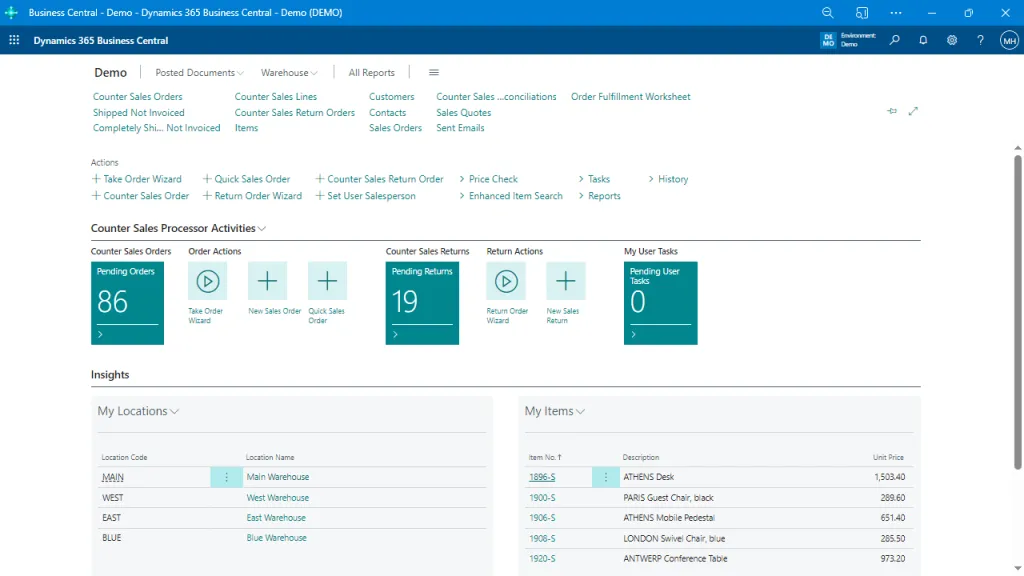
This interface provides a comprehensive overview of Counter Sales activities. It highlights pending orders, returns, and user tasks, enabling efficient management of sales workflows. Insights into locations and items are readily accessible, offering immediate visibility into inventory and operations for quick decision-making.
How Counter Sales Supports Combined Return and Replacement Operations
The Counter Sales app from Insight Works addresses these workflow gaps by guiding staff through a unified return process that simultaneously manages refunds and replacements.
It reduces manual steps by combining financial and fulfillment actions into one transaction flow, easing user navigation and minimizing duplicated effort.
This integrated approach enforces consistent posting and document creation, supporting accurate record-keeping and operational continuity during complex counter interactions.
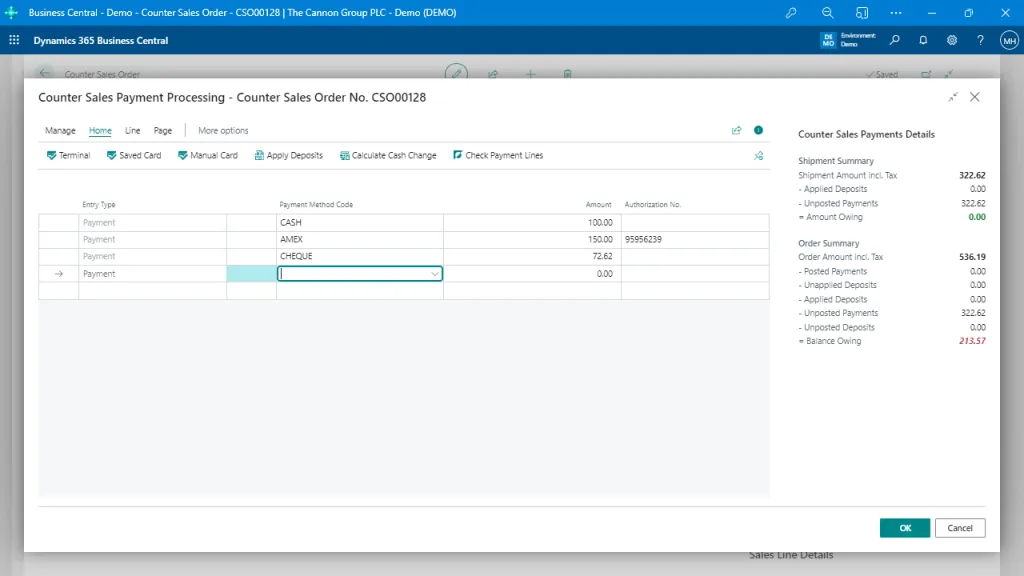
The Payment Processing interface allows users to handle multiple payment methods for a single order, including cash, credit cards, and checks. It simplifies transaction reconciliation and provides detailed payment summaries, ensuring accurate and flexible customer billing.
Reflecting on Return and Replacement Workflow Challenges
Managing refunds and replacements as discrete steps creates unnecessary complexity and risk in daily counter operations. Understanding that the fragmentation arises from how workflows separate financial and fulfillment tasks helps clarify why errors and delays persist. Recognizing this process challenge encourages a focus on aligning transactional steps to reflect real-world interactions more naturally, improving accuracy and service consistency without relying on manual workarounds.