Why Adaptive Cards in Microsoft Teams Improve Quality Inspections in Business Central
Many organizations rely on Microsoft Dynamics 365 Business Central to manage quality inspections, compliance, and traceability. The Quality Inspector app from Insight Works streamlines your quality control process, reducing rework and maximizing customer satisfaction. The app extends Business Central with configurable inspection templates, grading logic, and automated test creation.
Despite these capabilities, quality inspections often slow down at the point of data collection. Inspectors record results on paper, enter values later, or delay updates because they must switch systems. Those delays reduce visibility and increase the risk of errors.
Quality teams feel these challenges most when inspections occur on the shop floor, in receiving areas, or during active production runs.
Why Quality Data Timing Matters for Daily Operations
Quality inspections directly affect production flow, inventory availability, and shipment decisions. Late or incomplete inspection data slows downstream processes.
Production supervisors wait for inspection results before continuing work. Warehouse teams wait for lot disposition before moving inventory. Quality managers lose real-time insight into emerging issues that require immediate action.
Operational delays often lead to idle inventory, shipment holds, and unnecessary rework.
How Business Central Handles Quality Inspections Today
Business Central provides a reliable system of record for inspection data. Quality Inspector builds on that foundation with automated test generation, configurable grading, process controls, and reporting.
The platform expects users to enter inspection results directly into Business Central. That workflow works well for office-based roles. The same workflow creates friction for inspectors who move between workstations, bins, or production steps throughout the day.
The system performs as designed, but the data entry experience does not always align with how inspections happen in practice.
Where Inspection Workflows Break Down
Inspectors often stop their current task to open Business Central, locate the correct test, and enter values. These interruptions slow inspections and reduce consistency.
Frequent system switching distracts from inspection accuracy. Delayed data entry increases the likelihood of incomplete or outdated inspection records.
These workflow issues do not reflect a limitation in Quality Inspector. The problems stem from a mismatch between inspection environments and traditional data-entry interfaces.
How Adaptive Cards in Teams Change the Workflow
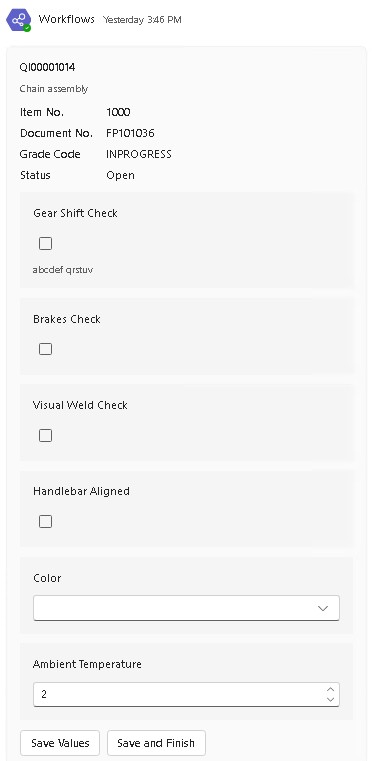
Adaptive Cards allow Quality Inspector inspection forms to appear directly inside Microsoft Teams. Power Automate connects Business Central events to Teams and automatically sends inspection responses. Inspectors receive inspection requests in the same workspace they already use for communication and coordination.
- Faster Inspection Completion: Adaptive Cards enable inspectors to enter inspection results immediately in Microsoft Teams. The workflow removes delays caused by switching between applications. Production and receiving teams can move forward without waiting for manual updates.
- Reduced Manual Data Entry: Adaptive Cards send inspection values directly back to Quality Inspector in Microsoft Dynamics 365 Business Central. The integration removes duplicate entries and transcription. Quality teams benefit from fewer data errors and stronger audit reliability.
- Improved Inspector Adoption: Microsoft Teams already plays a central role in daily operations for many organizations. Adaptive Cards allow inspectors to complete inspections without learning new navigation patterns. Familiar tools encourage higher participation and more consistent data capture.
- Real-Time System Visibility: Business Central updates inspection records as soon as inspectors submit Adaptive Cards. Supervisors and quality managers gain immediate insight into inspection status, grades, and results.
- Clear Separation of Responsibilities: Inspectors focus on answering inspection questions accurately and efficiently. Business Central continues to handle grading logic, validation rules, lot blocking, and reporting. The system preserves control while keeping inspections simple for frontline users.
Why This Approach Fits Quality Inspector
Quality Inspector supports event-driven automation and external integrations by design. Adaptive Cards extend that design without replacing Business Central or introducing a separate quality system.
Many quality solutions rely on external portals or disconnected databases. Quality Inspector keeps Business Central as the single source of truth while allowing inspectors to work in Microsoft Teams.
The approach improves usability without compromising traceability, compliance, or process control.
Business Impact in Practical Terms
Organizations that use Adaptive Cards with Quality Inspector typically see:
- Faster inspection turnaround.
- Higher data accuracy.
- Increased inspector participation.
- Fewer production and receiving delays.
- Stronger real-time quality visibility.
Each outcome supports better operational decisions and more consistent quality execution.
Closing Takeaway
Quality processes succeed when people use them consistently and promptly. Adaptive Cards enable inspectors to complete Quality Inspector tests directly inside Microsoft Teams while Business Central updates automatically in the background.
The workflow aligns quality inspections with how work actually happens on the floor.
To learn more, visit QualityForDynamics.com, watch the Adaptive Cards walkthrough video to see how this workflow fits into real quality inspection scenarios, or reach out to your Microsoft Partner today.