The Hidden Bottleneck in Your Business Central Production Plan
You’ve optimized your routings. Your BOMs are clean. Your planners are working overtime to keep production flowing. So why are delivery dates still slipping?
The answer might not be your production orders—it could be your maintenance schedule.
Most manufacturers using Business Central don’t realize that unscheduled or poorly timed maintenance is quietly sabotaging throughput. And because Business Central doesn’t natively treat maintenance as a schedulable activity, planners are left juggling spreadsheets, relying on tribal knowledge, and hoping for the best.
But there’s a more innovative way to handle this—without adding complexity.
Maintenance as a Scheduling Constraint
In traditional ERP setups, maintenance is reactive. A machine goes down, production halts, and planners scramble. Even preventive maintenance is often scheduled manually, disconnected from the production calendar.
That’s where MxAPS comes in.
MxAPS (Manufacturing Execution Advanced Planning & Scheduling) is an app from Insight Works that brings finite capacity scheduling to Business Central. It automatically plans production orders based on resource availability, constraints, and priorities—and yes, it can also schedule non-production activities, such as maintenance.
It treats maintenance as a first-class scheduling citizen, inserting it directly into the production plan using rule-based logic. That means your planners can see downtime before it happens and adjust production accordingly.
No more guessing. No more last-minute rescheduling.
How MxAPS Works in Business Central
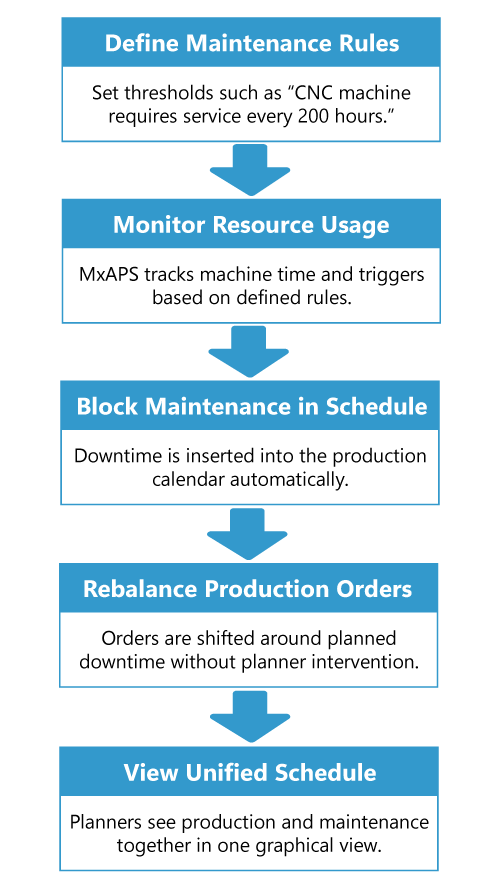
Let’s say your CNC machine needs preventive maintenance every 200 hours. With MxAPS:
- You define that rule once.
- MxAPS tracks usage and automatically blocks time in the schedule.
- It rebalances production orders to account for that downtime.
- Your planners see the impact in the same graphical scheduler they use for all other tasks.
It’s seamless. And it’s all inside Business Central.
What About Maintenance Manager?
While MxAPS handles when maintenance should happen, Maintenance Manager helps track what maintenance was done and why.
Maintenance Manager is Insight Works’ asset and equipment management app for Business Central. It lets you:
- Log service history and inspections
- Track asset lifecycle and costs
- Generate work orders and compliance reports
Think of Maintenance Manager as the record-keeper, and MxAPS as the scheduler. Together, they give you both strategic planning and operational control—without overwhelming your team.
Why This Matters
Manufacturers using MxAPS have reported improved on-time delivery and reduced scheduling conflicts, thanks to automated planning and predictive maintenance capabilities.”
If you’re using Business Central and struggling with production bottlenecks, it’s time to ask: Is your maintenance schedule working against you?
Ready to Take Control?
Explore MxAPS on Microsoft AppSource or visit SchedulingForDynamics.com to learn more.