Quality Inspector vs. Microsoft Quality Management
Microsoft Dynamics 365 Business Central now includes a built-in Quality Management module — and it was built by Insight Works. Here's what that means for you, and how to choose the right solution for your operation.
The Difference between Quality Inspector & Microsoft Quality Management
Quality Inspector
- The full app that the Microsoft module is built from
- Broader feature set for more complex or high-volume operations
- Clear upgrade path from the Microsoft module, familiar concepts, more capability
- Purpose-built for warehouse, production, and inventory workflows
- Best fit for operations that need more than the built-in module offers
- Includes a migration toolkit to help organizations move between Microsoft Quality Management and Quality Inspector when needed.
Microsoft Quality Management
- A licensed subset of the Insight Works Quality Inspector app
- Built by Insight Works and licensed to Microsoft
- Native to Business Central, no separate install required
- Proven foundation, the concepts and workflows are the same
- Best fit for operations with standard quality control needs
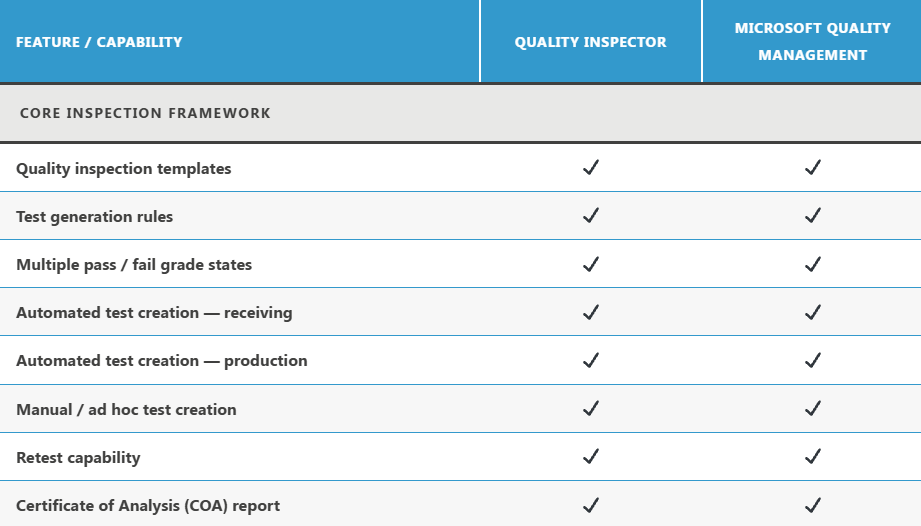
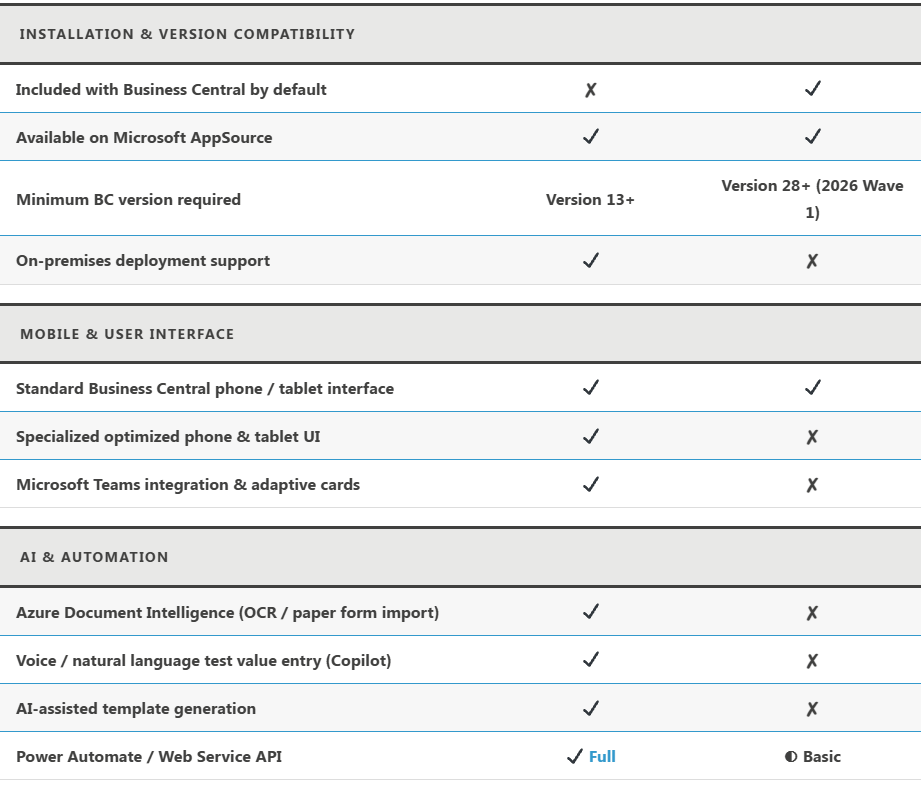
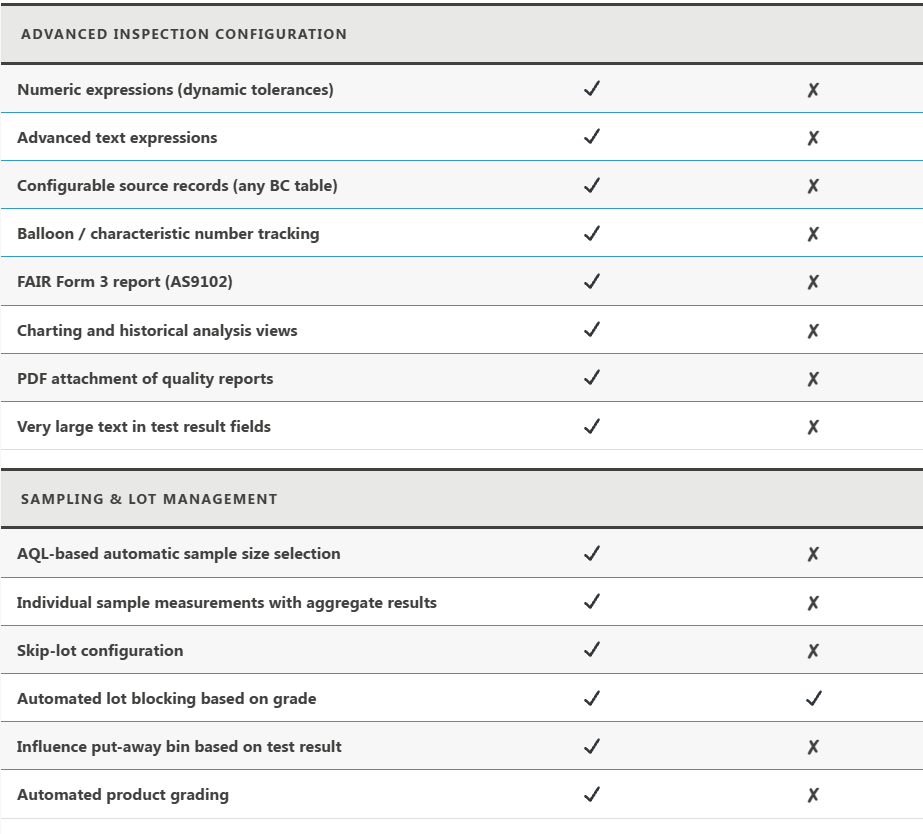
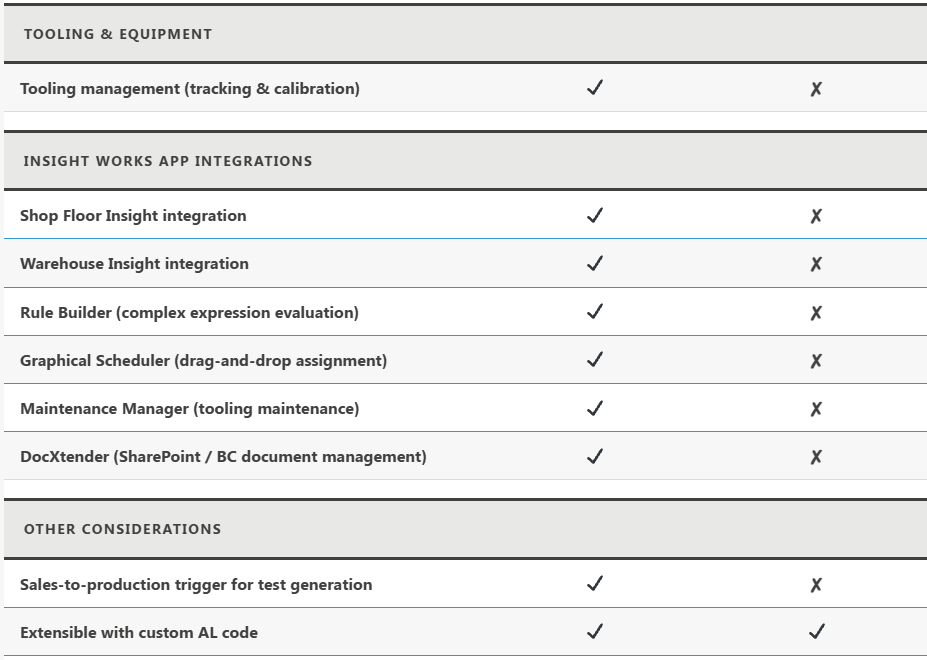
Feature Comparison Matrix
A side-by-side look at what each solution includes — so you can decide with confidence.

Which Quality Management Solution Is Right for You?
Start with the questions that matter most for your operation.
Consider Quality Inspector if…
- You need Insight Works app integrations — Shop Floor Insight, Warehouse Insight, DocXtender, or Maintenance Manager
- Your operation relies on AQL sampling, skip-lot processing, or automated product grading with lot blocking
- You want to capture inspections on any Business Central record — sales orders, fixed assets, rental returns, and more
- Teams integration, AI-assisted entry, or paper form OCR are important to your workflow
- You need FAIR Form 3 reports, advanced sampling analytics, or PDF quality report attachments
- You are running Business Central 13 through 27 (Quality Management requires version 28 or newer)
Consider Quality Management if…
- You are new to quality inspection in Business Central and want to start without additional licensing cost
- Your inspection process is straightforward — pass/fail, receiving checks, basic production quality gates
- You are not using other Insight Works apps such as Shop Floor Insight or Warehouse Insight
- You do not need mobile-optimized tablet interfaces, Teams integration, or AI-assisted data entry
- You want to evaluate quality control in BC before committing to a fuller solution — and potentially migrate to Quality Inspector later
Starting with Quality Management? There's a clear upgrade path.
Insight Works provides an Upgrade Toolkit to migrate from the Microsoft Quality Management module to Quality Inspector. Start your quality journey with the module included in Business Central, then move to Quality Inspector when your requirements grow — without rebuilding your configuration from scratch.
How the Two Products Are Related
- Insight Works built the Microsoft Business Central Quality Management module under a licensing agreement with Microsoft.
- It is a curated subset of Quality Inspector, meaning the core concepts, template structure, and inspection workflow are identical across both products.
- Anyone already using Quality Inspector will recognize Quality Management immediately, and anyone who starts with Quality Management will find a familiar environment when they upgrade.
- The two products are separate extensions with different installation paths and a meaningful gap in advanced functionality.
- They can coexist in the same Business Central environment without conflict, with no dependencies between them.
If You Use Other Insight Works Apps, Quality Inspector Is the Answer
- Insight Works does not plan to build integrations between Quality Management and other Insight Works apps.
- If your operation relies on Shop Floor Insight, Warehouse Insight, Maintenance Manager, DocXtender, or similar apps, Quality Inspector is the required path.
Quality Inspector
The comprehensive quality control app for Business Central — with advanced sampling, AI entry, Teams integration, and full Insight Works app compatibility.
Microsoft Quality Management
Included with Business Central v28+. A solid starting point for quality control — built on the Quality Inspector foundation.