Too Little, Too Big: Why Business Central Manufacturers Have Had No Real PLM Option… Until Now
Bluestar PLM for Business Central brings CAD data, BOMs, documents and approvals into one native system with purchasing and production, for small and mid-sized manufacturers.
As of October 1, 2026, Bluestar PLM for Dynamics 365 Business Central is available on Microsoft Marketplace and directly from Bluestar. It brings product lifecycle management into Business Central: engineering data, documents, BOMs and approvals, managed in the same system as purchasing, inventory and production.
For years, Business Central manufacturers have had two ways to manage engineering data. One does too little. The other is too big. Bluestar PLM for BC closes that gap, and on October 6 we will show you how in our launch webinar.
The reality of Business Central Manufacturers today
For smaller manufacturers, managing engineering data and processes well is a constant challenge. Engineering teams are small, IT resources are limited, and there is rarely time or budget for a dedicated PLM project.
Where do the CAD files for your current BOM live? At many BC manufacturers, the answer is: in several places at once.
- CAD files on individual workstations, file servers or SharePoint. Spread across folders and local drives. Nobody knows for sure which version is valid.
- BOMs in Excel. Maintained by hand and re-keyed into Business Central. Every copy drifts a little further from the design
- Changes by email. Change requests sit in inboxes. There is no approval workflow and no controlled release.
- No revision history. No record of who changed what, when and why. The result shows up on the shop floor. A wrong revision reached production, and the cost comes back as rework, scrap and late deliveries.
The result shows up on the shop floor. A wrong revision reaches production, and the cost comes back as rework, scrap and late deliveries.
Two options, neither fits
Business Central manufacturers who want to fix this have had to choose between too little and too big.
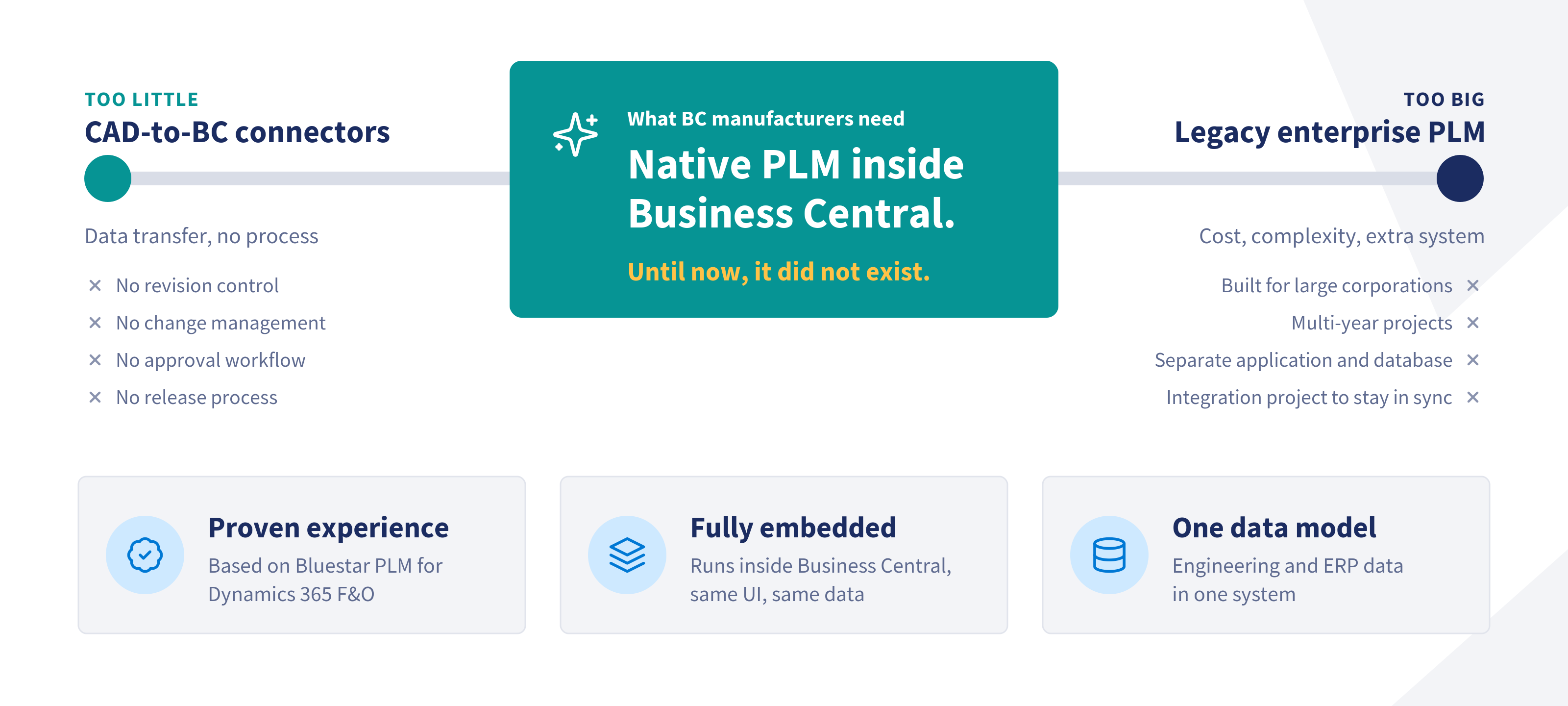
Too little: CAD-to-BC connectors. Several tools move CAD data and BOMs into Business Central. That removes some manual typing. But a connector manages no process. There is no revision control, no change management, no approval workflow, no release process and no traceability. A data transfer is not a process.
Too big: legacy enterprise PLM. Legacy enterprise PLM providers build for large corporations and multi-year projects. Licenses, implementation and administration are priced and staffed to match. These are complex systems with a lot of functionality, but that functionality is built for very large organizations. For small and mid-sized manufacturers, much of it is overkill, and adapting such a system to their needs adds even more complexity. These systems also always run next to the ERP: a separate application with its own database, kept in step with Business Central through an integration project.
For a smaller manufacturer with 50 or 500 employees, one option leaves the core problem unsolved. The other creates a second one.
The gap, and why we built Bluestar PLM for BC
Between connectors and enterprise PLM Systems, nothing has run natively inside Business Central. That is the gap Bluestar PLM for BC is built to close.
It is based on more than 25 years of experience with Bluestar PLM for Dynamics 365 Finance & Operations, used by manufacturers such as Bastian Solutions, Schréder and Barry-Wehmiller. Two principles carry over:
- Fully embedded. Bluestar PLM for BC runs inside Business Central, with the same user interface and the same data.
- Engineering and ERP data in one system. Designs, BOMs and documents sit next to items, purchasing and production orders.
One data model
Bluestar PLM for BC is a native Business Central extension, available directly from Bluestar or through the Microsoft Marketplace. It uses the Business Central database, security model and user interface. Engineering data is not synchronized into Business Central. It is Business Central data.
That is what one data model means in practice. The engineer, the production planner and the buyer look at the same item, the same BOM and the same revision. No export, no sync job, no second login.
More than CAD to BOM
Getting CAD data into Business Central as BOMs matters, and Bluestar PLM for BC does this in Multi-CAD environments, initially for Autodesk Inventor, Autodesk AutoCAD and SolidWorks®. But this is where connectors and pure PDM tools stop. PLM is about what happens to the data after it arrives.
Available at launch:
- Engineering objects.
Each product design is managed as one object that holds product data, drawings, files, the BOM and the 3D model. It moves through configurable lifecycle statuses such as Design, In Review and Approved. - Document management.
Check-in and check-out, a full version trail and automatic PDF renditions, so only approved documents reach production. - Approval and release.
A BOM version goes to production only after approval, with a complete audit trail. - Engineering BOM to production BOM.
Transfer with BOM versions, effective dates, where-used and version comparison.
On the roadmap at launch, and following in upcoming releases:
- Full engineering change management, with change requests, change orders and impact analysis
- Quality management, covering inspections, non-conformances and corrective actions
- Support for more CAD systems, including Solid Edge
- Dedicated AI Copilot Agents to make the most time-consuming engineering processes more efficient.
A connector moves data. PLM controls what happens to it.
The TCO difference
A separate PLM system costs more than its license. It is a second system you keep running for years.
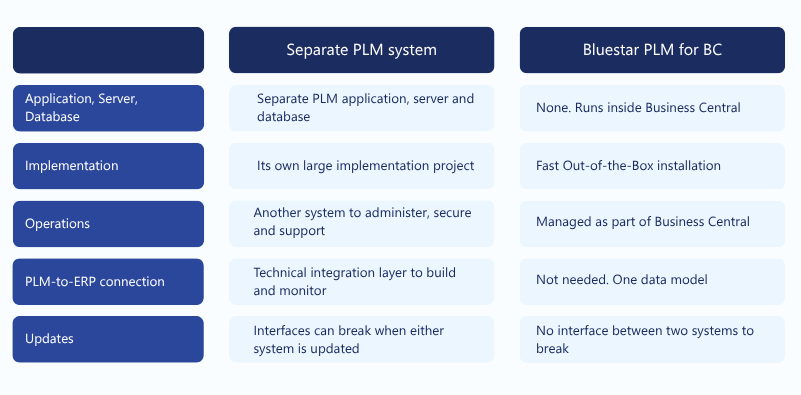
For IT, that means one system to run and maintain instead of two. For the business. it keeps the cost of PLM predictable.
AI-ready by design
One data model also matters for what comes next. Engineering and ERP data live in the same Dynamics 365 Business Central environment, so AI tools get the full product and business context, from CAD and BOMs to purchasing and production. Bluestar PLM for BC is built on that foundation and aligned with Microsoft’s AI platform.
Watch a demo on demand
In our launch webinar, Matthias Kraus, Senior Project Manager and Sales Engineer at Bluestar PLM, shows Bluestar PLM at work in Business Central. The demo follows one design change, from Business Central out to CAD and back, with the BOM, drawing and revision updating together.