Dynamics 365 Contact Center: Three Ways to Reduce Replatforming Risk Before Implementation
Microsoft Dynamics 365 Contact Center often enters the conversation when an organization reaches a renewal, faces rising costs, or wants to reduce the complexity of its current contact center stack. Those triggers may start the project, but they rarely define the real work. In contact center projects, I have seen the bigger risk appear when teams discover too late how deeply the current platform is embedded across people, integrations, reporting, and day-to-day operations.
Microsoft describes Dynamics 365 Contact Center as a Copilot-first, cloud-based contact center that supports voice and digital channels, artificial intelligence (AI), unified routing, analytics, and customer relationship management (CRM) context. That breadth matters during evaluation because the existing platform may support much more than phone calls. Business processes, data flows, security requirements, and teams outside the primary service organization can all become part of the migration scope. Some of that work will not become visible until the team starts tracing dependencies.
Why Microsoft Dynamics 365 Contact Center Replatforming Gets Complicated
Organizations usually begin reconsidering contact center technology for one of two reasons. Cost pressure may come from renewals, licensing changes, infrastructure expense, or total cost of ownership. Complexity creates a different kind of pressure through aging infrastructure, custom applications, fragmented processes, or new security requirements.
Both are valid reasons to change platforms. Neither tells you everything the current environment is doing. That is where planning risk enters. A workload that looks small during early discovery can become a major scope change if the business depends on it every day.
Understand How Deeply the Contact Center Is Embedded
This sounds obvious, which is one reason teams can move through it too quickly. Mature contact center platforms often have years of integrations, automations, carrier dependencies, reporting feeds, security decisions, and business processes built around them.
The main service team is usually easy to identify. The less obvious groups are where teams tend to find dependencies that change scope. Reception may use the same telephony environment. Sales or account teams may depend on contact center capabilities. An internal IT group may have built automation around call events. A third-party provider depends on a data feed that nobody considers part of the contact center. I usually work through three lenses during this part of discovery:
People and Business Groups
Start with customer service and supervisors, then look beyond the obvious users. Sales, reception, back-office teams, IT, security, compliance, and third-party providers may also depend on the platform.
Technology and Data
Trace the telephony and carrier services first, then follow computer telephony integration (CTI), application programming interfaces (APIs), bots, workflows, identity controls, recording, quality management, reporting feeds, and data stores.
Operational Criticality
For each dependency, document volume, hours of operation, downtime tolerance, retention requirements, fallback options, and who owns the business and support decisions.
Microsoft’s Voice-Channel Documentation is a useful reminder of how many functions can sit around what looks like a simple phone interaction. Native voice can involve routing, voicemail, recording, transcription, sentiment analysis, transfers, supervisor capabilities, and analytics. Unified Routing adds another dependency layer because queues, skills, capacity, and assignment logic may affect work across channels.
The output I want from this step is a dependency register with an owner, business impact, replacement approach, and validation status for every material item. Built early, that same register can become part of the readiness review before go-live.
A small missed dependency can become a major scope change when the affected workload is business critical.
Map the Operational Impact, Not Just the Technology Change
Technology teams naturally focus on connectivity, configuration, migration, and integration. The operational transition often creates just as much project work. Workforce Engagement Management planning introduces another set of operational dependencies as service models expand.
Reporting continuity is one place where the operational work becomes visible quickly. If the old and new contact center platforms run in parallel, leadership may still expect one set of service metrics. The project may therefore need a temporary data migration or hybrid reporting model that was not obvious when the platform change was first scoped.
Training creates a different planning dependency. The team needs to know which roles need new material, how much content must change, who will prepare supervisors and IT support, and how much lead time the training organization needs before go-live.
At that point, I stop treating these as checklist items and turn them into workstreams with evidence that the team can actually review before launch.
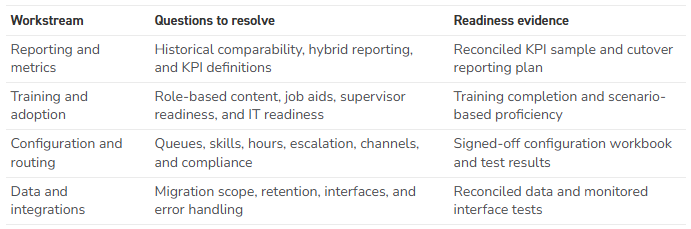
If readiness cannot be demonstrated, I still consider the item an assumption rather than a completed plan. A simple user story is also a useful test of whether the requirement is clear enough to plan around.
“The training team needs two months of lead time before go-live so it can build material and schedule in-person training” is much more useful than “training is in scope.” If the need cannot be explained clearly, the need probably is not understood well enough yet.
New Dynamic has also looked at how voice, routing, workforce management, automation, and AI change the operating model in Scaling Customer Service Beyond Case Management. Those capabilities can improve service operations, but they also add dependencies that need clear ownership before rollout.
Recheck the Timeline After Discovery
By the end of discovery, the original date may no longer fit the work. Teams often try to absorb every new dependency without moving the timeline. That is where avoidable risk starts to accumulate.
If discovery uncovers another business group, a reporting bridge, or an integration that needs to be rebuilt, use that information to change the plan. The schedule should reflect what the team now knows.
At that point, I sort the work into three buckets. Table stakes are required for a safe launch. Fast follows have value, but they can wait for the next release. The wish list contains useful improvements that should not be allowed to drive the first production date.
A limited pilot is often the least expensive place to prove the assumptions that matter. A smaller user group can validate routing, reporting, support, and operational behavior before those same issues affect a broader rollout. The goal is not to delay value. It is to reduce the cost of learning by finding issues while the blast radius is still small.
If your plan includes “it is going to be close,” Murphy’s Law says you will overshoot.
Microsoft’s unified routing model makes this especially relevant because routing can span voice and digital work, queues, representative capacity, skills, and assignment rules. Those are not details I would want to validate for the first time during a full-scale launch.
Microsoft Dynamics 365 Contact Center Replatforming FAQs
What should an organization inventory before replatforming to Microsoft Dynamics 365 Contact Center?
Start with the people and business groups that depend on the platform. Then trace the technology, data, and operational dependencies around them. Telephony, reporting, security, automation, integrations, support ownership, and workloads outside the primary service team can all affect scope.
Is contact center implementation mainly a technology project?
No. The technology build is only one workstream. Reporting continuity, training, routing, integrations, operational support, and stakeholder readiness can move the schedule just as easily as a configuration or migration issue.
Should organizations pilot Microsoft Dynamics 365 Contact Center before a broader rollout?
A pilot is useful when it can disprove a real project assumption. A limited user group might validate routing under realistic conditions, compare old and new KPI calculations, or run a support escalation from start to finish before the same process reaches hundreds of users.
Key Takeaways
- Replatforming risk often appears outside the obvious Contact Center user group.
- Build the dependency register early enough that it can later become part of go-live validation.
- Treat reporting, training, routing, and integrations as real workstreams rather than notes on a project checklist.
- Let discovery change the roadmap. Table stakes belong at launch; fast follows and wish-list items do not.
- Use pilots to test assumptions that could materially change support, scale, or timing.
Replatforming works better when discovery is treated as part of delivery rather than a short exercise before the “real” project begins. The current environment has accumulated years of business decisions. Some of those decisions will follow the organization whether the project team notices them early or late.
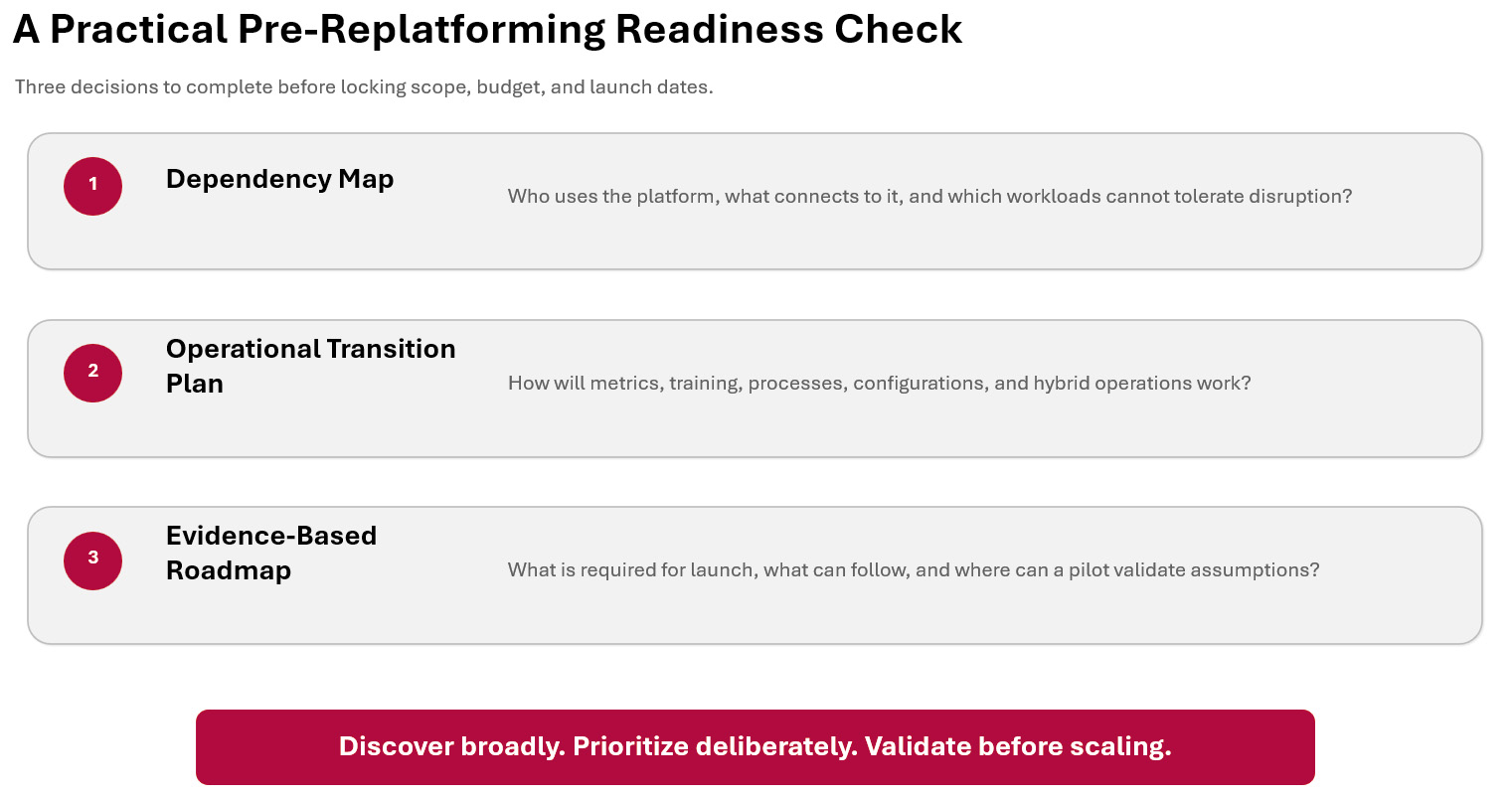
My recommendation is straightforward. Discover broadly, prioritize deliberately, and validate before scaling. That gives the Microsoft Dynamics 365 Contact Center implementation a roadmap based on evidence rather than the assumptions that existed before discovery started.
Dave Braun – Senior Consultant
Working with New Dynamic
New Dynamic is a Microsoft Solutions Partner focused on the Dynamics 365 Customer Engagement and Power Platform. Our team of dedicated professionals strives to provide first-class experiences incorporating integrity, teamwork, and a relentless commitment to our client’s success. Contact Us today to transform your sales productivity and customer buying experiences.