Integrating Dynamics 365 Sales with Business Central: A Practical Guide for Teams and Their Partners
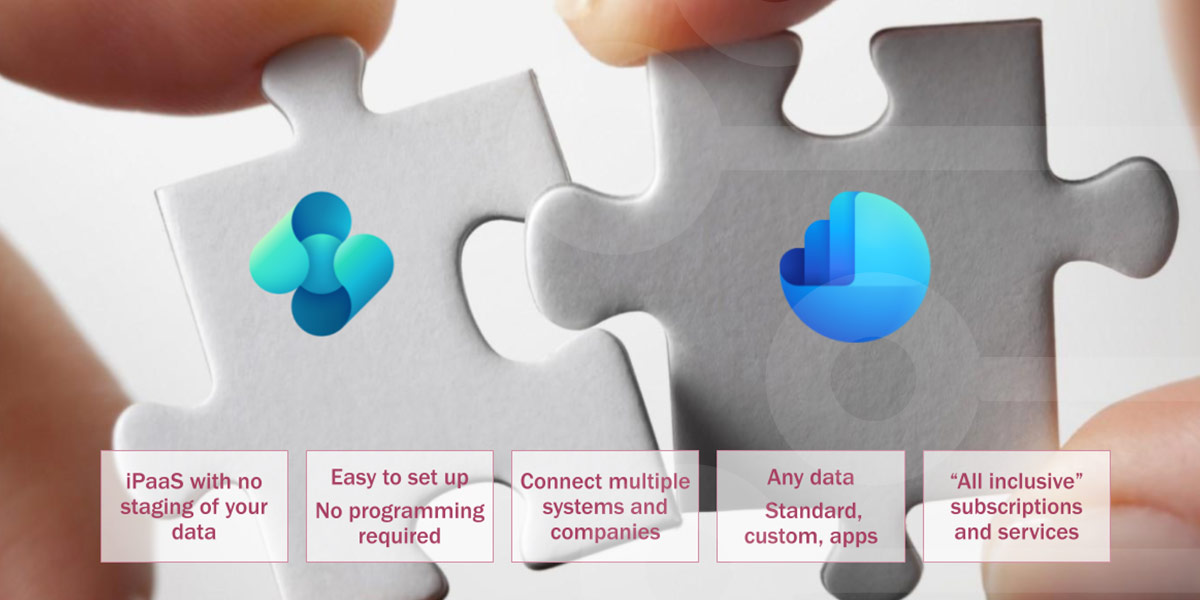
The short version: Dynamics 365 Sales and Business Central do not connect on their own. There are three ways to bridge them - the native Dataverse connector, custom development, and a dedicated integration platform - and the right choice depends less on the tool than on a handful of design decisions: who owns each record, how duplicates are prevented, how currency is handled, what your company structure looks like, and how much data moves. This guide walks through all of it, for the teams who use these systems and the partners who connect them.
If you spend time around Microsoft Dynamics, you know the symptoms. A sales rep cannot tell whether an order has shipped. Finance is rekeying a customer that already exists in CRM. A quote in Dynamics 365 Sales and an invoice in Business Central never quite match. None of this means anything is broken. It usually means the two systems are not connected yet, and connecting them is a project worth doing well.
It is easy to assume that two products which both carry the Dynamics 365 name, and both sit on the Microsoft platform, must work together out of the box. In practice they are separate applications, and the integration between them is a deliberate piece of work to scope, own, and maintain - whether that lives with an internal team or an implementation partner. Naming that work early is half the battle. This article is written for both sides of the table: the people who use Dynamics 365 Sales and Business Central every day, and the partners who design the connection between them.
The two systems, briefly
Business Central is the back office. It is Microsoft's ERP for small and midsize organizations, and it owns finance, inventory, purchasing, sales order processing, and fulfillment. When a deal is done, Business Central is where it is priced, shipped, and invoiced.
Dynamics 365 Sales is the front office. It is the CRM where the sales team manages leads, opportunities, pipeline, and forecasting, long before anything reaches finance. One system owns the relationship; the other owns the money and the goods.
Integration is what lets a single customer, quote, and order move cleanly between the two instead of being entered twice. When done well, an opportunity in Dynamics 365 Sales becomes a sales order in Business Central without rekeying, and the fulfillment status flows back so the rep can see progress without leaving the CRM. This is the heart of CRM and ERP integration, and it is the outcome every approach below is trying to reach.
The three ways to connect them
There are three established approaches, each with a different balance of flexibility, cost, and required skills.
1. The native Dataverse connector
Microsoft's own integration runs through Dataverse and is built into Business Central. It ships with a predefined set of tables - customers, contacts, vendors, orders - that synchronize between the platforms, and Microsoft keeps extending it with each release. For organizations whose needs match the standard model, it is the lowest-friction starting point and carries no extra connector license. The trade-off is standardization: the predefined tables resist customization without AL development, the connector is oriented to cloud Business Central, and setup assumes real Dataverse fluency.
2. Custom development
Building the integration in-house or through a partner buys total flexibility and the ability to model any object or process. The lesson that comes up again and again is that the build is the smaller half of the cost. Custom integrations need maintenance every time either platform changes, and the total cost of ownership tends to outrun early estimates over a few years.
3. A dedicated integration platform
The third route is a purpose-built data integration or data replication platform that sits outside the Power Platform. These tools typically offer configuration-based mapping instead of code, fold maintenance and updates into a subscription, and can reach scenarios the native path cannot, such as on-premises Business Central. They add a vendor to the estate, so the question is whether their flexibility and predictable upkeep justify that against your requirements.
The decisions that decide the outcome
Whichever route you choose, a handful of design decisions determine whether the integration hoese before you commit to a tool, not after.
Who owns each record?
Decide which system is the source of truth for each field, and in which direction it syncs. Finance-owned fields such as credit limit and payment terms should stay authoritative in Business Central; sales-owned fields such as account owner and lifecycle stage should stay authoritative in Dynamics 365 Sales. A blanket last-write-wins setup is the most common cause of silent overwrites. Defining synchronization direction per field is the foundation everything else rests on.
How do you prevent duplicate customers?
Duplicates are the classic symptom. They appear when accounts and contacts sync through independent jobs, and a record is created in Business Central before it has been matched to its counterpart. The discipline that prevents them is simple: couple existing records before turning sync on, and resolve identity through a single mapping. Settle your matching keys during design, because cleaning up duplicates after go-live is far harder than avoiding them - a point covered well in most guidance on CRM data cleansing.
How you handle currency
If Business Central and your Dataverse environment run on different base currencies, the native connection has historically refused to establish, and currency remains a planning constraint even after recent improvements. International groups need to decide up front how amounts are reconciled and which exchange rate applies as data moves. This one decision often determines which approach is even viable.
What your company structure looks like
Map the estate before you design the integration. One Business Central company to one CRM is the simple case. Consolidating several Business Central companies into one corporate CRM, spanning separate Microsoft tenants, or running on-premises Business Central all stress the assumptions of a single-environment setup. Confirm the structure you actually have is supported before committing.
How much data moves, and how fast
Size the integration to real volumes. A low-volume notification and a high-volume bidirectional sync of customers, items, and orders are different engineering problems, and platform throughput limits become a real constraint at scale. Decide whether you need near-real-time updates or scheduled batches, and how the integration should behave when one system is briefly offline.
Matching the approach to your situation
With those decisions made, the choice of method becomes much clearer:
- If your scenario is standard, cloud-only, and single-company, the native Dataverse connector is the pragmatic default.
- If your requirements are genuinely unique and you can fund ongoing development, a custom build earns its place.
- If you have on-premises Business Central, multiple entities, currency complexity, or you simply want the integration owned by an operations team rather than a developer backlog, a dedicated platform is usually the better fit. This is the space Rapidi's Dynamics 365 Sales and Business Central integration is built for.
The most expensive mistake is not picking the wrong tool. It is assuming the connection already exists and discovering otherwise after go-live.
Where a no-code platform fits alongside partners and teams
It is worth being precise about how a platform like Rapidi fits, because it is not a replacement for the people who know your business. Rapidi is the integration layer. Implementation partners and internal consultants stay focused on process design, customization, and change management, while the data movement between Dynamics 365 Sales and Business Central is configured visually rather than coded.
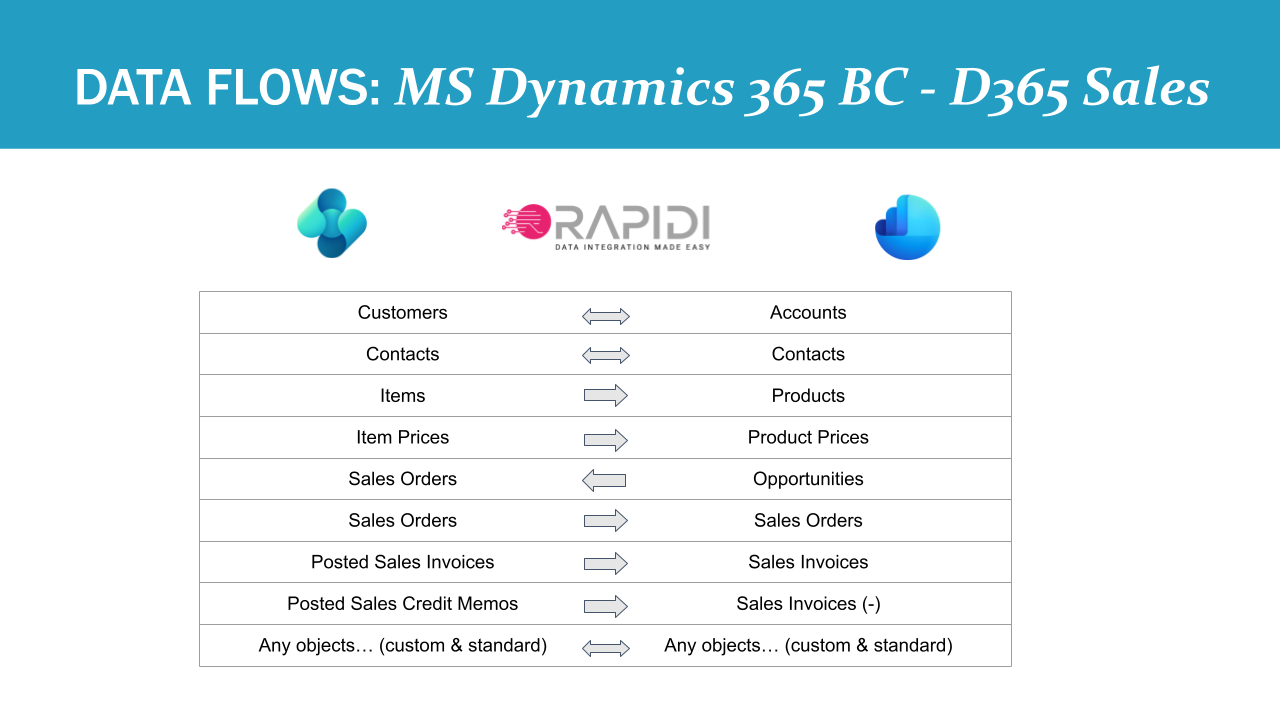
In practice, that means you set sync direction per field so your ownership decisions are enforced, resolve customer identity in a single mapping so duplicates do not accumulate, reconcile currency as data passes through, and support multi-company, multi-tenant, and on-premises topologies. Because Rapidi transfers data directly rather than staging it in an intermediate database, there is no separate Azure SQL bill, and maintenance and support sit inside one predictable subscription. Partners often run the integration on behalf of their clients - owning the mappings through the visual configuration interface while the client owns the process. And if a project later becomes a migration, from Salesforce to Dynamics 365 Sales or from Dynamics NAV to Business Central, the same configuration carries forward. For teams weighing the numbers, an ROI and total-cost-of-ownership view is usually the clearest way to compare the options.
Frequently asked questions
How do we stop finance-owned and sales-owned fields from overwriting each other?
Define synchronization direction per field rather than per record. Keep finance-controlled fields authoritative in Business Central and sales-controlled fields authoritative in Dynamics 365 Sales, and avoid a global last-write-wins rule. With a platform that supports per-field and conditional rules, the ownership model is enforced rather than left to chance.
What is the most reliable way to avoid duplicate customers?
Couple existing accounts and contacts to their Business Central counterparts before enabling synchronization, and resolve identity through one mapping rather than separate account and contact jobs. Decide your matching keys during design.
Does the integration work with on-premises Business Central?
The native Dataverse path is oriented to the cloud-based Business Central. On-premises estates need an approach that operates outside Dataverse; a dedicated platform can connect on-premises and cloud Business Central using secure outbound connections, with no inbound firewall changes.
How does this coexist with our implementation partner and existing customizations?
The integration layer is configured separately from your CRM and ERP customizations, so it sits alongside the work your partner or internal team already maintains rather than cutting across it. Partners frequently own and run the integration for their clients.
What does it cost to integrate the two systems?
Beyond your Business Central and Dynamics 365 Sales licenses, the native connector is included but surrounding Power Platform components can be billed separately, and custom builds carry ongoing maintenance. A subscription platform with a predictable, volume-independent fee is often the easiest total cost to forecast - worth modelling against your own numbers before deciding.
The takeaway
Integrating Dynamics 365 Sales with Business Central is less about the connector you choose and more about the decisions you make first. Get ownership, duplicates, currency, structure, and volume right, and almost any approach can succeed. Get them wrong, and the best tool still struggles. Whether you run this in-house or with a partner, plan the decisions early, and integration will be smooth.
If you want to learn more about how Rapidi can help you solve your data integration needs, book a free integration consultation.

About Rapidi
Rapidi is a no-code data integration and replication platform that connects CRM and ERP systems, including Microsoft Dynamics 365 Sales, Business Central, Finance, and Salesforce. For more than 30 years, we have helped organizations and their implementation partners integrate and replicate business data with secure synchronization, per-field control, and dedicated support, on the cloud and on-premises alike.
Learn more about Dynamics 365 Sales and Business Central integration or contact our team to scope your project.