How Route Optimization Works in Dynamics 365
Route optimization can reduce windshield time by as much as 30%, giving sales reps and field teams more time to engage with customers instead of spending hours on the road.
For organizations that rely on field sales, service technicians, or on-site teams, this capability is essential. At its core, route optimization focuses on intelligently sequencing visits, minimizing travel time, lowering fuel expenses, and helping teams accomplish more in a single day. When this functionality is embedded directly within CRM workflows, it becomes a powerful operational and strategic advantage.
In this Q&A-style guide, we explore how Route Optimization works in Maplytics, a certified geo-mapping and location intelligence solution built natively for Microsoft Dynamics 365, Power Apps, Power Pages, and Dataverse. From basic concepts to advanced scenarios, this overview answers the most common questions businesses ask when optimizing routes for real-world operations.
What Is Route Optimization?
Route optimization is the process of arranging multiple locations, such as customer visits, sales meetings, or service calls, into the most efficient sequence possible. Instead of manually deciding which stop to visit first or estimating travel time, optimization algorithms automatically calculate the best order based on defined objectives. These objectives typically include reducing total travel time, minimizing distance, or avoiding unnecessary detours.
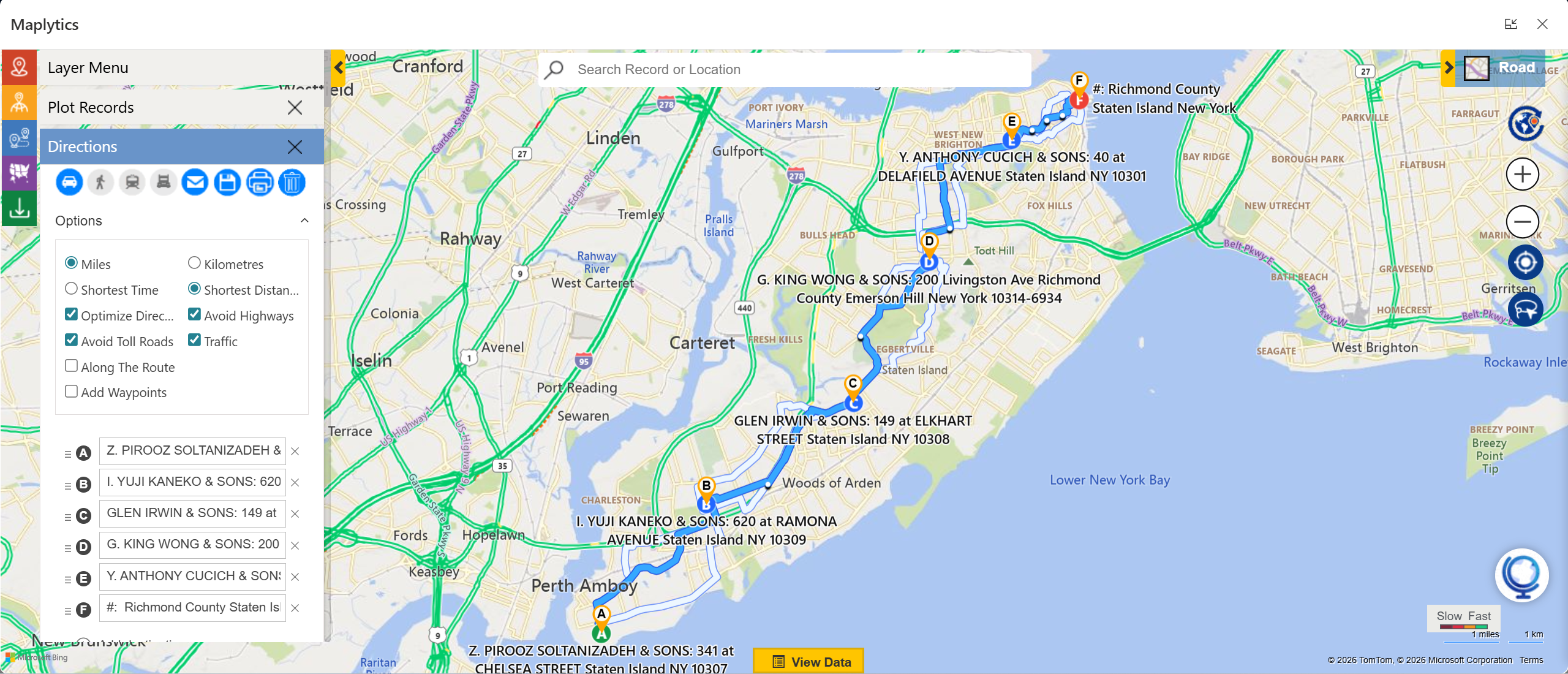
In Maplytics, route optimization allows users to select an origin, a destination, and multiple intermediate stops to instantly generate an optimized route. The system calculates the most efficient path while minimizing fuel consumption, travel duration, and backtracking. Depending on business needs, users can configure the optimization to prioritize either the shortest travel time or the shortest travel distance.
How Does Route Optimization Work in Maplytics?
Maplytics leverages location intelligence that is directly connected to CRM data. Once users select CRM records, such as accounts, leads, opportunities, work orders, or custom entities, as waypoints, Maplytics automatically reorganizes them into the most efficient travel sequence.
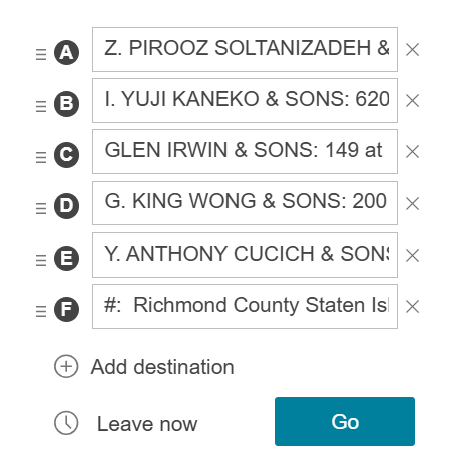
From a user’s perspective, the process is simple and intuitive. The user opens the Route Card within the map interface, defines an origin and destination, and adds stops by selecting records directly from the map or searching by name. After choosing the preferred optimization criteria, such as shortest time or distance, a single click plots the optimized route. This automated sequencing removes the guesswork and manual effort traditionally associated with route planning.
What Travel Modes Are Supported?
To accommodate different field scenarios, Maplytics supports multiple travel modes. Driving mode is optimized for road vehicles and incorporates traffic considerations to improve accuracy. Walking mode is ideal for pedestrian routes, especially in dense urban environments. Public transit mode leverages buses, trains, and other available transit options where supported.
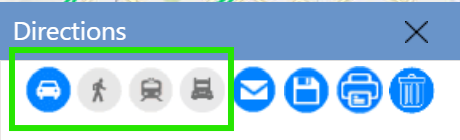
By offering multiple travel modes, Maplytics ensures that routes are practical and realistic, regardless of how field teams move between locations.
What Customization Options Are Available in Maplytics’ Route Optimization?
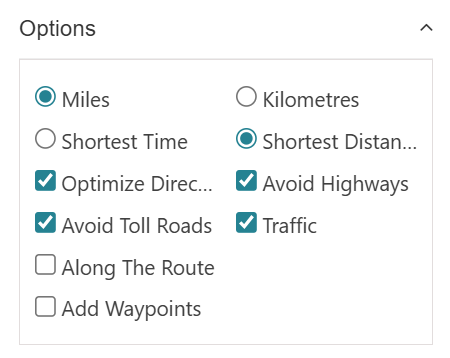
Maplytics provides extensive route customization options, enabling businesses to tailor routing based on operational priorities. Users can choose distance units such as miles or kilometers and define whether routes should be optimized for time or distance. Cost-saving preferences like avoiding toll roads or highways can also be applied, while real-time traffic data ensures routes adapt to current road conditions.
An additional capability, “Along the Route Search,” allows users to identify CRM records within a defined distance of the planned route. This helps field teams uncover nearby opportunities or tasks without straying far from their primary path, making routes both efficient and opportunistic.
Can Waypoints Be Added Directly from CRM Data?
Yes. One of Maplytics’ strongest differentiators is its deep CRM integration. Instead of manually entering addresses, users can add waypoints directly from CRM records. Selecting a pushpin on the map or using a lookup search instantly adds records such as accounts, contacts, or custom entities to the route.
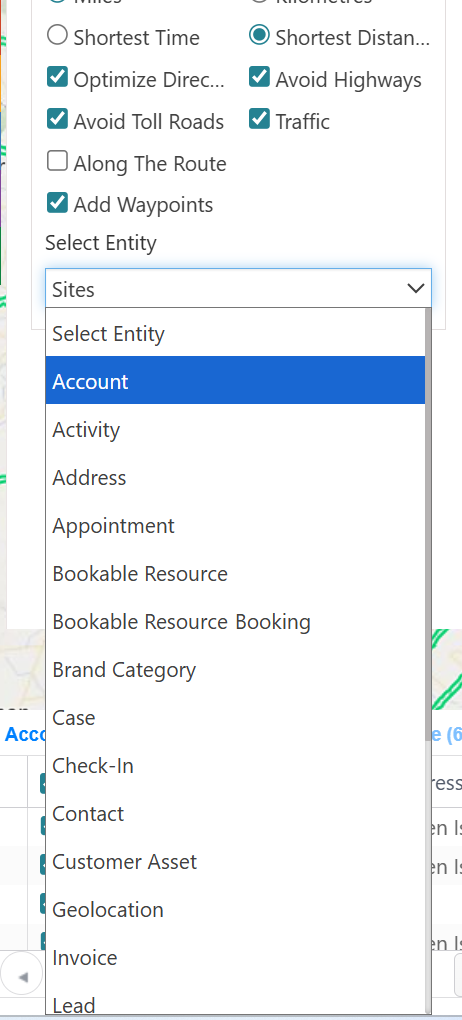
Each waypoint remains fully connected to its CRM context, allowing users to access customer details, interaction history, and related activities at every stop. This seamless integration ensures that routing is always aligned with real business data.
What Directions and Navigation Options Are Available?
After a route is plotted, Maplytics displays a Directions Card that provides turn-by-turn navigation, travel time, and distance for each segment of the journey, along with total route metrics. For navigation on the go, users can open the route in popular navigation apps such as Google Maps, Apple Maps, or Waze.
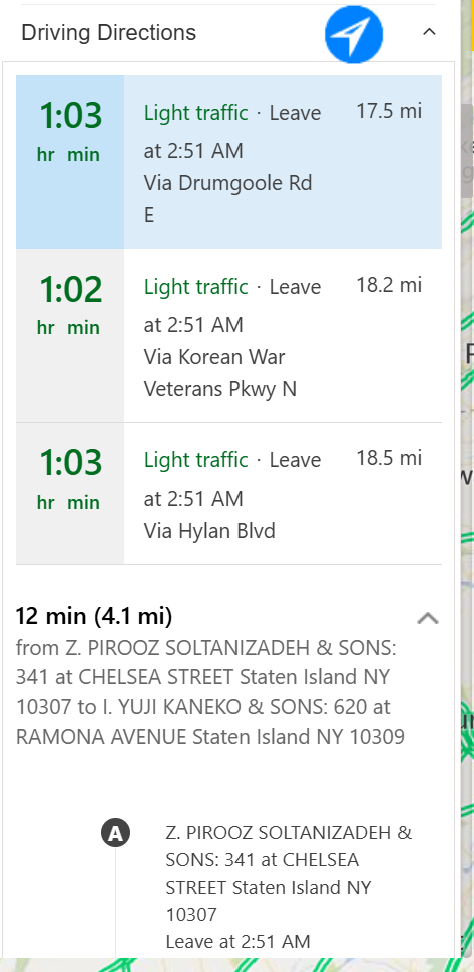
Routes can also be shared via email or messaging, allowing field reps to access navigation links instantly on mobile devices. This flexibility ensures smooth transitions from planning to execution.
How Do Saved Routes Work?
Maplytics allows users to save optimized routes for future use. Saved routes retain key details such as waypoint sequence, total distance, and travel time. Users can name routes, assign ownership, organize them into route sets, and update them as plans evolve.
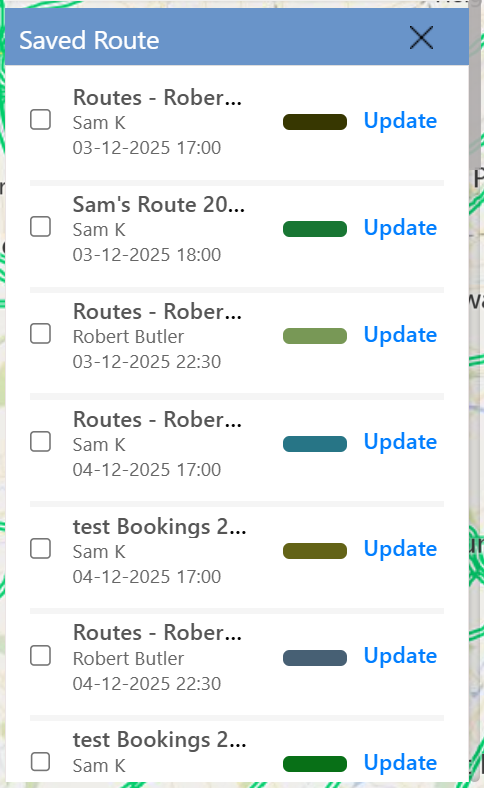
Managers can view multiple saved routes simultaneously, making this feature especially useful for overseeing teams, planning recurring travel schedules, or preparing routes in advance.
What Is “Along the Route” Search?
The “Along the Route” Search feature identifies CRM records that fall within a specified distance of an existing route. For example, when traveling between scheduled stops, Maplytics can highlight nearby customers, leads, or service requests within a default radius of 0.5 units.
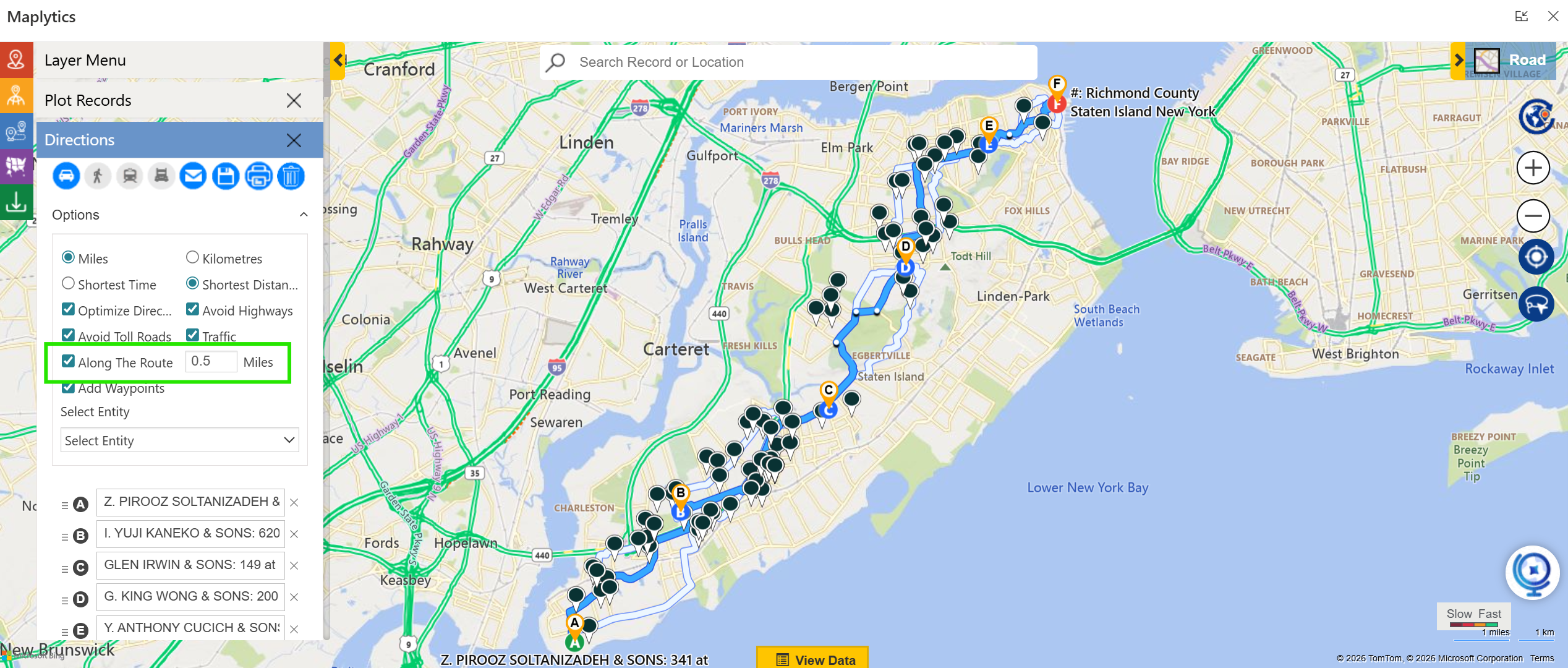
This capability helps field teams maximize productivity by identifying additional visits that can be handled with minimal deviation, turning planned travel into revenue-generating opportunities.
Does Traffic Impact Route Optimization?
Yes. Maplytics incorporates real-time traffic data into route calculations, allowing routes to adjust based on congestion and road conditions. This is particularly valuable for time-sensitive appointments, helping teams avoid delays and maintain punctuality.
How Does Route Optimization Fit into CRM Workflows?
Because Maplytics is built directly into Microsoft Dynamics 365 and Dataverse, route optimization becomes an integral part of the CRM workflow. Routes are directly linked to CRM records, ensuring navigation and visit planning are not isolated tasks. Field reps gain full context at every stop, including customer information, activity history, and recommended next actions. This tight integration ensures routing supports broader customer engagement strategies rather than operating separately.
Are Advanced Scenarios Like Truck Routing Supported?
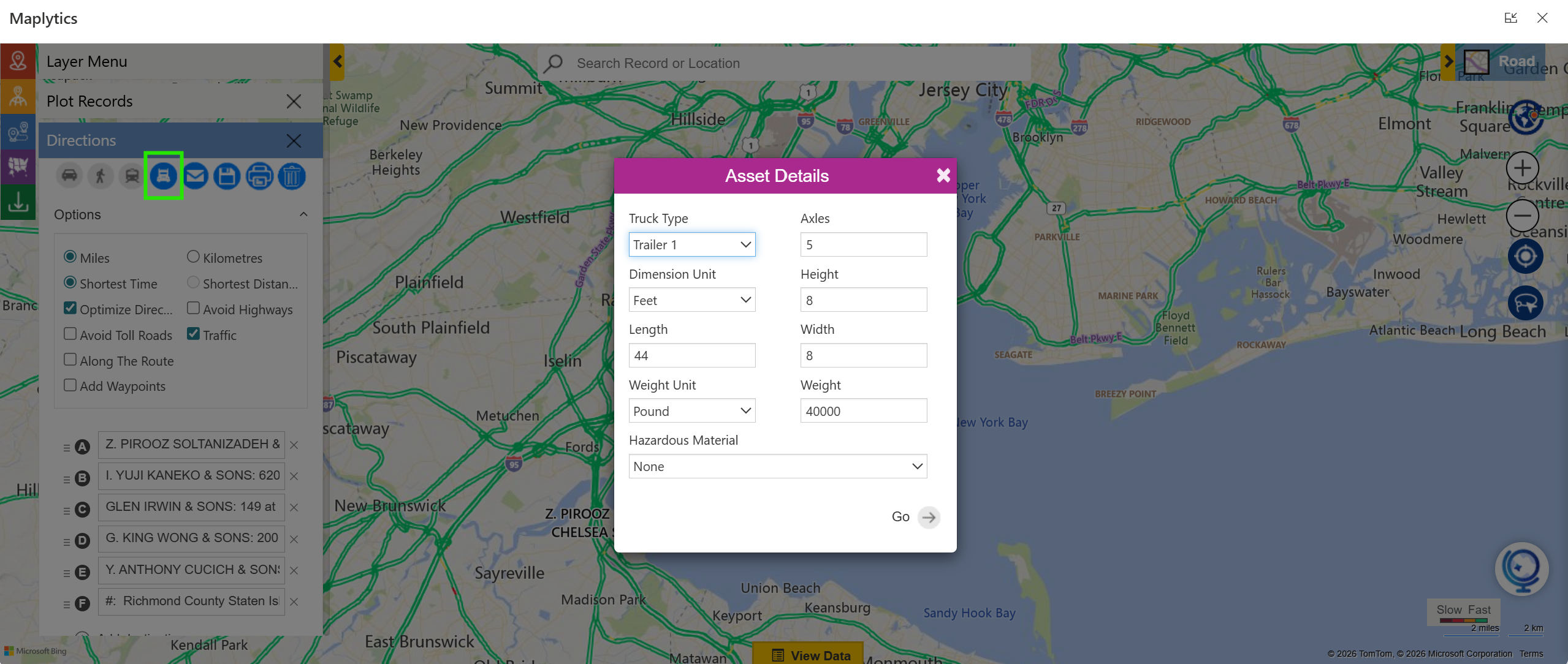
Yes. Maplytics supports truck route planning for logistics and fleet operations. Users can specify vehicle details such as trailer type, dimensions, weight, and hazardous material indicators. While shortest-distance optimization may not always apply due to vehicle restrictions, this functionality helps teams plan compliant and realistic routes based on asset-specific constraints.
What Are the Key Business Benefits?
Route optimization delivers measurable benefits across organizations. Teams experience reduced travel time and fuel costs, improved punctuality, higher daily visit counts, and better overall resource utilization. Many businesses report significant time savings after adopting optimized routing, allowing teams to complete more visits per day while lowering operational expenses.
Additional FAQs
How many waypoints can a route include?
Maplytics supports up to 25 waypoints per route, enabling flexible multi-stop planning.
Can toll roads or highways be avoided?
Yes, users can configure routes to avoid tolls or highways based on preferences.
Can routes be viewed in external navigation apps?
Yes, routes can be opened in Google Maps, Apple Maps, or Waze.
Can optimized routes be shared?
Absolutely. Routes can be shared via email or printed, complete with CRM context and turn-by-turn directions.
What’s More?
With Maplytics, route planning becomes intuitive, flexible, and deeply integrated into your CRM workflows. Maplytics, with its features, is available immediately as part of the for Dynamics 365, Power Apps, Power Pages, and Dataverse. Organizations interested in adoption, 15-day free trials, or personalized demos are encouraged to contact Maplytics’ sales team at [email protected]
For more information, visit our website or Microsoft Marketplace. One can hop on the detailed Blogs, Client Testimonials, Success Stories, Industry Applications, and Video Library for quick query resolution. Technical docs for the working of Maplytics are also available for reference.