Unlocking the Truth: AI, Italics, and the Lock Icon in Microsoft Dynamics 365 Business Central
Author’s note: This article follows my earlier MSDW piece on using AI in Business Central. In How Human Expertise Reshapes AI: A Solution for Reallocating Costs in Microsoft Dynamics 365 Business Central, I highlighted how AI can accelerate learning and troubleshooting and when combined with human expertise AI exploration can produce stronger, more reliable results than either alone. This time, I share the other side of the story—when AI leads you down the wrong path, and how human insight ultimately reveals the answer.
The Puzzle
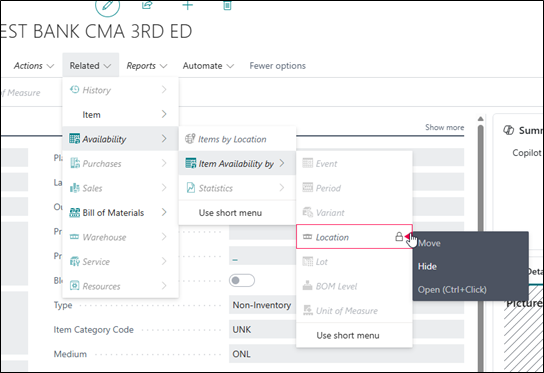
I noticed a lock icon beside some actions in Profile Customization mode. Using ChatGPT I asked “Why is there a lock on the field in the attached file? Can I unlock it?” ChatGPT, in its conversational style, pointed me to page locks, field lock editing, outdated personalization, and even permission setup as a cause. Plausible, but none of them explained what I was actually seeing. Copilot provided the same answer, however, in its own more neutral and instructional style. Since I prefer ChatGPT’s style, I kept doing my research there. I really need to give my ChatGPT a name. Any ideas?
The Clue: Italics
The real breakthrough came from observation, not AI. The locked items were displayed in italics.
- Item Availability by → Location
- Period
- Variant
- Lot
- BOM Level
- Unit of Measure
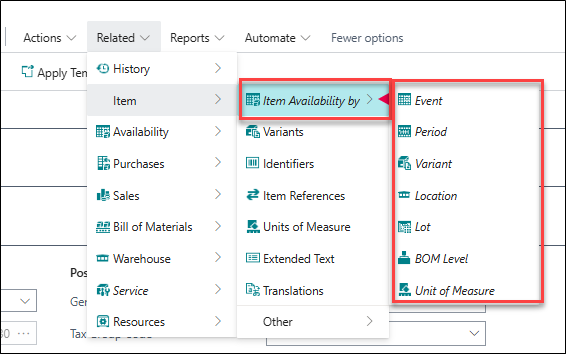
Then it hit me: these italicized actions are dependent children of the parent action Item Availability by. They don’t stand alone. Location on its own is incomplete; it only makes sense as Item Availability by Location.
That’s why you can’t move it independently. The lock isn’t about field locking or permissions. It’s about dependency. The italics are the system’s way of telling you that.
Pro Tip: Reading the Clues in Customization Mode
- Italicized + locked = dependent child action
- You can’t promote or move them without their parent
- To expose them elsewhere, move the parent action (e.g., Item Availability by)
- Permissions still apply, but they’re not what’s driving the italics
The AI vs. the Human
When I pushed ChatGPT on this, it shifted from technical guesses to flattery. At one point it told me:
FREE Membership Required to View Full Content:
Joining MSDynamicsWorld.com gives you free, unlimited access to news, analysis, white papers, case studies, product brochures, and more. You can also receive periodic email newsletters with the latest relevant articles and content updates.
Learn more about us here