MRP and Production Planning in Dynamics 365 Finance and Supply Chain Management: A Guide to Planning Optimization
Most manufacturers running Dynamics 365 Supply Chain Management are using only a fraction of its planning engine. Microsoft has deprecated the classic master planning engine in favor of Planning Optimization, and the two work differently enough that a setup left untouched since go-live is quietly leaving both performance and capability on the table. If your MRP configuration hasn't been revisited since your implementation, this guide is the review you've been putting off.
Quick Summary (as of Supply Chain Management 10.0.48)
- Microsoft has deprecated the classic master planning engine. Planning Optimization is its replacement. The old engine still runs, but it gets no new features and only limited support.
- Planning Optimization runs calculations outside the SQL database, so plans finish faster and can run more often, even during office hours.
- It now supports finite capacity scheduling, production-order explosion, routes, co-products and by-products, and yield. A few scenarios such as step consumption remain gaps, so run a fit analysis before you migrate.
- DDMRP is included at no extra license cost, but it requires the Planning Optimization add-in. The method typically cuts inventory 30 to 45 percent.
- Forrester's Total Economic Impact study of Dynamics 365 Supply Chain Management found 90 percent ROI and a 22-month payback for a composite organization.
This is a working guide to how MRP and production planning actually run in Dynamics 365 today, what changed with Planning Optimization, and where teams most often get the configuration wrong.
What Is Planning Optimization in Dynamics 365 Supply Chain Management, and Why Master Planning Was Deprecated
Planning Optimization is the current engine that runs master planning in Dynamics 365 Supply Chain Management. It replaces the classic, built-in engine that shipped with the product for years. The Master planning module itself hasn't gone anywhere; what changed is the engine underneath it.
Here's the part that matters for planning decisions. Microsoft has deprecated the classic master planning engine. Deprecated is a specific word, so it's worth being precise about what it means and doesn't. The old engine still runs. Microsoft hasn't set a removal date and has committed to giving at least a year's notice before it ever does. What you don't get anymore is investment: no new features, and support only for blocking issues and functional regressions. In practice, that means the classic engine is frozen while every new planning capability lands in Planning Optimization only.
There's also a hard dependency worth knowing. Since release 10.0.32, you have to install the Planning Optimization add-in before you can enable planning processes at all, even if you intend to keep running the deprecated engine for a while. So the add-in is already in your environment. The question is whether you're using it.
Why Planning Optimization exists in the first place
The classic engine ran master planning inside the same SQL database as the rest of your transactions. On large data volumes, that made planning runs slow and heavy, which is why so many teams could only run a full regeneration overnight. Planning Optimization moves the calculation out to a dedicated, in-memory service that sits outside the SQL database. The payoff is shorter runtimes, far less load on SQL during a run, and the freedom to replan during the working day, with no more waiting for the nightly batch. For a planner reacting to a large order that just landed, that difference is the whole game.
How MRP Works in Dynamics 365 Supply Chain Management: The End-to-End Flow
Strip away the terminology and MRP answers one question: given what you need to ship and what you already have, what should you make or buy, and when. Here's how Planning Optimization works through that in Dynamics 365 Supply Chain Management.
When you start a planning run, the application sends a signal to the Planning Optimization service. The service requests the data it needs through a connector, and the SQL database sends over the setup, master, and transactional data: items, coverage groups, on-hand inventory, sales orders, forecasts, purchase orders, and production orders. The service holds all of that in memory, runs the calculation, and sends the results back: planned orders, along with the pegging that shows why each one exists. That pegging is what lets a planner trace a suggested purchase order back to the specific demand that drove it.
Inside that run, the engine nets requirements against supply, applies your coverage group logic, respects lead times and order modifiers, and factors in safety stock and safety margins. Coverage groups are where most of your planning behavior actually lives, so they deserve more attention than they usually get. They decide whether an item is planned by requirement, by period, or against a min/max, and they carry the time fences that shape the plan.
One practical note on Planning Optimization behavior: firming works a little differently from the classic engine. Auto firming runs as a separate batch job after the planning run completes, and it fires on the order start date rather than the requirement date. That change means planned orders firm in time without you having to pad the firming time fence with lead time. It trips up teams migrating from the old engine, so it's worth confirming before go-live.
For a full account of where the two engines diverge, Microsoft documents the differences between Planning Optimization and the classic engine directly.

A Worked Example: One Planning Run, Start to Finish
Concepts land better against a concrete case, so here's a small one. Say you build a pump assembly, and a customer places an order for 200 units due in three weeks. The pump has a two-level bill of materials: each unit needs one motor, which you buy, and one housing, which you machine in-house from bar stock.
When Planning Optimization runs, it starts at the top. It nets the 200-unit demand against on-hand finished pumps and any existing supply. Say you have 30 on hand and nothing inbound, so net demand is 170. The engine explodes the bill of materials against that 170: 170 motors and 170 housings, each offset by its lead time so the components arrive in time to build the pumps before the due date.
Now it nets each component in turn. If you have 50 motors on hand, the engine plans a purchase order for 120, dated back from the pump build date by the motor's purchase lead time. For the housings, it plans a production order for 170, explodes that against your bar stock, and plans a purchase for the steel if you're short. At each step it pegs the supply to the demand that created it, so a planner can open the planned purchase for motors and see it traces up to that customer order.
Finally, if you plan with finite capacity, the engine schedules the housing production against your machining resources and checks whether the dates hold. If the machine is already loaded, the planned order slips, and the plan surfaces the conflict now, while you can still act, well before it would otherwise show up on the floor in three weeks. That single run, from demand to netting to explosion to a capacity-checked schedule, is MRP doing its job.
How Demand Forecasting Feeds MRP in Dynamics 365 Supply Chain Management
MRP is only as good as the demand you feed it. In Dynamics 365 Supply Chain Management, demand forecasting sits upstream of planning and shapes what the engine treats as future demand.
Planning Optimization reads demand forecasts, reduces the forecast by actual orders as they come in so you don't double-count, and supports forecast models with sub-models for scenarios like separating baseline demand from promotional spikes. It also honors supply forecasts when you plan against expected inbound supply. The setting that catches people is forecast reduction: if the "reduce forecast by" logic doesn't match how your demand actually converts, the plan either double-orders or starves, and the numbers look fine right up until they don't.
The forecast doesn't have to be perfect. It has to be consistent and reduced correctly, so the engine nets it against real orders the way you expect.
BOM Explosion and Multi-Level Component Planning
For a manufacturer, the interesting part of MRP is what happens below the finished good. When the engine plans a parent item, it explodes the bill of materials and generates dependent demand for every component, level by level, down through sub-assemblies to raw materials.
Planning Optimization handles multi-level explosion, phantom BOMs, constant and variable scrap, and subcontracting. For process manufacturers, it plans formula versions with co-products and by-products and respects formula yield, both supported since version 10.0.33. Those were meaningful gaps in the early days of Planning Optimization, which is part of why some teams stayed on the classic engine. They're closed now.
A couple of edges are still open, and this is exactly the kind of detail the generic guides miss. Step consumption on BOM and formula lines is currently ignored when Planning Optimization is enabled. Sales-line reservation through explosion isn't supported yet either. Neither is common, but if you rely on either, you need to know before you migrate. That's the whole reason the fit analysis exists, which we'll get to.
Capacity Planning in Dynamics 365 Supply Chain Management: Finite vs Infinite, Operations vs Job Scheduling
Material planning tells you what to make. Capacity planning tells you whether you can actually make it in time. The two have to work together, and this is where a lot of planning setups quietly fall back to wishful thinking.
Dynamics 365 Supply Chain Management supports both infinite and finite capacity. Infinite capacity assumes your work centers can absorb whatever the plan throws at them, which is fine for a rough-cut view and dangerous as a production commitment. Finite capacity respects the real limits of your resources and schedules against them, so the dates it gives you are dates you can hold. Planning Optimization now schedules resources with finite capacity, and it supports scheduling through explosion of production orders as of version 10.0.32.
There are two scheduling depths to know. Operations scheduling works at the operation level against a rough time frame and is quick, so it's the sensible default for a planning run across many orders. Job scheduling breaks each operation into individual jobs against specific resources and times, which you use when you need a detailed, executable shop-floor schedule. Most manufacturers plan with operations scheduling and reserve job scheduling for the near-term horizon where precision earns its cost. For the production side of this, Folio3 works with clients on production planning for manufacturers across both discrete and process operations.
From Planned Order to Shop Floor: The Execution Handoff
A planning run produces planned orders, and a planned order is only a suggestion. Nothing happens on the floor or with a supplier until those suggestions become real orders, so it's worth knowing how the handoff works, because it's where a clean plan either turns into execution or stalls.
Planned orders get firmed into real orders: a planned production order becomes a production order, and a planned purchase order becomes a purchase order or a purchase requisition, depending on your procurement policy. Firming is the commit point. You can firm manually, when a planner reviews and approves, or automatically through the firming time fence for orders inside a horizon you trust. Once firmed, a planned order no longer moves with the next planning run, which is exactly why over-firming hurts: you've frozen decisions the plan can no longer adjust.
From there, execution takes over. A released production order drives material consumption and routing operations on the floor, and if you run Warehouse Management, the material picks and finished-goods put-away flow through warehouse work. A firmed purchase order goes to the supplier and, on receipt, through your inbound warehouse process. The planning engine handed off the "what and when"; Warehouse Management and production execution handle the "where and how." This matters for planning because of feedback: as production and purchase orders progress, they become supply that the next planning run nets against, so weak execution data quietly corrupts the next plan.
DDMRP in Dynamics 365 Supply Chain Management: When to Use It and How It's Configured
Classic MRP assumes your forecast is roughly right and your lead times are stable. When neither holds, the plan whipsaws: you chase demand you can't see coming and carry inventory in the wrong places. Demand-Driven MRP, or DDMRP, is built for exactly that environment.
DDMRP places strategic decoupling points in your bill of materials and manages buffer stock at those points. Each buffer has red, yellow, and green zones that drive replenishment, and the buffers absorb variability so a forecast miss on one item doesn't ripple up and down the whole chain. It suits manufacturers with high demand variability or with cumulative lead times longer than what customers will wait. Microsoft points to the general DDMRP methodology delivering inventory reductions in the range of 30 to 45 percent while holding or improving service levels.
Two facts settle most of the "can we use it" question. DDMRP in Dynamics 365 Supply Chain Management is included at no extra license cost, and it requires the Planning Optimization add-in to run. If you're still on the classic engine, DDMRP is one more reason the migration pays for itself.
Planning Optimization vs Master Planning: A Feature and Migration Comparison
The honest headline is that Planning Optimization's scope isn't identical to the classic engine's, though the gap has narrowed to a handful of edge cases. Here's where the major capabilities stand.
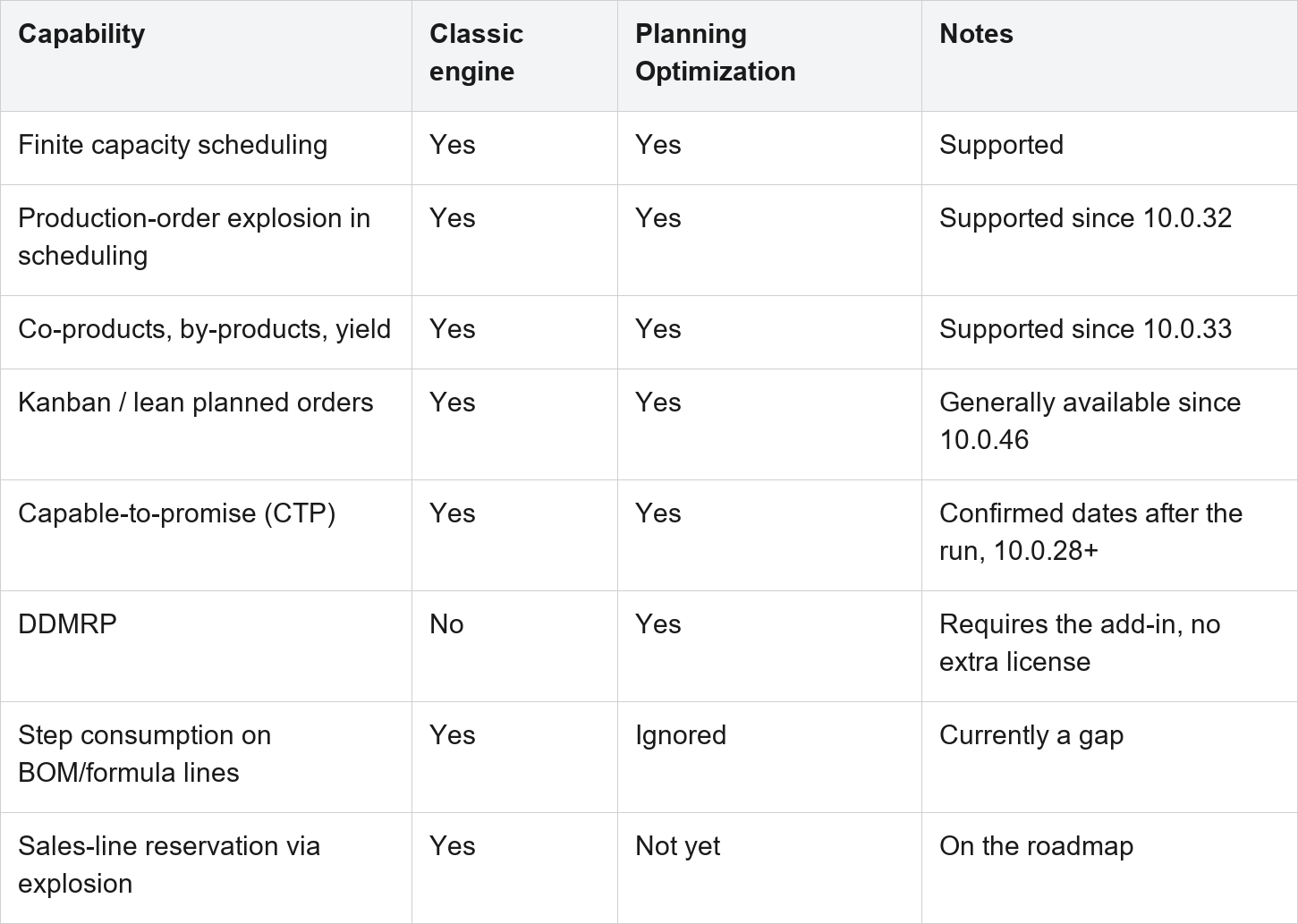
Before you migrate, run the Planning Optimization fit analysis. It scans your actual setup and data and flags where the result might differ between the two engines. A blank result means you're clear. Where it flags something, you can still enable Planning Optimization; the flag just tells you which of your settings the service won't honor, so you can decide what to adjust. One caveat worth respecting: the fit analysis can't catch every inconsistency, so treat it as the opening step in migration planning and expect to dig deeper.
Planning Parameters That Throw a Wrench At Your Plan
If the engine is producing a plan you don't trust, the cause is almost always a parameter. A handful of settings do most of the damage, and they're the easiest things to set once and forget.
Coverage codes. Each item's coverage group carries a coverage code that decides how the engine plans it. Requirement plans exact quantities against each demand, Period groups demand into buckets to cut order frequency, Min/Max holds stock between a floor and a ceiling, and Manual leaves it to a planner. Requirement suits expensive or lumpy items; Period suits cheap, steady ones. Mixing them up is how you end up with either a flood of tiny orders or too much idle stock.
Time fences. Time fences bound what the engine looks at and touches. The coverage time fence sets how far ahead it plans, the freeze time fence protects the near term so you don't reschedule what's already in motion, the firming time fence auto-firms orders inside a trusted horizon, and the explosion and capacity time fences control how far ahead the engine explodes BOMs and schedules capacity. Set the coverage fence too short and the engine can't see demand that matters. Set the freeze fence wrong and it churns orders you've already committed.
Order modifiers. Minimum, maximum, and multiple quantities shape every order the engine suggests. A stale minimum order quantity inflates every planned order for that item, and a multiple that doesn't match how you actually buy or build creates rounding you'll fight in every run.
One behavior to plan around: with Planning Optimization, every plan is regenerative. It deletes and rebuilds all non-firmed planned orders on each run. The deprecated engine offered a faster net-change option that only touched changed items, and that option is gone. It rarely matters in practice, because Planning Optimization is fast enough to regenerate often, but it's worth knowing if you tuned your old cadence around net-change runs.
Common MRP Configuration Mistakes in Dynamics 365 Supply Chain Management, and How to Avoid Them
Most planning problems aren't engine problems. They're configuration that was set once at go-live and never revisited. These are the ones that show up again and again.
Coverage groups nobody has touched since implementation. Coverage groups drive the bulk of planning behavior, and defaults chosen during a rushed go-live tend to calcify. If your plan feels wrong, start here.
Lead times that don't match reality. Planned dates are only as honest as the lead times behind them. When purchase or production lead times drift from what actually happens on the floor, every date the engine produces is off, and planners quietly stop trusting the system.
Safety stock set once and forgotten. Demand and lead-time variability move over time. A safety stock number that was right two years ago is now either tying up cash or leaving you exposed, and nobody revisits it because nothing obviously broke.
Treating min/max as planning. Reorder-point logic reacts to a number falling below a line. It isn't planning, and using it for items with dependent demand means the engine never sees the demand coming.
Skipping the fit analysis before migrating. Teams flip on Planning Optimization, hit the step-consumption or reservation gap in production, and blame the engine. The fit analysis would have shown it in advance.
Over-firming. Firming too aggressively strips the planner's ability to react, since firmed orders no longer move with the plan. Firm what you're committed to and let the rest stay planned.
What a Good Planning Setup Looks Like for Discrete vs Process Manufacturers
There's no single right configuration, because a machine shop and a food producer plan against different physics. The engine is the same; the setup that fits is not.
For discrete manufacturers, the weight sits on routes, finite capacity, and disciplined engineering change control. You want operations scheduling driving the plan, job scheduling on the near horizon, and BOMs whose revisions and effectivity dates actually reflect what's on the floor. Capacity is usually the binding constraint, so plan against it finitely and give yourself dates you can actually hold.
For process manufacturers, formulas carry the complexity. Co-products and by-products, formula yield, and shelf life all have to be modeled correctly, or the plan looks clean and the floor tells a different story. Planning Optimization supports all three now, which is what makes it viable for process operations that had to wait on the classic engine before.
The Business Case: What Better Planning Is Worth
Planning improvements are easy to hand-wave and hard to fund, so it helps to anchor the conversation in real numbers.
Forrester's Total Economic Impact study of Dynamics 365 Supply Chain Management modeled a composite organization and found benefits of roughly 44 million dollars over three years against costs under 24 million, for a net present value near 21 million, a 90 percent ROI, and a 22-month payback. The gains came from five areas: higher production volume, less downtime, better quality, lower infrastructure cost, and improved developer productivity. On the inventory side specifically, the DDMRP methodology Microsoft supports in the platform is associated with 30 to 45 percent inventory reductions where variability is high.
Treat those figures as directional for your own business. The point is that the money in planning shows up in inventory carrying cost, service levels, and capacity utilization, and those are large enough numbers that a configuration review usually pays for itself.
How Folio3 Configures MRP and Production Planning for Manufacturing Clients
Getting Planning Optimization, capacity scheduling, and DDMRP working together for a specific plant is configuration work, and it rewards experience. As a Microsoft Solutions Partner with more than 20 years in the ecosystem and 200-plus certified professionals, Folio3's Dynamics 365 Supply Chain consultants run this for manufacturers across discrete and process operations: assessing the current setup, running the fit analysis, tuning coverage groups and lead times, and moving teams off the deprecated engine without disrupting live planning.
The work that moves the needle is rarely a big rip-and-replace. It's the unglamorous tuning: coverage groups that match how you actually plan, lead times that match the floor, safety stock sized to current variability, and capacity scheduled finitely so the dates hold.
FAQ
Is Master Planning deprecated in Dynamics 365?
The classic master planning engine is deprecated. It still runs, but Microsoft invests in no new features for it and supports it only for blocking issues and regressions. There's no removal date, and Microsoft has committed to at least a year's notice before any removal. Planning Optimization is the engine going forward.
What is the difference between Planning Optimization and Master Planning?
Planning Optimization runs the calculation in a dedicated in-memory service outside the SQL database, so plans run faster and more often, even during the working day. The classic engine ran inside SQL and is now frozen. Planning Optimization also holds all new capability, including DDMRP.
Does Planning Optimization support finite capacity scheduling?
Yes. Planning Optimization schedules resources with finite capacity and supports scheduling through explosion of production orders as of version 10.0.32. A few scenarios such as step consumption remain gaps, so run the fit analysis first.
Is DDMRP available in Dynamics 365 Supply Chain Management?
Yes. DDMRP is included at no extra license cost and is supported by the Planning Optimization add-in, which it requires to run. It suits manufacturers with high variability or long lead times.
How long does it take to set up MRP in Dynamics 365 Supply Chain Management?
A standard configuration usually takes a few weeks, depending on BOM complexity, capacity requirements, and how much integration and data cleanup is involved. The time goes into coverage groups, lead times, and capacity setup, and rarely into the engine itself.
Can you still use the old master planning engine?
Yes, for now. You can keep running the deprecated engine while you prepare to migrate, and you don't need an exception from Microsoft to do so. Since release 10.0.32, though, you still have to install the Planning Optimization add-in either way.
Ready to Pressure-Test Your Planning Setup?
Running Dynamics 365 Supply Chain Management and unsure whether Planning Optimization is configured correctly for your production environment? Folio3's Dynamics 365 Supply Chain consultants offer a complimentary MRP configuration review, covering your engine, coverage groups, capacity setup, and migration readiness.
Book a complimentary MRP configuration review → https://dynamics.folio3.com/contact/