Business Central for Manufacturing: How Production Costs Are Calculated, Adjusted, and Controlled
Quick Summary
- Business Central builds a manufactured item's cost from six single-level shares: material, material non-inventory, capacity, subcontracted, capacity overhead, and manufacturing overhead.
- Manufacturing overhead is the only derived share. Business Central calculates it as a percentage of all the other shares combined, so one wrong routing time inflates two cost lines at once.
- Output posts at expected cost (standard cost times quantity) when the last routing operation closes. Actual cost only replaces it after the order is set to Finished and Adjust Cost - Item Entries runs.
- Variance posts across five buckets: raw materials, capacity, subcontractor, capacity overhead, and manufacturing overhead.
- The Automatic Cost Adjustment field in Inventory Setup is the most common source of month-end cost discrepancies in Business Central manufacturing.
- Standard is the costing method Business Central's production model is built around. The other four (FIFO, LIFO, Average, Specific) track variance less cleanly by comparison.
Why Production Cost Control Is a Top Reason Manufacturers Choose Business Central
Before the mechanics, it's worth saying why manufacturers put production costing on Business Central in the first place, because it's usually what pushes them off spreadsheets and older systems.
A spreadsheet can hold a bill of materials and a rate card. What it can't do is keep the cost current as the floor moves. Business Central rolls cost up through every level of a multi-level BOM automatically, so a price change on a component three levels down reaches the finished good without anyone rekeying it. It tracks work in process in real time, so a half-built order shows the value already sunk into it. And when a job closes, it posts the gap between what you expected to spend and what you actually spent into variance accounts, split by cause, which saves finance from reconciling it by hand.
That last part is the real draw. Spreadsheets and legacy systems can tell you what a job cost after the fact. Business Central tells you where the cost came from and why it differs from plan, at the moment the order is adjusted, in buckets you can read. Overhead absorbs automatically against the rates you set, subcontracting flows through the routing, and the capitalized cost that lands on the item card is one finance can stand behind.
The rest of this guide is how that machinery works, and where a setup nobody owns quietly breaks it.
Ask a manufacturer running Microsoft Dynamics 365 Business Central what a production order cost, and you'll get a number. Ask why that number changed three weeks after the order closed, and the room usually goes quiet.
What follows is predictable. Operations signs off on a job, finance sees something different at month end, and everyone settles on the explanation that the system is wrong. It rarely is. Business Central manufacturing costing is deterministic and fully documented, and it will tell you exactly where a cost came from if you know which shares to look at. The problems live in the setup underneath, in a handful of fields that got picked once during implementation and haven't been touched since.
This piece covers how the cost of a manufactured item actually gets assembled, why it legitimately moves after posting, and one Inventory Setup field that quietly wrecks margins in more deployments than anything else I've seen.
How Does Business Central Calculate the Cost of a Manufactured Item?
Business Central calculates the standard cost of a produced item from six single-level cost shares:
Standard Cost = Single-Level Material Cost + Single-Level Material Non-Inventory Cost + Single-Level Capacity Cost + Single-Level Subcontracted Cost + Single-Level Capacity Overhead Cost + Single-Level Manufacturing Overhead Cost
Each one has a distinct source:
- Material cost comes from the standard or unit costs of the components and subassemblies on the production BOM. Only items of type Inventory count here.
- Material non-inventory cost comes from components of type Non-Inventory, and it only reaches produced items if the Include Non-Inventory Items to Produced Items toggle is switched on in Manufacturing Setup. It never applies to assembled items at all.
- Capacity cost comes from the routing: run time, setup time, and the unit cost sitting on the work center or machine center.
- Subcontracted cost comes from any routing line assigned to a subcontracted work center.
- Capacity overhead cost comes from the overhead rate and indirect cost percentage on the capacity resources.
- Manufacturing overhead cost isn't entered anywhere. Business Central derives it: take the sum of the five shares above, multiply by the item's Indirect Cost %, divide by 100, then add the item's Overhead Rate.
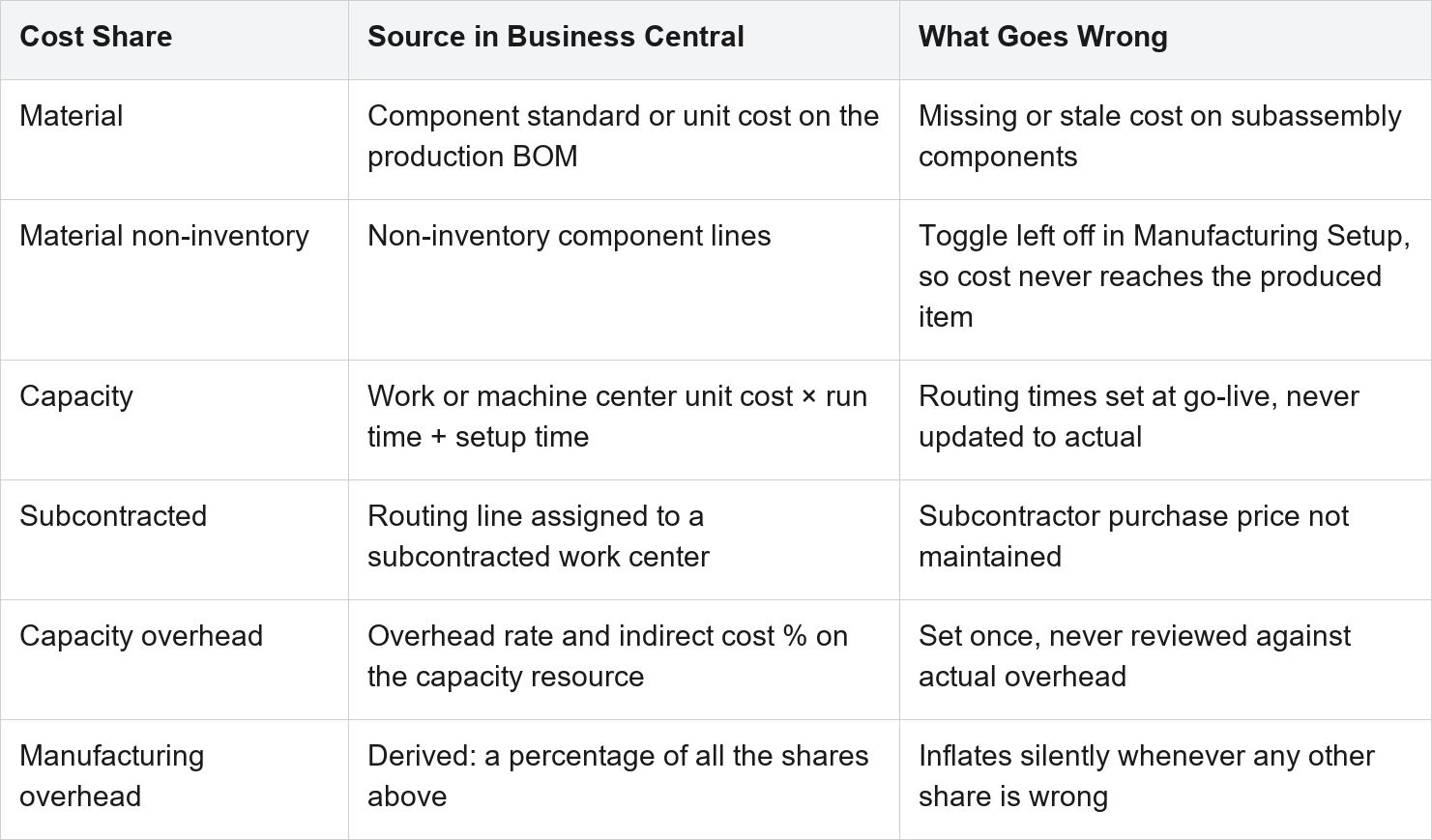
That last one has a consequence most teams miss. Because manufacturing overhead is calculated from every other share, a wrong run time in a routing doesn't just inflate capacity cost. It inflates overhead too, in the same direction, at the same time.
Say a routing has an operation at 10 minutes and the press actually takes 14. Capacity cost on that item is now 40% light. But manufacturing overhead is a percentage of a total that includes capacity cost, so it's light as well. You go looking for one bad number and you find two, and the second one only moved because the first did.
The single-level shares only describe one level of the BOM. Rolled-up shares aggregate everything beneath the item, which is how a price change on a raw material three levels down eventually reaches your finished goods cost. Eventually being the operative word, because it only gets there once cost adjustment has forwarded it.
If your team is still mapping which capabilities sit where, our breakdown of Business Central modules covers how manufacturing lines up against inventory, finance, and supply chain.
Why Do Production Costs Change After Posting in Business Central?
This is the mechanic behind most of the arguments.
When the last routing operation on a production order posts, Business Central writes output to the item ledger at expected cost. Expected cost is output quantity multiplied by the standard cost sitting on the item card. It's the number you quoted before the job ran, not the bill after it. Nothing about it reflects what the order actually consumed.
Those entries stay flagged as Expected until two things happen: the order gets set to Finished, and the Adjust Cost - Item Entries batch job runs. Only then does Business Central invoice the order, which means it:
- flips the value entries from Expected to Actual
- clears the work in process accounts
- posts the variances between standard and actual
- updates the unit cost on the item card
Before that sequence finishes, finance is reading a placeholder and operations is reading reality. Nobody is wrong, and nobody can prove it either.
One thing to watch in mixed environments: this is production order behavior. Assembly orders post at actual cost straight away and never touch work in process. Teams whose instincts were formed on assembly find production baffling for exactly this reason. Our walkthrough of discrete manufacturing in Business Central maps the five production order stages against this cost flow.
Which Costing Method Should Manufacturers Use in Business Central?
Business Central supports five costing methods. The method decides whether an actual or a budgeted value gets capitalized, and how cost flows from inventory increases to inventory decreases.
Standard
Preset estimate, adjusted to actual through variance values
Repetitive manufacturing where cost control is critical and someone can maintain the standards
It's the only method that revalues uninvoiced quantities as well as invoiced ones. Business Central keeps no history of past standard costs, so your revaluation cadence is a governance problem, not a technical one
FIFO
Actual value of the receipt, oldest inventory consumed first
Stable input costs, or items with limited shelf life
Back-dating an inventory decrease won't reapply existing entries, so the cost flow doesn't self-correct
LIFO
Actual value of the receipt, newest inventory consumed first
Rarely the right answer, and disallowed in many countries and regions
Depresses reported profit when prices rise. Confirm it's statutorily acceptable before you go near it
Average
Weighted average of remaining inventory, per average cost period
Volatile input costs, commingled materials, chemicals, bulk goods
Back-date one entry and the average recalculates, adjusting everything downstream. Changing the average cost period forces a full readjustment
Specific
Exact cost of the specific unit received
High-value, serialized, or regulated items
Needs item tracking on both inbound and outbound. Serial and lot tracking on its own does not make cost follow the lot
For most discrete manufacturers, produced items belong on Standard. Business Central's whole production costing model is built around it, it pushes operational problems into variance buckets you can actually read, and it gives finance a stable capitalized cost to work from.
The catch is maintenance. Standard costing only works if somebody owns the Standard Cost Worksheet and revalues on a real cadence. Where that ownership doesn't exist, the standards go stale and the error doesn't disappear. It just moves into the variance accounts and sits there.
Average is the better call when input costs genuinely swing, which is common in process and light batch environments. If you're buying the same bar stock three times in a quarter at three different prices and it all ends up in the same bin, standard costing will spend the rest of the year explaining the gap to you through variance. Average just absorbs it. Pick the average cost period carefully though, because changing it later triggers a readjustment of every affected entry.
What Is the Automatic Cost Adjustment Setting, and Why Does It Break Margins?
If you check one field after reading this, make it this one.
On Inventory Setup, Automatic Cost Adjustment isn't a checkbox. It's an option field with seven values: Never, Day, Week, Month, Quarter, Year, Always. Whatever you choose defines how far back from the work date Business Central will automatically forward cost changes when you post.
Play that out with a freight invoice.
You receive and invoice a purchase on 10 January. The material gets consumed, the finished good ships, and the sale posts on 15 January. On 5 February the freight invoice turns up and gets applied to the original purchase, pushing its cost up.
Set to Month or Quarter, that freight cost forwards through to the sale. Cost of goods sold corrects itself.
Set to Day or Week, nothing happens. The freight sits on the purchase and never reaches the sale until somebody remembers to run Adjust Cost - Item Entries by hand. Your margin on that order stays wrong in the meantime, and Business Central never says a word about it.
Short windows do get chosen for a reason. They cut the performance hit of adjusting cost on every posting, which matters on a busy database. But that's a trade against accuracy, and almost nobody revisits the decision once they're live. Microsoft's guidance is to run cost adjustment as often as you can, outside working hours, if it isn't running automatically.
Two related points, because they come up:
- Cost adjustment has to run before value entries can be reconciled with the general ledger. An unadjusted inventory ledger won't tie out, however clean the general ledger looks.
- The detection logic changes by method. FIFO, LIFO, Standard, and Specific are detected through item application entries. Average cost items go through the average cost adjustment entry point. Production and assembly orders are detected at order level, which is what forwards cost from consumed material and used capacity onto the output entries of the same order.
How Do You Read Production Order Variance in Business Central?
Variance is just subtraction:
Actual Cost − Standard Cost = Variance
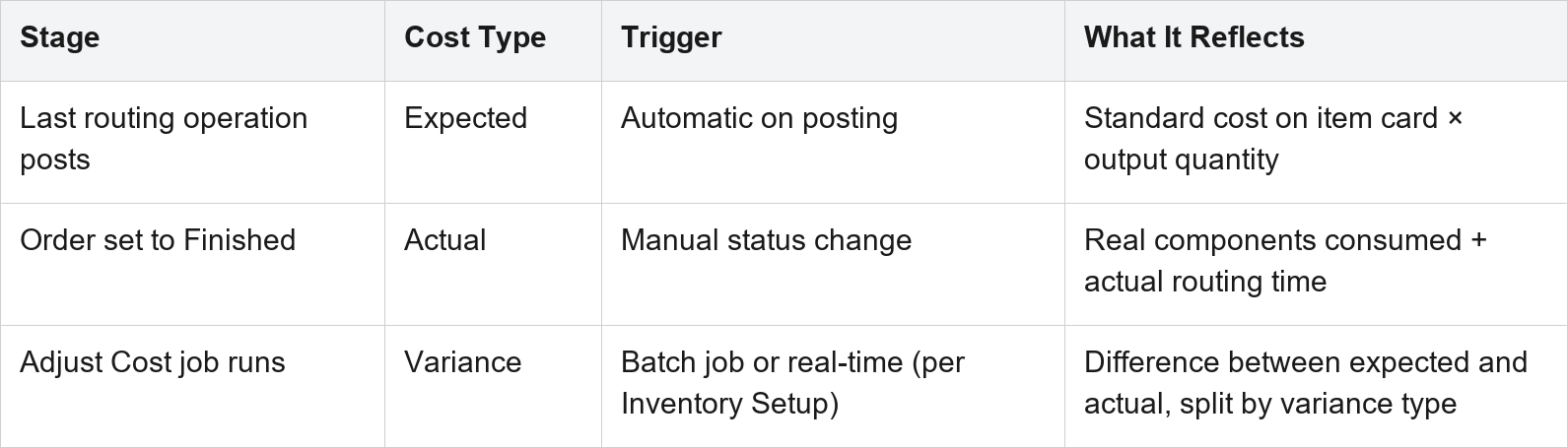
Business Central calculates it separately across five buckets, and reading them one by one is what turns a cost report into a diagnosis.
Material variance usually means scrap, substitutions, or a BOM that no longer matches what the floor actually pulls. Capacity variance points at run times and setup times that have drifted from how the work centers really perform. Subcontractor variance is almost always an old vendor price baked into the standard.
Capacity overhead and manufacturing overhead variance are different. They rarely tell you anything about operations at all. Nine times out of ten they're telling you the overhead rate and indirect cost percentage haven't been updated in a while.
Two mechanics that trip people up. Revaluation doesn't affect variance, only inventory value, so revaluing an item won't clean up an ugly variance number. And for produced and assembled items, the standard cost used in the variance calculation is locked in when cost is adjusted, not when the item is invoiced. Purchased items work the other way round. That's why the timing of your Adjust Cost - Item Entries run decides which standard your variances get measured against.
Frequently Asked Questions
Does Business Central support standard costing for manufacturers? Yes. Standard is one of five supported costing methods, and it's the one Business Central's production costing model is designed around. Produced items on Standard are capitalized at a predetermined cost, and the difference from actual cost posts to variance accounts across five buckets: raw materials, capacity, subcontractor, capacity overhead, and manufacturing overhead.
Why did my production order cost change after I posted it? Because production output posts at expected cost, which is output quantity multiplied by the standard cost on the item card. It only becomes actual cost once the order is set to Finished and the Adjust Cost - Item Entries batch job runs. That job clears work in process, posts variance, and updates the item's unit cost.
How does Business Central calculate manufacturing overhead? It derives it rather than taking it as an input. Business Central adds up material, non-inventory material, capacity, subcontracted, and capacity overhead cost, multiplies that total by the item's Indirect Cost %, divides by 100, and adds the item's Overhead Rate.
Can I change an item's costing method after go-live? Not directly. Business Central blocks it once item ledger entries exist for that item. Microsoft's documented approach is to replace the item outright: renumber the original, create a new item under the old number, copy the master data across, move the inventory using assembly orders, then block the original. Be aware that if the new method is Standard, some cost can end up distributed to variance accounts during the transfer. Setting the Default Costing Method field on Inventory Setup stops it happening again.
Is Business Central manufacturing costing good enough without an add-on? For most small and mid-sized discrete manufacturers, yes. The native model handles multi-level roll-ups, five variance buckets, work in process, subcontracting, and overhead absorption. Process manufacturers who need formula and recipe management, or cost attribution down to the batch, are usually better served by Dynamics 365 Finance and Operations.
Getting the Cost Setup Right
None of this is fragile. It's just unforgiving of setup nobody owns.
Stale standards. A routing that drifted from the shop floor two years ago. Automatic Cost Adjustment left on Day because it was faster during testing. A costing method picked by whoever happened to create the first item master. Individually, none of it looks like much. Together they produce a cost of goods sold that nobody in the building believes, and most of those decisions were made quietly during Business Central implementation and never looked at again.
Folio3 is a Microsoft Solutions Partner with over 20 years in the Dynamics ecosystem and 200+ certified professionals across seven global regions. Our manufacturing team works at exactly this layer: auditing costing method assignments, rebuilding routing and overhead rates against what the shop floor actually does, and setting an adjustment and revaluation cadence that holds up after go-live. If your production costs are technically correct and still nobody trusts them, that's usually weeks of work, not a reimplementation.
Take a look at our Dynamics 365 manufacturing implementation capabilities, or just send us the variance report that started the argument.
Talk to a Dynamics 365 Expert → https://dynamics.folio3.com/contact/