
Beyond the Basics: Posting Inventory Purchases the Righter Way in Business Central
Consultant and Managing Partner, MGC Group LLC
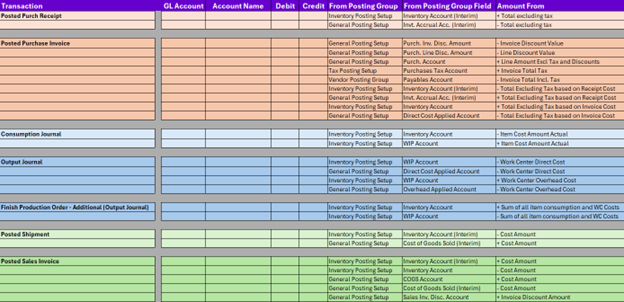
Inventory posting categories in Dynamics 365 Business Central

Inventory accounting in Microsoft Dynamics 365 Business Central is full of nuance, and nowhere is this more evident than in how the system handles inventory purchases. It’s easy to get caught up in the mechanics of getting transactions to post, but real value comes when we understand why those postings occur the way they do and how we can use them to inform better business decisions.

In this article, I’ll break down how Business Central handles expected vs. actual inventory costs, why separating the Purchase Account from the Direct Cost Applied Account matters, and how this structure supports the creation of a supplemental inventory value statement. This is a practical guide for financial and operations users alike who want to move beyond compliance and into meaningful insight—the Righter Way.

Step One: Expected Costs When Inventory is Received

When you receive inventory but haven’t yet posted the vendor invoice, Business Central records expected costs. These are temporary entries designed to reflect the anticipated increase in inventory value and liability without yet impacting your permanent accounts.

Here’s what gets posted:

Business Central inventory expected cost

This expected entry is reversed later, when the vendor invoice is posted with actual costs.

Step Two: Actual Costs When the Invoice Is Posted

Once the invoice arrives and is posted, Business Central:

FREE Membership Required to View Full Content:

Joining MSDynamicsWorld.com gives you free, unlimited access to news, analysis, white papers, case studies, product brochures, and more. You can also receive periodic email newsletters with the latest relevant articles and content updates.
Learn more about us here

About Cynthia Priebe - Microsoft MVP

Cynthia Priebe works directly with end users and finance professionals daily — often brought in where others have not been able to find a solution. That field work is the source of everything she writes. After more than 20 years with Microsoft Dynamics NAV and now Dynamics 365 Business Central, her focus is on why the system behaves the way it does, not just what it can do.

Her work centers on the scenarios that don't always behave as expected and aren't always documented — particularly permissions and security behavior, financial reporting, and post–go-live configuration. Much of her content addresses functionality that didn't get fully configured at go-live, capabilities organizations didn't know existed, or setup that needs to evolve as the business changes.

Cynthia is a Microsoft MVP in Business Applications — Dynamics 365 Business Central, a Microsoft Certified Trainer (MCT), and has held the MB-800 Business Central Functional Consultant certification since it first became available. Before the exam launched, she was part of the worldwide team that wrote the original exam items. She also works with Microsoft Partners and ISVs, contributing practitioner-level knowledge to how BC is built, documented, and taught.

A regular presenter at DirectionsNA, DynamicsCon, and Community Summit, she is also a co-leader of the DUG Mentorship Meetup Group, owner of the Sharing the Righter Way™ LinkedIn community, and served on the Programming Committees for both Community Summit 2024, 2025 and DynamicsCon 2026.

You can connect with Cynthia on LinkedIn or join the Sharing the Righter Way™ LinkedIn community. In addition to her contributions here ...

FREE Membership Required to View Full Content:

Joining MSDynamicsWorld.com gives you free, unlimited access to news, analysis, white papers, case studies, product brochures, and more. You can also receive periodic email newsletters with the latest relevant articles and content updates.
Learn more about us here