The Ultimate Guide to WhatsApp Integration with Dynamics 365 CRM Using Meta or Twilio
Customers expect instant, personalised responses, often via WhatsApp. Yet many businesses still juggle between their CRM and messaging apps, losing context, wasting time, and risking poor customer experience.
Imagine if you could bring WhatsApp directly into your Microsoft Dynamics 365 CRM, so every message, media file, and customer interaction is tracked and managed in one place. With a solution like WhatsApp4Dynamics integrated via the official APIs from Meta or Twilio, your sales, support, and marketing teams can chat seamlessly, without ever leaving the CRM.
From AI-powered sentiment analysis to auto-mapped conversations and WhatsApp‑native templates, this isn’t just an integration; it’s a communication revolution.
Why Integrate WhatsApp with Dynamics 365 CRM?
WhatsApp is the world’s most-used messaging app, and integrating it with Dynamics 365 CRM can transform how your teams communicate.
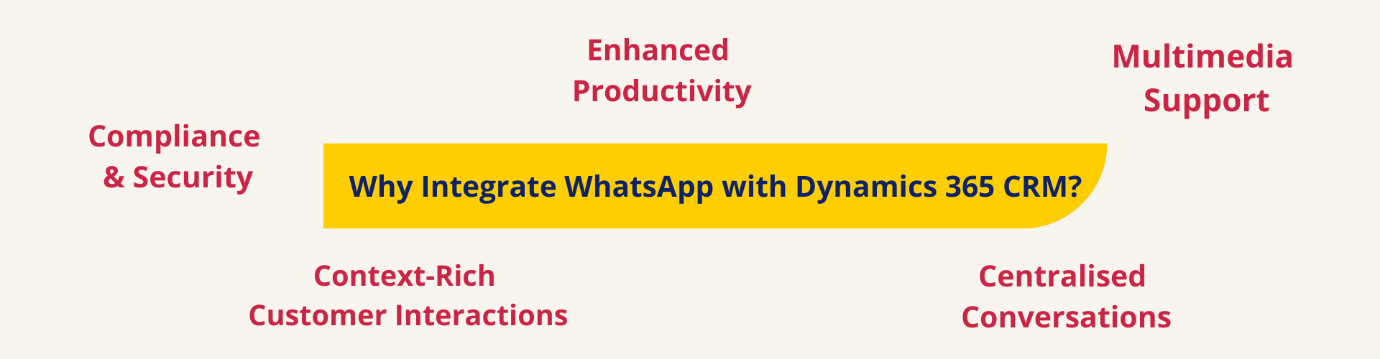
Here’s why it matters:
- Centralised Conversations: No more switching apps, manage chats directly in CRM.
- Context-Rich Customer Interactions: Auto-map conversations to Leads, Contacts, Accounts, or custom entities.
- Enhanced Productivity: AI tools like sentiment detection, chat summaries, and text rephrasing streamline agent workflows.
- Multimedia Support: Send images, documents, PDFs, and media files without leaving CRM.
- Compliance & Security: Fully encrypted messages, aligned with global privacy standards.
With integration, your CRM becomes the hub for personalised, faster, and smarter communication.

Integration Options: Meta API vs Twilio API
You have two powerful routes to integrate WhatsApp into Dynamics 365 CRM:
1️. Meta WhatsApp Business API (Direct Integration)
Perfect for enterprises that want full control.
Steps to Integrate:
- Register on Meta Business Manager.
- Validate your business account and phone number.
- Set up your WhatsApp Business API.
- Create message templates and submit for Meta approval.
- In Dynamics 365:
- Open WhatsApp4Dynamics > Configurations
- Enter Meta API details
- Sync approved templates into CRM
2️. Twilio WhatsApp API
Ideal for teams looking for a low-code, quick deployment.
Steps to Integrate:
- Create a Twilio account.
- Get your Account SID, Auth Token, and Messaging Service SID.
- In Dynamics 365 CRM:
- Open WhatsApp4Dynamics > Configurations
- Input Twilio credentials
- Map entities (Lead, Contact, Account)
- Configure session timeouts and chat preferences
Twilio simplifies setup, letting your team start chatting fast and efficiently.
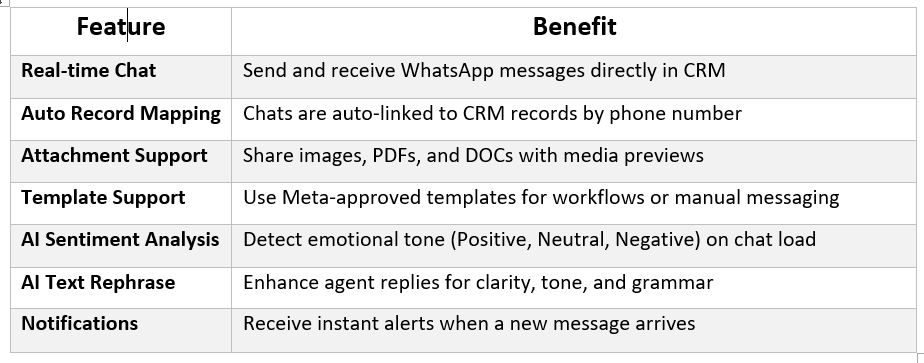
What You Can Do After Integration
Once WhatsApp is integrated with Dynamics 365 CRM, your team gains:
Industries That Benefit Most from WhatsApp + Dynamics 365 CRM Integration
Integrating WhatsApp with Dynamics 365 CRM isn’t limited to specific sectors; its impact spans multiple industries where real-time communication, faster response times, and personalised engagement are essential. Here are the industries where this integration delivers the highest value:
1. Retail & E-Commerce
- Fast-moving industries need fast communication.
- WhatsApp enables instant order updates, product inquiries, delivery notifications, and personalised promotions, all tracked inside Dynamics 365 for streamlined sales and service.
2. Banking & Financial Services
- Customers expect secure, instant updates.
- With encrypted messaging, banks and financial institutions can share account-related alerts, appointment reminders, loan updates, and investment discussions.
3. Healthcare
- From appointment scheduling to discharge follow-ups, WhatsApp helps healthcare organisations offer quick, friendly, and confidential communication.
- Dynamics 365 centralises all conversation logs while keeping patient data secure.
4. Travel & Hospitality
- Bookings, confirmations, itinerary changes, check-in alerts, and WhatsApp make travel communication effortless.
- Agents can manage inquiries inside CRM without switching channels.
5. Manufacturing & B2B Services
- WhatsApp simplifies vendor communication, order confirmations, shipment updates, and after-sales support.
- When integrated with Dynamics 365, every conversation helps strengthen vendor and distributor relationships.
6. Education & E-Learning
- Institutions can send admission updates, course information, reminders, and support queries through WhatsApp.
- CRM-driven analytics help track student engagement seamlessly.
FAQs: Integration Insights
Can I link WhatsApp chats to custom Dynamics 365 CRM entities?
Absolutely! Map chats to Leads, Contacts, Accounts, or even custom-built records.
How do I manage WhatsApp message templates from Meta in Dynamics 365 CRM?
Create templates in Meta Business Manager. Once approved, WhatsApp4Dynamics pulls them into CRM for automated or manual use.
- Is the WhatsApp + Dynamics 365 CRM integration secure and compliant?
Yes, all messages are end-to-end encrypted. Customer data never leaves your CRM. - What CRM platforms support WhatsApp integration for business messaging?
Dynamics 365 CRM, Salesforce, HubSpot, Zoho CRM, and Freshworks CRM are among the top platforms with robust WhatsApp integration options. How can I integrate WhatsApp with my CRM system effectively?
Choose the right API (Meta or Twilio), use a connector like WhatsApp4Dynamics, configure entity mappings, and set up templates and sessions for smooth operations.
Can WhatsApp CRM integration improve customer communication and engagement?
Absolutely! It centralises conversations, tracks interactions, allows personalised engagement, and provides AI-powered insights to make responses faster and smarter.What are the common challenges in WhatsApp integration with Dynamics 365 CRM?
Some challenges include API configuration, template approvals, session timeout management, and mapping custom entities. Using a prebuilt solution like WhatsApp4Dynamics simplifies these tasks.
Quick Launch Checklist
Ready to get started? Here’s a simple roadmap:
- Choose your integration platform: Meta or Twilio
- Register your WhatsApp number and get API credentials
- Install WhatsApp4Dynamics
- Configure mappings, templates, and session settings
- Start chatting with leads and customers directly inside Dynamics 365
Final Thoughts
Integrating WhatsApp with Dynamics 365 CRM isn’t just about messaging; it’s about streamlining operations, enhancing customer experiences, and empowering your team with AI-driven insights.
Stop switching apps and start managing all your customer interactions from a single, intelligent hub. With WhatsApp4Dynamics and either Meta or Twilio APIs, your CRM becomes smarter, faster, and more connected than ever.
Try WhatsApp4Dynamics today with a 15-day free trial from Inogic or Microsoft AppSource.
Request a personalized demo: [email protected]