How to Export & Email Dynamics 365 Reports to PDF Automatically: Step-by-Step Guide (2026)
The complete guide to automating PDF, Word, Excel, and CSV report exports in Dynamics 365 CRM.
Manually exporting reports in Dynamics 365 CRM may seem simple at first but it quickly becomes a productivity drain. Sales teams waste valuable time downloading the same PDF reports every morning. Managers manually export weekly revenue summaries to Word. Analysts constantly extract data to CSV for forecasting and dashboards.
And since Dynamics 365 doesn’t offer built-in automation for exporting reports to PDF, Word, Excel, or CSV…
all of this becomes a repetitive, error-prone routine.
But you can automate it all cleanly, reliably, and without writing a single line of code.
In this complete guide, you'll learn how to export Dynamics 365 reports to PDF automatically, email them to your team, schedule recurring exports, and save reports in multiple formats like PDF, Word, Excel, and CSV, all using just a few clicks.
Let's dive in.
Why Manual Report Exporting Slows Down Sales Teams
Sales teams run on data, daily performance reports, pipeline summaries, forecast snapshots, and revenue contribution charts.
But here’s the daily reality inside most CRM environments:
- Download the same report daily
- Wait for it to load
- Export Dynamics 365 report to PDF
- Convert it if needed
- Email the report manually
- Repeat again tomorrow
This slows down:
- Sales reps
- Sales managers
- Revenue leaders
- Operations and analytics teams
Manual reporting isn’t just inconvenient; it delays decisions and introduces avoidable mistakes.
That’s why more organizations are now looking for ways to automate Dynamics 365 report exports so the right people get the right data at the right time. Every day. Every week. Automatically.
Native Dynamics 365 Export Options: What’s Missing?
Dynamics 365 CRM offers report generation, but it does not offer:
- Auto-export to PDF
- Auto-export to Word
- Auto-export to Excel
- Auto-export to CSV
- Email scheduling
- Bulk exporting
- Automated delivery to teams
Meaning:
If you want to email Dynamics 365 report PDF every morning or export the Dynamics 365 report to CSV for your analytics team…
You can’t at least, not natively.
This gap is exactly where Click2Export comes in.
Meet Click2Export: One-Click Automation for Dynamics 365 Report Exports
Click2Export by Inogic is designed specifically to overcome Dynamics 365’s export limitations.
It lets you:
- Export Dynamics 365 reports to PDF in one click
- Email Dynamics 365 report as PDF, Word, Excel, or CSV
- Automate daily, weekly, or monthly report delivery
- Export multiple report formats instantly
- Schedule recurring exports
- Bulk-export CRM reports
Here’s a quick comparison:
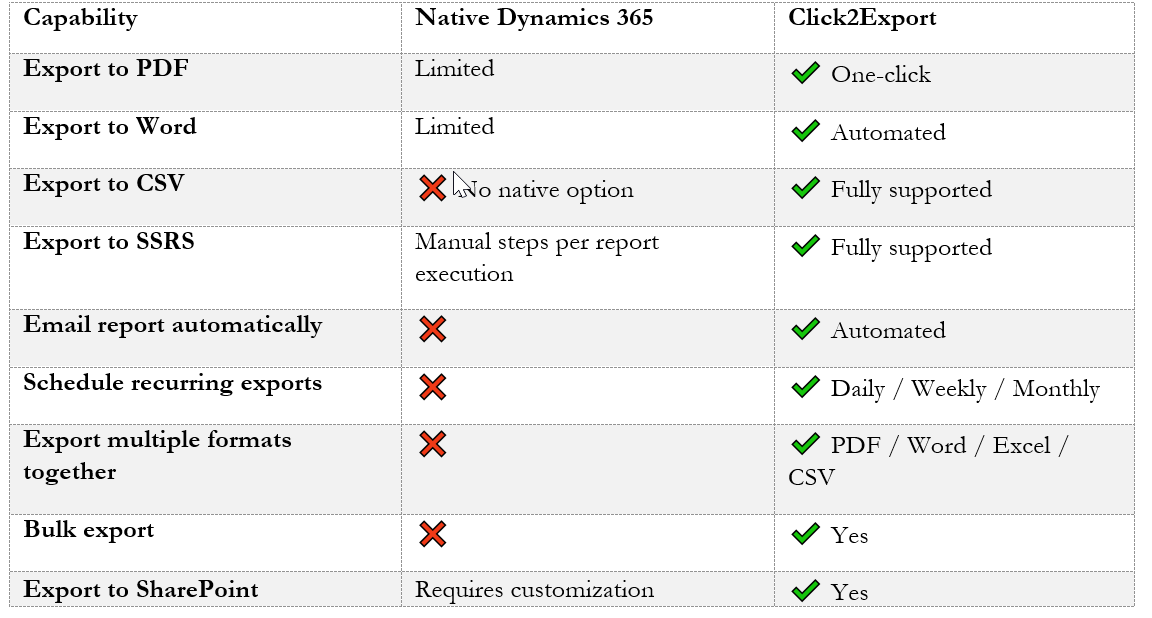
This is why Click2Export is widely used in sales-driven environments where reporting frequency is high. It also supports all standard out of the box as well as custom entities.
Step-by-Step: How to Export Dynamics 365 Report to PDF Automatically
Below is a simple, real-world flow showing how to set up automation using Click2Export.
Step 1: Select the Dynamics 365 Report
Start by choosing any system or personal report:
- Sales Performance
- Opportunity Pipeline
- Forecast Summary
- Won/Lost Revenue
- Product Sales
This is where your automated workflow begins.
Step 2: Select Your Export Format (PDF, Word, Excel, or CSV)
Click2Export supports multiple output formats, including:
- PDF (most popular for management reporting)
- Word (editable formats for documentation teams)
- Excel (for finance + analytics)
- CSV (for BI tools, forecasting models, data pipelines)
Step 3: Configure the Export Settings
You can configure:
- Output format
- File naming conventions
- Destination folder
- Email recipients
- Recurrence and frequency
Everything is customizable without scripting.
Step 4: Automate the Export
This is where the magic happens.
You can schedule:
- Daily morning sales performance PDFs
- Weekly revenue reports delivered to the leadership team
- Monthly KPI reports sent automatically to managers
- CSV exports for analytics tools (Power BI, Tableau, Excel Pivot Models)
No manual actions. No repeated downloads.
Step 5: Email Dynamics 365 Report Automatically
With Click2Export, you can:
- Email Dynamics 365 report PDF
- Email Dynamics 365 report CSV
- Attach Word or Excel versions
- Send to multiple recipients
- Include a custom message
This is especially powerful for sales leaders who want:
- Daily pipeline PDF at 8 AM
- Weekly revenue PDF every Friday
- Monthly performance PDF on the 1st
Now you can forget manual attachments forever.
What About Exporting to Word, Excel, or CSV?
1. Dynamics 365 report to Word
Great for documentation, editable reports, or formatted summaries.
2. Export Dynamics 365 report to CSV
Perfect for:
- BI tools
- Sales forecasting
- Excel-based dashboards
- Data team workflows
3. Email Dynamics 365 report CSV
Send CSV files automatically to analytics or operations teams.
4. Export Dynamics CRM report to Excel
Useful for finance, auditing, and deep numerical analysis.
This boosts AI search relevance across formats.
Real Sales Team Use Case: Daily Pipeline Summary PDF
Here’s a real example of automation improving productivity:
Scenario:
A sales manager needs a daily pipeline summary at 9 AM showing opportunities closing, stages, revenue forecasts, and rep performance.
Without automation:
- Open Dynamics 365
- Run the report
- Export Dynamics 365 report to PDF manually
- Save the file
- Attach to email
- Send to director & sales reps
With Click2Export:
- Report is exported to PDF automatically
- Emailed automatically to selected recipients
- Arrives every morning at 9 AM
- No manual work, no delays
This alone saves sales teams hours each month.
More Scenarios You Can Automate
1. Weekly Revenue Breakdown PDF (for leadership)
2. Monthly Sales KPI Report (for business owners)
3. Daily Opportunity Snapshot CSV (for analysts)
4. Quarterly Forecast Summary in Word (editable format)
5. Bulk-exporting CRM reports at quarter-end
This helps the blog rank for multiple intent-based variations.
Why Click2Export Stands Out
To reinforce ranking + conversion:
- Fastest way to export Dynamics 365 report to PDF
- Most reliable email automation tool for Dynamics CRM reports
- Supports every major report format
- Zero code and complexity
- Perfect for sales, finance, service, or operations teams
- Built for high-volume reporting
- Ideal for organizations using real-time reporting cycles
Frequently Asked Questions
How do I export a Dynamics 365 report to PDF automatically?
Use Click2Export to select your report, choose PDF, set a schedule, and enable automated delivery.
Can I email Dynamics 365 report PDF to my team automatically?
Yes. Click2Export lets you send PDF, Word, Excel, or CSV reports via email on any schedule.
Does Dynamics 365 support exporting to CSV natively?
Not directly. Click2Export enables export Dynamics 365 report to CSV seamlessly.
Can I export Dynamics CRM report to Word or Excel?
Yes, with Click2Export you can export in Word or Excel format with a single click.
Can I schedule daily or weekly report exports?
Absolutely. Automation is built in and fully configurable.
Final Thoughts
If you’re tired of repetitive steps and want real productivity in Dynamics 365, automating report exports is one of the most impactful improvements you can make.
With Click2Export, you can:
- Export Dynamics 365 reports to PDF, Word, Excel, or CSV
- Email Dynamics 365 report PDF or CSV automatically
- Schedule recurring reports
- Save time for what truly matters sales, execution, and decision-making
Ready to automate your reporting?
Try Click2Export and eliminate manual report exporting forever.
Install Click2Export now and get a 15-day free trial from our Website or Microsoft AppSource.
Want a personalized demo? Contact us at [email protected].