Dynamics 365 Data Deduplication: How to Evaluate Native and External Tools
Introduction
Duplicate CRM data slows down sales, inflates storage, ruins reports, and makes automation unreliable. As AI starts driving CRM workflows, clean data is no longer optional—it's foundational.
This guide compares DeDupeD, Native Dynamics 365 CRM Deduplication, and other 3rd-party dedupe tools to help businesses choose the right path to maintain clean, reliable, and AI-ready CRM data.
Table of Contents
- Introduction
- Why Deduplication Matters More Than Ever in 2025
- Overview of the Three Approaches
- DeDupeD vs Native Deduplication in Dynamics 365 CRM
- DeDupeD vs Other Third-Party Duplicate Detection Tools
- Feature-by-Feature Comparison Table
- What Makes DeDupeD the Category Leader?
- Ideal Use Cases
- Demo Video
- Conclusion
Why Deduplication Matters More Than Ever in 2025
AI copilots, predictive scoring, automated journeys, and intelligent routing all depend on accurate, unified customer records.
Any duplicate signals, two leads for the same person, conflicting phone numbers, inconsistent names - confuse AI, create false insights, and waste seller time.
This makes automated, scalable, flexible, and privacy-safe deduplication essential.
Overview of the Three Approaches
1) Native Deduplication (OOB)
The default option inside Dynamics 365 CRM. Basic, rules-based, entity-limited, and entirely manual.
2) Other Third-Party Deduplication Tools
Offer enhanced rule sets, fuzzy matching, or bulk operations, but often come with higher costs, complex configurations, or external processing.
3) DeDupeD (Auto Deduplication + Auto Merge)
A modern solution built for enterprise-grade deduplication with AI matching, prevention alerts, unlimited bulk merge, flexible rules, and full data privacy.
Basically, DeDupeD delivers full-entity support and true auto-merge; native dedupe covers only accounts/contacts/leads and lacks bulk or fuzzy merge.
DeDupeD vs Native Deduplication in Dynamics 365 CRM
Native CRM dedupe is helpful only for surface-level cleaning, but it falls short for organizations needing automation at scale.
Where Native Deduplication Helps
- Works for Accounts, Contacts, and Leads
- Basic exact match rules
- No-cost built-in option
Where Native Deduplication Falls Short
According to the battlecard, native D365 dedupe:
- Does not support custom entities
- Offers no auto-merge
- Has limited matching methods
- Lacks fuzzy matching
- Does not support address merge, phone formatting, or field-level merge criteria
- Offers no bulk merge for large datasets
- Only detects, does not prevent duplicates
Where DeDupeD Outperforms
- Dedupes all entities (OOB + custom)
- Supports exact, first/last N characters, contains + phonetic fuzzy matching
- Provides real-time duplicate prevention on both client & server side
- Allows unlimited bulk merge
- Offers auto-merge, address merge, field criteria, and phone normalization
- Fully processes data inside the customer’s CRM environment (no external servers)

DeDupeD vs Other Third-Party Deduplication Tools
Other tools in the market offer broader features than the native system, but often introduce complexities.
Where Other Deduplication Tools Help
- Support configurable rule sets
- Offer matching logic across fields
- Provide some form of auto-merge
- Useful for teams with deep technical resources
Typical Limitations of Other Deduplication Tools
- Many process data outside the customer’s CRM environment
- Higher cost for advanced features
- Auto-merge may require technical setup or rule-based scripting
- Limited to predefined fuzzy logic patterns
- Bulk merge capacities may not scale well
- Exclusion or privacy controls may not be intuitive
Where DeDupeD Stands Ahead
- Cost-effective with enterprise features
- Unlimited bulk merge with flexible criteria
- Advanced phonetic fuzzy matching
- 1-click exclusion rules
- All processing stays inside CRM, ensuring data privacy
- Auto-merge that works out of the box
- Address & phone merge with CRM-friendly formatting
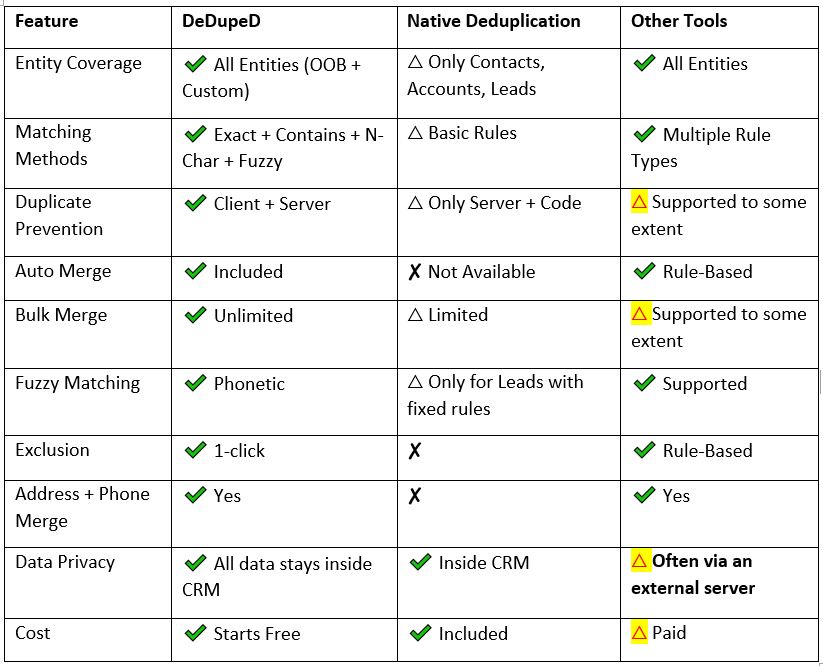
Feature-by-Feature Comparison Table
Below is a distilled feature view based on the official battlecard:
Feature Comparison Summary
✔ = Supported | ✘ = Not Available | △ = Limited
What Makes DeDupeD the Category Leader?
DeDupeD is Advanced Duplicate Detection & Auto-Merge for Dynamics 365 CRM - cleaner data, clearer decisions, zero manual effort.
And its strengths justify the positioning:
- AI-driven Matching Flexibility: From exact to phonetic fuzzy matching, DeDupeD understands variations in names, addresses, fields, and formats.
- True Automation: Detects, prevents, merges, and cleans—without manual review cycles.
- Enterprise-grade Bulk Capabilities: Unlimited bulk merges across any entity.
- End-to-End Data Privacy: Processing happens entirely inside your CRM tenant.
- Cost Efficiency: Starts free, scales affordably.
- User-Friendly & Admin-Friendly: Designed for CRM teams—not programmers.
Ideal Use Cases of DeDupeD – Deduplication in Dynamics 365 CRM
DeDupeD is ideal for organizations that:
- Work across multiple entities and custom tables
- Rely on AI, analytics, and automation
- Need scalable, repeatable deduplication
- Want server-side + client-side prevention
- Need to clean historical data quickly
- Want to protect data privacy and avoid external processing
Conclusion
Clean CRM data is the foundation of accurate reporting, AI adoption, and customer intelligence.
Native deduplication handles the basics.
Third-party tools improve the experience.
But DeDupeD stands out as the most complete, scalable, privacy-safe, automated dedupe solution for Dynamics 365 CRM teams in 2025.
If your CRM is growing, your data complexity is growing too.
A proactive dedupe engine like DeDupeD ensures your CRM stays clean, meaningful, and ready for the next era of AI-driven customer engagement.
Ready to Experience Effortless Deduplication?
Try DeDupeD free for 15 days from the Inogic website or Microsoft Marketplace, and see how clean data transforms your CRM, reporting, and AI-driven workflows.
Want a more guided experience? Book a personalized demo and get expert assistance by reaching us at [email protected].