Dynamics 365 CRM Skills: When to Use Native Copilot Before Custom Agents
A sales director asks for an AI agent that can identify stalled opportunities across several business units. It sounds like a reasonable development request. But there is a difference between identifying which deals need attention and building a system that changes records or automatically follows up with sellers. Microsoft's new Dynamics 365 CRM skills may already address part of that request.
In October 2026, Microsoft Announced 30 CRM Skills across Dynamics 365 Sales, Customer Service, and Customer Insights. The skills are generally available in Microsoft Copilot Cowork for tasks such as reviewing deals and preparing customer responses. Code supports building reusable solutions and is available through the Frontier program. Autopilot supports recurring work and remains in private preview.
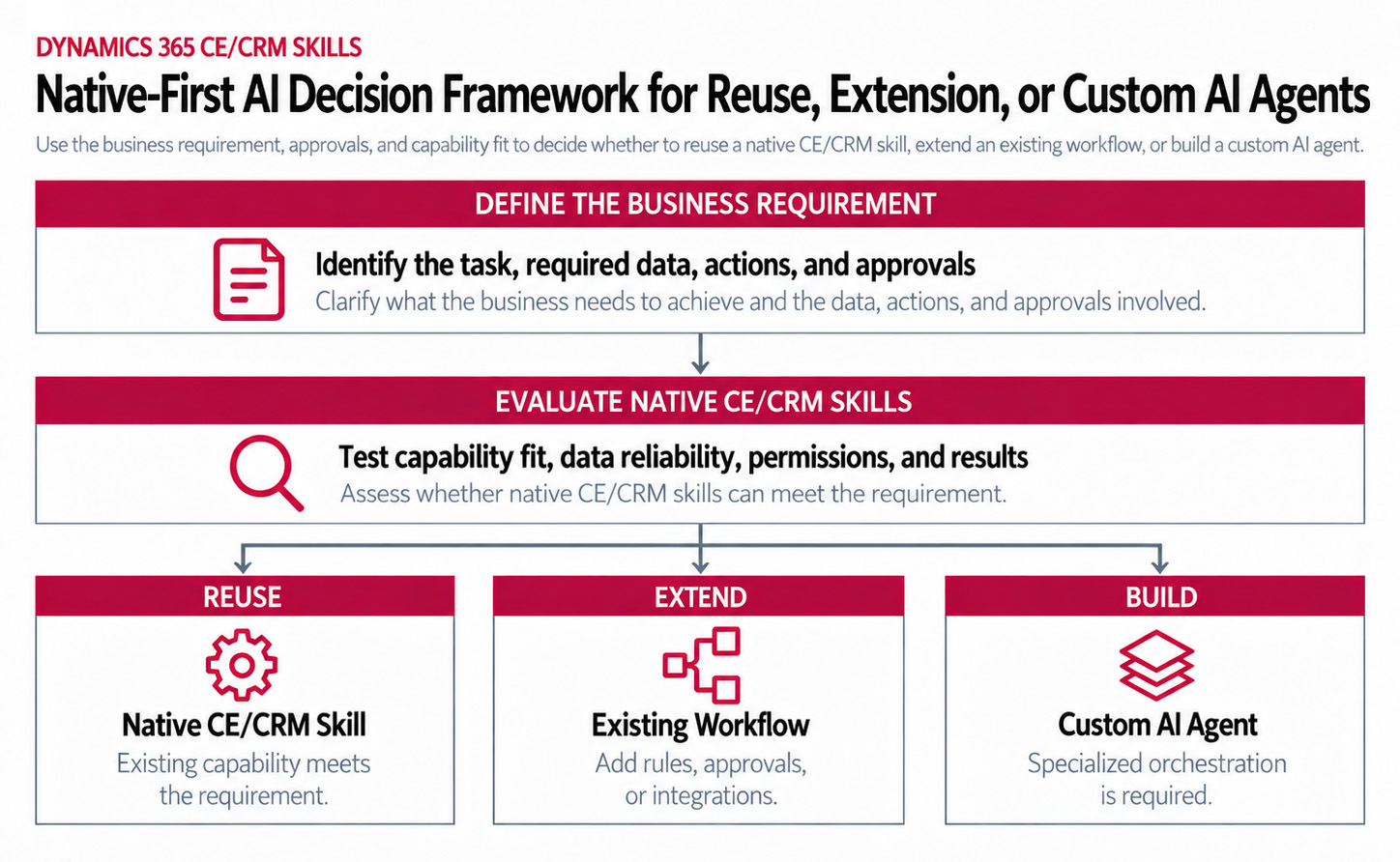
For teams planning AI projects in Microsoft Dynamics 365 Customer Engagement (CE/CRM), we would revisit the development backlog before approving another custom agent. Something that required custom development six months ago may now be covered partly by a Microsoft skill. The remaining work could be an approval, an integration, or a business rule that needs more attention.
What Do Dynamics 365 CRM Skills Actually Add
Dynamics 365 CRM skills provide reusable instructions for business tasks that involve CRM information. They work through Model Context Protocol (MCP) tools, which provide access to supported data and actions. Microsoft reports that the 30 skills work with more than 180 generally available tools.
In Dynamics 365 Sales, skills can help analyze pipeline health and identify deals that need attention. Customer Service representatives can use them to prepare escalation summaries from case histories. Customer Insights skills can check consent requirements and assist with preparing marketing communications.
Microsoft provides separate guidance for D365 Sales, Customer Service, and Customer Insights. Copilot Cowork can combine these CRM skills with relevant information from Microsoft 365 emails, meetings, and other workplace sources.
Where Do Native Dynamics 365 CRM Skills End and Custom Development Begin
Consider the original request to identify stalled opportunities. If the sales director wants a review of deals that have gone quiet, an existing skill may provide enough information. If the sales director also wants Copilot to update opportunity stages or coordinate approvals, we need to understand how those actions should work before deciding what to build. Microsoft provides several ways to support those requirements.
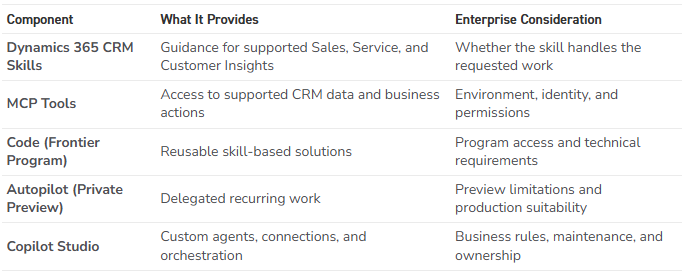
Take the approval step. If a sales manager needs to sign off before an opportunity changes stages, we would first look at what Dynamics 365 CE/CRM or Power Automate already supports. That is a smaller problem than developing and maintaining another agent.
Connecting the process to an outside business system may require more work. We would need to understand what information moves between the systems, which actions are available, and how failures are handled. For a broader comparison, see New Dynamic’s article on Native Dynamics 365 Agents, Copilot Cowork, and Copilot Studio.
A Pipeline Review Can Be Accurate and Still Misleading
Suppose two Sales teams use the opportunity stage Negotiation. The first team moves deals into that stage only after legal review. The second moves them there when pricing discussions begin.
Both teams are using the same field, but the stage represents a different level of buyer commitment. Now the sales director asks Copilot to identify late-stage opportunities that may slip. The skill can retrieve the correct records and still produce a comparison that leadership should question.
At New Dynamic, we would examine how the teams use the opportunity stages. We would also review close-date practices, recorded activities, currency handling, and access across business units.
For instance, a deal with an old close date and little recent activity may appear stalled. But if one team records most customer discussions outside Dynamics 365, that assessment is missing important context.
Before comparing at-risk opportunities across business units, check what each team means by Negotiation and account for differences in how those stages are used.
What Changes When Copilot Can Update CRM Records
Analyzing an opportunity is one thing. Changing it introduces different responsibilities. Microsoft's Sales skills documentation specifies user confirmation before consequential actions, including updating records and sending emails. Customer Service and Customer Insights have their own review and consent requirements.
Administrators also need to verify the intended Dynamics 365 CE/CRM environment and the permissions of the people using the skills. These checks matter in organizations with several environments or business units that restrict access to customer information.
Licensing cannot be assumed from the announcement alone. For example, the Sales plugin requires qualifying Dynamics 365 Sales and Copilot licensing, an enabled Dataverse MCP server, and applicable usage-based charges.
Someone needs to investigate unsuccessful actions, maintain the configuration, and determine what happens when business requirements change. New Dynamic’s AI Agent Governance Guidance examines those responsibilities in greater detail.
A proposed CRM update and a completed change are different things. Confirm who approves the action, whether the change was saved, and who investigates an unsuccessful update.
What If Your Organization Already Built Custom Agents
Organizations with existing Copilot Studio agents have another reason to review the announcement. Consider a custom workflow that collects account information, summarizes recent customer activity, and prepares a briefing for a seller. A supported CRM skill may now handle some of that preparation.
The organization still needs to examine everything that happens around it. The current workflow may contain specialized rules, integrations, or approval steps that the native skill does not replace.
There is little value in removing a working solution simply because Microsoft has introduced overlapping functionality. Compare the actual requirements, test the alternative, and consider the maintenance involved before making that decision. This review may also identify opportunities to simplify a custom agent without replacing it entirely.
How Should You Test a Skill Before Building Something New
Return to the sales director's request to identify at-risk opportunities. Start with a few sellers who know the pipeline and can recognize when a recommendation misses something important. A useful initial test has three steps.
- Choose opportunities that reflect Sales activity.
Include records from different business units, with varying stages, close dates, and activity histories. Use information that the participating sellers already know well.
- Compare Copilot's findings with the sellers' assessments.
Do the flagged deals need attention? Did Copilot miss a customer conversation or misunderstand the stage of an opportunity? Ask sellers to explain where they agree or disagree with the results.
- Investigate the differences before changing the solution.
Missing information may come from incomplete records, different Sales practices, limited access, or a capability the skill does not support. Determine the cause before considering custom development.
A successful test should tell the team whether the skill helps sellers make better decisions during their normal work. It should also reveal where existing Dynamics 365 configuration or Power Automate could address a remaining requirement. For organizations still evaluating AI priorities, New Dynamic's D365 AI Opportunity Lab can help assess potential applications, readiness, and the scope of an initial pilot.
Dynamics 365 CRM Skills: Key Takeaways
- Microsoft's new Dynamics 365 CRM skills expand the work organizations can accomplish with supported Copilot capabilities.
- MCP tools provide access to CRM data and actions, while skills and Copilot Cowork help coordinate tasks.
- Different business definitions can produce misleading recommendations even when the underlying records are technically correct.
- Permissions, licensing, and approvals require attention when Copilot moves from analysis to changes in CRM.
- Existing custom agents are worth reviewing for overlapping functionality, but replacement should follow testing.
For the sales director, identifying stalled opportunities may be enough to get started. Let the sellers review what Copilot finds and see whether the information helps them manage the pipeline. If the team later wants to automate stage changes or follow-up activities, those requirements can be evaluated separately.
Travis South – Director of Marketing