Why Mailchimp Dynamics CRM Integration Is the Missing Piece in Your Sales Strategy
Most sales teams don't lose deals because they lack effort. They lose deals because they lack timing. A prospect opens three emails about a product they're evaluating, and the sales rep finds out two weeks later, if at all, because that information sits in Mailchimp while the deal sits in CRM. By the time the rep follows up, the moment has already passed.
This is not a data problem. It's a visibility problem. And it's exactly why more revenue teams are rethinking how their CRM and email marketing platform should work together.
Key Takeaways
- CRM efficiency improves when engagement data (opens, clicks, campaign activity) sits inside the same record sales already works from
- Industry context changes what "good integration" looks like, a non-profit and a manufacturer don't need the same setup
- A proper Dynamics 365 Mailchimp integration removes the lag between marketing signal and sales action
- Manual syncing creates data decay over time; automated sync prevents it
- The goal isn't just connecting two tools, it's shortening the distance between customer interest and customer conversation
What Dynamics 365 Mailchimp Integration Really Changes for Your Team
Here's the part most vendors skip. Integration isn't valuable because it "connects two systems." It's valuable because of what that connection removes from someone's daily workload.
Before integration, a typical week for a marketing or sales ops person might look like this:
- Exporting Mailchimp engagement reports into spreadsheets
- Cross referencing email addresses against CRM records manually
- Updating lead scores based on stale, days old activity
- Explaining to sales why a "hot" lead hasn't been contacted yet
A working Dynamics 365 Mailchimp integration removes each of these steps individually, not as a bundled promise, but as separate, measurable time savings. That distinction matters when you're justifying the investment internally.
Industry Lens: Where Mailchimp CRM Integration Creates the Most Value
Generic integration advice tends to ignore that different industries have very different marketing rhythms. Here's how the value shifts by sector:
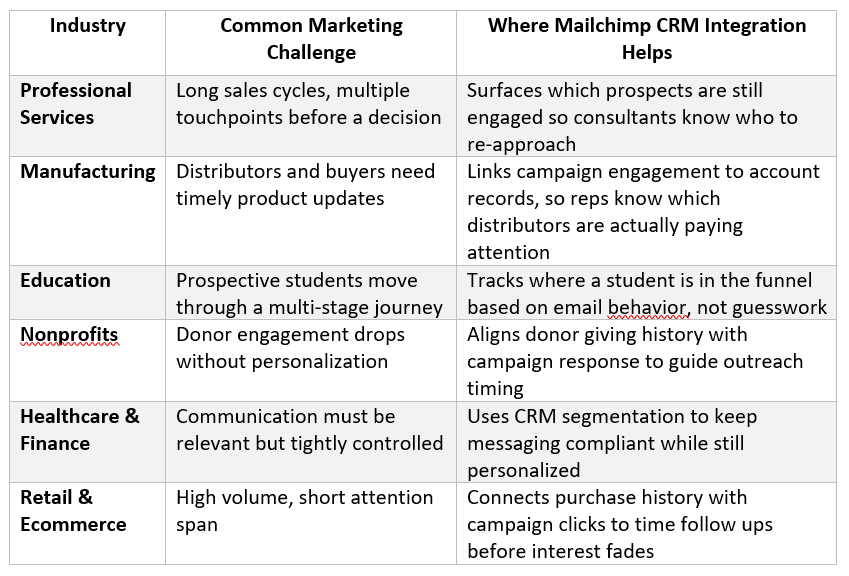
The common thread isn't the industry. It's that engagement data sitting outside the CRM is engagement data nobody acts on in time.
How to Integrate Mailchimp Dynamics 365 the Right Way
There's a wrong way to approach this, and it's more common than people admit: connecting the two systems first, then figuring out what data actually matters later. That usually results in cluttered records and a CRM that feels noisier, not smarter.
A better approach to integrate Mailchimp Dynamics 365 looks like this:
- Decide what engagement signals actually influence sales decisions (opens are weak signals, repeated clicks on pricing pages are strong ones)
- Map only the fields that matter, not everything Mailchimp tracks
- Set sync frequency based on how fast your sales cycle actually moves
- Involve sales in defining what "engaged" means before turning integration on
Done this way, the CRM stays clean, and sales trusts what it's seeing.
Sync Mailchimp Dynamics 365 Data Without the Manual Work
The difference between manual updates and automated sync isn't just convenience. It's accuracy over time.
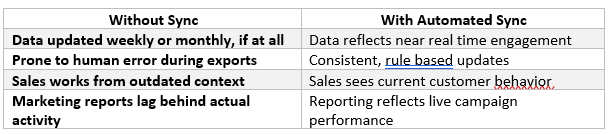
When you sync Mailchimp Dynamics 365 data automatically, you're not just saving time, you're preventing the slow data decay that quietly erodes trust in CRM records over months.
Choosing a CRM Connector for Mailchimp: What to Look For
Not every connector is built the same way, and the differences show up fast once you're relying on it daily. A dependable CRM connector for Mailchimp should offer:
- Two way sync, not just one directional data pushes
- Field level mapping control, so you're not forced into a rigid structure
- Visibility into sync logs, so errors don't go unnoticed
- Security that respects existing CRM permission structures
A weak connector creates more cleanup work than it saves. A strong one disappears into the background, which is exactly what you want from infrastructure.
CRM Email Marketing Integration: Turning Engagement into Pipeline
Here's the shift that actually matters for revenue teams. A proper CRM email marketing integration doesn't just show sales that someone opened an email. It shows patterns.
- A lead who clicked three pricing related emails in a week is a different conversation than a cold outbound call
- A dormant account that suddenly re-engages with a product update deserves a proactive check in, not a scheduled quarterly review
- A donor who consistently opens impact stories but hasn't given recently might respond better to a personal note than another mass email
This is the layer most teams miss when they treat integration as a technical checkbox instead of a sales enablement tool.
Mailchimp CRM Sync and Long-Term Data Health
One thing rarely discussed honestly: integration isn't a one-time setup, it's ongoing maintenance. A Mailchimp CRM sync that worked well at 500 contacts can behave differently at 50,000. Segmentation logic drifts, tags pile up unused, and fields that once mattered stop being relevant.
Healthy long-term sync means periodically reviewing:
- Which synced fields are actually being used in reports or sales conversations
- Whether duplicate handling rules still match how your team enters data
- Whether audience segments in Mailchimp still reflect current CRM segmentation logic
Treating sync as "set and forget" is usually where integrations quietly lose value over time.
Measuring ROI: What CRM and Mailchimp Integration Should Deliver
If you can't measure it, you can't defend the investment later. A properly implemented CRM and Mailchimp integration should show measurable movement in:
- Time between lead engagement and first sales follow up
- Percentage of leads contacted while still actively engaged (not days later)
- Reduction in manual data entry hours across marketing and sales ops
- Campaign attribution accuracy tied to actual pipeline, not just open rates
If none of these numbers move within a quarter or two, the integration isn't being used correctly, not that integration itself doesn't work.
Final Word: Connect CRM to Mailchimp with Confidence
None of this requires building something from scratch. Microsoft Dynamics 365 already gives sales and marketing teams a strong operational foundation, and when you connect CRM to Mailchimp properly, that foundation extends naturally into email engagement, campaign performance, and audience management, all without forcing teams to abandon the tools they already know.
For organizations exploring this path, solutions like Marketing4Dynamics by Inogic are built specifically to make this connection reliable and secure inside Dynamics 365, so the focus stays where it should, on understanding customers and acting on that understanding faster. Marketing4Dynamics is a Microsoft certified app, which matters more than it might seem at first glance. Certification means the solution has been reviewed against Microsoft's own standards for security, reliability, and compatibility within the Dynamics 365 ecosystem.
If you're ready to see how this looks for your own sales and marketing workflow, exploring a trial run inside your Dynamics 365 environment is usually the fastest way to find out.
Visit our website: www.inogic.com or mail us at: [email protected]
FAQs
Is Marketing4Dynamics safe to use with sensitive customer data?
Yes. Marketing4Dynamics is a Microsoft certified application, built to align with Dynamics 365's existing security and permission structures. Access to synced data follows the same roles already configured in your CRM.
Do I need developer support to integrate Mailchimp with Dynamics 365?
No. The integration is designed for configuration, not custom development, so marketing and CRM admins can set it up without involving IT for every change.
Will integration disrupt my existing Mailchimp campaigns or CRM records?
No. Existing campaigns, lists, and CRM records remain intact. The integration adds synchronization and visibility on top of what you already have, it doesn't require rebuilding your setup.
How often does data sync between Mailchimp and Dynamics 365?
Sync frequency is configurable based on how fast your sales cycle moves, ranging from near real time updates to scheduled intervals, depending on what your team needs.
How often does data sync between Mailchimp and Dynamics 365?
Sync frequency is configurable based on how fast your sales cycle moves, ranging from near real time updates to scheduled intervals, depending on what your team needs.