The Route Optimization Guide You Were Told Not to Read
If Your Field Team Is Running Perfectly, Stop Reading Right Now!
Seriously. This blog is not for you.
- If your reps never backtrack across town,
- your schedules never fall apart mid-morning,
- your fuel costs are exactly where they should be, and
- your customers are always visited on time.
Close this tab!
You have clearly figured something out that most field operations teams have not.
But if you are still here, there is probably a reason. That reason is likely sitting somewhere in the gap between how your field day is planned and how it actually unfolds on the road.
The Problem With "Good Enough" Field Operations
Most field teams do not have a catastrophic problem. They have a slow drain.
- A rep who backtracks across the city because stops were scheduled alphabetically rather than geographically.
- Another who spends forty-five minutes sitting in a cafe after a cancellation because there was no quick way to find a nearby prospect.
- A manager reviewing end-of-week numbers and noticing that the team logged more drive time than client time, yet again.
None of these feels like emergencies. But added up across a team of ten, over four weeks, over a quarter, they represent a significant and completely preventable loss of time, fuel, and revenue.
The data to fix all of this already exists inside your Dynamics 365 CRM. It just needs a map empowering it. What better than Maplytics, the certified application on Microsoft Marketplace?
Do Not Try Route Optimization in Dynamics 365 If You Enjoy the Chaos
Route mapping in Dynamics 365 through Maplytics does something deceptively simple. It takes every account, lead, or visit on your rep's schedule and plots them on an interactive map. The system then calculates the most efficient sequence for the day, factoring in real-time traffic, road conditions, toll roads, and travel time windows.
The result is not just a shorter route, but also a smarter one. It is the kind that actually holds up on the road rather than looking clean on a screen and falling apart at the first red light.

For a team that has been planning routes from memory or spreadsheets, seeing this for the first time is genuinely disorienting. Because once you see how much unnecessary distance your reps have been covering, it is very hard to unsee it.
If that kind of clarity sounds uncomfortable, stay away from route optimization in Dynamics CRM. It will only make you want to fix things.
Avoid End-to-End Navigation If Your Reps Enjoy Juggling Three Apps at Once
Most field reps leave the office with their CRM open on one device, a navigation app on their phone, and a list of addresses copied into a notes app. It works, but it creates friction at every single step, i.e., switching between screens, copying addresses manually, and re-entering information that is already sitting in the CRM.
Maplytics eliminates this. Turn-by-turn directions are available directly inside Dynamics 365, covering every stop on the optimized route from start to finish. No switching apps. No manual address entry. No calling the office to confirm a postcode.
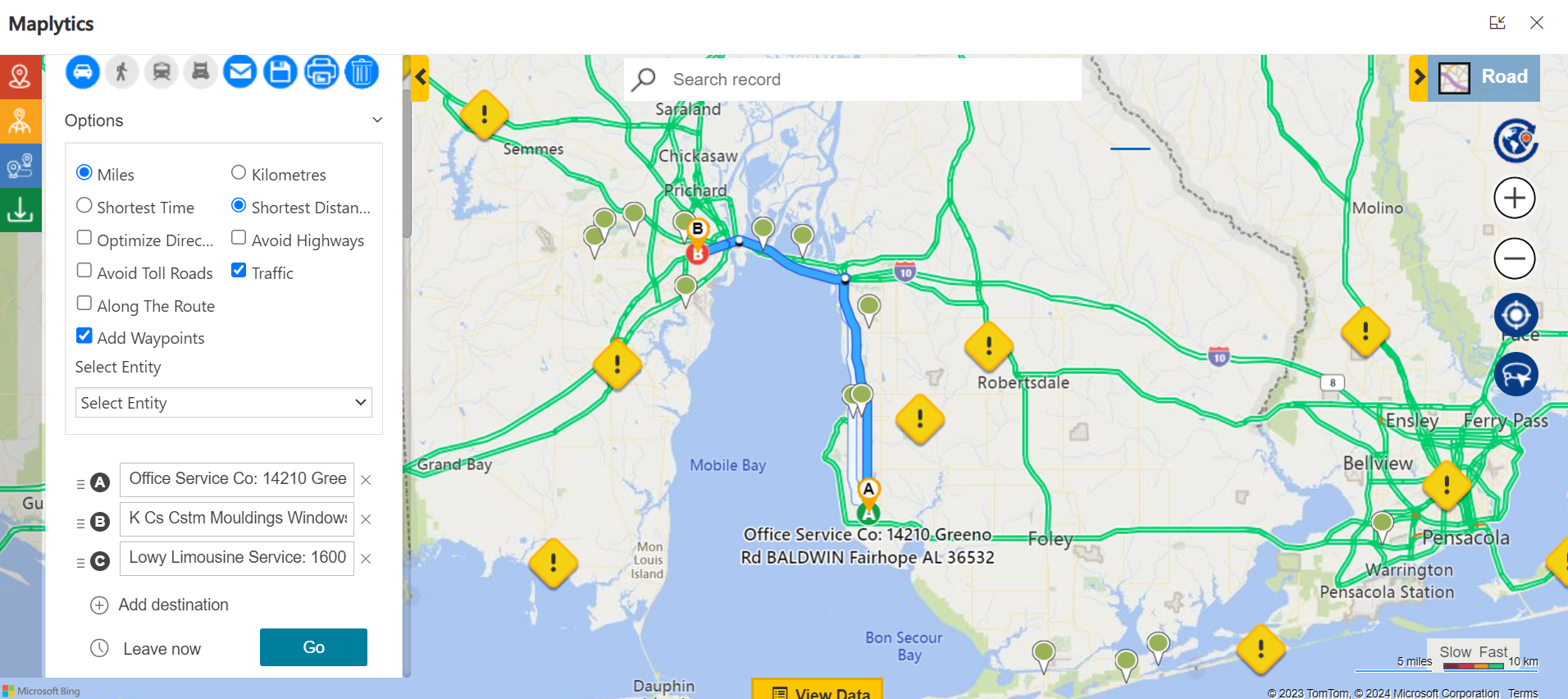
For field teams, this is not a minor convenience. It is hours recovered every week across the entire team. If your reps are comfortable with the current setup, this level of simplicity will only raise their expectations permanently.
Skip Travel Mode Settings If One-Size-Fits-All Routing Has Been Working Fine
Here is something most route planning tools ignore. Every field rep does not travel in the same way. A sales rep driving across a sprawling suburban territory has completely different routing needs than a service technician navigating a dense city center on foot, or a rep using public transit between appointments.
Maplytics accounts for all of it. Driving, walking, transit, & truck, each mode generates a route that reflects how the rep is actually moving, not how someone in an office assumed they would be moving. A truck driver gets routed around low bridges and weight restrictions. A walking rep gets the most walkable sequence of nearby stops.
If uniform routing has been working well enough so far, the idea that routes could be calibrated to the individual will probably feel like an unnecessary luxury. It is not. It is just one of those features you do not miss until you have it.
Do Not Let Your Reps Discover Proximity Search or They Will Never Plan the Old Way Again
A cancelled appointment used to mean one thing- a wasted slot. The rep drives back to the office, the time is lost, and the day finishes short.
Proximity search in Maplytics changes this entirely. A rep enters their current location, sets a comfortable travel radius, and instantly sees every nearby account, lead, or opportunity plotted on a live map inside Dynamics 365. They identify the closest unvisited prospect, make contact, and fill the gap, without any extra driving, without calling the manager, and without losing the afternoon.
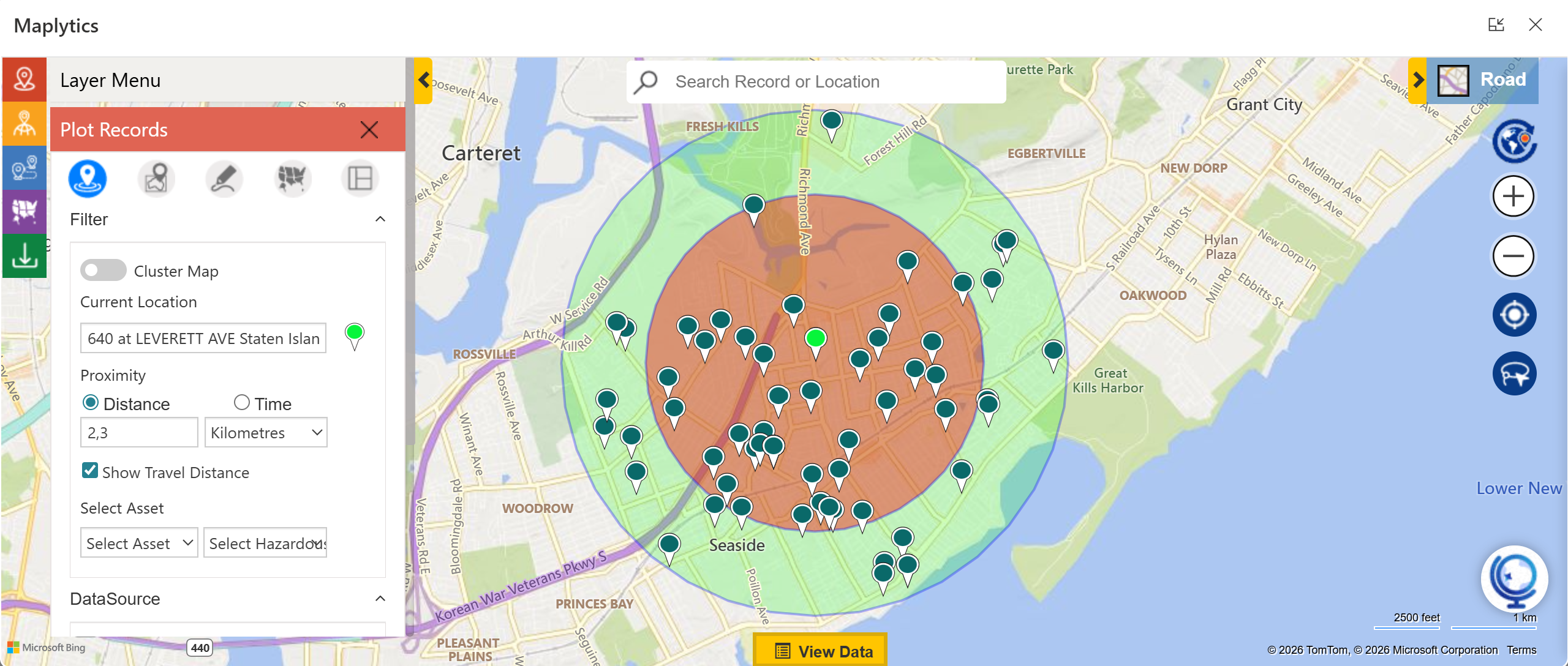
It sounds small. For a team of ten reps, across a month of unpredictable schedules, it converts what used to be dead time into one of the most productive pockets of the day.
If Long-Term Chaos Sounds Like the Plan, Definitely Skip the 15-Day Free Trial.
Maplytics does not ask your team to change how they work. It plugs directly into the Dynamics CRM environment they already use, no new systems, no data migration, no retraining. The existing data becomes the foundation. The map just makes it finally visible and actionable.
Managers gain live visibility over where every rep is and whether the planned route is matching reality on the road. Territory overlaps disappear. Fuel costs drop. Missed visits get flagged before the week ends rather than after.
Route optimization, proximity search, travel mode customization, and turn-by-turn navigation each feature saves something on its own. Together, they shift the economics of running a field team in a direction that becomes very difficult to argue against.
We said do not try it. But if you have read this far, you already know what you are going to do.
What's More?
Maplytics, with its AI assistant, MapCopilot, adapts to the shape of your business. Whether your mapping needs run on Bing Maps, Azure Maps, Google Maps, Apple Maps, or ESRI ArcGIS, Maplytics makes the integration inside Dynamics 365 feel seamless, from Radius Search and Route Mapping to Territory Management and Heat Map analysis, etc. To experience it first-hand, you can have a 15-day free trial of get a personalised demo inside Microsoft Dynamics 365 CRM, Power Apps, Power Pages, or Dataverse, get in touch at [email protected], or explore more at the Website and Microsoft Marketplace.