How to Build an AI-Driven SharePoint Search Experience with Copilot in 2026
If you’ve ever opened Microsoft SharePoint, knowing the document exists, but not knowing where.
Feels personal? Right?
Contracts in one folder. SOPs in another. Proposals are buried inside Teams sites.
And when deadlines are tight, traditional keyword search just doesn’t cut it.
That’s exactly where Microsoft Copilot and AI change the game.
Let me walk you through a practical, end-to-end story of how Copilot AI transforms SharePoint search in various platforms like Teams, Dynamics 365, Outlook, and more, using a real business scenario, and how teams are moving from manual hunting to instant answers.
From SharePoint Document Search Chaos to Copilot-Powered Clarity
Meet Alexa, an operations manager in New York.
Her morning starts with a simple task:
“Find the latest vendor agreement and summarize the billing before my 11 AM meeting to share within Teams.”
Sounds easy, right?
In reality, that document could live anywhere across SharePoint sites, folders, or Teams channels.
Instead of clicking through endless libraries, Alexa opens Teams and simply asks:
“Please provide the Neid billing document.”
This is where Copilot AI steps in.

Use Case 1: Copilot Agent with Semantic Search for SharePoint Documents
Traditional SharePoint search relies heavily on keywords.
Copilot doesn’t.
For example, you can ask conversational questions such as, “Provide outstanding balance on my NanoTech Fitness Tracker order”, and the Copilot Agent will scan relevant SharePoint documents, retrieve the most pertinent answers, and provide detailed insights for quick decision-making
With semantic search, Copilot understands intent and meaning, not just exact phrases. Alexa doesn’t need the file name or folder path. Copilot interprets “Order” and “outstanding balance” contextually and surfaces the most relevant document instantly.
Business impact:
- No dependency on file names or metadata
- Faster discovery across large SharePoint repositories
- Natural language instead of rigid keywords
This is the foundation of modern SharePoint knowledge retrieval.

Use Case 2: Conversational Search Across Multiple Documents
Now Alexa asks for a summary:
“Please provide a summary of all Orders.”
Instead of opening multiple files manually, Copilot scans several documents at once and responds conversationally.
This multi-document intelligence enables:
- Cross-file comparisons
- Instant summaries
- Follow-up questions without restarting search
- Continuous context in one chat thread
It feels less like “search” and more like talking to your company’s collective knowledge.

Use Case 3: Context-Aware Search with Built-In Citations
Alexa now needs confidence before sharing insights with leadership.
Copilot doesn’t just give answers; it provides citations.
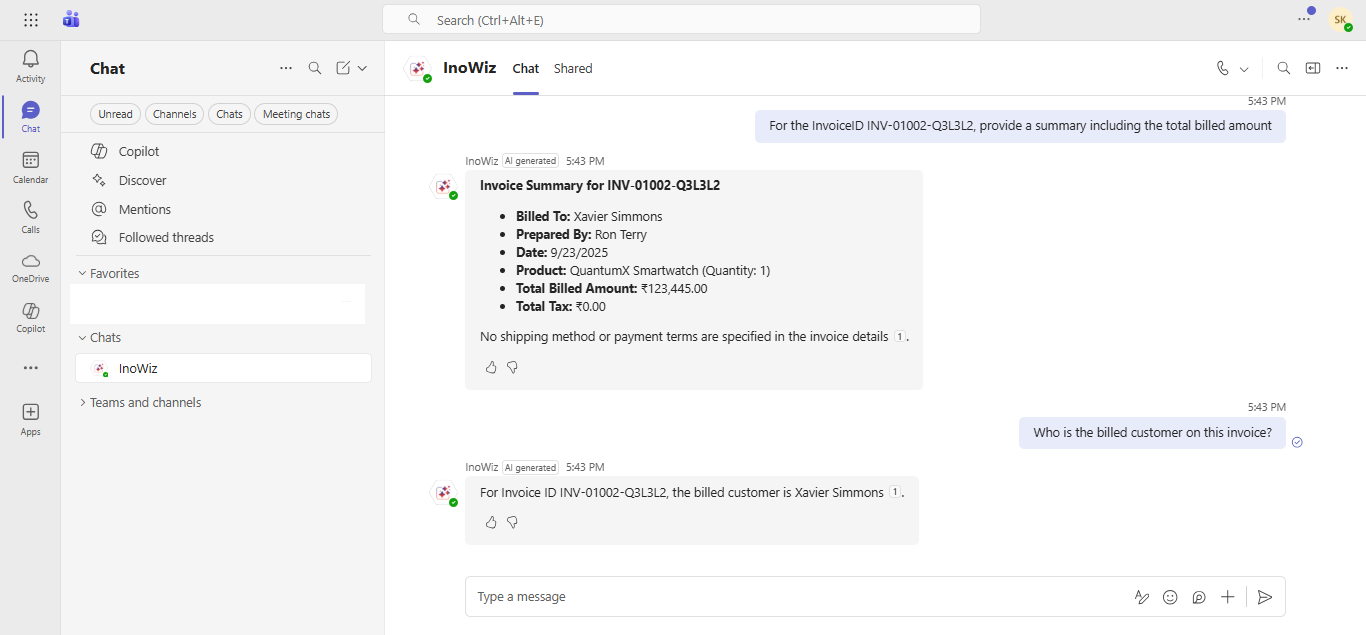
It allows you to ask questions conversationally to InoWiz Copilot, such as “for the Invoice ID INV-01002-Q3L3L2, provide a summary including the total billed amount”, and instantly receive precise, context-rich results
Every response includes links back to the exact SharePoint documents and sections used. This means:
- Full transparency
- Easy verification
- Audit-ready responses
- Trust in AI-generated insights
For compliance-driven industries like finance, healthcare, or government, this feature alone is a game changer.
Use Case 4: Respecting SharePoint Security - Automatically
A common concern with AI search is data exposure.
Copilot respects existing SharePoint permissions by default.
If Alexa doesn’t have access to a document, Copilot can’t see it either.
There’s no separate security model to manage. Your SharePoint roles, access rules, and permissions remain the single source of truth.
This ensures:
- Zero data leakage
- Role-based answers
- Enterprise-grade governance
AI becomes powerful without compromising control.
For example,
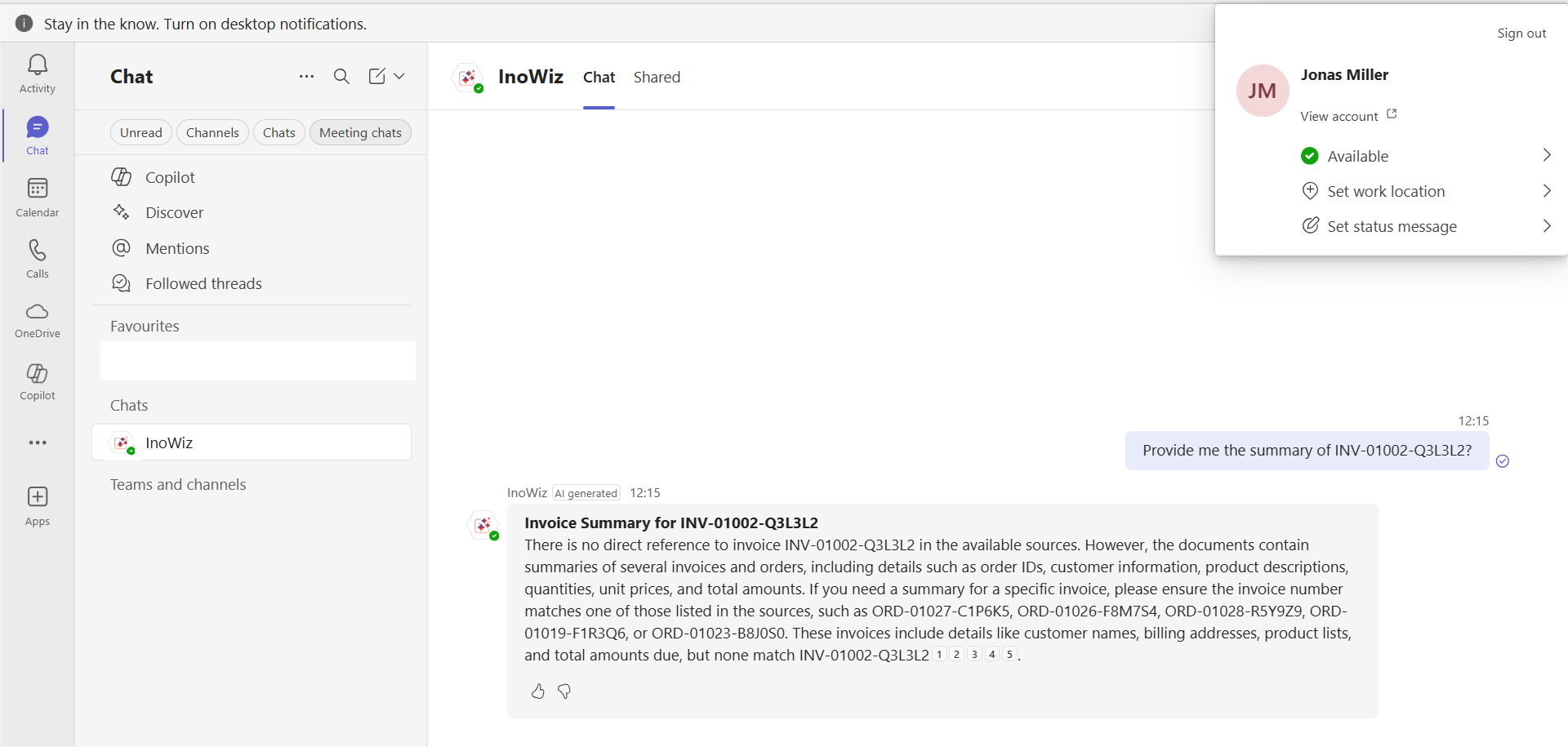
John Smith is looking for information on invoice INV-01002-Q3L3L2. Instead of browsing through folders, he simply asks Copilot, “Provide me a summary of invoice INV-01002-Q3L3L2.”
Because John already has permission to view this document, Copilot instantly fetches the file from SharePoint and presents a clear summary.

Later, Jonas tries asking the same question. But since he doesn’t have access to that invoice, Copilot returns no details, protecting the information and ensuring only authorized users can view sensitive content.
Use Case 5: Easy Setup with Azure AI Search Configuration
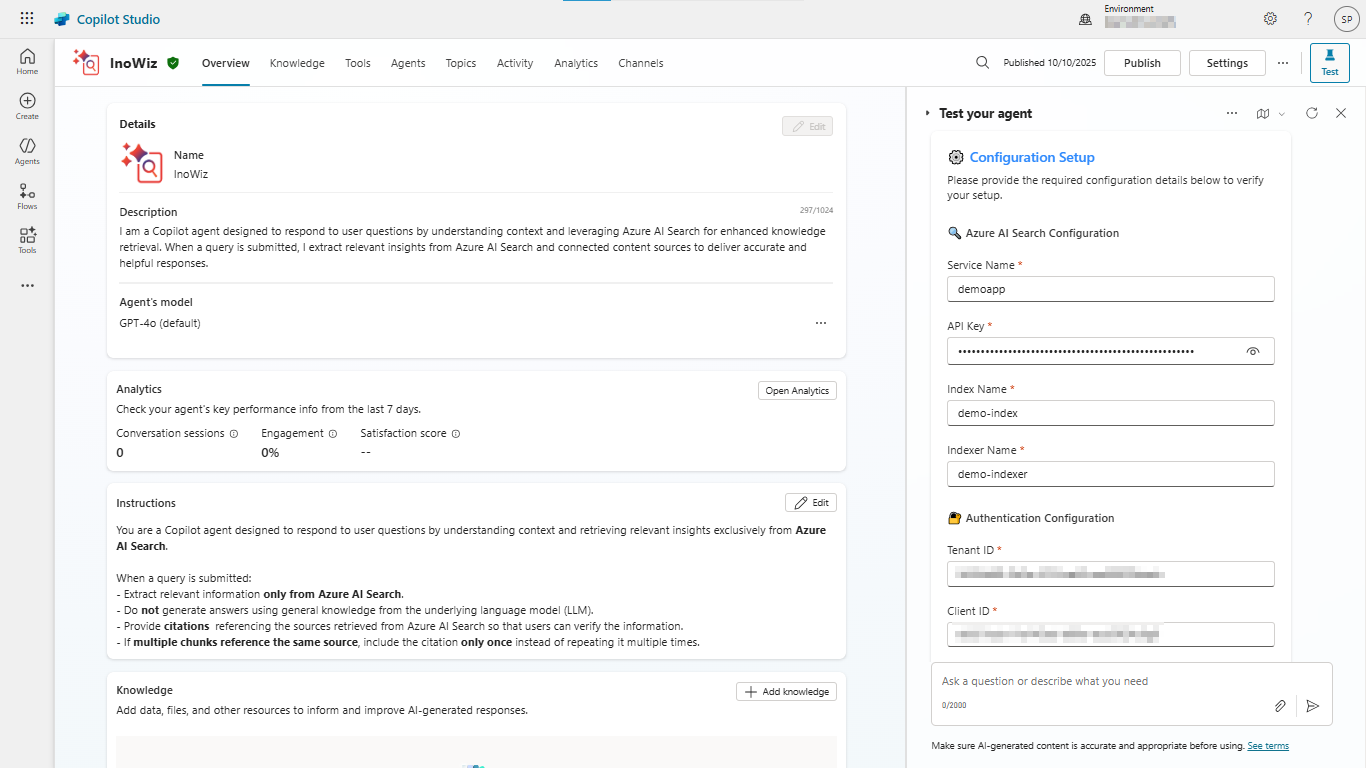
Behind the scenes, Copilot-powered SharePoint search leverages Azure AI Search.
Traditionally, configuring Azure AI Search can feel technical and time-consuming.
Modern SharePoint Knowledge AI solutions simplify this with guided settings and prebuilt configurations, making it much easier for IT teams to:
- Connect SharePoint content
- Index documents
- Enable semantic search
- Deploy Copilot agents faster
What once took weeks can now be achieved in days, sometimes hours.
Turning Answers into Action: When Copilot Goes Beyond Search
By now, Alexa has found her documents, compared contracts, and verified insights — all inside Microsoft SharePoint with help from Microsoft Copilot.
But this is where things get even more interesting.
Copilot doesn’t stop at finding information. It helps her use it.
Use Case 6: From Raw Data to Clarity: Tabular Format Responses
After reviewing multiple invoices and agreements, Ananya asks:
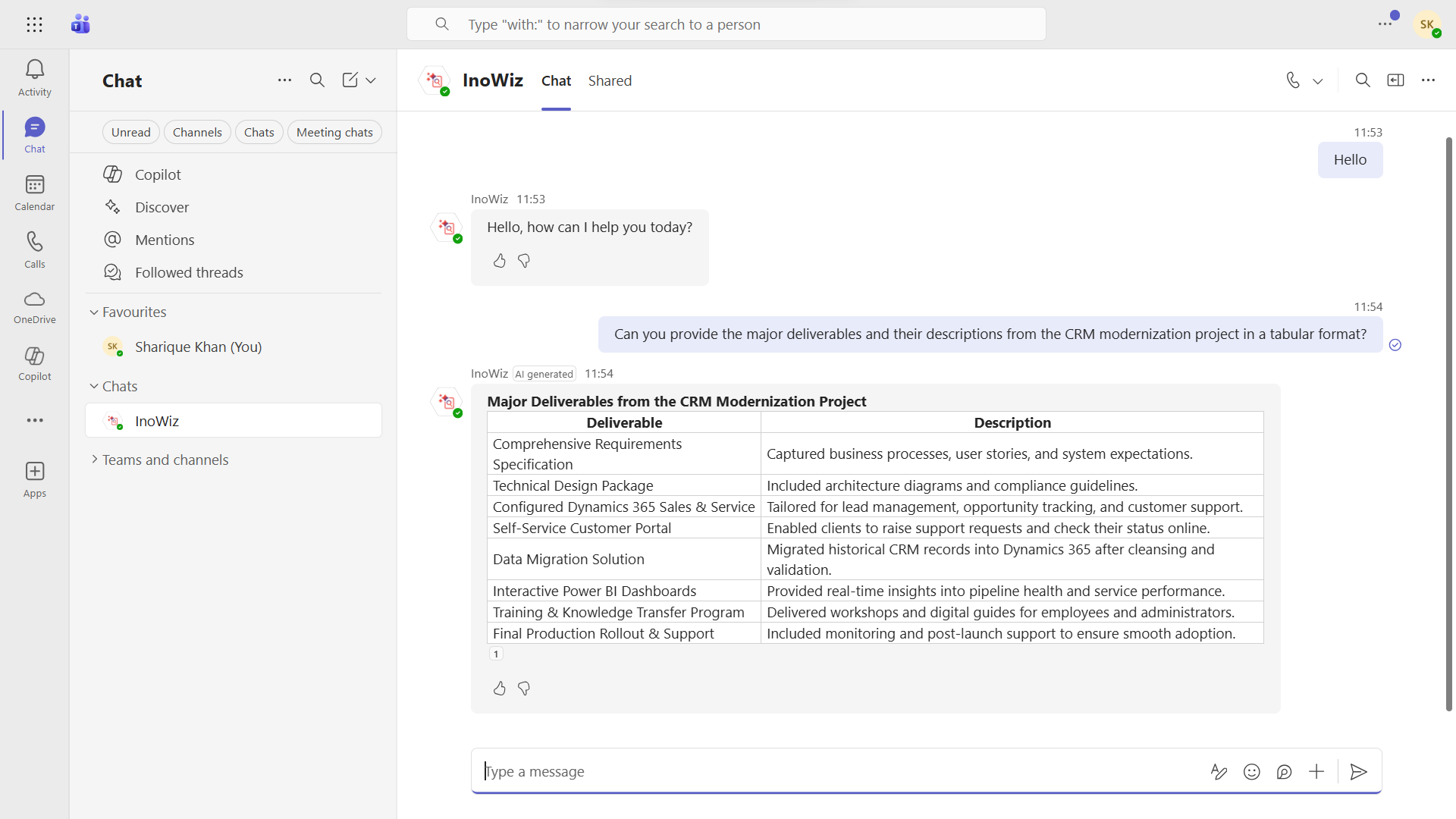
“Can you provide the major deliverables and their descriptions from the CRM modernization project in tabular format?”
Instead of returning long paragraphs, Copilot automatically presents the extracted SharePoint data in a clean, structured table.
Key fields like vendor name, payment cycle, contract value, and renewal date appear neatly organized, ready to scan, compare, and analyze.
No copying into Excel.
No manual formatting.
Just instant, data-centric insights that help Ananya make faster decisions during her leadership call.
For business users, this means:
- Easier comparison across documents
- Better readability for complex data
- Faster interpretation of key metrics
- A more interactive search experience inside SharePoint
AI turns scattered documents into structured intelligence.
Use Case 7: From Insights to Communication: AI-Powered Email Draft Generation
Meeting done! Now Alexa needs to update her finance team.
Instead of starting from scratch, she simply asks Copilot:
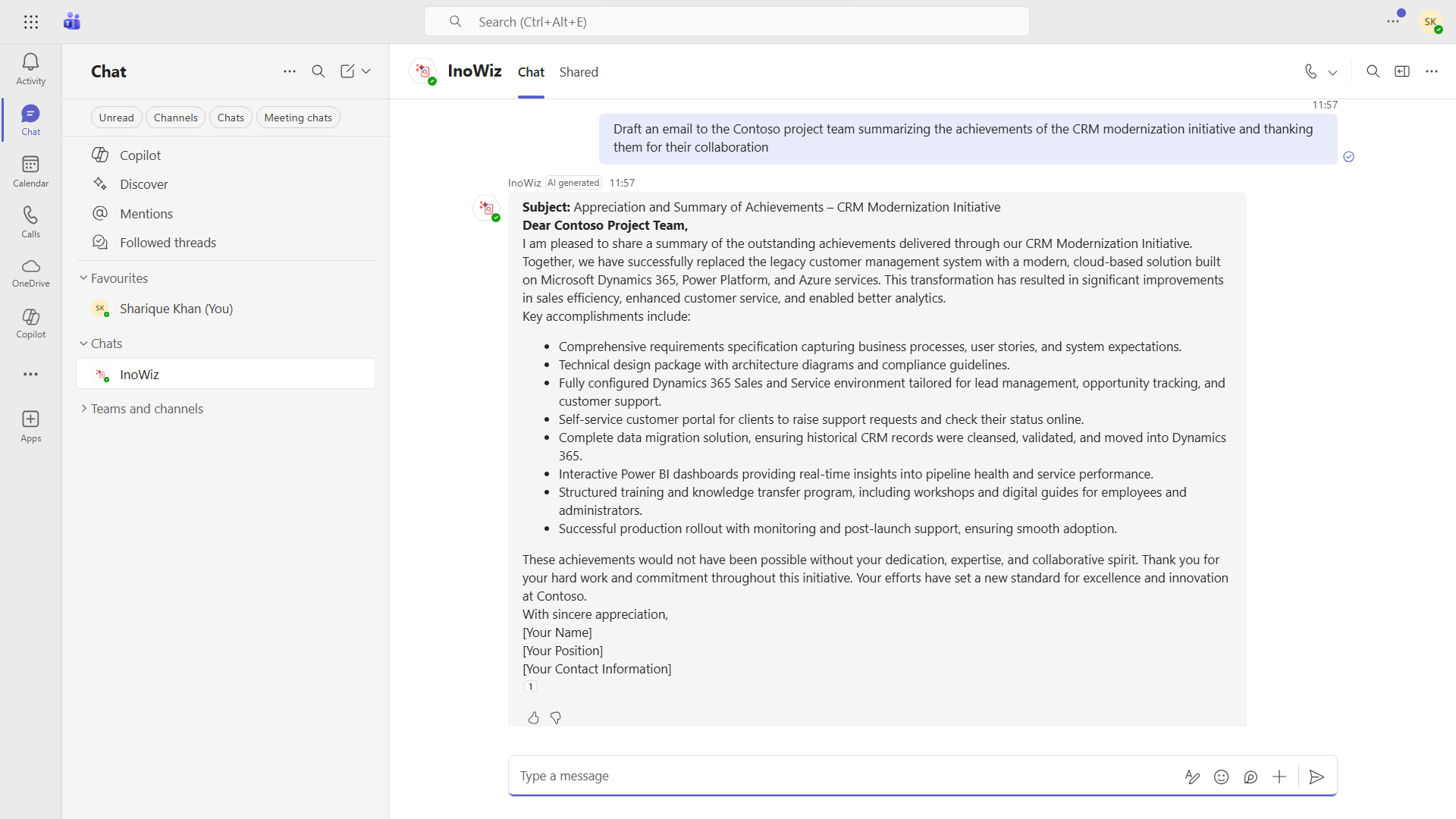
“Draft an email to the Contoso project team summarizing the achievements of the CRM modernization initiative and thanking them for their collaboration.”
Using the same SharePoint documents she just reviewed, Copilot instantly creates a professional, context-aware email draft, complete with key points, clear language, and the right tone.
She makes a quick edit, hits send, and moves on.
This feature helps teams:
- Save time on routine communication
- Maintain consistent messaging
- Respond faster to stakeholders
- Turn document insights directly into action
All powered by AI across Microsoft 365 experiences.
Use Case 8: One Platform, Many Languages: Multi-Language AI Search Support
Later that day, Alexa collaborates with colleagues in France.
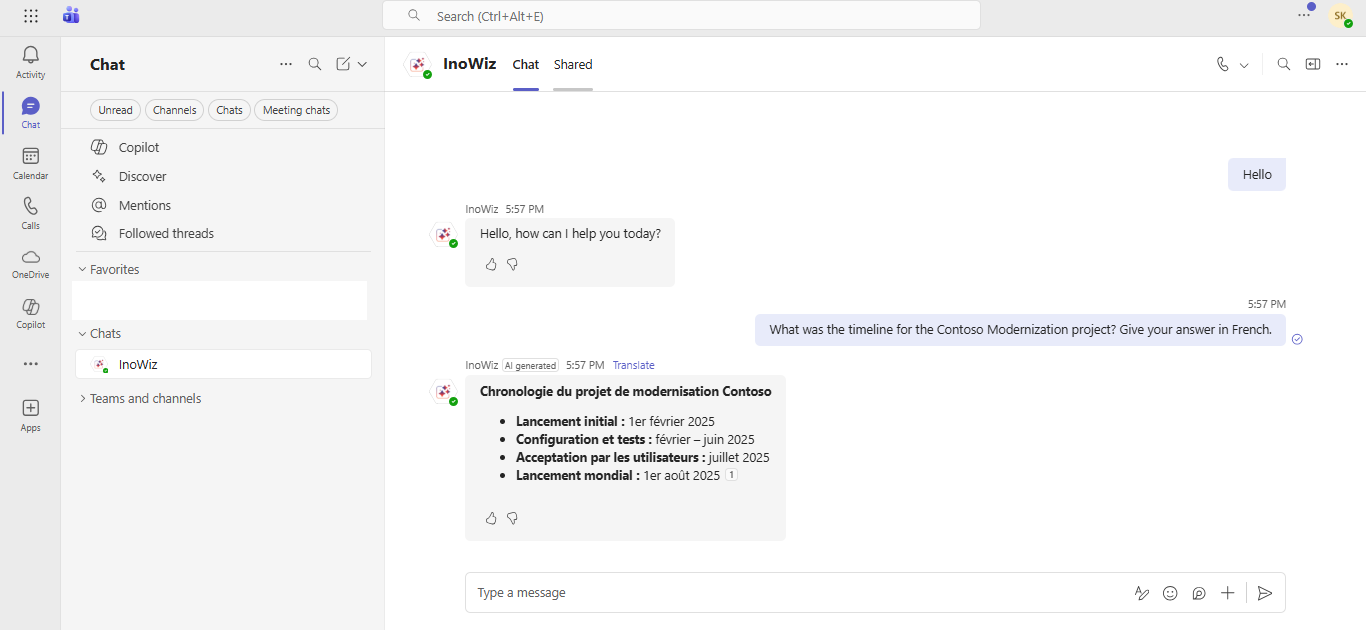
Each teammate asks questions in their own language.
Copilot understands them all.
With multi-language AI search, global users can query SharePoint in their preferred language and still receive accurate, localized, and contextual answers, based on the same underlying documents.
This enables:
- Seamless collaboration across regions
- Inclusive access to organizational knowledge
- Faster onboarding for international teams
- Consistent insights, regardless of language
Your SharePoint knowledge truly becomes global.
Bringing It All Together with SharePoint Knowledge AI Search
Organizations looking to accelerate this journey often adopt purpose-built solutions like SharePoint Knowledge AI Search.
It extends native SharePoint + Copilot + AI capabilities by combining:
- Copilot agent with semantic search
- Conversational multi-document intelligence
- Contextual answers with citations
- Built-in SharePoint security compliance
- Simplified Azure AI Search setup
The result? A unified, enterprise-ready knowledge experience, without heavy custom development.
Why This Matters in 2026 and Beyond
Modern teams don’t just need storage.
They need instant understanding.
Copilot AI in SharePoint search helps organizations:
- Reduce time spent searching by up to hours per week per employee
- Improve decision-making with trusted, cited answers
- Unlock hidden value from existing documents
- Scale knowledge access globally
Whether your teams are in Australia, the US, the UK, or Europe, AI-powered SharePoint search creates a consistent, intelligent experience across regions.
Final Thoughts: From Searching Files to Asking Questions
The future of SharePoint isn’t about folders.
It’s about conversations.
With Copilot AI, employees stop hunting for documents and start asking questions. Knowledge becomes accessible, contextual, and actionable, exactly when it’s needed.
If your organization already uses SharePoint, you’re sitting on a goldmine of information.
Copilot simply helps you unlock it.
If you’re looking to enable semantic search, unlock Copilot-driven document insights, and deliver secure, permission-aware knowledge discovery, let’s walk you through it with a personalized demo.
Explore more on the Inogic website or via the Microsoft Marketplace, or reach out directly at [email protected] to see Copilot-powered SharePoint document search in action.