4 Field Service Challenges You Can Solve with Maplytics in Dynamics 365
Field service businesses deal with a specific kind of pressure that office-based teams rarely face. Your people are scattered across locations, jobs shift through the day, and the margin for coordination errors is thin.
- A technician sent to the wrong area,
- a territory with no clear owner,
- a cancellation that nobody capitalizes on.
These are not edge cases. They are the daily reality for most field operations running without proper geographic visibility.
Key Takeaways-
1. List views hide geography. Dynamics 365 data without a map tells you what exists, not whether your team can act on it efficiently.
2. Inefficient routing is a silent cost. Ten reps losing an hour daily to bad routes equals fifty hours of lost productivity every week.
3. Cancellations are hidden opportunities. Proximity Search surfaces nearby accounts and leads the moment a gap opens, turning downtime into pipeline.
4. Territory problems grow quietly. Overlaps and coverage gaps rarely surface until a client is lost. Visual territory management catches them first.
Dynamics 365 gives field service businesses a solid CRM foundation, centralizing work orders, customer records, and service data in one place. But organized data and field-level visibility are two different things. Knowing that a job exists in your system tells you very little about whether your nearest rep can reach it efficiently, whether your territories are balanced, or whether your team is spending more time driving than delivering.
Maplytics, the leading Dynamics 365 map integration certified on Microsoft Marketplace, closes that gap. It layers location intelligence directly over your existing CRM data, no external tools, no data exports, no additional platforms to manage. Here are four of the most common field service challenges it solves.
Challenge 1: Inefficient Route Planning Leading to Wasted Time and Fuel
Field service teams without optimized routing operate on instinct. Technicians plan their own sequences, often visiting clients in the order they appear on a list rather than the order that makes geographic sense. The result is unnecessary backtracking, extended drive times, and a meaningful chunk of every working day spent behind the wheel rather than on-site.
At scale, this adds up fast. A team of ten field reps, each losing an hour a day to avoidable driving, represents fifty hours of lost productivity every week, and the fuel and vehicle costs to match.
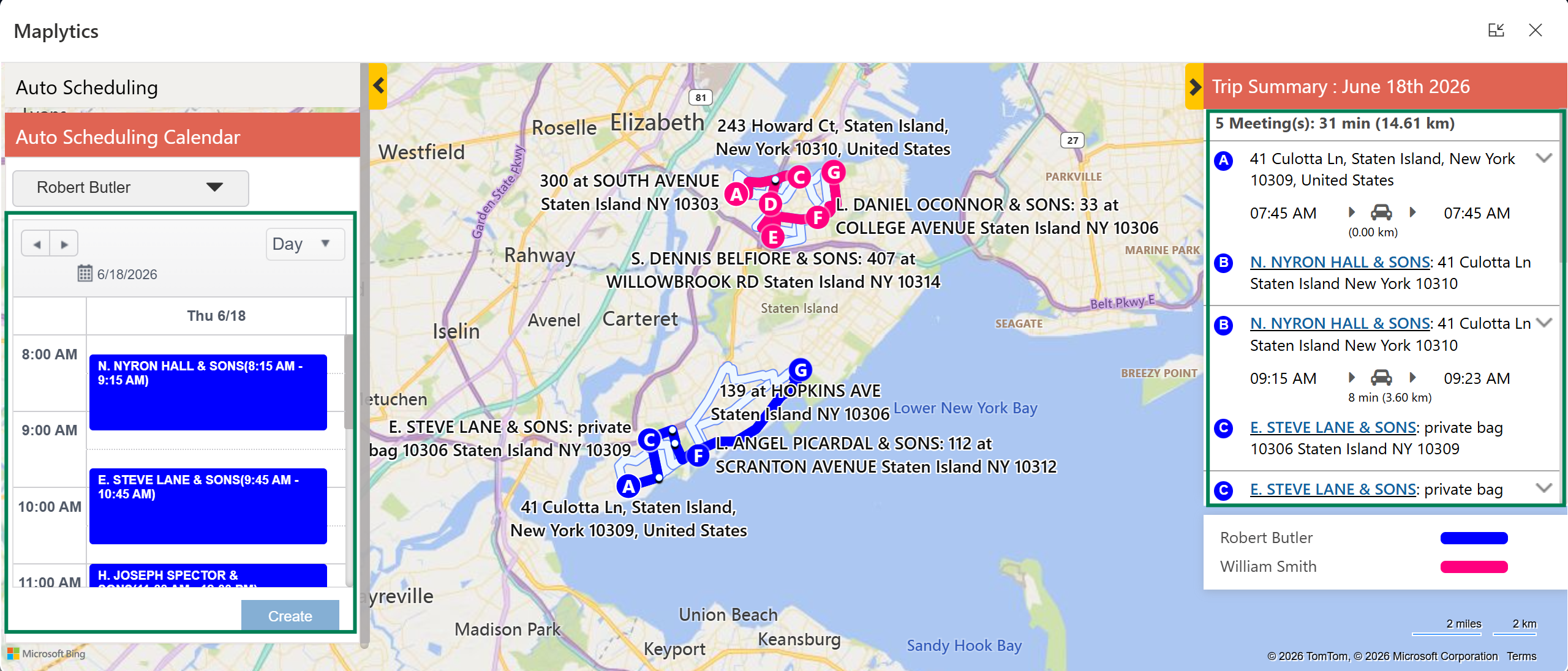
How Maplytics solves it: Maplytics' Route Optimization automatically calculates the most efficient sequence of stops for each rep's day, factoring in live traffic data, custom departure times, and travel mode. With Auto Scheduling, managers can generate optimized multi-day routes for entire teams simultaneously, accounting for meeting duration, buffer time, break time, and working hours. Routes are saved in Dynamics 365, are shareable with new team members, and are reusable for recurring service areas. Reps follow their schedule on mobile, check in at each location, and navigate without ever leaving the CRM environment.
Challenge 2: Difficulty Finding Nearby Clients or Prospects During Field Visits
When a field appointment ends early, or a cancellation creates a gap in the schedule, most reps default to moving on to the next confirmed stop, even when valuable accounts, leads, or lapsed clients are just minutes away. Without a way to quickly surface what is nearby, the opportunity goes unnoticed.
This is one of the most consistent sources of missed revenue in field service, not because opportunities do not exist, but because they are invisible to the rep on the ground.
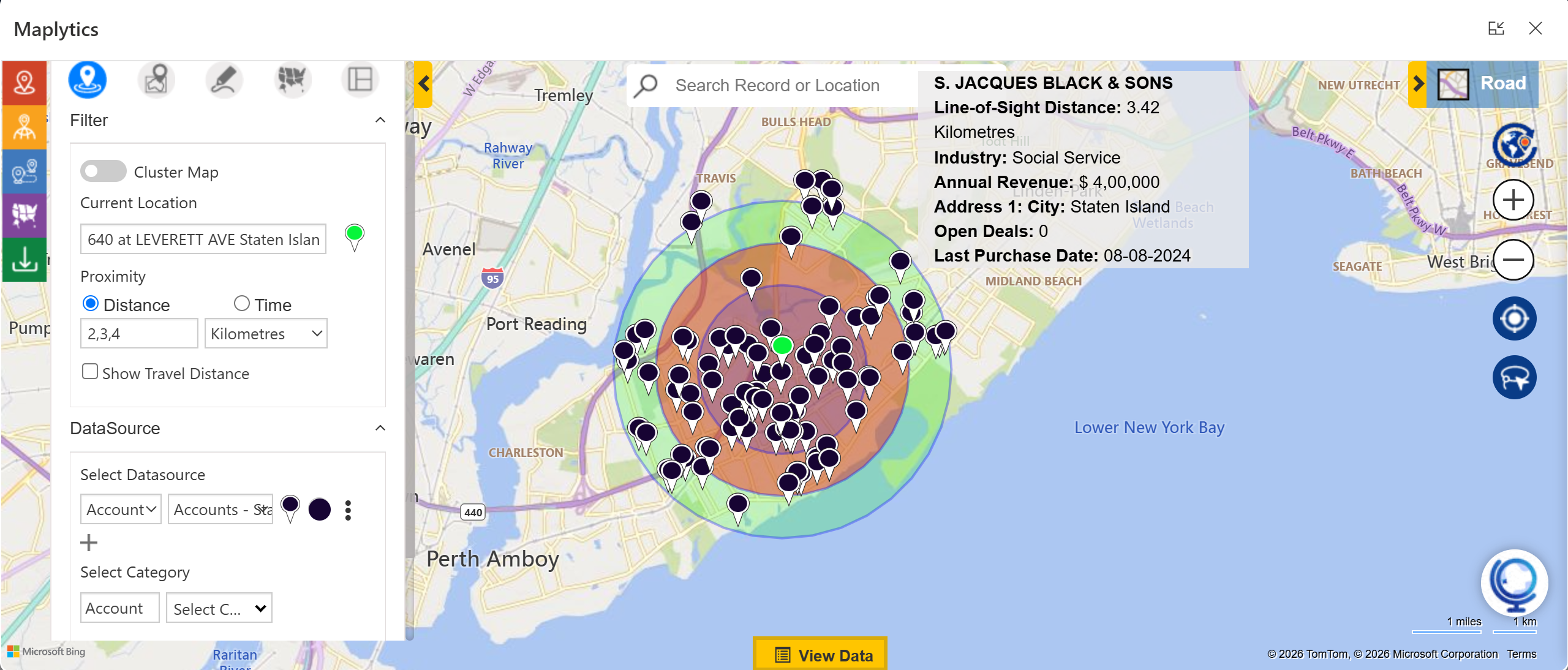
How Maplytics solves it: Maplytics' Proximity or Radius Search allows field reps to define a search area around any location, their current position, a client site, or a custom point, and instantly surface every relevant CRM record within that radius. Leads, accounts, open opportunities, service cases, and any Dynamics 365 entity can be surfaced by proximity. Reps can filter by record type, status, value, or any custom field, and add a spontaneous visit to their optimized route in seconds. What used to require a phone call back to the office now takes a few taps on a mobile map.
Challenge 3: No Real-Time Visibility Into Field Team Activity
Once a field team leaves the office, most managers lose meaningful visibility into what is happening. Is the technician on-site or still driving? Has the appointment started? Is the team running to schedule or behind? Answering any of these questions typically means a phone call, which interrupts the rep and still gives an incomplete picture.
Without real-time field visibility, managers cannot make smart decisions about ad-hoc requests, cannot intervene when schedules slip, and cannot verify service delivery for compliance or billing purposes.
How Maplytics solves it: Maplytics' Real-Time Tracking displays the live location of every active field rep on an interactive map inside Dynamics 365. Managers see the full team at a glance, who is where, who is en route, and who has completed their last stop. Geofencing automates Check-In and Check-Out at client locations, creating a timestamped, location-verified record of every visit without any manual input from the rep. A built-in heatmap view shows activity density across regions, helping managers spot where coverage is strong and where it is thinning out. Every data point flows back into Dynamics 365 in real time.
Challenge 4: Poor Territory Planning Causing Overlap and Coverage Gaps
As field service organizations grow, territory boundaries become a persistent source of friction. Two technicians cover the same postcode. A high-potential region is assigned to a rep who is already overloaded. A newly onboarded team member has no clear picture of where their patch begins and ends. Without visual territory management, these problems compound quietly until a client complains, a deal falls through, or two reps arrive at the same site on the same day.
Dynamics 365 has basic territory assignment capabilities, but they operate at the record level. There is no visual layer showing how boundaries sit geographically, whether workloads are balanced, or where the gaps are.
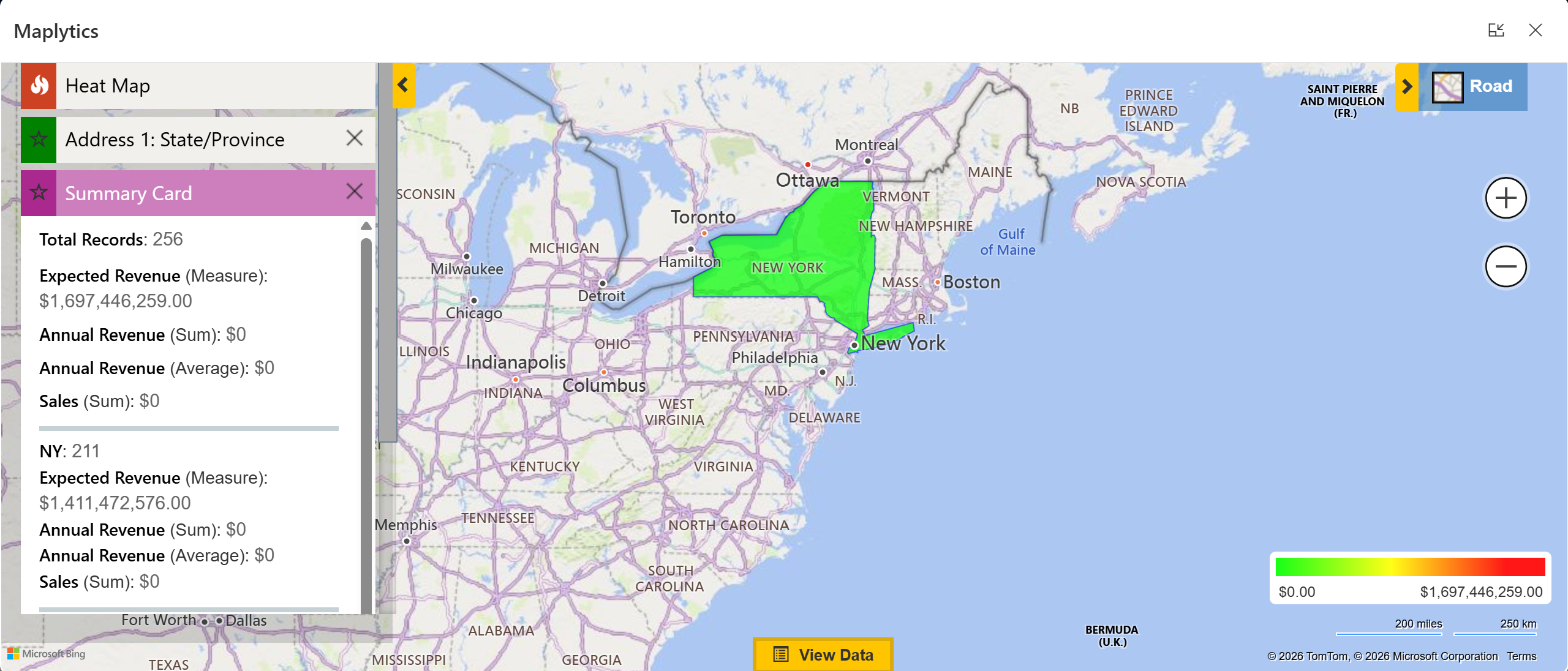
How Maplytics solves it: Maplytics brings full Territory Management inside Dynamics 365 as a map-based experience. Managers can draw territories freehand, build them from postal codes, states, or counties, or import existing boundaries via shapefiles, KML, etc. Territories can be balanced automatically by account count or revenue, and the Draft Territory feature lets managers test realignments before committing them to live CRM data. Each rep sees only their assigned territory on the map. Managers see all territories simultaneously, with coverage gaps and overlaps immediately visible. Territory assignments sync back to Dynamics 365 records automatically, no manual updates, no version mismatch.
The Common Thread
Each of these four challenges shares a root cause: field operations running without geographic context. The data exists in Dynamics 365, the accounts, the work orders, the schedules, and the technician records. What is missing is the spatial layer that connects them to the real world.
Maplytics adds that layer natively, without complexity and without code. For field service teams already invested in Dynamics 365, it is the most direct path from organized CRM data to genuinely intelligent field operations.
Whether the priority is cutting drive time, capturing more opportunities on the road, maintaining real-time visibility, or bringing structure to territorial chaos, Maplytics for Dynamics 365 field service delivers a measurable difference from day one.
What's More?
Maplytics, with its AI assistant, MapCopilot, adapts to the shape of your business. Whether your mapping needs run on Bing Maps, Azure Maps, Google Maps, Apple Maps, or ESRI ArcGIS, Maplytics makes the integration inside Dynamics 365 feel seamless, from Radius Search and Route Mapping to Territory Management and Heat Map analysis, etc. To experience it first-hand, you can have a 15-day free trial of get a personalised demo inside Microsoft Dynamics 365 CRM, Power Apps, Power Pages, or Dataverse, get in touch at [email protected], or explore more at the Website and Microsoft Marketplace.