From Dynamics SL to D365 Business Central: Rebuilding the Trial Balance the Righter Way
For organizations moving from Microsoft Dynamics SL to Dynamics 365 Business Central, the Trial Balance is often the first report that creates friction.
It’s not that the numbers are wrong, but familiar Trial Balance formats do not exist in the same way in Business Central, and standard reports behave very differently. This is especially true in W1 environments, where summary style Trial Balance reports were never part of the localization.
This article explains why that gap exists and how to recreate a familiar, audit friendly Trial Balance using Business Central Financial Reports when out-of-the-box Trial Balance reports do not present the information in a format finance teams are accustomed to seeing.
Why the Trial Balance Feels Different in Business Central
In United States and Canadian tenants of Business Central, many finance users rely on Report 10021, the Trial Balance Detail Summary. It provides beginning balance, debit, credit, and ending balance in a clean printable format. Because this report lives inside the United States and Canada localization layer, it often feels like part of the standard product. Many consultants and finance teams assume it exists everywhere.
It does not.
In W1 environments, including regions such as the Bahamas, Report 10021 is not included. No Trial Balance Summary report exists out of the box, and only modern AL-based reports are available. The report was not removed or deprecated. It was never part of the W1 localization. Both environments are correct. The difference comes entirely from Microsoft’s localization strategy.
Why a Financial Report Is Required
Even if a summary Trial Balance report were available everywhere, Business Central is intentionally literal in how Trial Balances work. Standard Trial Balance reports list only posting general ledger accounts, show only posted balances, and do not calculate or infer results.
That separation between stored facts and calculated presentation is deliberate. As a result, when organizations want a Trial Balance that behaves like a management report, supports dimension filtering, or mirrors familiar Dynamics SL output, Business Central’s Financial Report framework is the supported, long-term solution for designing that output intentionally.
Where Legacy SL Expectations Collide with Modern Reporting
This distinction became clear while validating a Trial Balance Financial Report for a property management company migrating from Dynamics SL. A balance sheet account for Current Year Profit Loss existed in the chart of accounts, but it did not appear on the Trial Balance Financial Report.
That visible behavior had to be explained first, before discussing accounting logic or system mechanics.
Why the Account Did Not Appear
At this point, it is important to clarify that this Trial Balance is not a custom report built from scratch, but a report designed using standard, supported Business Central Financial Report tools.
In Business Central, some standard Trial Balance reports include request page options such as Skip accounts with all zero amounts, which make report options visible and adjustable at runtime.
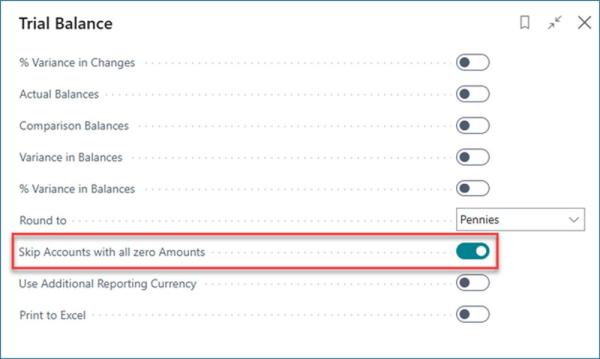
Financial Reports work differently. They do not rely on request page options to control behavior. Instead, inclusion and exclusion rules such as whether zero balance accounts appear are inherent design decisions defined in the Row Definition itself.
In this case, the Trial Balance Financial Report was intentionally designed to exclude accounts with zero balances across all displayed columns. The report behaved exactly as designed, even though that behavior was not surfaced as a selectable option on the report request page.
FREE Membership Required to View Full Content:
Joining MSDynamicsWorld.com gives you free, unlimited access to news, analysis, white papers, case studies, product brochures, and more. You can also receive periodic email newsletters with the latest relevant articles and content updates.
Learn more about us here