When Microsoft Dynamics 365 CE/CRM Reporting Becomes Unreliable and What to Do About It
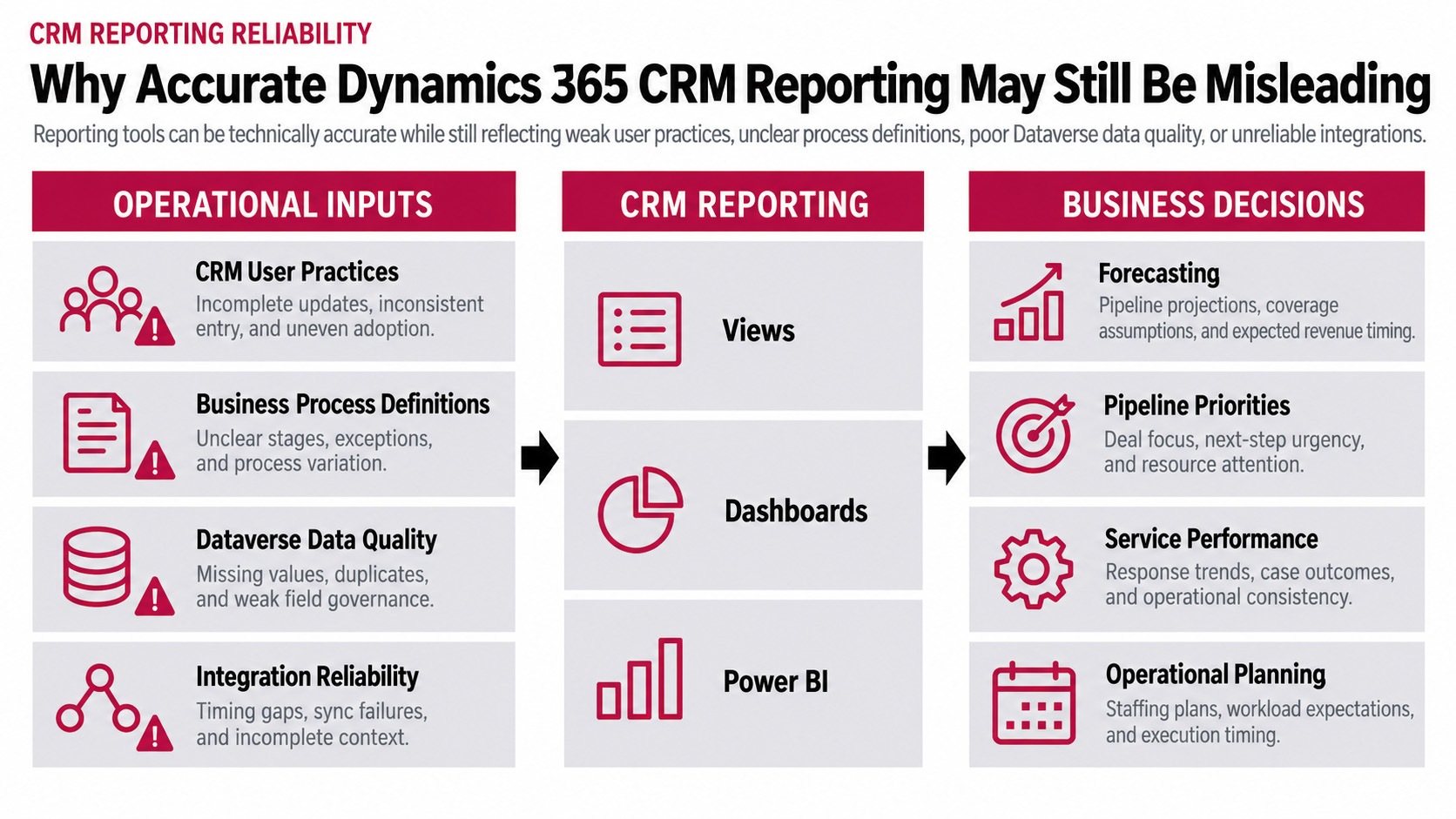
What Happens When Teams Use CRM Differently
Sales teams do not always update opportunities the same way. Some sellers record significant customer interactions as they happen. Others keep notes in spreadsheets and update Dynamics 365 CE/CRM shortly before a forecast meeting. The report uses the latest values on record, even when they do not reflect recent customer activity.
Customer Service has a similar problem with case closure. A resolved case may be closed immediately in one department but kept open for follow-up in another. Both practices may be intentional, yet they produce different open-case counts and resolution times.
Before attributing poor data quality to user adoption, examine the workflow itself. Does updating an opportunity duplicate work? Are ownership and required fields clear? Can employees complete routine activities without unnecessary steps?
When CRM processes create additional work, spreadsheets and other workarounds become attractive. Improving reporting may require simplifying those processes rather than repeating training.
When Sales Teams Calculate Opportunity Revenue Differently
Consider two business units reporting estimated opportunity revenue in Microsoft Dynamics 365 Sales. One enters the full value of a three-year customer agreement. Another reports only the revenue expected during the first year. Both teams may be following their established Sales processes, and each opportunity may contain a valid figure.
The problem arises when leadership combines those opportunities in one pipeline report. The dashboard adds the revenue values without necessarily accounting for the different methods used to calculate them. A business unit showing higher pipeline revenue may simply be reporting a longer contract period.
Microsoft’s Guidance on Opportunity Revenue explains how Dynamics 365 Sales supports system-calculated and user-provided estimated revenue. Before combining pipeline figures, organizations should confirm whether teams are reporting total contract value, annual revenue, or another agreed measure.
Where CRM Data and Reporting Models Go Wrong
An outdated opportunity close date can affect a pipeline forecast, and an account assigned to the wrong parent organization can change how revenue is grouped. Neither issue necessarily triggers a validation error.
A failed synchronization can leave CRM records out of date. An incorrect field mapping can put information in the wrong place in Microsoft Dataverse. Power BI needs its own checks. For imported data, look at the last successful refresh. Then compare the model’s relationships and calculations with a few source records.
A Power BI report can refresh successfully even when a connected system has stopped sending current information. Check the last successful synchronization as well as the report refresh.
The symptoms below can help narrow the investigation, although they do not establish the cause on their own.
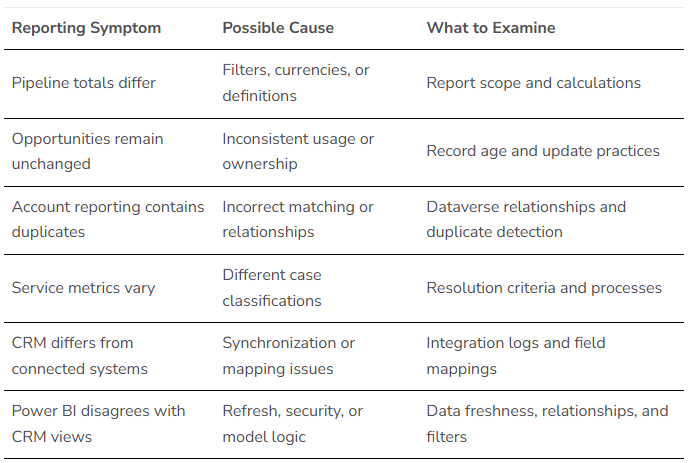
Not every difference indicates an error. Reporting periods, access permissions, and calculations can legitimately produce different totals.
What Dynamics 365 CE/CRM Reporting Tools Can and Cannot Fix
A Dynamics 365 CE/CRM view may be all a sales manager needs to find opportunities with outdated close dates. Power BI is more useful when the question involves historical trends, complex calculations, or information from several systems.
But neither tool can decide how the business should define pipeline revenue or which opportunities belong in the forecast. Those decisions need to come from the people responsible for the Sales process.
Microsoft’s Power BI Modeling Guidance for Power Platform covers data freshness, security, and performance. Those technical considerations matter, but the reporting team still needs to understand the business question before building the solution.
While building our Beyond Attribution: Pipeline Intelligence blog article, New Dynamic connected marketing engagement with opportunity data and noticed that some contacts and accounts were missing from our email audiences. The campaign reports did not show why, so we followed the contact data between systems and traced the problem to a broken workflow.
How Can Enterprises Improve Dynamics 365 CE/CRM Reporting Reliability
- Confirm What the Report Should Measure
Define the business decision, reporting period, qualifying records, and calculation rules. Confirm which opportunities, business units, currencies, and revenue definitions belong in the report. - Compare the Report with Source Records
Select representative opportunities or cases. Compare their values with the report output, including dates, ownership, status, and filters. Identify where the first discrepancy appears. - Review Process and Data Consistency
Confirm that teams follow consistent stage criteria, case classifications, and update practices. Identify workarounds that leave important information outside CRM. - Trace Integrations and Reporting Logic
Review synchronization failures, mappings, refresh schedules, and duplicate handling. For Power BI, examine relevant transformations, semantic model relationships, calculations, and security. - Assign Owners and Monitor Exceptions
Assign someone from the business to own the reporting definitions and someone technical to maintain the reports and integrations. Without that responsibility, definitions can drift between reporting cycles, and the same discrepancies may return. Review stale records, recurring reporting differences, and failed integrations.
After correcting the issue, repeat the comparison to confirm that the results now support the intended decision.
Save the example record and calculation behind the discrepancy. It gives the team a reference if the issue returns.
When Should You Review Your CRM Reporting Architecture
If the same numbers get disputed every month, or teams routinely reconcile separate spreadsheets before reporting to leadership, we would look beyond the dashboard. The problem may involve the way Dynamics 365 CE/CRM is configured, how information moves between systems, or who maintains those processes.
New Dynamic’s article on Dynamics 365 CE/CRM Support Models examines how support needs change as environments grow. When the cause remains unclear, a Dynamics 365 Health Check can help identify broader configuration, integration, or performance issues.
Dynamics 365 CE/CRM Reporting: Key Takeaways
- Reliable reporting depends on consistent business practices and accurate source information.
- Different revenue definitions and case-handling practices can undermine otherwise valid reports.
- CRM data quality and reporting model design must be evaluated separately and together.
- Begin improvements with a business decision, representative records, and accountable owners.
Travis South – Director of Marketing