Fishbowl Inventory: Complete Guide to Features & Pricing
If your business makes, moves, or sells physical products and you have outgrown spreadsheets — or outgrown what QuickBooks alone can track — Fishbowl Inventory is almost certainly on your shortlist. It has been one of the most recognized names in inventory management software for small and mid-sized businesses for over two decades, largely because of how tightly it hooks into QuickBooks.
But "recognized" is not the same as "right for you." This guide breaks down exactly what Fishbowl Inventory is in 2026, what it costs, where it genuinely shines, where real customers hit friction, and which alternatives are worth comparing before you sign anything.
Confused Which Inventory Management System Right For You?
Get Free Inventory Management Consulting from MetaOption Experts, Contact Now
What Is Fishbowl Inventory?
Fishbowl Inventory is inventory management and manufacturing software built for small to mid-sized businesses. It handles the operational layer that accounting software does not: real-time stock levels across locations, barcode-driven receiving and picking, purchase order automation, bills of materials, work orders, lot and serial tracking, and order fulfillment — then syncs the financial results back into your accounting system.
The company behind it was founded in 2001 in Utah and now operates out of American Fork, Utah, with additional operations serving Australia, New Zealand, and the UK. It was acquired by private equity firm Diversis Capital in December 2021, which kicked off a period of expansion and, more recently, a substantial re-platforming of the product toward cloud-native delivery and AI-assisted operations.
The short version of the positioning: Fishbowl is what QuickBooks-based businesses buy when QuickBooks inventory stops being enough. That is the single sentence that explains most of its customer base.
What Are the Best Fishbowl Inventory Alternatives?
Fishbowl is a popular inventory and warehouse management solution, but businesses may look for Fishbowl Inventory alternatives when they need more advanced warehouse automation, broader ERP integration, greater scalability, or specialized supply chain capabilities. MetaWMS and GOIS are two strong alternatives worth considering.
- MetaWMS offers advanced warehouse management, real-time inventory visibility, barcode/RFID workflows, multi-location inventory control, order fulfillment, and Microsoft Dynamics 365 Business Central integration.
- GOIS provides inventory management, barcode and mobile scanning, multi-location support, lot/serial and expiry tracking, kitting, and e-commerce and shipping integrations.
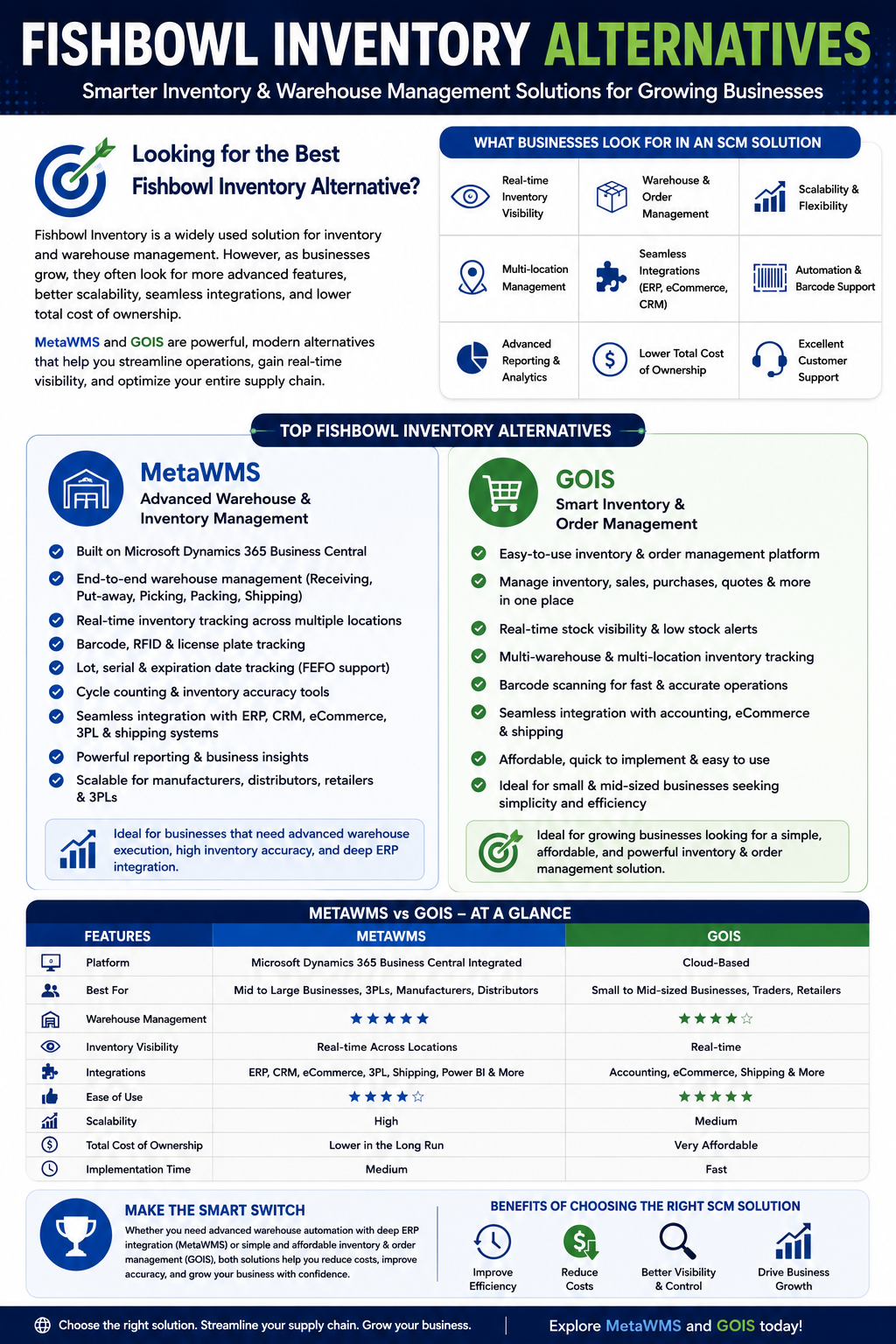
When comparing the best Fishbowl alternatives, businesses should consider inventory management features, warehouse complexity, automation, integrations, scalability, and total cost of ownership to select the right warehouse management software or inventory management software for their needs.
Who Fishbowl Inventory is built for
Fishbowl tends to fit best when several of these are true:
- You run manufacturing, wholesale, distribution, or multi-location retail operations
- You are committed to QuickBooks (Online, Desktop, or Enterprise) or Xero and do not want to switch accounting systems
- You need BOMs, work orders, or MRP — not just stock counts
- You need lot, batch, serial, or expiry tracking for compliance or recall readiness
- You have somewhere between 2 and 200 users, and a real budget for implementation
- You are past the point where a lightweight cloud tool can handle your workflow complexity
It tends to be a poor fit for pre-revenue startups, businesses that want to be live next week with no onboarding project, or companies that need deep native ERP-level financials, multi-entity consolidation, or heavy custom development.
The Fishbowl Product Lineup in 2026
One of the most common points of confusion is that "Fishbowl Inventory" refers both to the company's whole platform and to one specific product within it. Here is how the lineup breaks down today.
1. Fishbowl Inventory
The cloud-native inventory and warehousing product. Built for businesses that buy or import finished goods and resell them — barcode scanning, SKU tracking, reorder points, fulfillment, and QuickBooks Online or Xero sync. It does not include manufacturing capabilities (no BOMs, work orders, or MRP). This is an important distinction that trips up buyers who assume the entry-level plans cover production.
2. Fishbowl Advanced
The manufacturing and warehouse platform, and the option most Fishbowl customers end up on. It splits into two tracks:
- Advanced Manufacturing — full BOMs, sub-assemblies, configurable products, MRP and production scheduling, work orders, made-to-order builds, job/labor/landed costing, and deep QuickBooks Desktop and Enterprise integration.
- Advanced Warehouse — complex fulfillment and transfer orders, multi-warehouse and 3PL workflows, EDI integrations, tiered pricing rules, RMA management, advanced permissions and audit trails.
Advanced includes cloud hosting, with self-managed deployment options for teams that need infrastructure control.
3. Fishbowl Commerce Suite
Multichannel ecommerce management — connecting marketplaces and storefronts into the same inventory record so channel listings and stock stay aligned.
4. Fishbowl AI Insights and AI Manufacturing
The newer layer. AI Insights delivers on-demand analytics and reporting through an assistant interface. AI Manufacturing focuses on production prep, flagging material shortages and capacity gaps before they hit schedules. These are the most recent additions and, realistically, the least battle-tested parts of the platform — worth a hard demo rather than taking marketing claims at face value.
5. Fishbowl Payments
Built-in payment processing, so invoicing and collection happen inside the same system rather than through a bolt-on.
Core Fishbowl Inventory Features
1. Real-time inventory tracking
Stock levels update across every warehouse, bin, and sub-location as transactions happen. You get visibility into what is on hand, on order, committed, and available to sell — the four numbers most spreadsheet-based operations get wrong. Multi-location transfers, cycle counting, and parts and asset tracking are all supported.
2. Barcode scanning and mobile
Fishbowl's mobile scanning app lets teams receive, pick, pack, and ship by scan rather than by keyboard. Every scan updates inventory instantly. Barcode and label printing are built in, with customizable label formats. For most warehouse operations, this is where the measurable accuracy gain actually comes from.
3. Purchasing and automated reordering
Set reorder points per part and let the system generate vendor-aware purchase orders when stock crosses the threshold. Vendor management tracks cost, lead time, and vendor-specific part numbers. Landed cost allocation means freight, duties, and tariffs get distributed into inventory cost rather than dumped into a generic expense account — which matters a great deal for margin accuracy.
4. Sales and order management
Sales orders, quotes, kitting and bundling, tiered customer pricing, point-of-sale linkage, and ecommerce order intake all feed the same inventory pool. Order routing and fulfillment workflows determine which location ships what.
5. Manufacturing: BOMs, work orders, and MRP
For manufacturers, this is the reason to choose Fishbowl over a simpler tool. Multi-level bills of materials handle sub-assemblies and configurable finished goods. Work orders connect production directly to inventory consumption and sales demand. Material Requirements Planning tells you what parts you need, when, and where the gaps are. Time tracking and labor costing roll actual production cost into finished goods.
6. Traceability and compliance
Lot, batch, serial number, and expiration date tracking with forward and backward traceability. For regulated categories — food and beverage, chemicals, pharmaceuticals, aerospace, firearms — this turns a recall investigation from a multi-day paper chase into a report. Audit trails and advanced permissions support GMP, FDA, and ISO documentation requirements.
7. Reporting
Standard operational reports ship with the system, and custom reports are available as a paid add-on. This is worth flagging early: several customers report that anything beyond stock reporting requires either a paid custom report or third-party developer help, at meaningful cost. Budget for it if reporting is central to how you run the business.
Fishbowl Inventory and QuickBooks: The Real Selling Point
Most inventory platforms integrate with QuickBooks. Fishbowl's differentiator is the depth of that integration, particularly with QuickBooks Desktop and Enterprise — a connection that is genuinely rare among modern cloud inventory systems, since most vendors have abandoned Desktop support entirely.
Supported accounting connections include:
- QuickBooks Online (with two-way sync)
- QuickBooks Desktop and QuickBooks Enterprise
- QuickBooks Canada
- Xero
The practical benefit: inventory transactions post to the right accounts automatically. Cost of goods sold reflects actual landed cost. Month-end close stops involving a manual reconciliation between what the warehouse says and what the ledger says. For a controller who currently spends the first week of every month chasing inventory variances, this is the entire business case.
The flip side, which honest reviewers raise consistently: this depth creates vendor lock-in in both directions. If you later decide to move off QuickBooks, you have coupled two migrations together. And a small number of users report sync friction and occasional inventory discrepancies with QuickBooks, particularly during the first months after go-live when configuration is still settling.
Fishbowl Inventory Pricing (2026)
Fishbowl moved away from its old perpetual-license model — where you paid several thousand dollars upfront — to annual subscription pricing. If you are reading older reviews quoting a one-time fee of $4,395 or similar, that information is out of date.
Here is the published pricing as of August 2026. All plans are billed annually.
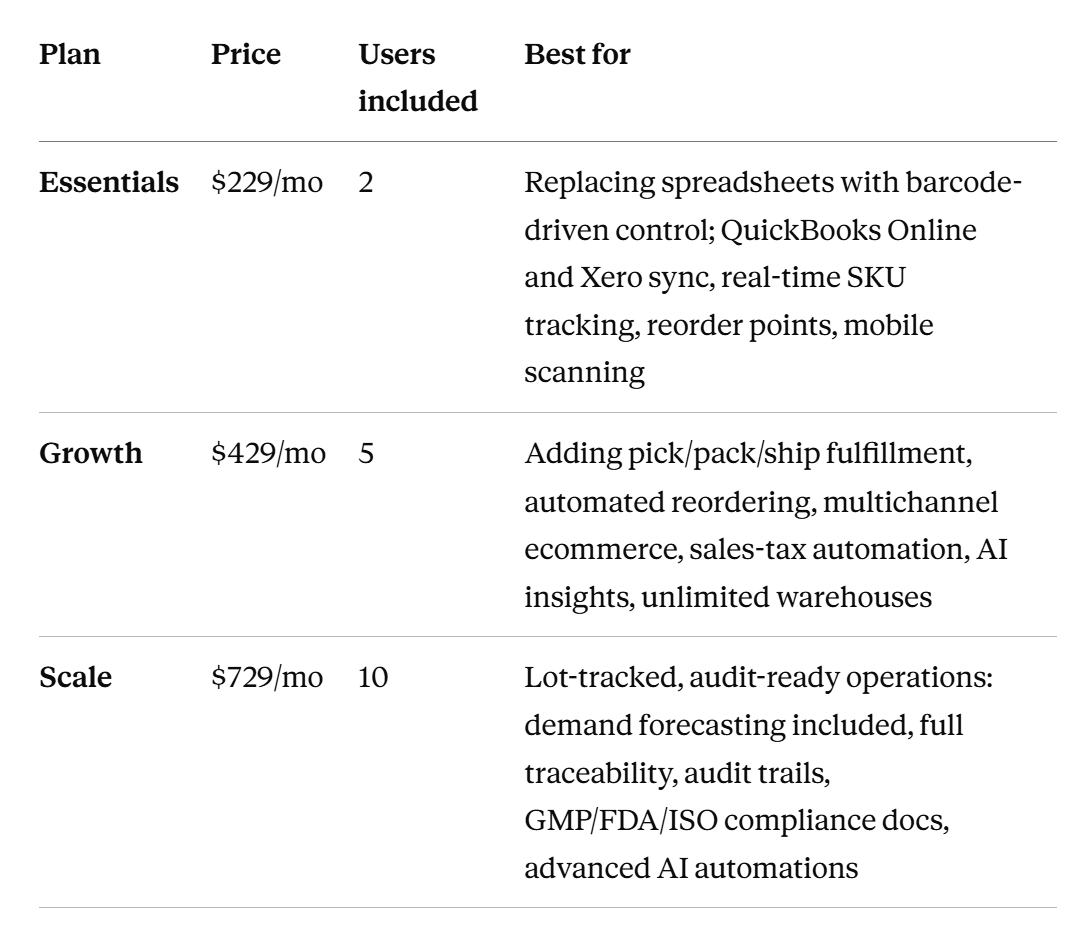
Lot-tracked, audit-ready operations: demand forecasting included, full traceability, audit trails, GMP/FDA/ISO compliance docs, advanced AI automations
Important: these Inventory plans do not include manufacturing. No BOMs, no work orders, no MRP.
Fishbowl Advanced (manufacturing and warehouse)
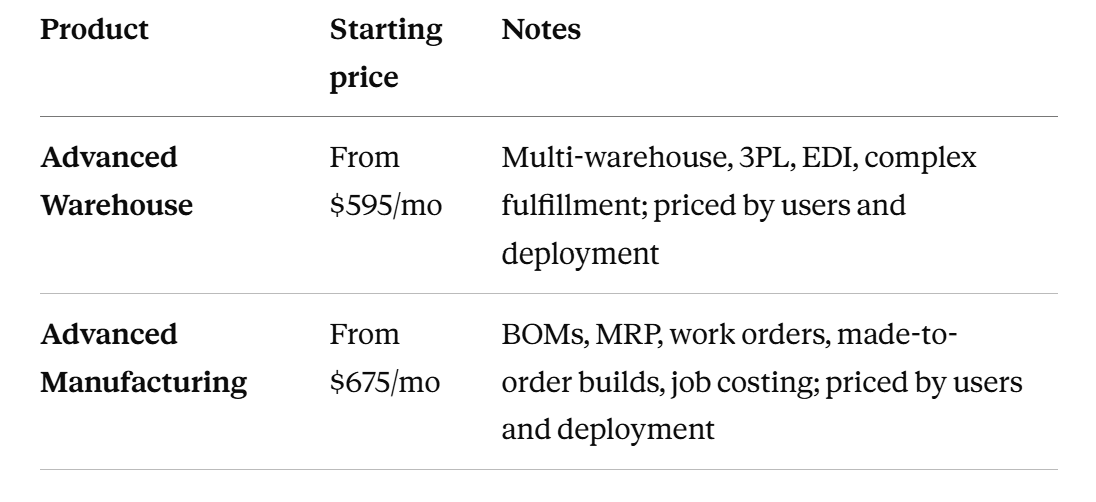
Advanced supports teams from 2 users up to 200+, and final pricing is always confirmed by quote rather than self-serve.
The costs that are not on the pricing page
This is where budgets get blown, so plan for it:
- Mandatory implementation package. Fishbowl requires an implementation package with every purchase, priced separately and quoted individually. It covers an implementation specialist, data migration (typically excluding historical data), a 6–8 week training certification program, and dedicated go-live support. There is no self-serve, skip-onboarding path.
- Additional ecommerce channel integrations beyond what your tier includes, commonly around $50/month per channel.
- Additional user seats beyond your plan's included count — priced by quote, and several reviewers describe adding licenses as expensive.
- Custom reports, priced as add-ons; third-party developers reportedly charge anywhere from a couple hundred to a couple thousand dollars per report.
- B2B Portal, advanced marketplace integrations, and demand forecasting on lower tiers, all add-ons.
- Hardware — scanners, label printers, mobile devices.
A realistic first-year total for a mid-sized manufacturer therefore lands well above the sticker subscription cost. Ask for an all-in quote covering year one and year two before comparing to alternatives, or you will be comparing an apple to a picture of an apple.
Pricing is published by Fishbowl and subject to change. Verify current figures on the vendor's pricing page before making a decision.
Fishbowl Inventory Pros and Cons
What users consistently praise
- QuickBooks integration depth, especially QuickBooks Desktop and Enterprise support that competitors have dropped
- Manufacturing capability at SMB pricing — BOMs, work orders, and MRP without an enterprise ERP price tag
- Strong traceability for lot, batch, serial, and expiry tracking, which regulated industries find hard to source elsewhere at this level
- Responsive support, with US-based phone, chat, and email support frequently called out positively in reviews
- Genuine, documented ROI — customer case studies cite outcomes like reduced stockouts, lower inventory carrying costs, decreased backorders, and substantial time savings in order entry
- Real functional depth — it handles the messy edge cases (kitting, transfers, RMAs, 3PL, landed cost) that lighter tools punt on
Aggregate ratings across major review platforms sit around 4.2 out of 5 from over a thousand verified reviews, which is solidly positive for an operationally complex product.
Where it draws criticism
- Steep learning curve. The feature depth that makes Fishbowl powerful also makes it hard to learn. Nearly every review mentions this, including the positive ones.
- Implementation is a real project. The 6–8 week certification is not optional, and data migration from a legacy system carries genuine risk and effort.
- Interface feels dated compared to newer cloud-native platforms, which some teams report as an adoption barrier with younger staff.
- Reporting limitations. Standard reports satisfy many users; anyone needing custom analytics faces add-on costs.
- Cost scaling. Per-seat and add-on pricing can escalate quickly as you grow, and several reviewers describe adding individual licenses as expensive.
- Integration gaps. Specific complaints surface around certain shipping tools and CRM syncs — verify your exact stack in the demo, not after signing.
- QuickBooks dependency is a strategic constraint as much as a feature.
Fishbowl Inventory vs. The Alternatives
No single system wins for everyone. Here is where the main competitors genuinely beat Fishbowl, and where they do not.
Alternative
Where it beats Fishbowl
Where Fishbowl still wins
Katana
Modern, visual production planning; cloud-native; strong Shopify fit; faster to launch
Deeper QuickBooks integration, stronger warehousing, wider industry coverage
Cin7 Core
Multichannel ecommerce and distribution breadth; not tied to QuickBooks
Manufacturing depth, QuickBooks Desktop support, lower complexity for production shops
inFlow
Simpler, cheaper, faster to learn; good B2B/wholesale fit
Manufacturing, MRP, compliance traceability, scale
Zoho Inventory
Lowest cost of entry; ideal if you already run Zoho apps
Everything past basic stock and order control
MRPeasy
Purpose-built MRP and production scheduling
Warehousing depth, accounting integration, breadth
Acctivate
Also QuickBooks-centric; different workflow philosophy
Broader manufacturing and cloud deployment options
NetSuite / Business Central
True ERP: multi-entity, multi-currency, full financials
Cost, speed to deploy, SMB fit — ERP implementations run months and six figures
The honest decision rule: if QuickBooks sits at the center of your finance stack and you need real manufacturing or traceability, Fishbowl is genuinely hard to beat at its price point. If either of those two conditions is false, there is probably a better-fitting or cheaper tool for your specific situation.
How to Evaluate Fishbowl Inventory Before You Buy
Run this checklist during the sales process, not after:
- Map your actual workflow first. Write down every step from purchase order to cash collection. Bring that document to the demo and make them walk it, step by step, in the live product.
- Confirm which product you need. If you build, assemble, kit, or mix anything, you need Advanced Manufacturing, not the entry-level Inventory plans. Confirm this in writing.
- Get the all-in year-one quote. Subscription + implementation + seats + integrations + custom reports + hardware. Then get the year-two number.
- Test your specific integrations. Name your exact shipping carrier, ecommerce platform, CRM, and QuickBooks version. Ask to see each one working.
- Ask about data migration scope. Confirm exactly what historical data comes across and what does not — this is a common source of post-signature disappointment.
- Pressure-test reporting. List the five reports your leadership actually looks at. Ask whether each is standard or custom, and what custom costs.
- Talk to reference customers in your industry and roughly your size, ideally ones who went live in the last 12 months.
- Plan for the learning curve. Identify who your internal system owner will be and budget their time for the certification program. Implementations fail on internal ownership far more often than on software capability.
Getting the Most Out of Fishbowl After Go-Live
- Clean your data before migration. Duplicate SKUs, inconsistent units of measure, and stale part numbers will follow you into the new system and multiply.
- Standardize your part numbering scheme before you import anything. Changing it later is painful.
- Set reorder points deliberately, using real lead times and demand variability — not gut feel. This is where the stockout reduction actually comes from.
- Enforce scanning discipline. The accuracy benefit disappears the moment staff start keying transactions manually.
- Cycle count continuously rather than doing one annual physical count.
- Reconcile with accounting monthly for the first few months to catch sync configuration issues early, while they are still small.
- Use the certification program fully. Businesses that treat the 6–8 week training as a checkbox get dramatically worse outcomes than those that treat it as a real project.
Frequently Asked Questions About Fishbowl Inventory
What is Fishbowl Inventory used for?
Fishbowl Inventory is used to track stock in real time, automate purchasing and reordering, manage sales and fulfillment, run manufacturing processes with BOMs and work orders, and sync all of it with QuickBooks or Xero. It is most common in manufacturing, wholesale distribution, and multi-location retail operations.
How much does Fishbowl Inventory cost?
As of August 2026, Fishbowl Inventory cloud plans start at $229/month for Essentials (2 users), $429/month for Growth (5 users), and $729/month for Scale (10 users), all billed annually. Fishbowl Advanced starts at $595/month for Warehouse and $675/month for Manufacturing, priced by users and deployment. A mandatory implementation package is quoted separately.
Is Fishbowl Inventory cloud-based or on-premise?
Both, depending on the product. Fishbowl Inventory is cloud-native. Fishbowl Advanced is cloud-hosted by default, with self-managed deployment options for organizations that require full infrastructure control.
Does Fishbowl Inventory integrate with QuickBooks?
Yes — and it is the platform's core strength. Fishbowl integrates with QuickBooks Online, QuickBooks Desktop, QuickBooks Enterprise, QuickBooks Canada, and Xero. QuickBooks Desktop support in particular is uncommon among modern cloud inventory platforms.
Does Fishbowl Inventory handle manufacturing?
Fishbowl Advanced Manufacturing does, with multi-level BOMs, work orders, MRP, production scheduling, and job and labor costing. The entry-level Fishbowl Inventory cloud plans do not include manufacturing features.
Is there a free trial or free version of Fishbowl Inventory?
There is no permanently free version. Trial availability has varied over time, and because every purchase includes a required implementation package, evaluation typically happens through a guided demo rather than self-serve signup.
How long does Fishbowl Inventory take to implement?
The standard onboarding includes a 6–8 week training and certification program. Total time to full productivity depends on data complexity, number of locations, and how much process redesign you take on alongside the software.
What are the best Fishbowl Inventory alternatives?
The most-compared options are Katana (cloud-native manufacturing), Cin7 Core (multichannel distribution), inFlow (simpler small-business inventory), Zoho Inventory (lowest cost entry), MRPeasy (production planning), and NetSuite or Business Central (full ERP for larger operations).
Is Fishbowl Inventory worth it?
For QuickBooks-committed businesses that need real manufacturing capability or regulated-industry traceability, generally yes — the functional depth at this price point is difficult to match. For businesses that need simple stock tracking, want to be live in days, or are not tied to QuickBooks, lighter and cheaper alternatives usually deliver better value.
The Bottom Line
Fishbowl Inventory has survived twenty-five years in a crowded market for a specific and defensible reason: it gives small and mid-sized manufacturers and distributors genuine operational depth — BOMs, MRP, traceability, multi-warehouse fulfillment — while keeping QuickBooks as the financial system of record.
That focus is also its boundary. The learning curve is real, implementation is a project rather than a signup, and total cost runs meaningfully above the advertised subscription once seats, integrations, and onboarding are counted.
Evaluate it against your actual workflow rather than a feature list, get an all-in multi-year quote, and compare it honestly against two alternatives before you commit. If QuickBooks and manufacturing are both central to your business, Fishbowl will likely still be standing at the end of that process.
Last updated: August 2026. Pricing and features verified against Fishbowl's published information at the time of writing and subject to change.