Business Central Support Services: What They Include
When businesses invest in Microsoft Dynamics 365 Business Central, they expect it to simplify operations, improve productivity, and support future growth. While the platform is powerful, it isn't something you simply install and forget. As your business evolves, you may face system updates, user issues, integrations, customizations, and performance challenges. That's where Business Central Support Services from MetaOption become essential.
Whether you're a small business or a growing enterprise, having reliable Business Central Support ensures your ERP system continues to deliver value every day. Instead of struggling with technical problems or unexpected downtime, businesses can rely on experienced professionals to resolve issues quickly, optimize performance, and keep operations running smoothly.
In this guide, we'll explore everything you need to know about Business Central Support Services, what they include, why they matter, and how they help organizations get the most out of Microsoft Dynamics 365 Business Central.
Looking for Complete Business Central Support Services?
What Are Business Central Support Services?
Business Central Support Services are professional services designed to help organizations maintain, troubleshoot, optimize, and improve their Microsoft Dynamics 365 Business Central environment. These services go far beyond fixing technical errors. A reliable Dynamics 365 Business Central Support team becomes your long-term technology partner, helping your ERP system adapt as your business grows.
Businesses often assume they only need support when something breaks. In reality, proactive Microsoft Business Central Support helps prevent problems before they impact daily operations. Support providers monitor system performance, recommend improvements, assist users, manage upgrades, and ensure your ERP environment remains secure and efficient.
Whether your organization needs occasional troubleshooting or ongoing managed support, choosing the right Business Central Support Services can significantly improve business efficiency.
Why Business Central Support Matters?
Imagine driving a luxury car without ever servicing it. It may perform well initially, but over time, neglect will lead to performance issues, unexpected breakdowns, and expensive repairs. The same applies to your ERP system.
Your Business Central environment manages critical business processes such as finance, inventory, purchasing, sales, warehouse operations, customer management, and reporting. Even a small issue can affect multiple departments simultaneously.
Professional Business Central Support helps businesses by:
- Reducing system downtime
- Improving ERP performance
- Resolving technical issues quickly
- Supporting users with daily operations
- Maintaining security and compliance
- Keeping the system updated with Microsoft's latest releases
- Ensuring business continuity
Simply put, Business Central Support Services keep your ERP healthy so your business can stay productive.
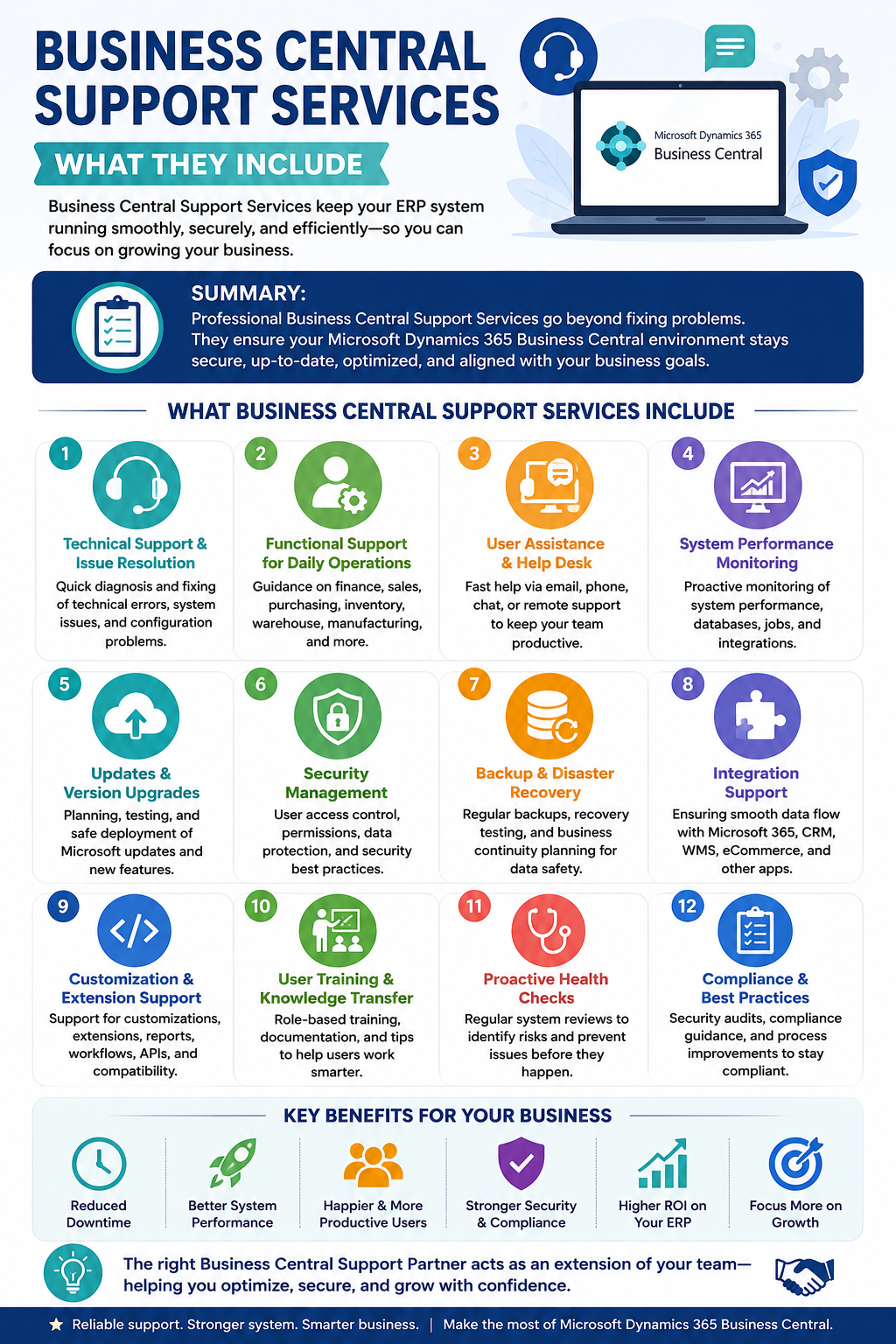
What Is Included in Business Central Support Services?
Many organizations believe support only means answering help desk tickets. In reality, comprehensive Business Central Support Services cover a wide range of technical and functional areas.
Let's look at the most important services included.
1. Technical Support and Issue Resolution
Every ERP system occasionally encounters technical challenges. Users may experience login issues, integration failures, report errors, workflow interruptions, or system performance problems.
A dedicated Dynamics 365 Business Central Support team investigates the root cause instead of simply fixing the symptoms.
Typical technical support includes:
- Error diagnosis
- Bug fixing
- User login issues
- Workflow failures
- Integration troubleshooting
- Database optimization
- System configuration
- Extension troubleshooting
Instead of spending hours searching forums for answers, businesses can rely on experienced Microsoft Business Central Support professionals to resolve problems efficiently.
2. Functional Support for Daily Business Operations
Not every issue is technical.
Sometimes users simply need help understanding how Business Central works.
Employees often ask questions like:
- Why isn't my invoice posting?
- Why isn't inventory updating?
- How can I approve purchase orders?
- Why are financial reports showing incorrect data?
These are functional questions that require business process expertise.
Professional Business Central Support Services provide guidance on:
- Finance operations
- Sales management
- Purchasing
- Inventory management
- Warehouse processes
- Manufacturing workflows
- Project management
- Customer relationship management
This type of Business Central Support helps employees become more productive while reducing operational delays.
3. User Assistance and Help Desk Support
Let's be honest. Not everyone enjoys reading ERP manuals.
Employees often need immediate answers rather than lengthy documentation.
That's why many organizations choose Business Central Support Services with dedicated help desk assistance.
Support teams answer user questions through:
- Phone
- Live chat
- Ticketing systems
- Remote desktop sessions
Instead of waiting hours to solve a simple issue, users receive expert guidance that keeps work moving.
A responsive Microsoft Business Central Support team minimizes frustration and boosts employee confidence.
4. System Performance Monitoring
An ERP system should never feel slow or unreliable.
Over time, growing databases, increasing users, complex reports, and custom extensions may reduce performance.
Professional Dynamics 365 Business Central Support continuously monitors:
- Response times
- Database performance
- Server utilization
- Background jobs
- Scheduled tasks
- Integration performance
When potential issues are detected early, they can be resolved before users even notice them.
This proactive approach is one of the biggest advantages of managed Business Central Support Services.
5. Microsoft Updates and Version Upgrades
Microsoft regularly releases updates for Business Central.
These updates introduce:
- New features
- Security improvements
- Bug fixes
- Compliance enhancements
- Performance improvements
However, applying updates without planning can sometimes create compatibility issues.
Experienced Business Central Support professionals help businesses:
- Review release notes
- Test updates
- Validate extensions
- Verify integrations
- Minimize downtime
- Deploy upgrades safely
With expert Microsoft Business Central Support, businesses enjoy the latest features without unnecessary risks.
6. Security Management
Cybersecurity is no longer optional.
Business Central stores sensitive financial, customer, inventory, and operational information that must be protected.
Professional Business Central Support Services help organizations improve security through:
- User permission management
- Role-based access control
- Authentication configuration
- Data protection
- Security reviews
- Compliance recommendations
- Backup verification
A strong Dynamics 365 Business Central Support strategy reduces security risks while ensuring only authorized employees access business-critical information.
7. Backup and Disaster Recovery Support
Technology doesn't always behave perfectly.
Hardware failures, accidental deletions, cyberattacks, or human errors can cause data loss.
Reliable Business Central Support Services ensure your organization has a proper backup and disaster recovery strategy.
Support providers help with:
- Backup monitoring
- Data restoration
- Recovery testing
- Business continuity planning
- Disaster recovery procedures
This gives businesses peace of mind knowing their critical ERP data can be recovered quickly when unexpected situations occur.
8. Integration Support
Today's businesses rarely rely on one software solution.
Business Central often connects with:
- Microsoft 365
- Power BI
- Power Automate
- CRM platforms
- Warehouse Management Systems
- Shipping software
- Payment gateways
- E-commerce platforms
- Third-party business applications
Managing these integrations requires expertise.
Professional Microsoft Business Central Support teams monitor connected applications, troubleshoot synchronization issues, and ensure data flows accurately between systems.
Without proper Business Central Support, integration failures can create duplicate records, inaccurate reporting, delayed orders, and frustrated employees.
9. Customization and Extension Support
Every business has unique processes. That's why many organizations customize Business Central using extensions, workflows, reports, and automation.
While customization increases efficiency, it also requires ongoing maintenance.
Experienced Business Central Support Services assist with:
- Extension troubleshooting
- Custom workflow updates
- Report modifications
- API maintenance
- Performance optimization
- Compatibility testing
- Custom feature enhancements
A trusted Dynamics 365 Business Central Support partner ensures customizations continue working smoothly, even after Microsoft releases new updates.
10. User Training and Knowledge Transfer
Even the most advanced ERP system is only as effective as the people using it. Employees who understand Business Central can complete tasks faster, make fewer mistakes, and use the platform more efficiently. This is why user training is an important part of Business Central Support Services.
A trusted Business Central Support partner doesn't just solve problems. They also help your team become more confident with the software.
Training may include:
- New employee onboarding
- Module-specific training for finance, sales, purchasing, and inventory
- Best practices for daily operations
- Hands-on workshops
- Process documentation
- Video tutorials
- Knowledge-sharing sessions
As Microsoft introduces new features, Dynamics 365 Business Central Support providers also educate users about updates and improvements. This helps businesses maximize their ERP investment instead of using only a small percentage of the available features.
11. Proactive System Health Checks
Wouldn't it be better to prevent problems instead of fixing them later?
That's exactly what proactive monitoring achieves.
Many Business Central Support Services include scheduled health checks to identify risks before they become major issues. Instead of waiting for users to report slow performance or system errors, support specialists regularly review the ERP environment.
Typical health checks include:
- Database performance analysis
- Extension compatibility reviews
- License usage checks
- Workflow validation
- Storage monitoring
- Integration performance reviews
- Security assessments
- User access audits
These preventive measures reduce downtime and ensure your ERP system continues to perform at its best.
With proactive Microsoft Business Central Support, businesses spend less time dealing with unexpected issues and more time focusing on growth.
12. Compliance and Security Guidance
Businesses today must comply with various industry regulations and data protection requirements. Whether it's financial reporting standards or internal governance policies, maintaining compliance is easier with expert assistance.
Professional Business Central Support Services help organizations by:
- Reviewing security settings
- Managing user permissions
- Auditing access controls
- Supporting compliance reporting
- Advising on data retention practices
- Assisting with regulatory updates
While Business Central includes strong security capabilities, proper configuration is equally important. Experienced Dynamics 365 Business Central Support professionals ensure that your environment follows recommended security practices and protects sensitive business information.
Understanding Service Level Agreements (SLAs)
Not all support plans are created equal.
When evaluating Business Central Support Services, it's important to understand the Service Level Agreement (SLA). An SLA defines how quickly the support provider will respond to and resolve issues.
A typical SLA includes:
- Response time for critical issues
- Resolution targets
- Support availability
- Communication channels
- Escalation procedures
- Priority classifications
For example, if your finance team cannot post invoices or your warehouse operations come to a halt, a high-priority issue should receive immediate attention. Businesses that rely heavily on Business Central often choose premium Business Central Support plans that provide faster response times and extended support hours.
Choosing the right SLA ensures that your business receives timely assistance whenever it is needed.
Cloud Support vs On-Premises Support
Microsoft Dynamics 365 Business Central is available as both a cloud-based solution and an on-premises deployment. Each environment requires a slightly different support approach.
Cloud Support
Cloud deployments generally include:
- Update management
- User administration
- Security configuration
- Integration support
- Performance optimization
- Extension management
Because Microsoft manages the infrastructure, Microsoft Business Central Support providers can focus on helping businesses optimize processes and resolve functional or technical issues.
On-Premises Support
On-premises environments may require additional services such as:
- Server maintenance
- Database administration
- Infrastructure monitoring
- Backup management
- Disaster recovery
- Hardware troubleshooting
Whether your ERP is hosted in the cloud or on your own servers, experienced Business Central Support Services ensure stable and reliable operations.
How to Choose the Right Business Central Support Partner
Selecting the right support provider is just as important as choosing the ERP itself. A knowledgeable partner can help you avoid costly downtime, improve system performance, and make better use of Business Central's capabilities.
When evaluating a Business Central Support provider, consider the following factors:
- Microsoft certifications and expertise
- Experience with your industry
- Proven implementation and support history
- Clear communication
- Transparent pricing
- Fast response times
- Dedicated support team
- Ability to handle customizations and integrations
- Positive customer reviews
- Long-term consulting capabilities
A reliable Dynamics 365 Business Central Support partner should understand both the technical and business aspects of your ERP environment. They should be able to recommend improvements, solve complex issues, and support your future growth.
Benefits of Investing in Business Central Support Services
Many organizations view support as an additional expense. In reality, it is an investment that helps protect your ERP system and improve operational efficiency.
Some of the biggest benefits of Business Central Support Services include:
- Reduced downtime
- Faster issue resolution
- Better user productivity
- Improved system performance
- Stronger data security
- Easier software upgrades
- Reliable integrations
- Lower IT maintenance costs
- Improved compliance
- Higher return on ERP investment
With dependable Business Central Support, businesses spend less time troubleshooting and more time serving customers, managing operations, and driving growth.
Common Questions About Business Central Support
Is Business Central Support only for large enterprises?
No. Small and medium-sized businesses often benefit the most from Business Central Support Services because they may not have dedicated ERP specialists in-house.
Can support providers help with customizations?
Yes. Most experienced Microsoft Business Central Support teams assist with custom extensions, reports, workflows, APIs, and third-party integrations.
How often should Business Central be updated?
Microsoft releases updates regularly. A professional Dynamics 365 Business Central Support provider can help plan, test, and deploy updates without disrupting business operations.
Does support include user training?
Many support providers include user guidance, documentation, workshops, and refresher training as part of their service offerings.
What industries use Business Central Support Services?
Businesses across manufacturing, retail, wholesale distribution, healthcare, professional services, construction, eCommerce, and logistics all rely on Business Central Support Services to keep their ERP systems running efficiently.
Conclusion
Microsoft Dynamics 365 Business Central is much more than accounting software. It serves as the backbone of finance, inventory, purchasing, sales, warehousing, customer service, and reporting for thousands of businesses worldwide. To keep this critical system performing at its best, organizations need dependable Business Central Support Services.
From troubleshooting technical issues and assisting users to managing upgrades, monitoring system health, strengthening security, and supporting integrations, comprehensive Business Central Support covers every aspect of maintaining a healthy ERP environment. Rather than reacting to problems after they occur, proactive Dynamics 365 Business Central Support helps businesses prevent disruptions, improve efficiency, and stay focused on growth.
If you're looking to maximize the value of your ERP investment, partnering with an experienced provider of Microsoft Business Central Support can make all the difference. The right support team acts as an extension of your business, helping you optimize operations, reduce downtime, and confidently adapt to changing business needs. Whether you're implementing Business Central for the first time or managing a mature ERP environment, investing in professional Business Central Support Services ensures your system remains reliable, secure, and ready to support your business for years to come.