Free vs Advanced Mailchimp Integration for Dynamics 365: What CRM Leaders Must Know
If you manage CRM strategy in Microsoft Dynamics 365, you are not simply connecting an email tool. You are defining how marketing intelligence flows into revenue execution.
Free or basic Dynamics 365 Mailchimp integration connectors are often adopted at the team level, not the strategy level. They promise connectivity. But in enterprise CRM environments, basic connectivity often comes at the cost of functionality. And compromise at the marketing-sales handoff layer affects lead conversion. That is where enterprise risk begins. Let’s understand this with a questionnaire.
Key Takeaways
- Free Dynamics 365 Mailchimp integrations often provide one-way sync, leading to outdated CRM data and missed insights
- Lack of real-time unsubscribe sync creates serious compliance and reputational risks
- Without campaign and Customer Journey visibility inside CRM, sales teams operate without a critical engagement context
- Basic integrations force platform switching, reducing productivity and CRM adoption
- Poor duplicate handling leads to data inconsistency and inflated contact records
- Advanced integrations like Marketing4Dynamics enable real-time bidirectional sync, in-CRM campaign execution, and complete marketing-sales alignment
6 Strategic Questions Every CRM Admin Must Ask Before Choosing a Dynamics 365 Mailchimp Integration
1. Does Your Dynamics 365 Mailchimp Integration Support True Two-Way Sync?
Most free or basic integrations only push data from Dynamics 365 to Mailchimp.
But what happens when:
- A contact unsubscribes?
- Preferences change?
- New engagement data is generated?
That data never comes back.
Why this is a problem:
Your CRM slowly becomes outdated and outdated data leads to poor targeting, missed opportunities, and flawed reporting.
What an advanced integration should do:
A decision-grade integration must support true bidirectional sync, including:
- Contacts and leads
- Audiences and members
- Tags, interests, and segments
- Campaign engagement metrics
- Unsubscribe and compliance signals
Without this, your CRM is operating on partial truth.
2. Can You Track Mailchimp Campaign Performance Inside Dynamics 365?
With free tools, campaign performance lives in Mailchimp.
Sales teams have zero visibility unless someone manually exports and shares reports.
The result:
Marketing and sales operate in silos.
What an advanced integration should do:
Surface campaign engagement directly inside Dynamics 365:
- Contact and lead timelines
- CRM dashboards and reports
- Campaign records
When sales can see that a lead opened a pricing email or clicked a CTA, follow-ups become timely, contextual, and far more effective.
3. Does It Support Mailchimp Customer Journey Tracking in Dynamics 365?
Mailchimp Customer Journeys are where real nurturing happens.
But most basic integrations only sync one-off campaigns, not automated journeys.
The blind spot:
Sales teams don’t know:
- Where a lead is in the journey
- What emails they’ve received
- How they’ve engaged
This leads to redundant outreach and missed buying signals.
What an advanced integration should do:
Sync Customer Journey activities opens, clicks, and sends as real-time CRM activity records.
This transforms marketing automation into sales-ready intelligence.
4. Can You Create and Send Mailchimp Campaigns Directly From Dynamics 365?
Basic integrations force teams to switch platforms constantly:
- Build in Mailchimp
- Validate in CRM
- Report back in Mailchimp
The impact:
- Workflow friction
- Higher error rates
- Lower adoption
What an advanced integration should do:
Enable full campaign execution within Dynamics 365:
- Create and design campaigns
- Select audiences from CRM lists
- Preview and test emails
- Schedule and send campaigns
- Track performance post-send
This isn’t just convenience, it’s what drives consistent usage.
5. Does It Respect CRM Duplicate Detection?
Free integrations often create duplicate records because they ignore CRM matching logic.
The fallout:
- Inflated databases
- Duplicate campaign sends
- Skewed analytics
- Time wasted on manual cleanup
What an advanced integration should do:
Use email-based matching and CRM-native duplicate detection rules to:
- Identify existing records
- Update instead of recreate
- Maintain data integrity
So should you choose free Mailchimp Dynamics CRM integration or an advanced tool like Marketing4Dynamics? Let’s have a look.
Direct Comparison: Free Integration vs. Advanced Dynamics 365 Mailchimp Integration
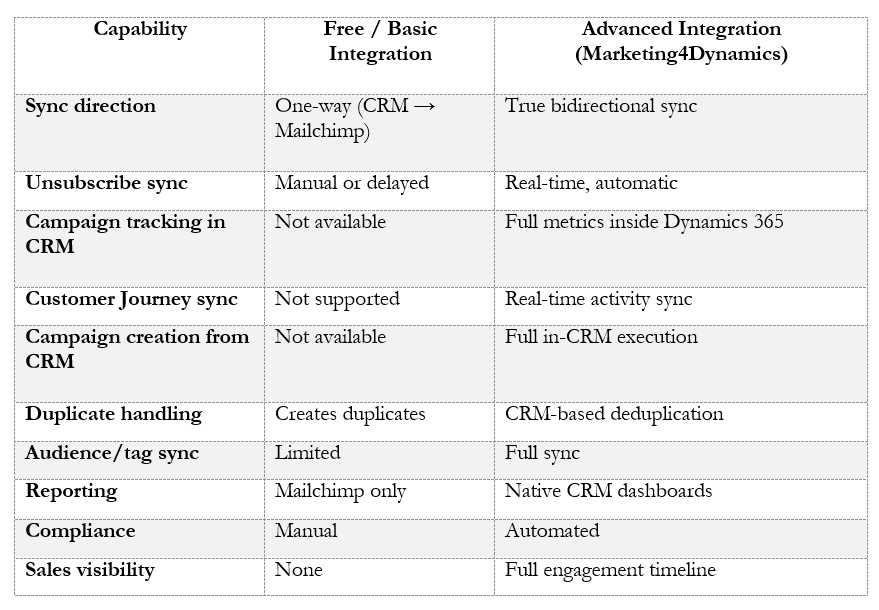
The Strategic Cost of Choosing a Free Integration
The cost is not the license savings. The real cost is:
- Dirty CRM data from incomplete or failed syncs
- Compliance exposure from unmanaged unsubscribes
- Sales teams are missing critical campaign engagement signals
- Admin hours lost to manual imports, exports, and reconciliation
- Marketing and sales operating on different versions of the truth
- Reduced CRM adoption as users work around a broken integration
A Mailchimp integration is not just a connector. It is a data governance layer, a sales enablement surface, and a compliance mechanism. If it does not align with your CRM architecture and business process, it becomes operational noise.
Where Marketing4Dynamics Makes the Difference
Marketing4Dynamics by Inogic is purpose-built for Dynamics 365 CRM designed not just to connect Mailchimp, but to fully integrate it into your CRM ecosystem.
It goes beyond basic sync to deliver:
- Real-time bidirectional data synchronization
- Mailchimp Customer Journey tracking inside CRM
- Native campaign creation and execution in Dynamics 365
- Full visibility of opens, clicks, bounces, and unsubscribes
- Automated compliance and consent sync
- CRM-aware deduplication and data governance
This transforms your Mailchimp integration from a connector into a marketing-sales intelligence layer.
Ready to See the Difference?
Explore how Marketing4Dynamics transforms your Dynamics CRM Mailchimp connector from a basic sync into a full marketing-sales intelligence layer.
Start your 15-day free trial available on the Inogic Website and Microsoft Marketplace.
Want a strategic demo of Marketing4Dynamics in your CRM environment? Reach us at [email protected].