Why Small Manufacturers Are Moving to Business Central for ERP in 2026
If you are searching for the best manufacturing ERP for small business, it usually means your current systems are starting to break down.
Spreadsheets are everywhere. Inventory is not always accurate. Production planning feels reactive instead of controlled. And getting a clear view of costs and profitability is harder than it should be.
At this point, most small manufacturers realize the same thing. They do not just need better tools. They need a system that connects everything.
That is what ERP is designed to do. It brings together production, inventory, and financials into a single system that reflects how your business actually operates. In this guide, we break down the best options and how to choose the right one.
What Makes Manufacturing ERP Different
Not all ERP systems are built for manufacturing.
Many platforms are designed around accounting first, with production added later. That approach can work for simple operations, but it often creates gaps as manufacturing complexity increases.
Those gaps usually show up in a few key areas. Bills of Material become difficult to manage or cost accurately. Production planning lacks structure. Inventory does not reflect what is actually happening on the shop floor. And reporting starts to fall out of sync with real operations.
A true manufacturing ERP is built differently.
It connects production, inventory, purchasing, and financials in a way that mirrors how your business actually runs. Instead of working around the system, your processes are supported by it. That is what allows manufacturers to move from reactive decision-making to controlled, data-driven operations.

What Small Manufacturers Need from an ERP
When evaluating a manufacturing ERP for small business, the goal is not more features. It is the right capabilities.
Your ERP should match how your business actually runs.
For most small manufacturers, that comes down to a few essentials:
- Production management that supports your workflow, from assembly to full production
- Bills of Material (BOMs) with clear structure, version control, and accurate costing
- Material Requirements Planning (MRP) to align purchasing and production with real demand
- Real-time inventory visibility across locations
- Shop floor visibility to track progress, labor, and material usage
- Integrated financials so costing and reporting reflect real operations
- Scalability so the system grows with you
If your ERP cannot handle these fundamentals, it will create more work instead of removing it.
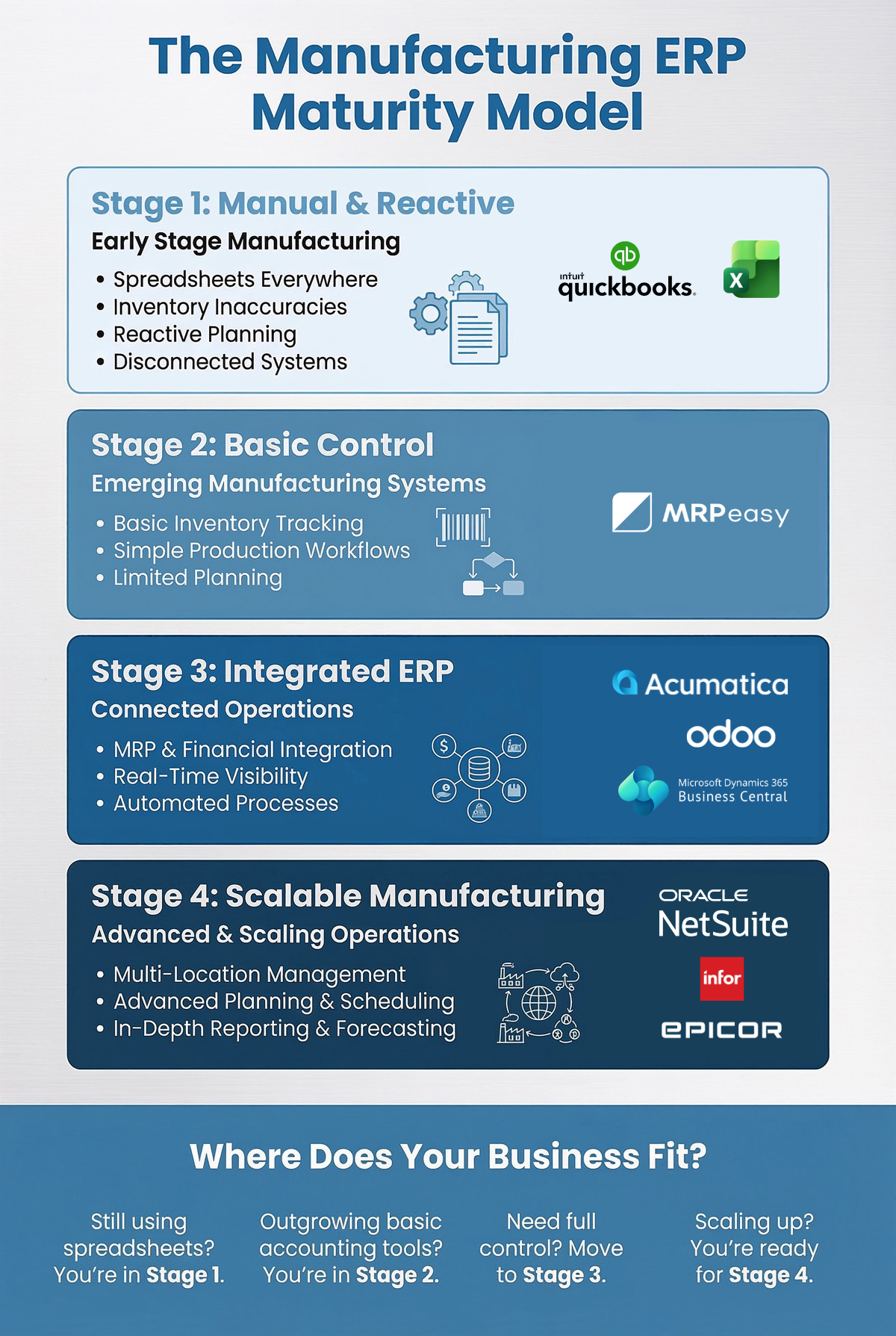
Understanding the Manufacturing ERP Maturity Model
Most small manufacturers do not move to ERP all at once. They evolve.
What starts as spreadsheets and a basic accounting system eventually turns into disconnected processes, inconsistent data, and limited visibility across the business. As operations grow, those gaps become harder to manage.
The manufacturing ERP maturity model helps explain this progression.
It shows how manufacturers typically move from manual, reactive operations to fully integrated systems that support planning, execution, and growth.
- Stage 1: Manual and Reactive
Operations rely on spreadsheets and basic tools. Inventory is often inaccurate, planning is reactive, and information is spread across multiple systems. - Stage 2: Basic Control
Systems are introduced for inventory and simple production workflows. There is more structure, but planning is still limited and often manual. - Stage 3: Integrated ERP
Financials, inventory, and production are connected in one system. MRP, real-time visibility, and more structured workflows begin to take shape. - Stage 4: Scalable Manufacturing
The business manages multiple locations, more advanced planning, and deeper reporting. The system supports growth instead of limiting it.
Most small manufacturers evaluating ERP are moving from Stage 2 to Stage 3.
That transition is where ERP starts to deliver real value. It shifts the business from reactive operations to structured, data-driven decision-making, while creating a foundation for long-term growth.
Top Manufacturing ERP (and Accounting) Systems for Small Businesses
Several ERP systems stand out for small manufacturers. Each one serves a different type of business depending on complexity, budget, and growth plans.
The key is not which system is “best” overall. It is which one fits your stage of growth and how your operation actually runs.
Microsoft Dynamics 365 Business Central
Business Central is one of the most complete ERP systems available for small manufacturers. It brings financials, inventory, and production into a single platform, eliminating the need for disconnected tools. It supports both assembly and full production workflows, allowing businesses to start simple and expand into more advanced capabilities like routings, work centers, and MRP. For many manufacturers, it offers the best balance between usability, functionality, and long-term scalability.
Acumatica
Acumatica is a flexible, cloud-based ERP designed to adapt to different manufacturing processes. It includes core capabilities such as BOMs, production orders, and MRP, along with strong financial and inventory management. Its resource-based pricing model can be appealing for growing teams, though implementation plays a major role in how well the system performs over time.
NetSuite
NetSuite is built for companies that are planning to scale. It offers strong financials, multi-entity support, and global capabilities, making it a good fit for manufacturers expanding into multiple locations or business units. While it includes manufacturing functionality, some features require configuration depending on the use case. It is best suited for companies expecting increased complexity.
Odoo
Odoo takes a modular approach, allowing manufacturers to build their ERP system over time. It includes manufacturing, inventory, and accounting modules, with flexibility to customize based on specific needs. This makes it a strong option for budget-conscious companies, but it can require technical expertise to maintain consistency across modules.
Epicor
Epicor is designed specifically for manufacturing environments that require deeper production control. It supports advanced workflows such as scheduling, capacity planning, and shop floor management. It is a strong fit for manufacturers with more complex operations, though it can be more resource-intensive to implement and manage.
QuickBooks Enterprise
QuickBooks Enterprise is often used by very small manufacturers that start with accounting-first systems. It can handle basic inventory and simple BOMs, but it is not a true manufacturing ERP. As operations grow, most companies rely on workarounds or additional tools, which limits long-term scalability.
Each of these systems fits a different stage of growth.
The right choice depends on whether you need a simple system to gain control, or a platform that can support you as your operations become more complex.
How to Choose a Manufacturing ERP for Small Business
Choosing the right manufacturing ERP for small business is not about finding the system with the most features.
It is about finding the system that fits how your business operates today, while supporting where you are going next.
For most small manufacturers, the decision comes down to a few key factors:
- How you manufacture: Assembly, make-to-stock, make-to-order, or engineer-to-order. Not every ERP handles these models equally well. If the system does not align with how you build products, you will end up forcing your processes into the software.
- Your current level of complexity: Number of SKUs, order volume, inventory across locations, and planning requirements all matter. Some systems are designed for simplicity, while others are built for more complex operations.
- Your growth plans: Many businesses choose based on current needs, then outgrow the system within a few years. Consider future order volume, additional locations, and increased planning requirements before making a decision.
- Financial integration: Your ERP should connect production, inventory, and financials in one system. Without that connection, costing and reporting become unreliable, and decision-making slows down.
- Implementation and support: The ERP itself is only part of the equation. The success of the system depends on how well it is implemented. A partner that understands manufacturing will configure the system around your processes, not force you into a generic setup.
When you evaluate ERP systems through this lens, the options become much clearer.
The goal is not just to replace your current tools. It is to build a system that removes friction and supports how your business actually runs.
Why Many Small Manufacturers Choose Business Central
At some point, small manufacturers stop looking for another tool and start looking for a system that can actually support how their business runs.
That is where Microsoft Dynamics 365 Business Central comes in.
Business Central is designed to connect financials, inventory, and manufacturing in a single platform. Instead of managing production in one system and accounting in another, everything is aligned. That means better visibility, more accurate costing, and fewer workarounds.
For small manufacturers, this matters.
It allows you to move from reactive planning to structured operations. Production, purchasing, and inventory are connected through Material Requirements Planning. Financials reflect what is actually happening on the shop floor. Reporting becomes something you can rely on instead of something you have to question.
Just as importantly, Business Central is built to scale.
You can start with simpler workflows and expand into more advanced capabilities as your operations grow. That includes deeper production management, more structured planning, and better reporting across the business.
For many small manufacturers, the goal is not just to replace spreadsheets or QuickBooks.
It is to implement a system that can support the business for years without needing to be replaced.
That is where Business Central stands out.
Next Steps
If you are evaluating a manufacturing ERP for small business, the next step is to get clear on where your current setup is falling short.
Start by identifying the gaps:
- Where are you relying on spreadsheets or manual workarounds
- Where is inventory or production data unreliable
- Where are delays or inefficiencies showing up
From there, assess whether your current systems can support your next stage of growth.
An ERP should not just solve today’s problems. It should give you a foundation to scale without needing to replace it in a few years.
If you want a clearer picture of what that looks like, you can schedule a free 30-minute consultation with a Business Central specialist to walk through your current setup and next steps.