Free Kanban vs Enterprise Kanban in Dynamics 365: How to Choose Right Tool in 2026
If you manage CRM strategy in Microsoft Dynamics 365, you’re not selecting a Kanban board. You’re defining how revenue moves through your CRM.
You’re deciding:
- How pipeline visibility impacts forecasting accuracy
- How user experience impacts CRM adoption
- How data movement impacts process compliance
- How visualization impacts revenue velocity
The Hidden Cost of Free Kanban Tools in Dynamics 365 CRM
Free Kanban tools are often adopted at the user level and promise simplicity, not at the strategy level. But in enterprise CRM environments, simplicity often means functional compromise. And compromise at the pipeline layer affects revenue execution. And that’s where enterprise risk begins.
Why This Matters to CRM Leaders (Not Just End Users)
For a sales rep, a Kanban board is convenient. For a CRM Manager or Product Owner, it is:
- A process governance layer
- A BPF enforcement mechanism
- A forecasting lens
- A CRM adoption driver
- A data integrity surface
If your Kanban layer is weak, your CRM execution layer becomes inconsistent.
The Executive Reality: CRM Visualization Impacts Revenue
Industry research consistently shows:
- High CRM adoption correlates with improved quota attainment (Salesforce State of Sales reports show high-performing teams are significantly more likely to use structured pipeline management tools).
- Gartner research indicates poor data quality costs organizations millions annually.
- McKinsey studies show workflow friction reduces productivity by 20–30% in digital sales environments.
- Forrester reports that process automation and structured sales execution significantly improve win rates.
When Kanban becomes a card management tool instead of a decision engine, utilization drops.
Internal workflow studies in sales operations environments show that users can spend up to 30–40% of pipeline time navigating tools instead of executing sales actions when visualization tools lack inline editing, filtering, and aggregation capabilities.
For CRM leaders, that’s not a UI issue. That’s a revenue leakage issue.
The 7 Strategic Evaluation Questions Every CRM Decision Maker Must Ask
1. Does the Kanban Tool Support Multi-Entity Business Pipelines?
Enterprise CRM environments rarely operate on Opportunities alone.
You may require:
- Lead-to-Opportunity flows
- Case-to-Resolution boards
- Custom entity workflows
- Cross-functional pipeline visualization
A free tool often supports a single entity view.
A strategic CRM Kanban solution must:
- Support OOB entities
- Support custom entities
- Allow multi-entity BPF orchestration
If not, you create process silos.
2. Does Kanban Board Respect Your CRM Customization Strategy?
Admins and product managers invest heavily in Custom fields, Custom entities, Business rules, Security roles, and custom pages. If the Kanban board cannot dynamically adapt to these configurations, it becomes a surface-level visualization, disconnected from your CRM architecture.
Decision-maker insight: A tool that doesn’t align with your metadata model increases technical debt.
3. Does the Kanban tool Support Business Process Flow (BPF) Governance in CRM?
In Microsoft Dynamics 365, Business Process Flow is not cosmetic. It drives:
- Stage compliance
- Sales methodology alignment
- Reporting structure
- Forecast categorization
A serious Kanban board should allow:
- Multi-entity BPF handling
- BPF pinning (global & personal)
- Stage-based organization
- Cross-entity BPF consistency
Free tools typically flatten BPF logic into basic status lanes, which breaks process governance.
4. Can Revenue Be Visualized Without Opening Records in Kanban Board?
Forecasting should not require:
- Opening each opportunity
- Manual calculation
- Exporting to Excel
A decision-grade Kanban board must:
- Show aggregate revenue in lane headers
- Display weighted pipeline values
- Surface deal counts instantly
Without this, your board is decorative, not strategic.
5. Does Kanban Board Reduce Clicks or Increase Them?
Free tools often:
- Require record opening for edits
- Lack inline actions
- Don’t support quick activity creation
An enterprise-grade board should provide:
- Drag-and-drop stage updates
- Quick actions (Email, Call, Task)
- Inline record editing
- Ribbon command access
For CRM leaders, fewer clicks = higher adoption.
6. Does Kanban Board Support Advanced Filtering & Grouping?
Complex pipelines require:
- Swim lanes
- Row grouping
- Expand/collapse logic
- Dynamic filtering
- Sorting by custom fields
If users must switch views to filter data, productivity drops and adoption declines.
7. Is Kanban Tool Built for Enterprise Data Volume?
Performance is rarely discussed until it becomes a problem.
Free Kanban tools often struggle with:
- High-volume opportunity datasets
- Multi-region CRM instances
- Large security role matrices
An enterprise-ready Kanban board must include:
- Lazy loading
- Optimized rendering
- Smooth scrolling
- Context-aware refresh
CRM decision makers should always ask: Has this tool been designed for enterprise CRM scale?
Direct Comparison: Free Kanban vs Enterprise Kanban in Dynamics 365
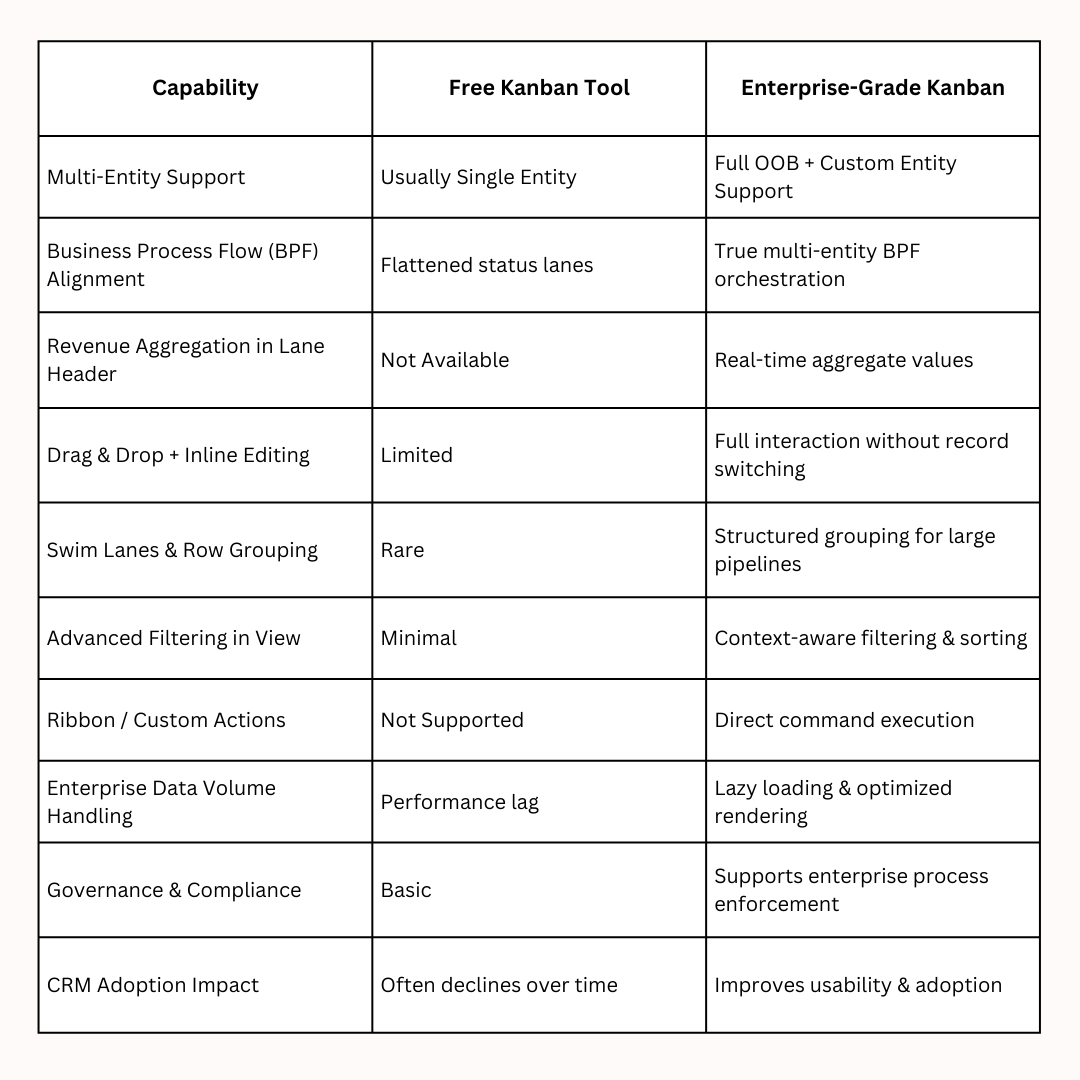
The Strategic Cost of Choosing a Free Kanban Tool
The cost is not license savings.
The cost is:
- Lower CRM adoption
- Inconsistent BPF compliance
- Reduced forecasting accuracy
- Increased admin support tickets
- Higher training overhead
- User frustration
A Kanban board is not just UI. It is a workflow accelerator.
If it doesn’t align with governance, performance, and customization strategy — it becomes operational noise.
Why Advanced Kanban Boards Make the Difference
For organizations using Microsoft Dynamics 365, a Kanban board should not simply “display stages.” It should execute business logic, align with process governance, and provide real-time operational intelligence.
This is exactly where the Kanban Board by Inogic positions itself at the #1 position.
Recognized as one of the most advanced Kanban solutions built specifically for Dynamics 365 CRM, it goes beyond surface-level visualization to deliver real-time, business-aligned execution capabilities. Here’s how it quietly sets the benchmark:
Kanban Across Any Entity: Supports both out-of-the-box and custom entities with configurable lanes and structured layouts, ensuring the board aligns with your CRM architecture, not the other way around.
Lane Configuration with Revenue Aggregation: Create lanes based on status, stage, priority, or custom fields, with real-time revenue totals and card counts displayed directly in headers for instant pipeline visibility.
Execution-Ready Interactive Cards: Drag-and-drop stage updates, quick actions (Email, Task, Call), color coding, and flexible layouts, enabling action without record switching.
Built-In BPF Alignment: Multi-entity Business Process Flow support with global and personal pinning, keeping stage progression aligned with governance and sales methodology.
Advanced Filtering & Context Control: In-board search, dynamic filtering, ribbon access, and custom rule triggers, all within the same view.
Enterprise-Grade Performance: Optimized rendering, lazy loading, and smooth responsiveness are designed for high-volume Dynamics 365 environments.
Executive Summary for CRM Leaders
If you are:
- A CRM Manager responsible for adoption
- A Product Manager responsible for roadmap alignment
- A CRM Admin managing customization complexity
- A Decision Maker optimizing revenue processes
Then your Kanban board must:
- Align with CRM architecture
- Support enterprise customization
- Respect Business Process Flow governance
- Improve forecasting visibility
- Reduce operational friction
Free tools are built for simplicity. Enterprise CRM execution requires sophistication.
Want to know how the advanced Kanban Board works in your CRM? Get a 15-day free trial from the Inogic Website or the Microsoft Marketplace.
Want to have a CRM data visualization and workflow automation strategic demo? Reach us at [email protected].
Until then, keep visualizing and keep growing!