9 Reasons You Should Choose a Kanban Board for Better Workflow Control in CRM
In the era of a hyper-competitive business environment, teams demand clarity, speed, and actionable insights from their CRM. Traditional list and grid views can’t deliver the instant visibility that modern sales, support, and operations teams need. That’s why visual workflow management has become a cornerstone of CRM success, and the Kanban Board by Inogic is leading the charge for Dynamics 365 CRM users worldwide.
What Is a Kanban Board?
A Kanban board is a visual tool for tracking workflows, organizing work items as “cards” in columns (“swim lanes”) that represent task status, business process stages, ownership, or priority. In Dynamics 365 CRM, this means you can visually map your sales pipeline, service cases, projects, and more, without endless scrolling or report generation.
This shift from static grids to interactive boards aligns with the way teams think, work, and collaborate, making workflows intuitive, transparent, and fast.
How Kanban Board directly addresses core business needs and why it’s the preferred visual productivity solution for CRM teams worldwide.
1. See Workflow Progress at a Glance
Problem: Teams struggle to understand where work stands in the pipeline without deep filtering or running reports.
How Kanban Board Helps:
With Kanban Board, your CRM records are transformed into visual cards grouped into lanes and rows that represent stages like Lead → Qualified → Proposal → Close. This visual representation gives teams instant clarity on progress, eliminates guesswork, and highlights bottlenecks without drilling into lists or reports.
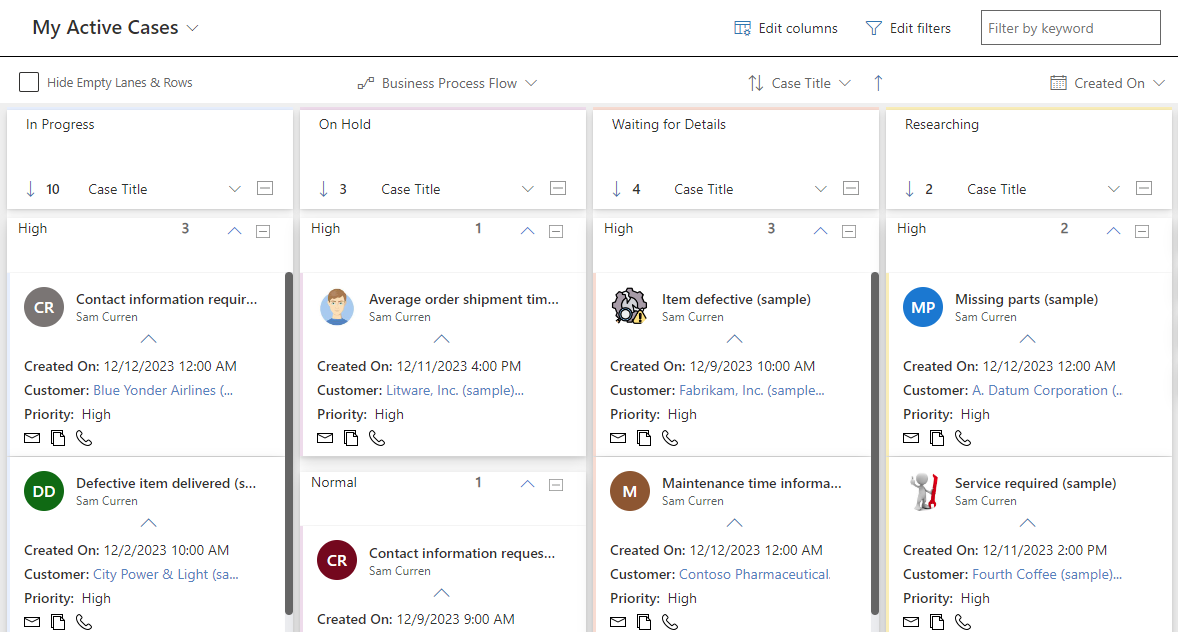
2. Act Faster Without Manual Updates
Problem: Updating CRM records often requires opening multiple forms and tabs, causing lost time and repetitive clicks.
How Kanban Board Helps:
Kanban Board supports drag-and-drop updates, where moving cards across lanes automatically updates the underlying CRM fields. This inline update capability means less clicking, fewer form opens, and more time spent executing work rather than managing data.
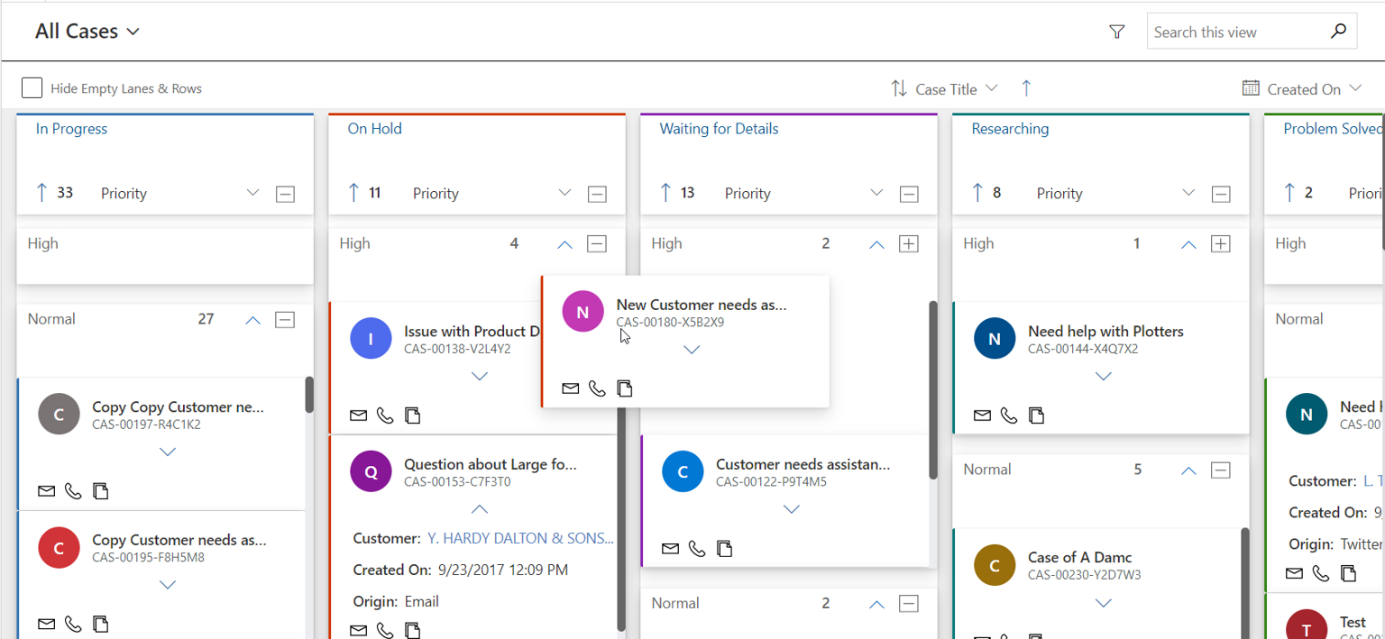
3. Make Prioritization and Decisions with Real-Time Visibility
Problem: Managers and team leads need fast insights into opportunity values, case counts, and workloads to guide decisions, but traditional views make this tough.
How Kanban Board Helps:
The Kanban Board displays aggregate values (SUM, COUNT, MIN/MAX) and customizable drill-downs within lanes and rows, allowing stakeholders to track pipeline value, task volumes, and priorities without exporting data. This turns raw CRM data into real actionable intelligence.
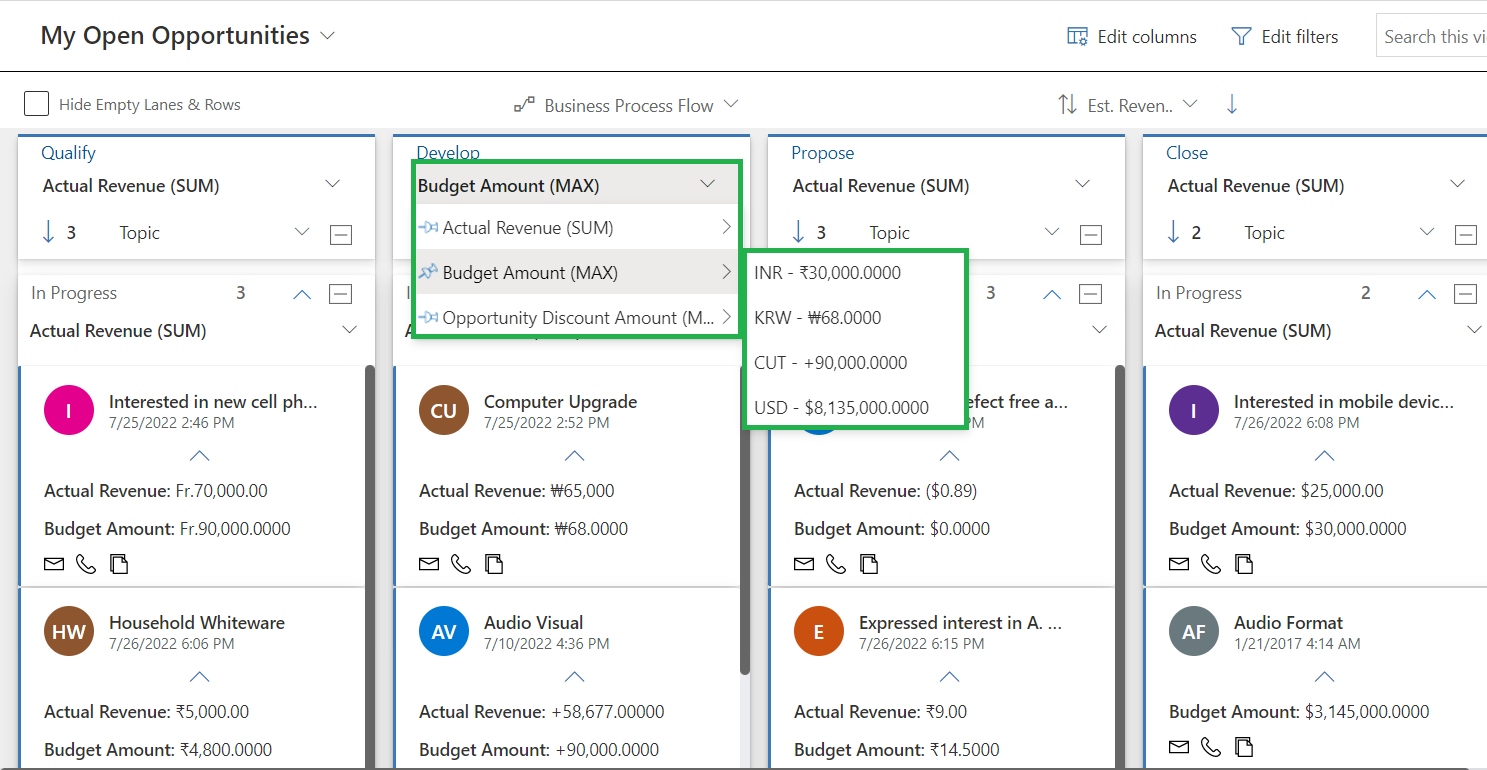
4. Align the Team Around Common Processes
Problem: Teams use different processes or stages, causing misalignment and inconsistent execution.
How Kanban Board Helps:
Kanban Board supports Business Process Flows (BPF) across entities, letting you map CRM stages visually in alignment with actual business methodologies. It also groups records by process stages so distributed teams stay synchronized and follow your best-practice workflows.
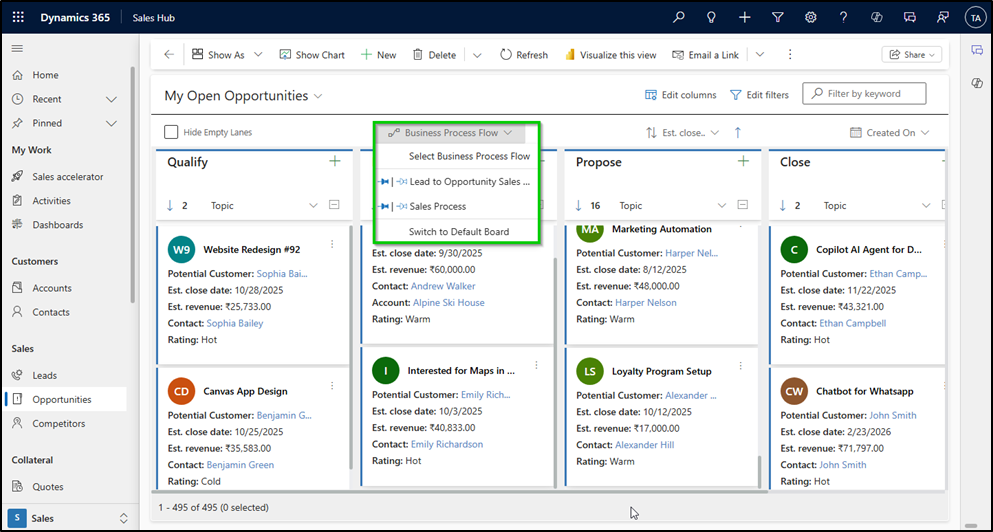
5. Stay Organized When Managing Large Data Volumes
Problem: CRM systems with thousands of records can slow down or overwhelm users, diluting productivity.
How Kanban Board Helps:
With features like row grouping, flexible swim lanes, and optional dynamic loading, Kanban Board manages high-volume data smoothly. Teams can scroll through boards and focus on what matters, without performance lag or confusion.
6. Reduce Redundant Tasks and Manual Errors
Problem: Repetitive updates and manual record changes increase the risk of human error and duplicate work.
How Kanban Board Helps:
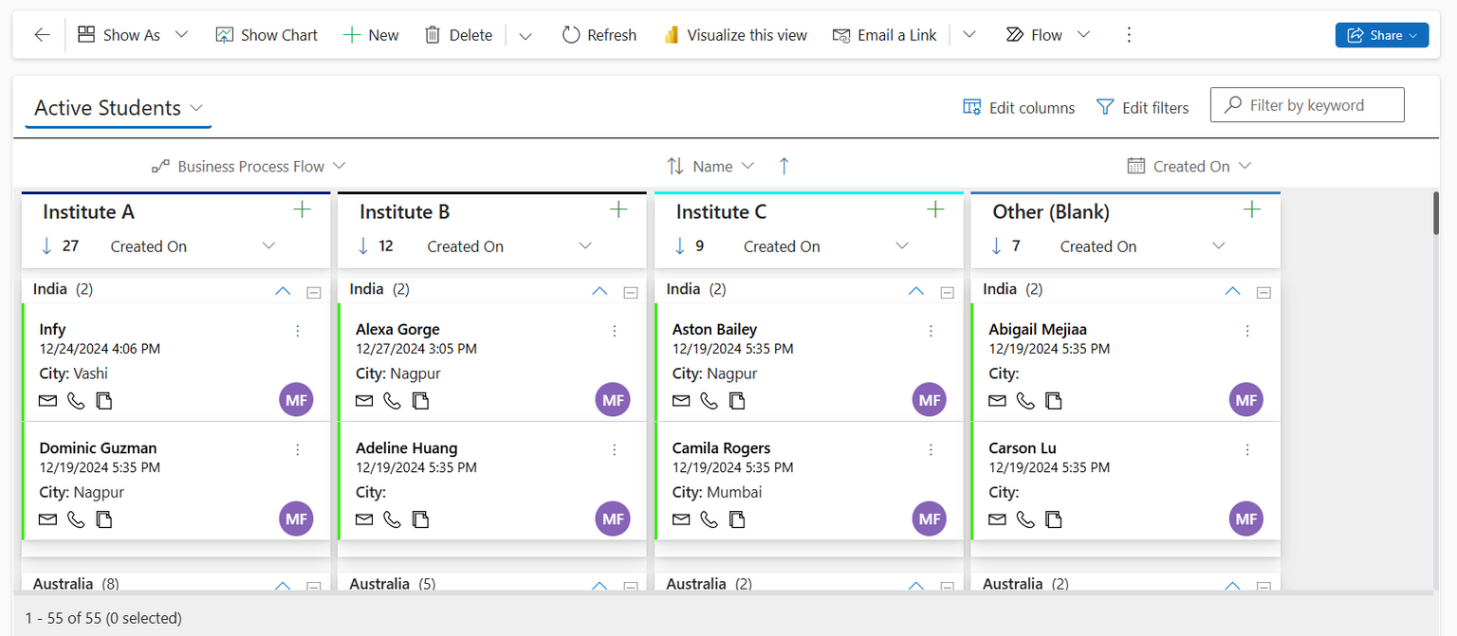
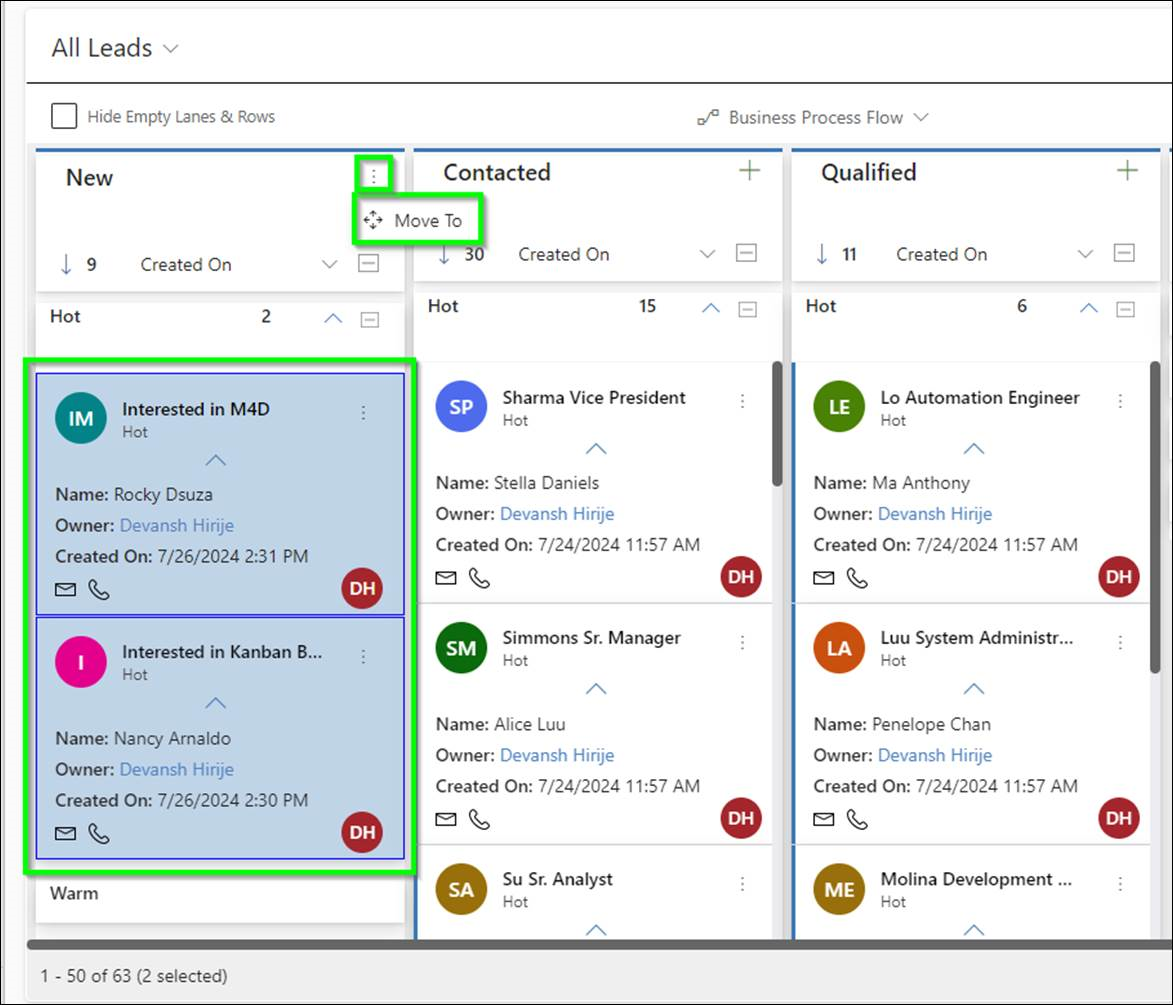
Kanban Board eliminates these inefficiencies by allowing quick inline edits, bulk moves of multiple cards at once, and real-time visual context that reduces duplicate efforts and miscommunication. It also ensures the underlying CRM data stays up-to-date and compliant with business rules.
7. Find What You Need Fast
Problem: Searching through rows of CRM data is time-consuming and distracts teams from their core tasks.
How Kanban Board Helps:
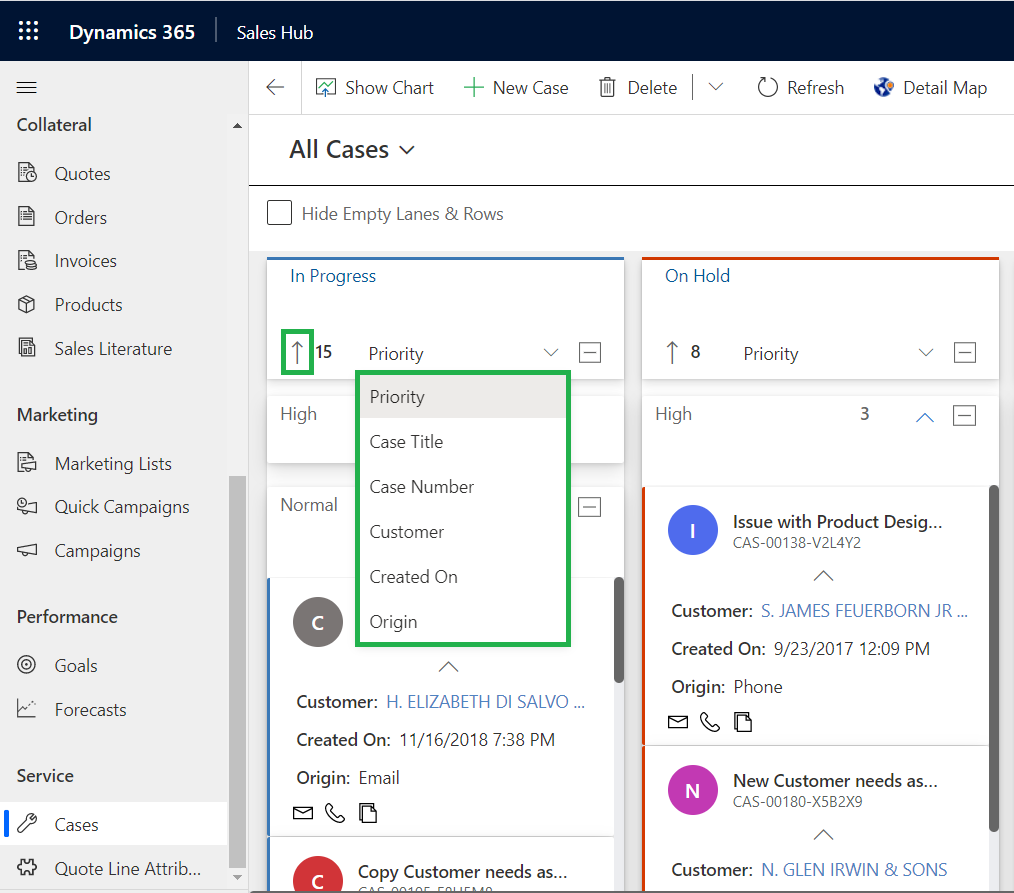
The built-in quick search, filters, and sorting let users instantly locate cards based on keywords or field criteria, so teams spend less time looking and more time doing.
8. Improve Collaboration Across Functions
Problem: Teams often work in silos, leading to miscommunication and duplicated efforts.
How Kanban Board Helps:
A shared Kanban view brings everyone onto the same visual page. With real-time visibility into tasks and statuses, teams communicate less about updates and focus more on actionable execution. This increased transparency drives accountability and aligns departments around shared goals.
9. Boost Productivity with Context-Aware Actions
Problem: Switching between CRM views and external tools slows down workflows.
How Kanban Board Helps:
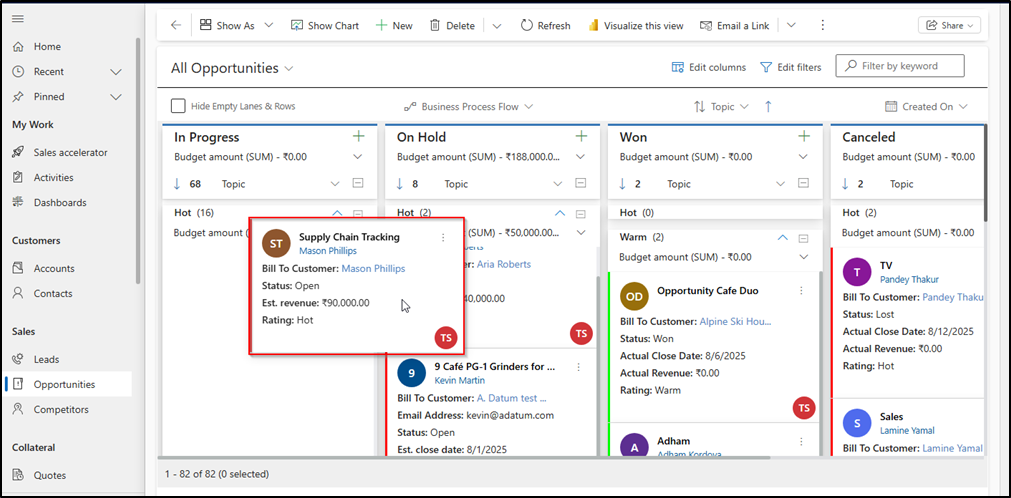
Because the Kanban Board is built natively within Dynamics 365 CRM and Dataverse, all CRM ribbon actions, like creating tasks or logging activities, integrate directly in the board interface. This context-aware productivity helps teams stay in their flow without toggling screens.
Real Business Impact — Beyond Features
The true power of Kanban Board is in what it enables:
- Faster Sales Pipeline Movement: Identify stalled deals and intervene sooner.
- Greater Team Visibility: Managers and executives see workload distribution in real time.
- Improved Productivity: Users spend less time navigating screens and more time executing.
- Better Collaboration: Shared visual context reduces miscommunication.
How This Solves Everyday CRM Pain Points
Here’s how different teams benefit:
Sales Teams
- Track opportunity stages visually.
- Prioritize pipeline by value or close date.
- Spot pipeline bottlenecks instantly.
Support & Service Teams
- Monitor case progress without running reports.
- Assign and update cases faster.
- Improve SLAs by visualizing slack or overload.
Operations & Management
- Align processes across departments.
- Get visual cues for workload planning.
- Use filtered boards for performance reviews.
Final Thoughts: The Future of CRM Is Visual
Data without context is noise. Kanban Board turns CRM data into meaningful, visual action items — helping modern teams work faster, smarter, and with greater clarity. Whether you’re optimizing a sales pipeline, speeding up case resolution, or aligning cross-functional teams, visual workflows are no longer optional — they’re essential.
💡 Make your CRM work the way you think — visually, instantly, and collaboratively — with Kanban Board by Inogic.
Getting Started — Transform Your CRM Workflow Today
If your team is ready to eliminate visibility gaps, reduce repetitive clicks, and accelerate progress with visual workflows, Kanban Board by Inogic is the visual tool built for your business needs.
Try it free for 15 days, install from the Inogic website or Microsoft Marketplace to experience immediately improved clarity and productivity.
Start Seeing Results — Try Kanban Board Today
Getting started is simple: install Kanban Board, connect to your Dynamics 365 CRM environment, and transform your most critical views into visual workflows that drive action, not just report on it.