A Decision-Maker’s Guide on Advanced Record Cloning in CRM for 2026
Why This Is Not Another “Clone Button” Blog
If you are a CRM Director, RevOps leader, or Dynamics 365 owner, your problem is not copying records.
Your real problem is this:
Your teams repeat the same business transactions hundreds of times a month, but your CRM forces them to rebuild each one manually.
Opportunities, Quotes, Cases, Orders, Renewals, Invoices —These are not unique. They are structured processes that repeat with slight variations.
And every time they repeat, your CRM burns:
- Time
- Accuracy
- Revenue
- User adoption
Click2Clone has spent more than 6 years inside production Dynamics 365 environments solving exactly this problem.
The Enterprise Problem Microsoft Never Solved
Dynamics 365 was built to store data — not replicate business processes.
Native CRM gives you:
- New record
- Blank form
- Manual re-entry
- Broken relationships
But real enterprises run on:
- Standardized deal structures
- Repeatable service models
- Subscription templates
- Contract frameworks
Without intelligent cloning, your CRM becomes:
- A typing tool
- A source of errors
- A barrier to scale
This is why large CRM deployments stall after go-live.
What Click2Clone Actually Is?
Click2Clone is not a utility.
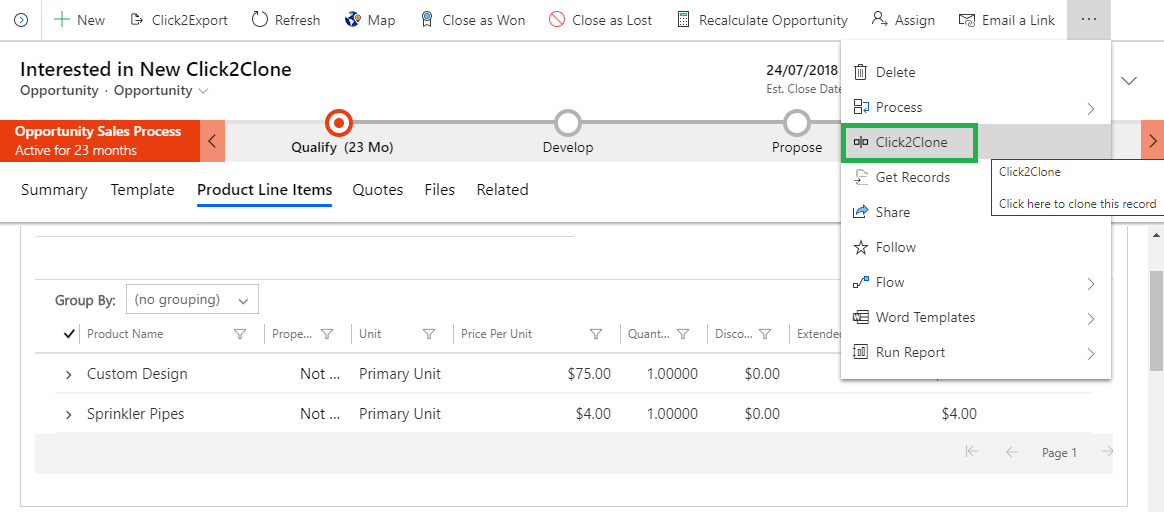
Click2Clone is an enterprise-grade record and relationship replication platform for Microsoft Dynamics 365 that allows organizations to duplicate complete CRM transactions, including parent records, child records, and entity relationships, in a single action.
It is used to convert repeatable business operations into reusable CRM processes
Click2Clone - It is a process replication engine for Dynamics 365.
It allows you to:
- Capture a proven business transaction
- Preserve its structure, relationships, and logic
- Reuse it across the organization in one click
This turns your CRM from a data store into a process accelerator.
Why Click2Clone Exists
Microsoft Dynamics 365 was designed to store and manage customer data.
It was not designed to replicate business transactions.
In real organizations:
- Deals repeat
- Quotes follow the same structure
- Service cases recur
- Invoices follow templates
- Renewals are nearly identical
Without structured cloning, every transaction must be rebuilt manually — which creates:
- Data inconsistency
- User fatigue
- Process drift
- Revenue leakage
Click2Clone was created to solve this systemic CRM limitation.
How Click2Clone Delivers 90% Data Entry Reduction
This comes from one enterprise capability:
Deep, relationship-aware record cloning
It means when you clone:
- An Opportunity → Quotes, Products, Activities follow
- A Case → Tasks, SLAs, and child records follow
- An Invoice → Line items, pricing, and references follow
Your teams don’t rebuild transactions.
They replay them.
How Click2Clone Reduces the Time Required to Create New Records
Let’s look at a mid-size Dynamics 365 deployment:
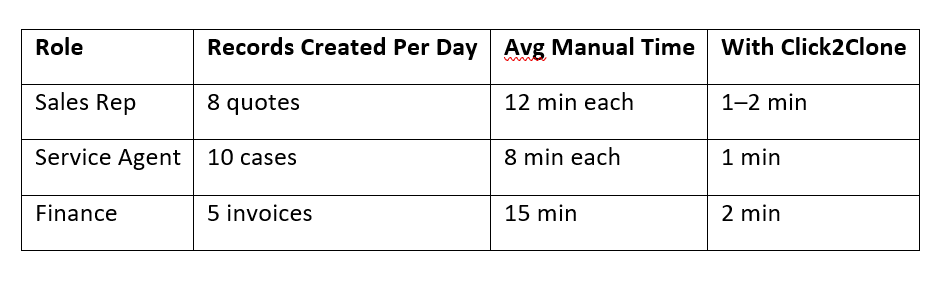
Across 30–50 users, this becomes hundreds of hours per month.
This typically reduces CRM creation time by 80–90% per transaction.
Click2Clone converts that lost time into:
- More selling
- Faster resolution
- Faster billing
- Higher CRM adoption
This is why mature CRM teams deploy it.
Ready to see how this works inside your CRM?
Click2Clone lets you replicate real Dynamics 365 transactions — not just copy fields — so your teams stop rebuilding the same records again and again.
Explore how Click2Clone fits your CRM workflows → Technical Documentation
See how much time your teams can save → Get a 15-day free trial for Click2Clone
Why Click2Clone Is Not Replaceable by Power Automate or Custom Code
Power Automate can move or copy fields.
It cannot:
- Clone relationships
- Preserve transaction hierarchies
- Replicate entire CRM processes
Custom development is:
- Expensive
- Hard to maintain
- Breaks during upgrades
Click2Clone is purpose-built for CRM replication and supported across Dynamics releases.
Why Enterprises Choose Click2Clone After 6+ Years in Market
Decision makers do not buy features — they buy risk reduction.
Click2Clone is used because it delivers:
1. Data Governance
Cloned records follow the same structure every time.
No missing fields. No broken references. No reporting drift.
2. Process Standardization
Winning deals, compliant cases, and approved invoices become templates that everyone reuses.
3. Scalability Without Hiring
As volumes grow, CRM teams don’t need more staff — they need faster execution.
Why Native CRM and Power Automate Can’t Replace It
Workflows and Power Automate:
- Trigger actions
- Move data
- But cannot replicate a full transaction with relationships
Click2Clone is purpose-built for:
- Multi-entity cloning
- Relationship preservation
- Business-ready duplication
This is why admins stop trying to build it themselves.
Where Click2Clone Fits in a Modern CRM Stack
Click2Clone sits between:
- Your CRM data
- Your automation
- Your reporting
It ensures that everything being automated or reported on is:
- Structured
- Consistent
- Repeatable
That’s why it becomes a core CRM productivity layer in mature deployments.
Who Click2Clone Is Designed For
This is not a “nice to have” tool.
It is built for:
- CRM Directors
- RevOps teams
- Finance leaders
- Support leaders
- Dynamics 365 Admins
Anyone responsible for:
- Scale
- Accuracy
- Adoption
- Performance
What You’re Really Buying with Click2Clone
You’re not buying cloning.
You’re buying:
- Fewer errors
- Faster cycles
- Higher CRM ROI
- Less user friction
- Operational leverage
That is why Click2Clone has remained relevant for more than six years, while most CRM add-ons disappear.
FAQs: Clone Records in Dynamics 365 CRM
How does Click2Clone reduce CRM data entry by up to 90%?
Click2Clone eliminates manual re-entry by copying entire record structures, such as opportunities, quotes, invoices, cases, and their related data, so users only modify what changes instead of recreating everything from scratch.
How is Click2Clone different from native Dynamics 365 record copy?
Native Dynamics 365 can only create blank records. It cannot duplicate child records, line items, relationships, or business structure. Click2Clone performs deep cloning, preserving the entire transaction hierarchy, which native CRM cannot do.
Can Click2Clone clone related records and line items?
Yes. Click2Clone supports deep cloning, meaning it copies not only the parent record but also all associated records such as products, tasks, invoices, quotes, activities, and custom entities.
Can Click2Clone be used for recurring business processes?
Yes. It is ideal for recurring processes such as renewals, subscriptions, service cases, contract creation, and repeat sales where similar records must be created repeatedly.
Is Click2Clone better than using Power Automate for cloning records?
Yes. Power Automate can move or copy data but cannot replicate full CRM transactions with relationships. Click2Clone is purpose-built for relationship-aware CRM cloning.
Ready to standardize how your CRM executes business?
Click2Clone lets you transform repeatable transactions into reusable CRM processes — so your teams work faster, your data stays accurate, and your operations scale without friction.
- See how Click2Clone fits into your Dynamics 365 environment
- Evaluate how much time your teams can recover
- Get 15-day free trial from the Inogic Website or Microsoft Marketplace.
- Reach us at crm@inogic.com, and Request an enterprise demo tailored to your processes