Tree View vs Mind Map View in Dynamics 365 CRM: Choosing the Right Relationship Visualization Method
For more than a decade, CRM teams have relied on visual relationship mapping to make sense of complex accounts, stakeholders, and interconnected records. Tools like Mind Map views changed how users discover relationships inside Dynamics 365 CRM.
But as CRM usage matured, data volumes increased, hierarchies deepened, and teams demanded faster operational clarity, one thing became clear: exploration alone is no longer enough.
That insight led to the evolution of Tree View inside Map My Relationship by Inogic, not as a replacement for Mind Map, but as a complementary visualization designed for structured, action-oriented CRM work.
Years of CRM Relationship Mapping: What Changed?
When Mind Map visualizations were first introduced in CRM:
- Users needed discovery
- Relationships were often unknown
- Navigation was non-linear
Mind Map View for CRM relationship visualization excels at helping users explore stakeholders, brainstorm connections, and visually expand relationships without constraints.
However, real-world CRM usage evolved:
- Accounts now contain hundreds of related records
- Sales and service teams need a predictable hierarchy
- Managers want repeatable, consistent views
- Admins must manage N-level, multi-entity relationships
This shift exposed a gap; CRM users needed structure, not just exploration.
Where Mind Map View is Best and Where It Starts to Struggle
Mind Map works best when:
- Exploring unknown relationships
- Visualizing associations freely
- Brainstorming stakeholders
- Understanding relationship context at a high level
But Mind Map becomes challenging when:
- Data depth increases significantly
- Users want top-down clarity
- Teams need fast navigation
- CRM actions must be performed quickly
- Relationship structures must remain consistent
This is exactly where Tree View comes in.
Why CRM Users Asked Tree View for CRM Relationship Visualization
Tree View wasn’t created as a “new visualization idea.” It emerged directly from how CRM teams actually work:
- Sales managers needed a predictable account hierarchy
- Account teams wanted to move parent → child → sub-child without losing context
- CRM admins needed clarity across N:N and multi-level relationships
- Operational users wanted fewer clicks and faster understanding
The request was simple:
“Give us a structured, reliable way to view CRM relationships at scale.”
What Is Tree View in Dynamics 365 CRM?
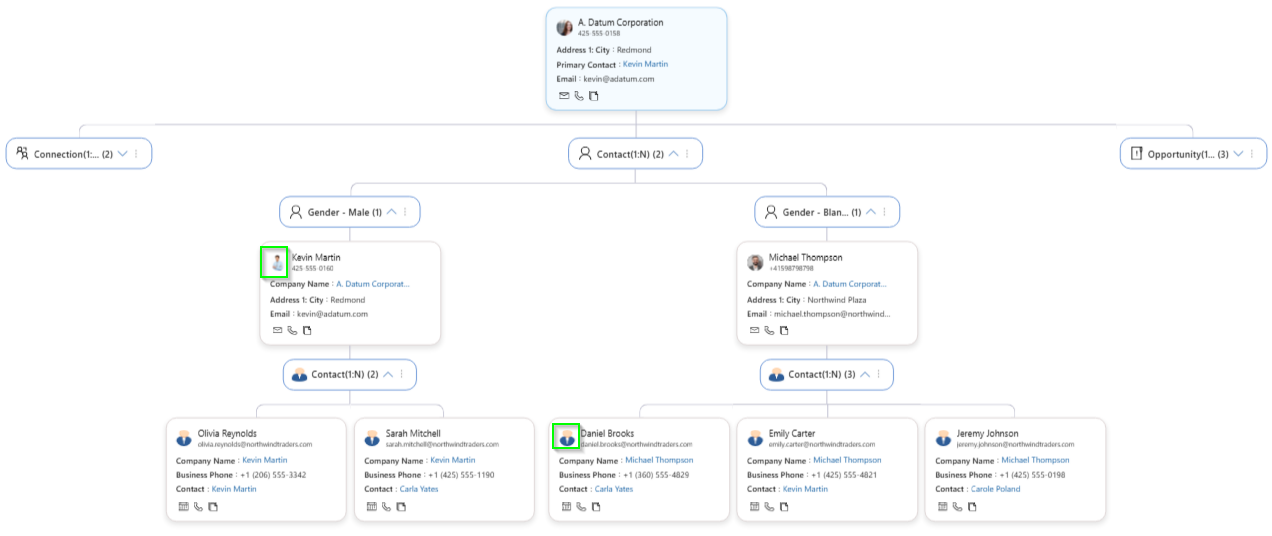
Tree View is a structured top-to-bottom visualization that presents CRM relationships in a clear parent–child format. Instead of navigating multiple forms or subgrids, users can view related accounts, contacts, opportunities, and custom entities in one organized visual flow.
Each node represents a CRM record, displaying essential details, while branches show 1:N, N:1, N:N, or custom relationships, making it easy to understand how records connect at every level.
Mind Map View vs Tree View: Choosing the Right View for the CRM Data Visualization
This isn’t about better or worse. It’s about the right tool, right context.
Use a Mind Map View when you need:
- Relationship discovery
- Open-ended exploration
- Visual brainstorming
- Contextual understanding
Use Tree View when you need:
- Structured CRM Data Visualization
- Deep N-level navigation
- Predictable layouts
- Faster operational actions
- Scalable relationship management
Together, they form a complete relationship visualization strategy.
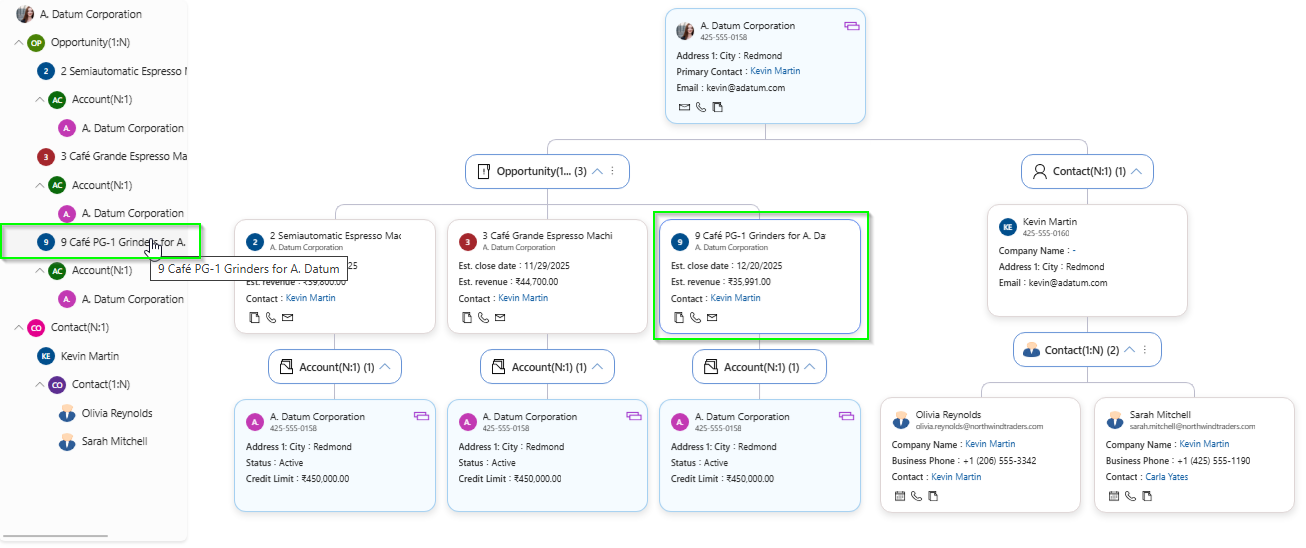
How Tree View Enhances an Established CRM Relationship Platform
Tree View builds on years of CRM visualization learning and introduces capabilities designed for scale and speed.
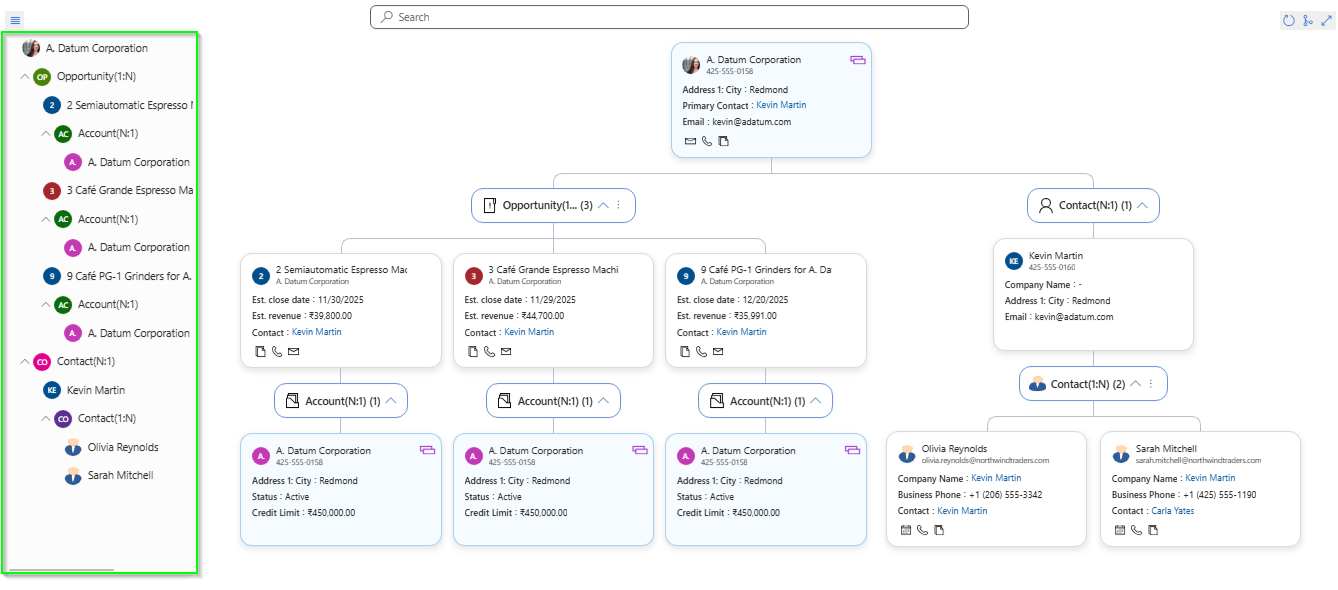
1️. Navigation & Orientation at Scale
- Tree Navigation Panel
- Auto-expand nodes
- Top-to-bottom hierarchy
- Drill-down N-level relationships
Users always know where they are in the relationship structure.
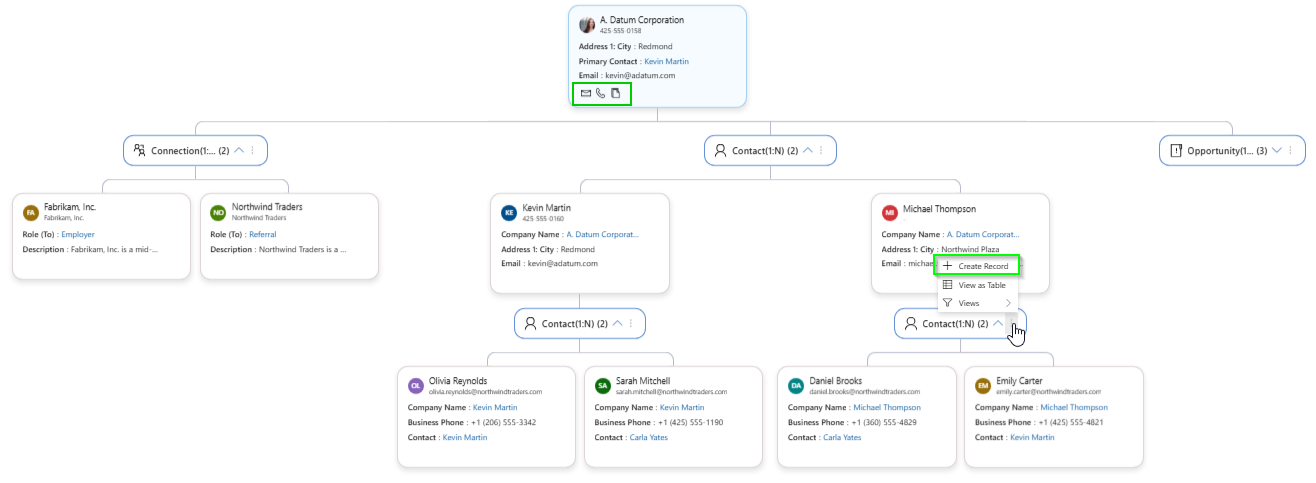
2️. Action Without Losing Context
- Create and associate records directly from the tree
- Perform quick actions like call or email from any node
Tree View becomes an interactive workspace, not just a visual.
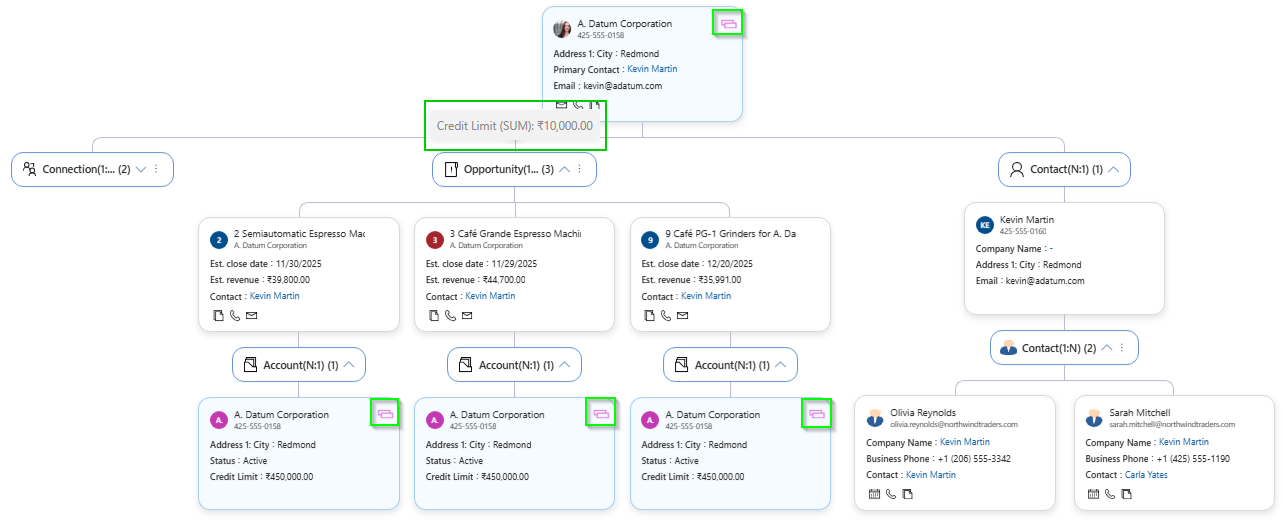
3️. Clarity in Complex CRM Data
- Duplicate record indicators
- Grouping and aggregation
- Filters and view-based exploration
- Switch relationships to table view instantly
Even large datasets remain understandable.
4️. Personalization in Business Language
- Custom node labels
- Custom cluster names
- Entity images in nodes
The tree speaks your organization’s language, not system jargon.
Real-World Scenarios Where Tree View Outperforms Mind Map
- Enterprise Account Management: Understand parent accounts, subsidiaries, and stakeholders instantly.
- Sales Pipeline Reviews: See how opportunities connect across accounts and contacts.
- Customer Support Escalations: Trace relationships across cases, contacts, and organizations.
- CRM Data Audits: Spot duplicate participation and cross-linked records visually.
In each case, Tree View delivers clarity, speed, and confidence.
A Mature CRM Relationship Visualization Product, Multiple Views — One Relationship Platform
After 5+ years of CRM data visualization expertise, Map My Relationship doesn’t force users into one visualization style. It acknowledges a reality every CRM team faces:
Exploration and execution require different perspectives.
Mind Map enables discovery.
Tree View delivers structure.
Together, they empower CRM users to understand relationships and act on them faster.
FAQs
What is Tree View in Dynamics 365 CRM?
Tree View is a hierarchical visualization that displays CRM relationships in a structured parent–child format, allowing users to navigate, analyze, and act on related records from a single view.
How is Tree View different from Mind Map?
Mind Map supports exploratory, non-linear relationship discovery, while Tree View provides a structured, predictable hierarchy ideal for operational clarity and large datasets.
Can Tree View and Mind Map be used together?
Yes. Tree View complements Mind Map by addressing different CRM needs—structure versus exploration, within the same relationship platform.
Who benefits most from Tree View in CRM?
Sales teams, account managers, customer service teams, CRM admins, and leadership reviewing complex account structures benefit most.
Does Tree View replace native Dynamics 365 navigation?
No. Tree View enhances Dynamics 365 by visualizing existing relationships without altering underlying CRM data or workflows.
Conclusion
CRM relationships are no longer simple, linear, or small. As organizations grow, so does the complexity of their accounts, stakeholders, and interconnected data. Over years of real-world CRM usage, one insight has become clear: no single visualization fits every scenario.
Mind Map continues to play a vital role in discovery and exploration. Tree View builds on that foundation by bringing structure, predictability, and operational clarity where CRM users need it most. Together, they represent an evolved approach to relationship visualization—one that adapts to how modern teams actually work inside Dynamics 365 CRM.
Tree View isn’t a shift in direction.
It’s a natural progression—shaped by experience, driven by scale, and designed for clarity.
Ready to experience structured relationship visualization with Tree View in Map My Relationship?
Take the next step toward structured, visual, and context-driven relationship management in Dynamics 365 CRM.
Get Map My Relationship from the Inogic website or the Microsoft Marketplace.
Reach us at crm@inogic.com to request a personalized walkthrough of Map My Relationship and see how Tree View and Mind Map together can help your teams explore, understand, and act on CRM relationships with confidence.