The Only Guide You’ll Need for Dynamics 365 CRM Data Cloning in 2026
Many teams today generate more CRM data than ever - opportunities, cases, projects, quotes, campaigns, and hundreds of custom entities. The challenge? Much of this data follows repetitive patterns, and manually recreating similar records consumes hours of valuable time.
That’s why data cloning has become a core productivity strategy for high-performing CRM teams across the USA, UK, Europe, Australia, the Middle East, and Asia-Pacific. Whether you’re in sales, service, marketing, operations, or CRM administration, automated cloning eliminates repetitive work and ensures consistency across your CRM.
This guide covers everything you need to know about data cloning in Microsoft Dynamics 365 CRM and shows how a mature, proven cloning solution can streamline workflows, boost efficiency, and transform the way your team works.
Why Data/Record Cloning Matters in Dynamics 365 CRM in 2026?
As CRM systems evolve, organizations face four major challenges:
- Repetitive data entry slows down teams: Creating similar records manually—like opportunities, quotes, projects, or cases—wastes valuable hours.
- Inconsistency creeps into CRM data: Manually copied data often leads to missing fields, incorrect values, or formatting errors.
- High-volume business processes demand repeatability: Sales cycles, service processes, and onboarding workflows follow templates that shouldn't be rebuilt each time.
- AI and analytics rely on structured, predictable data: Copilot AI, forecasts, insights, and automation perform best when CRM data is accurate and consistent.
Data cloning solves all of this instantly, automating repetitive tasks, ensuring data consistency, and empowering teams to focus on strategic work rather than manual entry.
Challenges of Manual Cloning (Without a Tool) in Dynamics 365
Without an automated cloning solution, CRM users face several obstacles:
- Tedious record recreation: Manually duplicating records is time-consuming and repetitive.
- High risk of human error: Missing fields, incorrect values, or formatting inconsistencies are common.
- Lack of standardization: Teams may follow different practices, leading to inconsistent data.
- Time lost on child records: Replicating related records manually slows workflows.
- Limited scalability: Teams can’t quickly replicate processes for high-volume operations.
- Compliance and access challenges: Maintaining role-based restrictions and regulatory compliance becomes difficult.
These challenges are especially pronounced for teams operating across multiple regions, business units, or industries with repetitive workflows, making manual cloning inefficient and error prone.
What a Proven Record Cloning Solution Should Deliver (Based on 5+ Years of Industry Adoption)
A mature, battle-tested Dynamics 365 CRM cloning solution should offer:
- One-click cloning of any CRM entity: Easily duplicate standard and custom entities like opportunities, quotes, cases, campaigns, projects, and more.
- Template-based cloning: Create reusable templates to ensure every record follows the same structure and business logic.
- Deep cloning of related child records: Automatically clone activities, tasks, products, services, project lines, and quote lines.
- Bulk cloning for high-volume teams: Essential for operations, sales, onboarding, or marketing teams handling large datasets.
- Workflow and Power Automate compatibility: Trigger cloning automatically as part of your CRM processes.
- Security-compliant record duplication: Fully respects Dynamics 365 CRM privileges and environment boundaries.
- Performance optimized for global deployments: Works seamlessly across the US, Europe, Middle East, APAC, and GCC clouds.
This is the foundation that modern CRM organizations rely on to streamline record creation, boost productivity, and maintain data consistency.
What are the Key Capabilities that Every Dynamics 365 CRM User Benefits from Automating Record Cloning
Below are the most impactful capabilities of a premium cloning solution (like Click2Clone by Inogic, without repeatedly naming it):
One-Click Cloning for Any CRM Record
Create new records in seconds—no copying, pasting, or retyping.
Whether you need to clone an opportunity, a project, or a custom entity, the process is instant and accurate.
Template-Based Cloning for Standardized Processes
Templates ensure:
- No fields are forgotten
- Business rules are enforced
- Best practices remain consistent
- Teams work faster with predictable structures
Perfect for sales playbooks, service processes, and project templates.
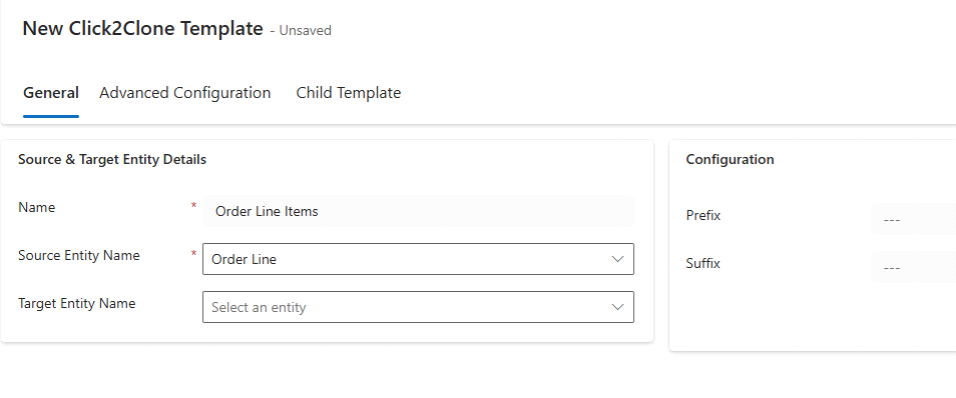
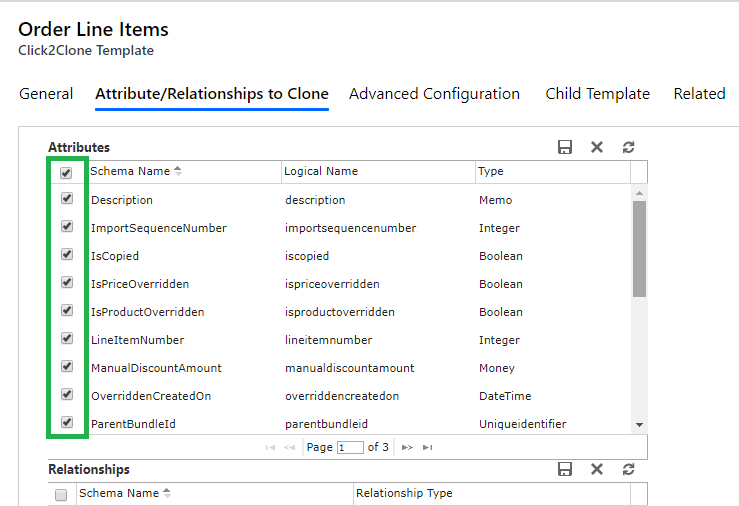
Clone Related Child Records Automatically
When cloning:
- Quote lines
- Opportunity products
- Project tasks
- Custom related records
…they all get replicated without manual intervention.
This is one of the biggest time-savers for teams across industries.
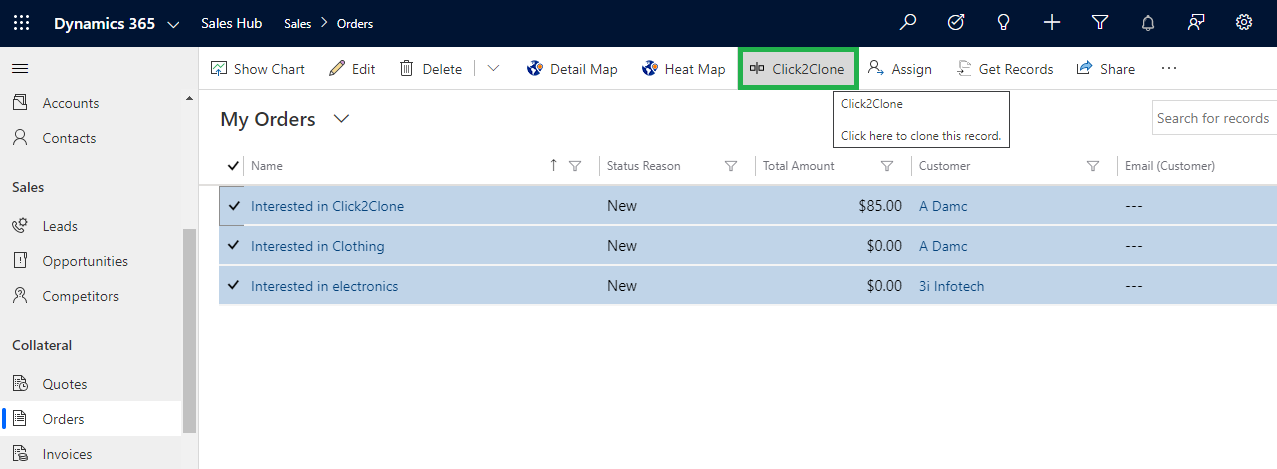
Bulk Record Cloning for High-Volume Workloads
Need to create:
- 100 onboarding templates?
- 50 similar campaigns?
- 200 case-based structures?
Bulk cloning makes this possible in minutes instead of days.
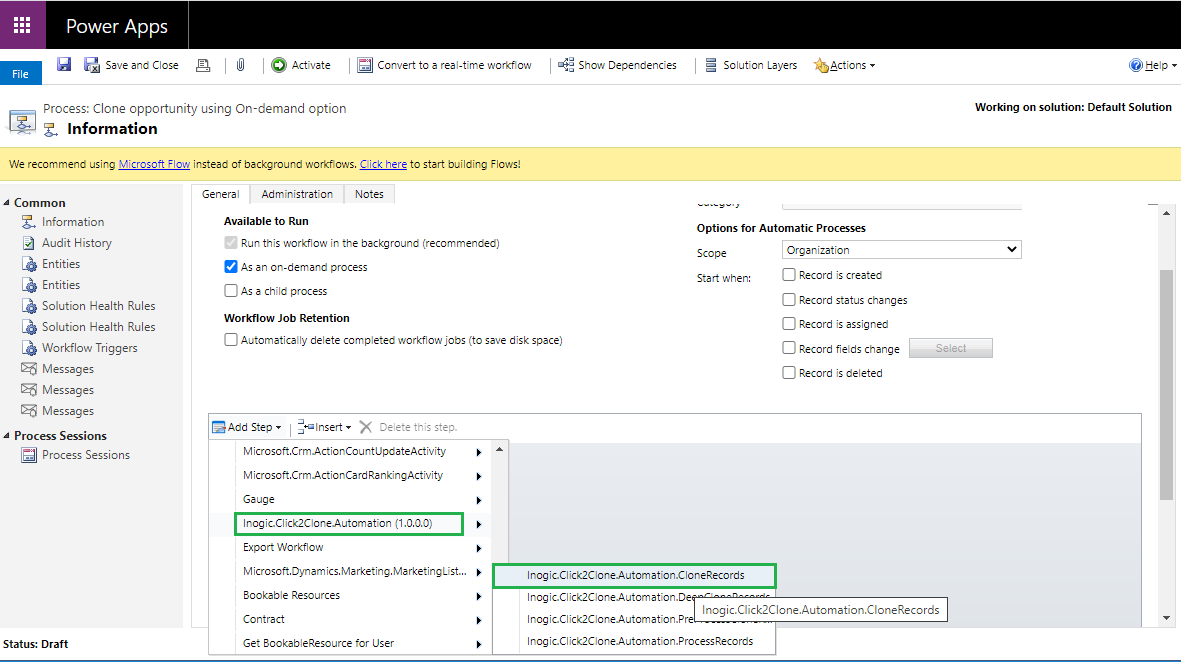
Automate Cloning with Workflows or Power Automate
Turn cloning into a fully automated CRM action triggered by:
- Stage change
- Field update
- Workflow rule
- New record creation
This brings cloning into enterprise-grade automation.
Maintain CRM Security, Permissions, and Compliance
A mature solution respects:
- Role-based access
- Business units
- Field-level security
- Environment boundaries
So, teams can clone data safely and responsibly.
Real Business Use Cases: Where Record Cloning in Dynamics 365 Creates Instant Value
Sales Teams
- Clone opportunity playbooks
- Recreate quote structures
- Maintain consistent product lineups
Service & Support
- Duplicate case templates
- Maintain SLA-ready structures
- Speed up ticket creation
Marketing
- Clone campaign frameworks
- Reuse strategies with different audiences
Project Managers (PSA / PO)
- Clone project templates
- Duplicate task structures
- Quickly recreate recurring project models
CRM Admins
- Speed up testing
- Reproduce environments
- Create sample data sets
How AI Enhances Data Cloning in Dynamics 365 CRM
AI engines like Copilot, Azure AI Models, and predictive scoring rely heavily on structured, clean, and consistent data.
Cloning supports AI by:
- Creating uniform datasets for training
- Maintaining consistent field values
- Reducing noise from human errors
- Speeding up testing cycles for AI-driven features
- Auto-generating replicable patterns for predictions
Data cloning is no longer just a utility; it’s an AI-enabled strategy.
FAQ for Record Cloning in Dynamics 365 CRM
Q1. How do I clone records in Dynamics 365 CRM?
Using a dedicated cloning tool, you can duplicate any CRM record in one click, including all mapped fields and child records.
Q2. Can I clone related child records automatically in CRM?
Yes. Activities, products, tasks, and other related records can be cloned along with the parent record.
Q3. What are the benefits of using templates for cloning in CRM?
Templates maintain consistency across teams, reduce manual effort, and ensure standardized business processes.
Q4. Can cloning be automated with Power Automate or workflows?
Absolutely. Cloning actions can be triggered automatically based on CRM rules, field changes, or workflows.
Q5. Is data cloning secure in Dynamics 365?
Yes. A mature solution respects CRM security roles, business units, and permissions.
Q6. Can I bulk clone multiple records at once?
Yes. Bulk cloning is ideal for onboarding, campaigns, projects, and high-volume CRM tasks.
Final Thoughts: Record Cloning Is Now a CRM Productivity Essential
As CRM workloads grow, organizations can no longer afford:
- Manual data entry
- Inconsistent processes
- Slow record creation
- Repetitive cloning tasks
A proven, 5+ year Dynamics 365 CRM cloning solution gives teams the speed, accuracy, and automation they need to scale in 2026 and beyond.
Ready to experience faster CRM processes?
Eliminate repetitive work and create error-free CRM records in seconds. Download a 15-day free trial from the Inogic website or Microsoft Marketplace.
For a personalized demo or more information, reach out to us at [email protected].
Cloning is the fastest way to boost CRM productivity, letting your teams focus on strategy - not data entry.