How to Restore Deleted Records in Dynamics 365: 3 Methods Compared (2026)
You can restore deleted Dynamics 365 records in three ways: the Dataverse Recycle Bin, a native environment restore, or a dedicated backup solution such as Backup4Dynamics. The right choice depends on what went wrong, how long ago it happened, and how many records are affected.
Picture a Monday morning. A bulk import finishes, and minutes later your sales team reports missing contacts and wrong field values. The question is no longer whether you have a Dynamics 365 backup. It is whether you can restore data fast, without rolling back the whole environment.
Already lost data? See how record-level restore works in Backup4Dynamics or start a free 15-day trial.
Dynamics 365 Data Loss: Deleted or Overwritten Records?
Each method handles a different kind of data loss:
- Deleted records: the records are gone.
- Overwritten values: the records exist, but a bulk update, import, or integration changed their fields.
- Late discovery: nobody noticed for weeks, which is common with integration errors.
Method 1: Dynamics 365 Restore Data with the Dataverse Recycle Bin
The Recycle Bin holds deleted records for a window you configure. Community documentation says records can be restored up to 30 days after deletion. Admins enable it in the Power Platform admin center, then restore through Settings, Data management, View deleted records.
The limits matter:
- It must be enabled before the deletion. Otherwise, records are permanently removed.
- It covers deletions only, not overwritten values.
- Records removed by custom business logic may need that logic reversed during restore.
Many guides were written while the feature was in preview, so confirm its current status on Microsoft Learn.
Method 2: Microsoft Dynamics 365 Backup and Restore (Native)
Microsoft provides automated backups for environments with a database, plus manual backups. Production managed environments can keep backups for up to 28 days, while nonproduction environments generally keep them for seven.
Whether you call it Dynamics CRM online backup or Microsoft Dynamics 365 backup, native recovery works at the environment level. To recover a few hundred records, you may have to restore an entire backup, which affects everything changed since. It is a solid base for a Dynamics 365 disaster recovery plan, but a heavy tool for record-level problems.
Method 3: Dynamics 365 CRM Backup Solution with Granular Restore
The Recycle Bin handles recent deletions. Native backup handles environment-level rollback. Backup4Dynamics is built for the gap between them: restoring exactly the CRM data you need, from the point in time you choose, without touching anything else.
It is a Dynamics 365 CRM backup solution for Sales, Customer Service, Field Service, and Dataverse. It backs up records, attachments, and notes on a schedule you set, and incremental backups capture only new or changed data. To recover data:
- Search backed-up records and review change history to see what changed and when.
- Choose the recovery point you need.
- Restore selected records, or restore a full entity snapshot along with related records by selecting relationship types.
- Decide how existing and deleted records are handled during restore.
- Track progress in Restore Runs.

Because it keeps its own copy, it also covers what the Recycle Bin cannot: overwritten values, deletions outside the recycle window, and data lost before the bin was enabled.
With Bring Your Own Storage, backups sit in your own Azure storage account, and processing runs in Azure resources in your subscription. Your own security, access, residency, and retention policies apply, which matters for Dynamics 365 data backup security and Dynamics 365 data retention.
Want to see it on your data? Start a free 15-day trial on Microsoft Marketplace or explore more here for a walkthrough.
Is Native Dynamics 365 Backup Enough for Your Business?
Native tools may be enough if your data changes slowly, 28 days of retention meets your compliance needs, and your team can tolerate environment-level restores.
Look at a dedicated backup if you run integrations or frequent bulk imports, need retention beyond Microsoft's window, must keep backup data in your own Azure tenant, or need to restore related records without a full rollback.
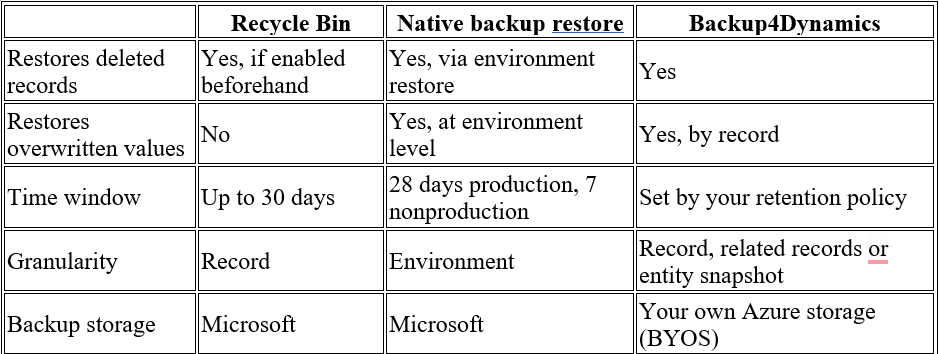
Dynamics 365 Backup and Restore Options Compared
How to Backup Dynamics 365: Retention and Security
Enable the Recycle Bin for critical tables.
- Take an on-demand backup before large imports or bulk updates.
- Schedule automatic backups that match how often your data changes.
- Set retention to match audit needs, not the default window.
- Keep backups under your own encryption and access controls.
- Test a restore every quarter, so the first one is not during an incident.
Dynamics 365 CRM Backup: Protect Your Data Before You Need It
Start a free 15-day trial of Backup4Dynamics, or email [email protected]. Attending the Community Summit in Nashville, October 11 to 15? Visit Inogic at Booth #733 for a live demo.
Dynamics 365 Backup and Restore FAQs
Can you restore deleted records in Dynamics 365?
Yes. Use the Recycle Bin if it was enabled before the deletion, restore a native backup, or use a backup solution for record-level restore.
How long does Dynamics 365 keep backups?
Up to 28 days for production managed environments and generally seven for nonproduction. Longer retention needs a dedicated solution.
How do I restore Dynamics 365 data without restoring the whole environment?
Use the Recycle Bin for recent deletions, or a backup tool with granular restore for everything else.
What is the difference between backup and disaster recovery?
Backup protects data from loss or corruption. Disaster recovery restores service after an outage. A Microsoft Dynamics 365 disaster recovery plan needs both.
Does Backup4Dynamics replace native backup?
No. It complements native backup with longer retention, customer-controlled storage, and granular recovery.