Why User Adoption Monitoring Matters in Dynamics 365 CRM
“Why aren’t people using CRM the way we expected?” is a question many managers ask after investing time and money into Microsoft Dynamics 365.
Teams log in, data exists, reports get generated, yet something feels off. Sales updates are missing, customer details are incomplete, and leadership struggles to trust the numbers.
The challenge isn’t the system itself, but the lack of visibility into how it’s actually being used daily.
User Adoption Monitor by Inogic solves this exact problem by helping organizations clearly understand user behavior inside Dynamics 365, who is using the system, how often, and which features are being adopted or ignored.
By turning everyday CRM activity into easy-to-read insights, User Adoption Monitor enables businesses to improve usage, data quality, and productivity without technical complexity or guesswork.
What Is User Adoption Monitor?
At its core, User Adoption Monitor is an advanced tool that watches how your team uses Microsoft Dynamics 365 CRM. It doesn’t spy on private details or monitor what people type; instead, it tracks actions and behavior to answer questions such as:
- Who is logging into the system and for how much time?
- How often are people updating customer records?
- How much time does the user spend on a specific record?
- Which features are being used the most, and which ones are being ignored?
- Are teams spending enough time in CRM, or avoiding it altogether?
This tool takes all these usage details and turns them into visual reports and dashboards. Managers can then use this information to determine whether the software is being utilized fully and effectively, or if there are adoption issues that require attention.
Why User Adoption Matters to You?
CRM platforms are designed to drive better decision-making, operational efficiency, revenue growth, and customer experience. But when teams use only a fraction of their capabilities, the organization fails to extract real business value. Poor user adoption leads to underutilized data, inaccurate reporting, missed opportunities, and slower execution, regardless of how powerful the system is.
For managers and leadership teams, user adoption is not a technical challenge; it’s a business performance issue. The true success of CRM lies not in implementation, but in how effectively people use it to support daily decisions and strategic goals.
Here’s why proper software use matters.
1. Better Customer Service
If your team isn’t logging customer interactions properly, your service agents can’t see full histories and context. A tool that tracks adoption shows you where gaps exist, helping you coach team members to do better.
2. Higher Sales Productivity
Sales teams that update pipeline data consistently can forecast deals and measure performance accurately. Adoption tracking tells you if your sales reps are actually entering data or if the system is underused.
3. More Accurate Business Decisions
Good data leads to good strategic decisions. If the CRM is half-filled or used inconsistently, reports will be misleading. Adoption monitoring ensures the data your managers rely on reflects reality.
In fact, studies show that organizations with high CRM adoption see higher revenue and greater customer satisfaction than those with low adoption.
How User Adoption Monitor Works in Dynamics 365 CRM
You don’t need to be a tech expert to get the value from this tool. Here’s how it works:
Tracks User Actions
The tool watches what users do, for example:
- Logging into the CRM.
- Creating a new customer contact.
- Updating an opportunity or case.
- Opening or editing records.
It then counts and categorizes these actions.
Think of it like a fitness tracker for your CRM usage; it logs activity, steps, and engagement so you can see trends.
Shows Time Spent in the System
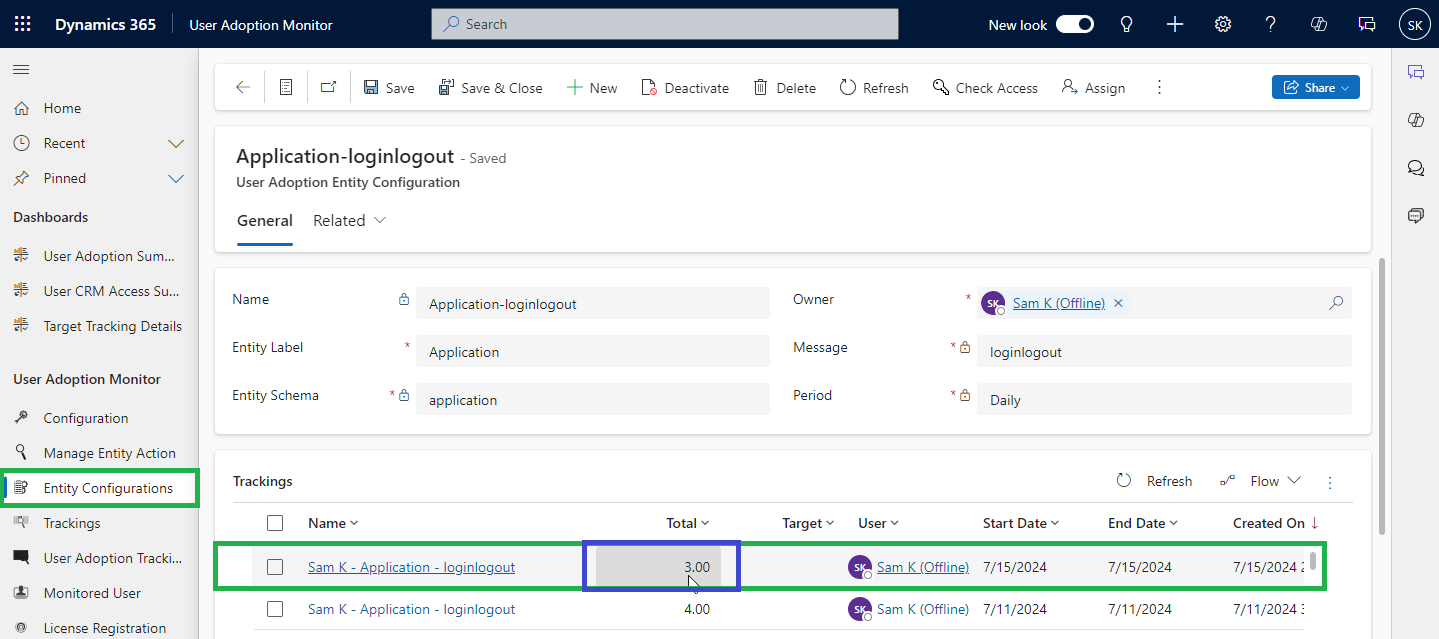
Not only does it track what users do, but it also tracks how long they stay active in the system during sessions. If someone logs in but then rarely does anything, that pattern will show up visually.
This helps managers spot behavior like:
- People logging in only once or twice a week.
- People spend most of their time in non-productive screens.
- Users spend too little time completing required tasks.
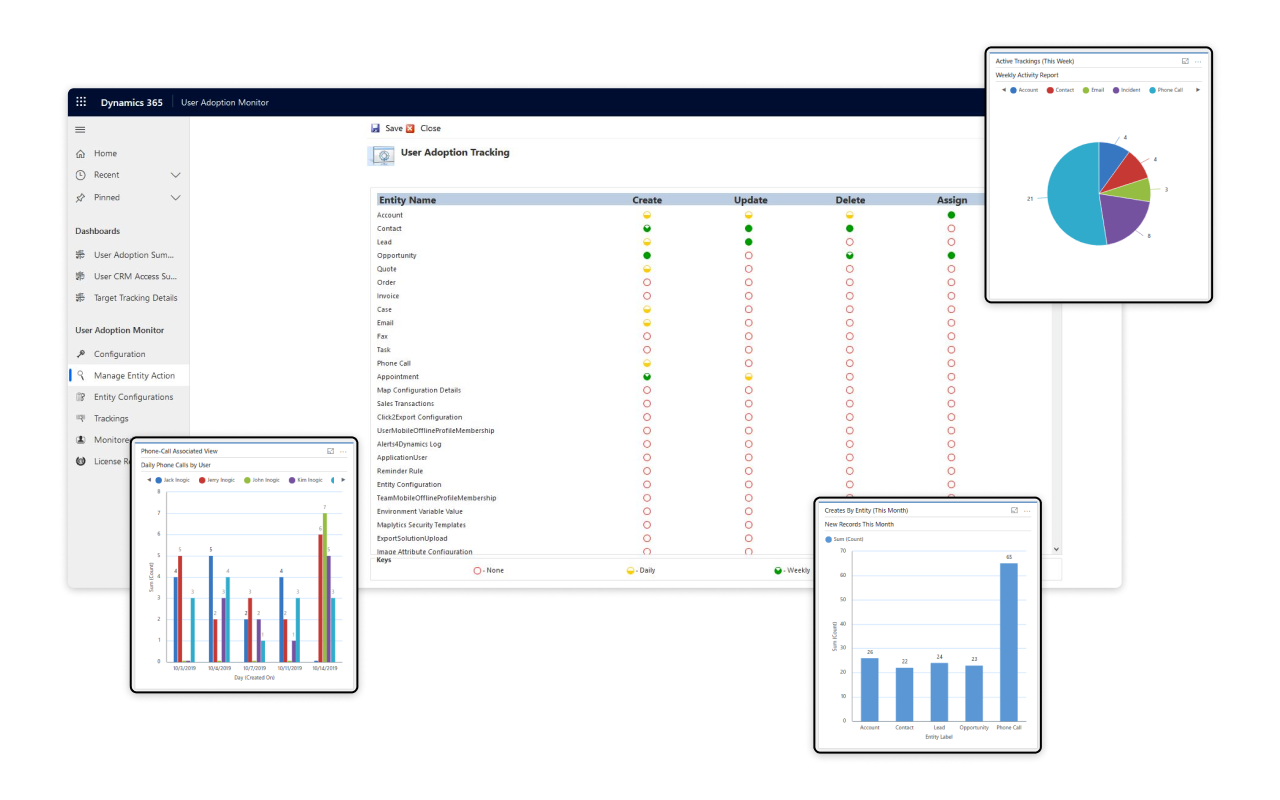
Dashboard Visuals for Easy Understanding
Instead of raw spreadsheet data, the tool shows charts and graphs, like:
- Which departments are using CRM the most?
- Daily, weekly, or monthly trends in usage.
- Leaderboards to see top performers in CRM engagement.
This visual presentation helps people understand the data without needing to analyze numbers manually.
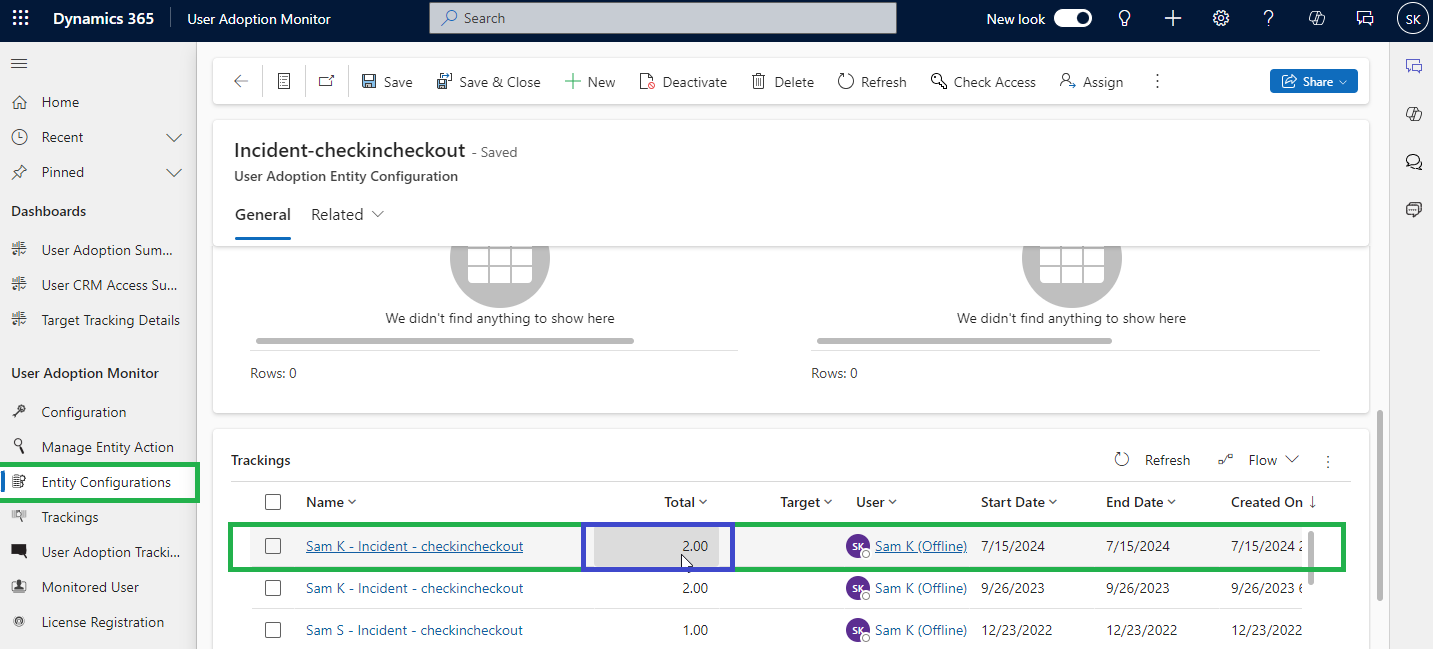
Check-In and Check-Out Monitoring
One unique part of the tool watches when someone starts working on a record and when they finish, similar to clocking in and out of a task. This helps teams see how much time is spent on specific tasks and where bottlenecks occur.
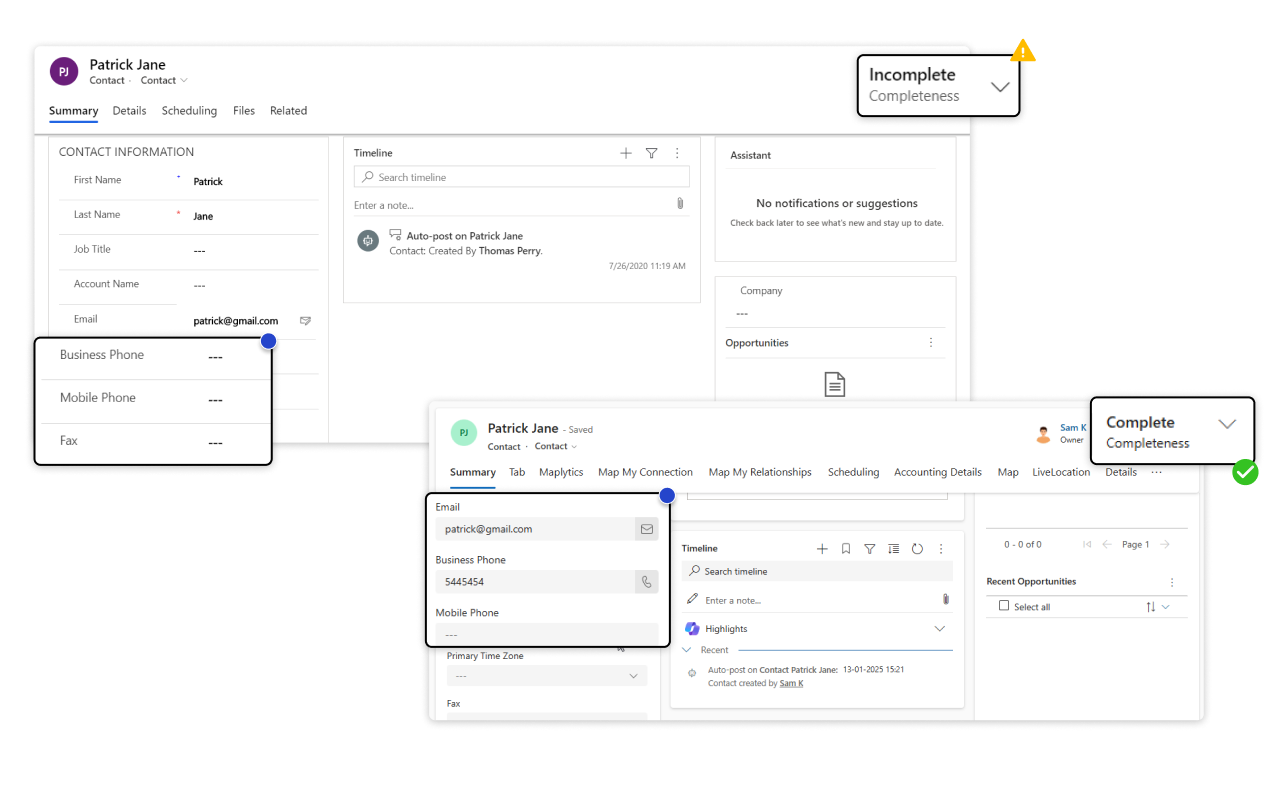
Data Completeness Checker
A major challenge in CRM systems is incomplete data, like leads with missing phone numbers or opportunities missing revenue numbers. User Adoption Monitor includes a feature that marks records as “complete” only when required fields are filled in. This nudges teams to enter full information and improves overall data quality.
Let’s understand more
To understand the impact of User Adoption Monitor, here are a few everyday applications-
Sales Team Adoption
A sales manager notices that the organization’s CRM isn’t being updated properly. Some team members rarely log calls or update deal stages, leading to inaccurate sales forecasts.
With User Adoption Monitor, the manager:
- Sees which reps are most and least active.
- Checks how much time each rep spends on key sales entities.
- Identifies coaching opportunities for underperformers.
By sharing adoption dashboards with the team, performance becomes transparent, and the sales team improves their data consistency within weeks.
Boosting Customer Support Efficiency
In a service organization, customers complain that reps don’t always have complete interaction histories, so they repeat questions or miss details.
With User Adoption Monitor, the support manager:
- Tracks whether service agents are populating all relevant fields in customer cases.
- Sets up mandatory fields that must be filled before a case is marked complete.
- Uses reports to arrange targeted training for agents who struggle with CRM usage.
This leads to better records, faster case resolution, and higher customer satisfaction.
CRM Cleanup After New Implementation
A company recently deployed Dynamics 365 CRM. After a few months, the leadership wants to know whether the CRM is delivering value, but they find data usage inconsistent.
User Adoption Monitor helps them:
- See user engagement trends (daily vs. weekly usage).
- Understand which CRM areas are adopted well and which are ignored.
- Adjust business processes and training based on real user behavior data.
This avoids guesswork and ensures the CRM becomes an effective tool instead of just software that “exists but isn’t used.”
How Managers Benefit from Adoption Insights in CRM?
Identify Training Needs
If the adoption reports show low usage in certain areas, managers can organize training sessions targeted at those gaps.
Save on CRM Licenses
If some users rarely use the system, managers can rethink licensing, reassign roles, or help increase utilization to justify costs.
Improve Team Accountability
With dashboards and leaderboards, teams know how they’re performing, which often increases engagement and healthy competition.
Better Strategic Decisions
By tracking actual usage trends over time, businesses can decide which processes to optimize or automate, based on data, not intuition.
To Sum Up
User Adoption Monitor sounds like a technical add-on, but it helps businesses understand how people actually use their CRM, and what needs improvement. It turns invisible user behavior into clear, visual insights that show when adoption is strong and when it needs attention.
For more on this, write to us at [email protected].
To get a 15-day free trial, visit our Website or Microsoft Marketplace.