Why UK Facilities Management Businesses Need One System, Not Three
For UK facilities management companies running multiple service lines — cleaning, fire safety, HVAC, electrical — the real operational problem is not finding work. It is managing it without losing money in the gap between the job and the invoice. Dynamics 365 Field Service and Business Central close that gap.
Picture a typical Tuesday morning for a 20-person UK facilities management company. The owner is on the phone to a client whose fire alarm service was due last week and did not get scheduled. The office manager is chasing three engineers for job sheets they forgot to submit. The bookkeeper is trying to reconcile last month's invoices against jobs that were completed but never properly recorded. And somewhere in a van, an engineer has just used the last replacement part in his kit without telling anyone.
This is not a story about a poorly run business. It is a story about a well-run business operating on tools that were never designed to hold a multi-service FM operation together. A job management app here, a separate accounting package there, a WhatsApp group for parts requests, and a spreadsheet that only one person really understands. It works — until it does not.
For UK facilities management companies that provide multiple services to the same client base — planned preventive maintenance, reactive call-outs, compliance inspections, cleaning schedules — the operational complexity grows faster than most job management tools can handle. Microsoft Dynamics 365 Field Service, paired with Dynamics 365 Business Central, is built specifically for this problem. Not as an enterprise system scaled down, but as a platform that grows with the business from the day it is implemented.
The average UK FM SMB runs three to five separate software tools to manage what should be a single workflow: schedule a job, dispatch an engineer, record the work, use the parts, raise the invoice. Dynamics 365 does all of this in one place — and the finance figures update in real time.
The Real Cost of Disconnected Tools for UK FM Businesses
Most small FM businesses underestimate how much their disconnected tools are actually costing them. The direct costs — multiple software subscriptions — are visible. The indirect costs are much larger and much harder to see.
Jobs completed but never invoiced
In a busy FM operation where engineers are completing reactive call-outs across multiple sites, jobs get done and job sheets get lost. Or they arrive late, after the monthly invoice run has already been processed. The client never gets charged. The work cost the business in labour and parts, and generated zero revenue. Most FM owner-operators, if they ran an honest audit, would find more of this than they expect.
Parts used but never charged back
Engineers carry consumables and replacement parts. When a smoke detector sensor gets replaced on a reactive call-out, that part needs to appear on the invoice to the client. In businesses where job completion and invoicing happen in separate systems, parts charging is inconsistent. Sometimes it makes it onto the invoice. Sometimes it does not. Over a month of reactive jobs across 30 clients, the difference is meaningful.
Compliance gaps that carry real legal risk
For UK FM companies carrying out fire alarm servicing, gas safety checks, or electrical testing, the compliance record is not optional. The Regulatory Reform (Fire Safety) Order 2005 requires documented evidence that fire safety systems are being maintained. A PAT testing certificate needs to be produced on demand. If those records live in a job management app that is separate from the service history the client can access, the audit trail has gaps — and gaps carry liability.
Planned maintenance that becomes reactive by default
Planned preventive maintenance contracts are among the most profitable work an FM company can hold. They provide recurring revenue, predictable scheduling, and long-term client relationships. But PPM only stays profitable when it is actually planned. When the scheduling tool does not talk to the contract management system, PPM visits slip, clients notice, and profitable contracts quietly become at-risk relationships.
UK FM businesses that rely on manual processes to manage PPM contracts risk both client retention and contractual compliance. Under many commercial FM contracts, missed scheduled visits constitute a breach. One lost contract can erase months of margin.
What Purpose-Built FM Job Management Tools Do Well — and Where They Stop
The UK market has several job management platforms specifically designed for field service and FM businesses. Jobber, Simpro, ServiceM8, and BigChange are all used by UK FM companies, and each solves the scheduling and dispatch problem reasonably well. Before choosing Dynamics 365, it is worth being clear about what these platforms do and where their limitations begin.
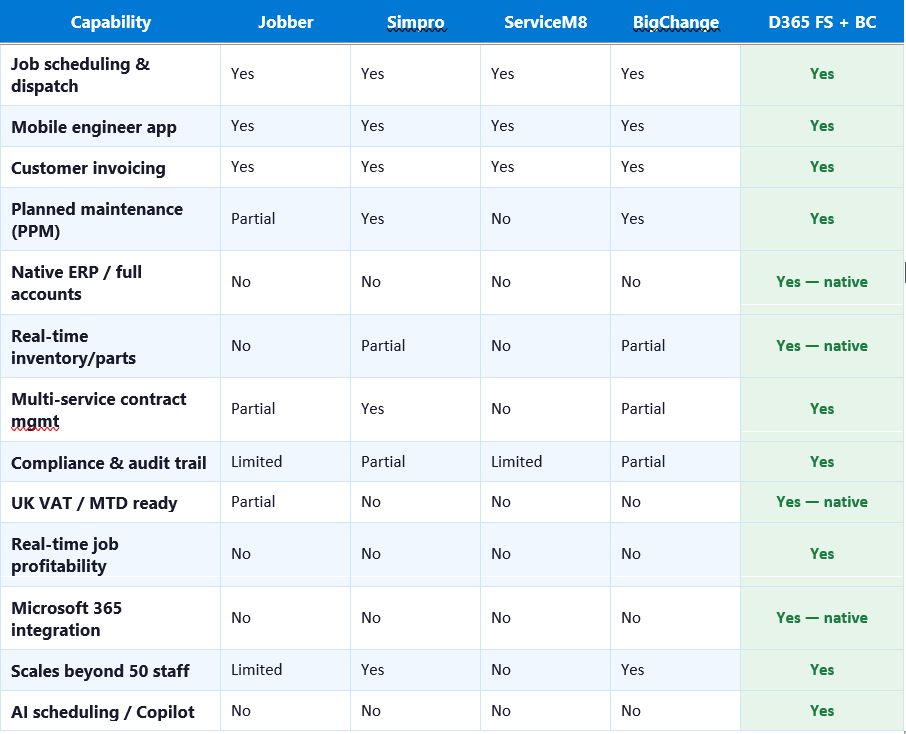
Jobber, Simpro, ServiceM8, and BigChange are established UK FM job management platforms. Capability assessments based on vendor documentation and published feature sets as of early 2026. D365 FS + BC refers to Dynamics 365 Field Service paired with Business Central.
Jobber
Jobber is a well-regarded platform for small trade and service businesses, with clean scheduling, client communication tools, and a mobile app that engineers actually use. For a single-service business — a plumber or a window cleaner — it works well. For a multi-service FM company managing PPM contracts, compliance records, and parts inventory across 30 client sites, it runs out of depth. It connects to Xero and QuickBooks for accounting, but those are separate subscriptions and the data sync is not real time.
Simpro
Simpro is more capable than Jobber at the FM level — it handles PPM scheduling, multi-trade jobs, and has better contract management. Many UK FM SMBs use it as a step up from Jobber. Its limitation is the same as every standalone FSM platform: it needs a separate accounting integration. Real-time job profitability — knowing whether a contract is making money as jobs are being completed, not at month-end — is not available natively.
ServiceM8
ServiceM8 is popular with sole traders and very small trade businesses. For a growing FM company, it reaches its ceiling quickly. PPM scheduling is limited, there is no meaningful inventory management, and the accounting integration requires a separate Xero or QuickBooks subscription.
BigChange
BigChange is the most FM-capable of the standalone platforms, with route scheduling, job management, compliance documentation, and CRM functionality in one place. It is used by some mid-sized UK FM companies and handles multi-service scheduling well. Like the others, however, it does not include ERP or full accounting. Financial reporting depends on a separate integration.
Where Dynamics 365 Field Service and Business Central Are Different
The distinction is not primarily about which platform has the better mobile app or the cleaner scheduling interface. On those measures, the standalone platforms are competitive and in some cases easier for a small team to get started with quickly.
Every standalone platform in this comparison requires the FM company to maintain a second system — an accounting package — and a connection between the two. That connection is always imperfect. Data moves between systems on a schedule, not in real time. Reconciliation is always someone's job. And the question that matters most to an FM owner-operator — did we make money on this contract this month — can only be answered after the accounts are reconciled, not while the jobs are being completed.
Dynamics 365 Field Service and Business Central are built on the same platform. A job completed in Field Service updates the accounts in Business Central immediately. Parts consumed on a job reduce inventory and update the cost of the job in real time. The invoice is generated automatically when the work order is closed. And the owner-operator can see, from a single dashboard, whether the cleaning contract at the office park in Reading is profitable — today, not at month end.
For a UK FM business managing 15 client sites across three service lines, real-time job profitability is not a nice-to-have reporting feature. It is the difference between renewing a contract at the right price and discovering six months later that it was loss-making from the start.
How Dynamics 365 Works for a Multi-Service UK FM Business
Planned preventive maintenance — scheduled, tracked, and compliant
PPM contracts are set up in Business Central with service intervals, SLA terms, and billing schedules. Dynamics 365 Field Service automatically generates work orders at the correct intervals, assigns them to available engineers based on location and skills, and tracks completion against the contract. If a scheduled visit is at risk of being missed, the system flags it before the client notices.
Reactive call-outs — from request to invoice in one workflow
When a client calls with a reactive job, the call-out is logged in Field Service, the nearest available engineer is dispatched, the job is completed and signed off on the mobile app, parts are recorded against the job, and Business Central generates the invoice. The entire workflow happens in one system, without manual re-entry at any point.
Multi-site client management
For FM companies managing the same client across multiple sites — a retail chain, a property portfolio, a group of care homes — Business Central holds the client structure, contract terms, and billing hierarchy. Field Service manages the work across all sites. The client gets a consolidated view of service history and the FM company gets consolidated financial reporting by client, not just by job.
Compliance and audit documentation
Field engineers complete digital job sheets on the mobile app, including compliance checklists, photographs, and client sign-off. These records are stored against the asset and the client in the same system as the financial record. When a client or insurer requests evidence of fire alarm maintenance history, the FM company can produce it immediately without searching through a separate document management system.
Parts and inventory management
Van stock, warehouse replenishment, and parts ordering are managed in Business Central. When an engineer uses a part on a job, it is deducted from inventory immediately and added to the job cost. Reorder alerts trigger automatically when stock falls below threshold. The FM company knows what it has, where it is, and what each job actually cost.
What Does It Cost and How Long Does It Take to Implement?
This is the question most FM owner-operators ask first, and it is a fair one. Dynamics 365 is not the cheapest option in the comparison table above. Jobber starts at around £35 per month. Dynamics 365 Field Service starts at approximately £40 per user per month for the Contractor plan and £84 per user per month for the standard Field Service licence, with Business Central adding from approximately £60 per user per month.
The relevant comparison, however, is not Dynamics 365 versus Jobber in isolation. It is Dynamics 365 versus Jobber plus Xero plus the hours spent each month reconciling the two, plus the jobs that slip through uninvoiced, plus the parts that never get charged back, plus the PPM visit that gets missed because nobody was tracking it. When FM owner-operators run that calculation honestly, the economics of a unified platform shift considerably.
For a UK FM business with 10 to 50 staff, a typical implementation timeline is eight to fourteen weeks from project kick-off to go-live, covering:
- Business Central configuration — chart of accounts, VAT setup, client and supplier records, contract pricing.
- Field Service configuration — work order types, service territories, engineer assignments, PPM schedules, mobile app setup.
- Data migration — existing client records, open contracts, asset registers, and job history.
- User training — office team, field engineers, and management reporting.
- Post-go-live support — typically four weeks of hypercare to ensure the first invoice run and PPM cycle complete correctly.
Frequently Asked Questions: Dynamics 365 for UK Facilities Management
What is the best field service management software for a small UK facilities management company?
For FM companies managing multiple service lines — cleaning, fire safety, HVAC, electrical — across multiple client sites, the best software is one that connects job management and finance in a single system. Dynamics 365 Field Service with Business Central does this natively, eliminating the need for a separate accounting package and the reconciliation overhead that comes with it. Standalone platforms like Simpro and BigChange handle scheduling well but require a separate accounting integration.
Can Dynamics 365 handle planned preventive maintenance contracts for UK FM companies?
Yes. Dynamics 365 Field Service supports PPM scheduling natively, with automatic work order generation at configurable intervals, engineer assignment based on location and skills, and SLA tracking. Business Central manages the contract billing side, including recurring invoices aligned to service schedules. PPM completion records and compliance documentation are stored against the asset in the same system.
How does Dynamics 365 help UK FM companies with fire safety compliance records?
Field engineers complete digital job sheets, compliance checklists, and client sign-offs through the Dynamics 365 mobile app. These records are stored against the relevant asset and client account in the same system as the financial record. When a client, insurer, or regulator requests evidence of fire alarm maintenance history, the FM company can produce it immediately. The Regulatory Reform (Fire Safety) Order 2005 requires documented evidence of maintenance activity — Dynamics 365 provides this as a byproduct of normal job completion, not as an additional administrative task.
How long does it take to implement Dynamics 365 for a small FM business in the UK?
For a UK FM business with 10 to 50 staff, a typical implementation runs eight to fourteen weeks from project kick-off to go-live. This includes Business Central configuration, Field Service setup, data migration, user training, and a post-go-live support period. Working with a Microsoft-certified Dynamics 365 partner experienced in UK FM operations significantly reduces implementation risk.
Is Dynamics 365 suitable for FM companies that are growing and plan to add more services or staff?
Yes. Dynamics 365 is designed to scale. A business that starts with 10 engineers managing two service lines can add service lines, client sites, legal entities, and staff without changing platforms. The system that works for a 15-person FM company in 2025 is the same platform used by large FM operators managing thousands of sites. For owner-operators planning growth, that scalability is a material consideration when choosing a platform today.