WhatsApp Integration for Dynamics 365 CRM: Why Your Business Needs It
Enterprise customer communication is broken. Teams are juggling WhatsApp on personal phones, copying messages into CRM manually, and losing context every time a customer switches agent. WhatsApp4Dynamics fixes that by bringing WhatsApp Business directly into Microsoft Dynamics 365 CRM, where your team already works.
Key takeaways
· WhatsApp4Dynamics is a native Dynamics 365 integration that brings WhatsApp conversations directly into your CRM, eliminating the need for tab-switching and manual message logging.
· The solution automatically maps every incoming WhatsApp message to CRM records, ensuring agents have complete customer context and profile information before responding.
· WhatsApp4Dynamics includes built-in GDPR-compliant consent management with automatic opt-in/opt-out tracking, separate marketing and utility sessions, and full audit trails for compliance reporting.
· Teams can collaborate seamlessly through chat assignment features and private agent consultation, allowing conversation handoffs without losing context or disrupting the customer experience.
· The platform automates customer communication through CRM workflow triggers for order confirmations, case updates, and reminders, reducing manual follow-ups and improving response times across all departments.
Why Are Enterprises Losing Customers to Poor Communication?
Businesses using Dynamics 365 CRM are managing leads, cases, and accounts inside the platform, but customer conversations are happening outside it. WhatsApp is where customers actually respond. According to Meta, WhatsApp has over 2 billion active users globally, making it the most used messaging platform in the world. Yet most enterprises have no structured way to integrate WhatsApp with their CRM.
The result? Missed messages, zero chat history, no accountability, and no data. Sales and support teams spend time switching tabs, hunting for context, and manually logging conversations. For large organizations, that inefficiency scales into a significant revenue problem.
What Is WhatsApp4Dynamics?
It is a Microsoft AppSource-certified WhatsApp integration for Dynamics 365 CRM, built by Inogic. It connects WhatsApp Business to Dynamics 365 using the WhatsApp Business API and Twilio API, enabling teams to send, receive, and manage WhatsApp conversations entirely within their CRM environment.
It is not a chatbot. It is not a third-party inbox. It is a native CRM integration that maps WhatsApp conversations to CRM records, automates workflows, manages consent, and gives managers full visibility into every customer interaction.
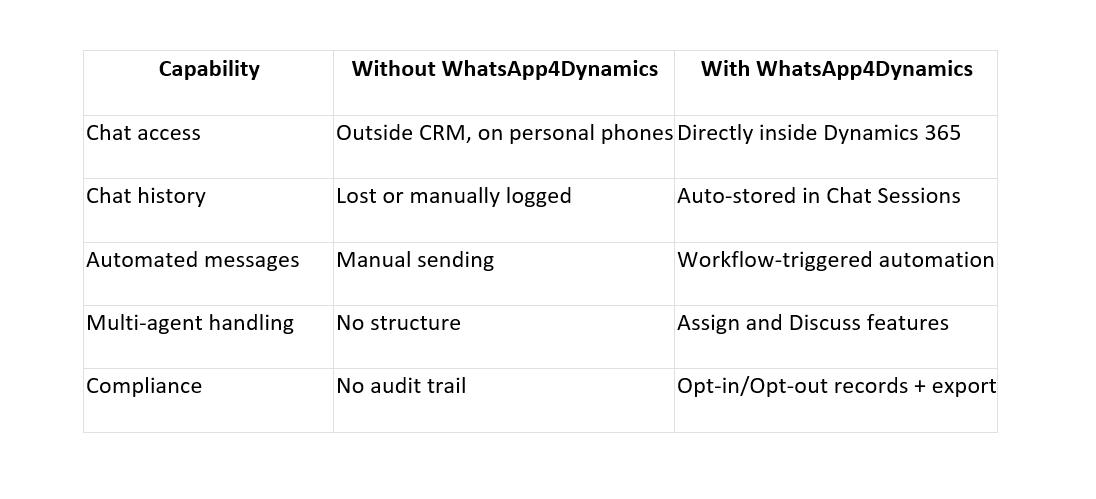
How WhatsApp4Dynamics Works: A Feature-by-Feature Breakdown
The Chat Hub: One Inbox for All WhatsApp Conversations
The Chat Hub is a centralized dashboard inside Dynamics 365 where agents manage all WhatsApp chats and voice calls from one screen. Every conversation appears as a Message Card showing the customer name, last message preview, unread count, wait time, and AI-powered chat sentiment.
Agents can filter by My Chats, New Chats, Accepted Chats, Bot Conversations, or Active Chats. There is no tab-switching, no manual searching, no lost context.
CRM Record Mapping: Know Who You Are Talking To
Every incoming WhatsApp message is automatically matched to a CRM record based on the sender's mobile number. When a contact, lead, or account already exists in Dynamics 365, their record is linked to the chat instantly.
Agents see the full customer profile before they type a single word. If the number is new, agents can create a CRM record directly from within the chat without leaving the conversation.
Message Templates: Consistent, Compliant Messaging at Scale
WhatsApp4Dynamics supports rich message templates, including text, images, buttons, and quick replies, all created in Meta and synced to the CRM. Template types cover every use case:
- Global Templates for general communication across all entities
- Entity Templates scoped to specific CRM records like Contacts or Cases.
- Consent, Opt-In, and Opt-Out Templates for marketing compliance
- Waiting Message Templates sent automatically when no agent is available
- Agent Join Templates triggered when an agent accepts a chat.
- Call Recording Templates for voice call consent management.
Role-based access ensures that agents only see templates relevant to their function.
Automated WhatsApp Messages: Trigger-Based Workflows
WhatsApp4Dynamics integrates with Dynamics 365 workflows to send automated WhatsApp messages based on CRM events. When an order is created, a reminder is due, or a case status changes, the system sends the relevant WhatsApp message to the customer automatically.
Teams can configure multiple triggers per entity, each with its own message template. This eliminates manual follow-ups and ensures timely communication without adding workload to the team.
Assign Chat and Discuss Chat: Built for Teams
Assign Chat lets an agent transfer an ongoing conversation to another team member in a few clicks. The recipient gets a notification, can accept or reject with a reason, and the chat moves seamlessly. An auto-timeout prevents requests from hanging open indefinitely.
Discuss Chat lets agents consult a colleague privately during a live customer conversation. The colleague sees the full chat history but cannot message the customer directly. The customer sees nothing. Internal collaboration happens without disrupting the customer experience.
Separate Sessions for Marketing and Utility
Automated marketing messages and agent-driven utility messages are tracked in separate sessions. Marketing messages appear with a distinct icon and background color so agents never confuse a campaign blast with a support conversation. Marketing sessions stay active for 30 days by default.
This separation matters for compliance, reporting, and understanding which type of communication is driving customer responses.
Opt-In and Opt-Out Consent Management
WhatsApp4Dynamics supports Single- and Double-Opt-In workflows for marketing consent. Customers who reply with a subscription keyword are automatically marked as Opted-In. Customers who send a stop keyword are immediately Opted-Out, and the system blocks further marketing messages to them.
For enterprises operating under GDPR or regional data regulations, this is not optional. WhatsApp4Dynamics builds it directly into the CRM workflow.
Export Chat History and Voice Call Support
Chat history is exportable in Excel, CSV, or HTML formats with custom date ranges, making audits and reporting straightforward. Voice calls can be made and received directly from Dynamics 365, with call recordings stored in Azure Blob Storage and consent captured through approved Meta templates.
Who Is WhatsApp4Dynamics Built For?
WhatsApp4Dynamics is built for enterprises and mid-to-large organizations using Microsoft Dynamics 365 CRM. It is specifically valuable for:
- Sales teams managing leads and opportunities through WhatsApp
- Customer service teams handling support cases and escalations
- Marketing teams running WhatsApp campaigns and managing consent
- Operations teams sending automated transactional messages
Any organization where customer communication on WhatsApp is currently unstructured, untracked, or happening outside the CRM will see an immediate impact.
The Bottom Line
Enterprises using Dynamics 365 CRM cannot afford to keep WhatsApp communication siloed outside their system. Lost conversations, missing context, and manual logging are costing teams time and costing businesses customers.
WhatsApp4Dynamics brings WhatsApp integration into Dynamics 365 natively, giving teams a single platform for every customer interaction, automated workflows, full chat history, compliance controls, and real-time collaboration features.
If WhatsApp is where your customers are, your CRM should be where your conversations are managed.
To see WhatsApp4Dynamics in action, visit inogic.com or reach out to the Inogic team at [email protected].
FAQs for WhatsApp4Dynamics
1. Is WhatsApp4Dynamics a chatbot solution?
No. WhatsApp4Dynamics is not a chatbot. It's a native Microsoft Dynamics 365 CRM integration that connects WhatsApp Business directly to your CRM environment. While it supports automated workflow-triggered messages, it's primarily designed for agents to manage real customer conversations from within the CRM without switching between apps.
2. Will WhatsApp4Dynamics work with my existing WhatsApp Business account?
Yes. WhatsApp4Dynamics integrates with WhatsApp Business through the official WhatsApp Business API and Twilio. It connects to your existing business account and brings all conversations into Dynamics 365 while maintaining full compliance with WhatsApp's messaging standards.
3. How does WhatsApp4Dynamics handle GDPR and consent compliance?
WhatsApp4Dynamics has built-in opt-in and opt-out consent management. It supports single and double-opt-in workflows, automatically marks customers based on subscription keywords, and blocks further marketing messages to opted-out users. All consent records are tracked and exportable for compliance audits.
4. Can multiple agents collaborate on the same WhatsApp conversation?
Yes. The "Assign Chat" feature lets agents transfer conversations between team members seamlessly. The "Discuss Chat" feature allows agents to consult colleagues privately during a live conversation without the customer knowing. The colleague can see the full chat history but cannot message the customer directly.
5. What happens to chat history and can it be exported?
All chat history is automatically stored in Dynamics 365 Chat Sessions and is fully searchable. You can export conversation history in Excel, CSV, or HTML formats with custom date ranges. Voice call recordings are stored in Azure Blob Storage. This makes audits, compliance reporting, and historical analysis straightforward.