Dynamics 365 CE/CRM Go-Live Readiness: What Enterprise Teams Should Validate Before Production
A Microsoft Dynamics 365 CE/CRM go-live can look complete on a project plan while the people expected to use the system are not yet ready. Sales representatives may be able to open an opportunity but not complete the steps needed to move it forward. Customer Service agents may see a case but not have access to the information needed to resolve it. Both situations can go unnoticed when testing focuses on whether the system works rather than whether people can do their jobs.
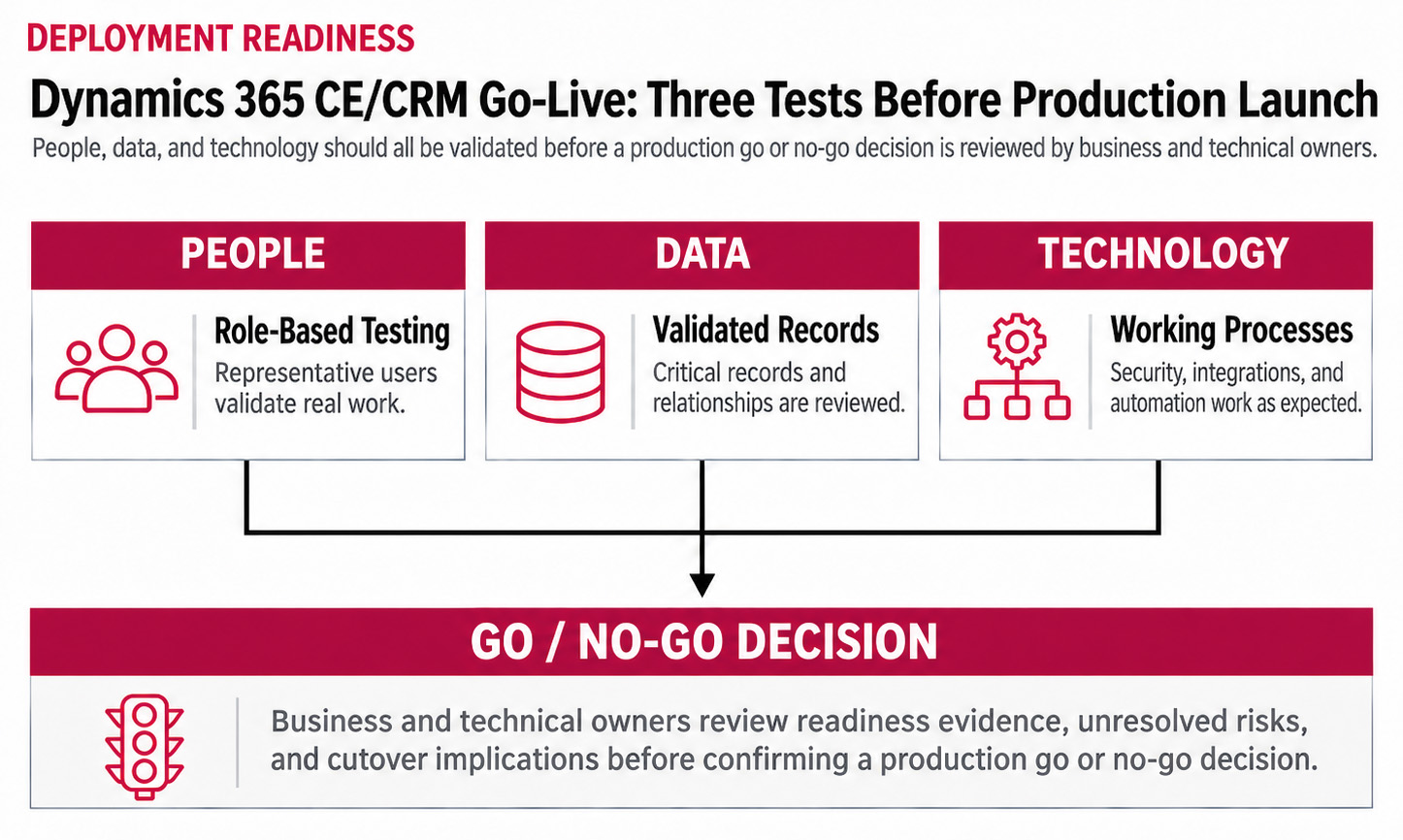
Can Sales and Service Teams Complete Their Work at Dynamics 365 CE/CRM Go-Live
In Microsoft Dynamics 365 Sales, a representative should be able to locate an account, review its history, update an opportunity, and complete the activities required by the Sales process. Managers also need to see information they can use for pipeline reviews and forecasts.
Microsoft Dynamics 365 Customer Service presents different challenges. Depending on the setup, agents may need to receive routed cases, review customer history, access knowledge articles, and escalate issues. A process can work during a demonstration but behave differently when real users encounter incomplete records, unusual requests, or exceptions.
User acceptance testing (UAT) should validate these everyday activities with the people who will actually perform them. Using representative data and the security roles assigned to real employees provides better evidence than testing everything with administrator access. Microsoft's Dynamics 365 Testing Guidance recommends testing complete business processes and obtaining approval from business stakeholders.
There is also a practical question worth asking during testing. Can employees finish the work without someone from the implementation team walking them through it? If not, the issue may be training, permissions, process design, or something else that still needs to be configured.
What Should Enterprise Teams Validate Before Production
Before approving production, enterprise teams should check critical workflows, data, security, integrations, and cutover plans. The table below pairs each readiness area with evidence that business owners can review, rather than relying on a completed task list.
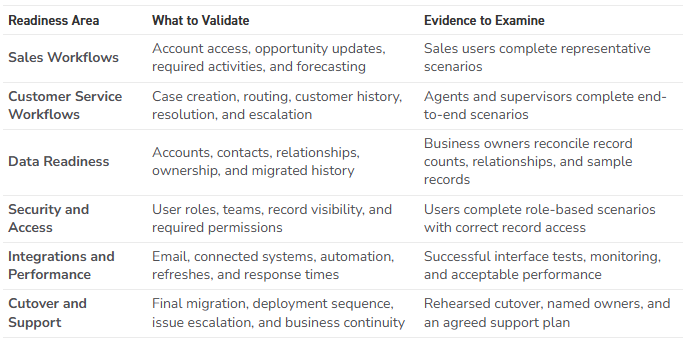
The checks should reflect the scope of the deployment. A Sales-only rollout may need more attention on forecasting, approvals, or quoting integrations. If Microsoft Dynamics 365 Customer Insights - Journeys is included, Marketing should verify migrated contacts, consent settings, and a controlled customer journey, not simply whether an email can be created.
Some failures may begin outside the Dynamics 365 application. Microsoft Dataverse provides the data foundation for Dynamics 365 CE/CRM, while custom Power Apps and Power Automate flows may support important parts of the process. A change that appears minor within CRM can affect other applications or automation.
Ask users to test an exception, not just the expected workflow. A missing account record, a failed approval, or a case that needs escalation can reveal gaps that standard testing misses.
Microsoft provides a broader Success by Design Go-Live Checklist covering testing, migration, performance, integrations, change management, and operational support. Organizations should use that guidance alongside their own business-specific requirements.
Deciding What Can Wait and What Cannot
An enterprise implementation rarely reaches go-live with every requested improvement complete. That does not automatically mean the launch should be delayed. The decision depends on whether an unresolved issue prevents essential work, has a tested workaround, or creates a risk the business is prepared to accept.
A preferred dashboard layout might be reasonable to address after launch. Sales representatives who cannot update opportunities or Service agents who cannot access assigned cases present a different level of risk. Before the final go/no-go decision, leadership should be able to answer three questions:
- Which critical processes have passed testing?
Business owners should review the results, not simply accept that the technical team marked the tests complete. - What remains unresolved?
Identify the impact, affected users, available workaround, responsible owner, and expected resolution. - What happens if the cutover encounters a problem?
Confirm who makes the decision to proceed, pause, or use an agreed fallback plan.
Rehearse the final migration so the team knows how long it takes, which records need to be reconciled, and when work in the previous system must stop. Microsoft's Cutover Guidance addresses these decisions, including rehearsals, dependencies, verification, and stakeholder sign-off.
A workaround is not necessarily a safe resolution. If essential work depends on one administrator manually correcting records or restarting a failed process, leadership should understand that dependency before approving launch.
Why Does Dynamics 365 CE/CRM Go-Live Adoption Struggle
Low adoption is not always a training problem. Sometimes employees understand how D365 CE/CRM works but find that the process requires extra steps, information is difficult to locate, or they still need another system to finish their work.
Sellers who have to enter the same customer details twice may return to a spreadsheet. Service agents who cannot find reliable customer history may ask a colleague or use an older system. These choices are often practical responses to workflow problems rather than resistance to change. That is why the first weeks after launch need a plan for more than answering user questions.
Before launch, decide who will handle urgent incidents, who can correct configuration issues, and how users should report problems. During hypercare, a designated business and technical team helps resolve those issues in the first days or weeks after production.
That support arrangement may need to change as the environment grows. New Dynamic’s D365 CE/CRM Support Model article looks at the signs that an organization's original support structure may no longer be sufficient.
Usage reports can help, but login counts alone do not establish adoption. More useful measures may include whether opportunities receive timely updates, whether cases move through the intended process, and whether users continue maintaining information outside CRM.
Managers should also pay attention to the questions employees ask. Several people struggling with the same task may indicate a process or design issue worth investigating before scheduling another training session.
At New Dynamic, we would want these operational responsibilities established before the system goes live, not negotiated after users begin reporting problems. Our Dynamics 365 CE/CRM Deployment Planning Services focus on understanding business requirements, implementation risks, and the processes the system needs to support.
Dynamics 365 CE/CRM Go-Live: Key Takeaways
- Test complete Sales and Customer Service workflows with representative users, data, and permissions.
- Validate migrated information, integrations, security, and performance against actual business requirements.
- Make go/no-go decisions based on operational impact, not simply the number of open issues.
- Prepare cutover, escalation, and post-launch support before production begins.
- Measure adoption by how effectively employees use CRM to perform their work, not just how often they log in.
Travis South | Director of Marketing