Cloud-Based Warehouse Management Software (WMS): Complete Buyer’s Guide
Executive Summary: In today’s fast-paced supply chains, a cloud-based Warehouse Management System (WMS) is no longer optional – it’s a strategic necessity. This buyer’s guide helps warehouse managers, operations directors, and decision-makers (from SMBs to enterprises) understand cloud WMS and why MetaWMS stands out.
We cover key features, benefits, decision criteria (features, scalability, integration, security, pricing, ROI, implementation time, support), common objections (and rebuttals), and a side-by-side comparison with top competitors. You’ll find MetaWMS’s unique selling points (USP) and detailed feature list, a practical implementation checklist with timeline, example pricing models and ROI calculations, and real-world success scenarios.
Why Cloud WMS Matters – Benefits and Buyer Intent
A cloud-based WMS controls and optimizes all warehouse activities- from receiving and put-away to picking, packing, and shipping- through real-time data and automation. Key benefits include:
- Inventory Visibility & Accuracy: Real-time stock tracking prevents overselling, reduces stockouts, and cuts carrying costs.
- Faster Fulfillment: Automated picking/packing workflows speed order processing and improve on-time delivery.
- Operational Efficiency: Barcode/RFID and mobile scanning eliminate manual errors, boosting pick rates and throughput.
- Scalability & Flexibility: Cloud systems scale easily—add users or new locations without major IT changes.
- Integration & Control: Native integration with ERPs (like Microsoft D365 BC for MetaWMS) means seamless data sync and unified operations.
- Lower IT Burden: SaaS WMS requires no on-premises servers or heavy maintenance—faster ROI and predictable subscription costs.
- Agility: Cloud WMS can be updated frequently with new features (AI, analytics) without downtime.
Buyer’s Intent & Audience: This guide targets warehouse managers, operations directors, and C-levels evaluating WMS for improving accuracy, speed, and visibility. It assumes no vendor constraints, covering SMB to enterprise needs. We emphasize actionable insights and clear comparisons to help you choose confidently.
Key Decision Criteria for Cloud WMS
When evaluating WMS solutions, focus on these core criteria:
- Core Features & Functionality: Barcode/RFID support, mobile apps, order picking and packing workflows, serial/lot tracking, cross-docking, slotting, wave/batch picking, returns handling, etc.. MetaWMS, for example, offers real-time inventory updates, automated label printing, license plate handling, and advanced audits (see MetaWMS Feature List below).
- Usability & Training: Intuitive interface and simple workflows reduce training time. Complex “big iron” systems can require weeks of training, whereas MetaWMS is “built for the actual warehouse-floor usability… clear task prompts, barcode-driven actions, minimal decision-making”.
- Scalability: The system must grow with you. MetaWMS supports adding new warehouses and users easily, without hidden licensing costs (pay-per-active-user model). Enterprise solutions like Manhattan or SAP can scale globally but often add complexity.
- Integration: Cloud WMS should sync with ERP, order management, TMS, e-commerce and finance systems. MetaWMS is natively integrated into Microsoft Dynamics 365 Business Central, offering real-time sync and faster data flow with minimal custom development. By contrast, other enterprise WMS often need custom middleware for each integration.
- Security & Compliance: Look for strong encryption (data in transit and at rest), role-based access controls, and industry compliance support. MetaWMS offers audit log trails and role-based permissions to meet regulatory requirements.
- Deployment Time & Ease: Faster implementation means quicker ROI. MetaWMS’s modular design and pre-configured workflows allow “faster onboarding with pre-configured flows” and minimal reliance on consultants. In contrast, heavy systems like Manhattan typically take months of configuration and testing.
- Support & Upgrades: Check vendor support model. MetaWMS emphasizes customer control with faster response, easier configuration updates, and less reliance on external consultants. Larger vendors may have global support networks, but changes often require partner involvement and longer lead times.
- Total Cost of Ownership (TCO): Consider all costs: license/subscription, implementation services, hardware (scanners, printers), training, and ongoing maintenance. As one expert advises, “The low price label can conceal lack of features or expensive future support costs. Compare initial costs with efficiency and accuracy you will get… A bit more investment can yield more savings long-term”.
- Return on Investment (ROI): Project quantifiable savings. Typical ROI drivers include labor savings from productivity gains, reduced inventory carrying costs due to better accuracy, fewer stockouts/expedite fees, and improved customer satisfaction/repeat business. For example, many MetaWMS customers see faster pick rates and up to 30% reduction in inventory levels, recouping their investment within months.
MetaWMS Overview and Unique Selling Points
MetaWMS is an advanced cloud WMS built natively on Microsoft Dynamics 365 Business Central. Its unique selling points include:
- Real-Time Sync with Dynamics 365 BC: No batch imports or delays – inventory, orders, and shipping are always current. “MetaWMS delivers complete inventory visibility, barcode-driven accuracy, and real-time operational control—all through a single connected platform”.
- Mobile-First Design: 100% mobile support (rugged scanners, tablets, smartphones). Works online or offline. MetaWMS was described as a “Smarter, Mobile-First Warehouse Management System”, allowing workers to scan/barcode on any device even in Wi-Fi dead zones.
- Barcode and RFID Support: 1D/2D scanning for pallets, cases, and small items. License-plate tracking (scan an entire pallet with one code).
- Advanced Labeling: On-demand barcode label printing during receiving, picking, and packing.
- Automated Workflows: Built-in rules for slotting, put-away, picking, and cross-docking. MetaWMS optimizes pick paths and pack sequences automatically.
- Warehouse Visibility Dashboard: Large-screen and desktop dashboards display KPIs (orders shipped, items expiring, pick rates, etc.) in real time. This actionable intelligence empowers managers to act before issues escalate.
- Flexible Bin/Site Management: Manage multiple warehouses, storage zones, temperature-controlled areas, etc. Auto-suggests bin locations based on item class and demand.
- Audit Trails & Security: Every transaction is logged. Role-based access ensures workers see only relevant tasks.
- Quick Implementation: Workflows are configurable via UI, not hard-coded. Key flows can be set up without coding.
- Expert Support: MetaOption (MetaWMS’s developer) is a Microsoft Gold Partner with dedicated WMS support. They offer training, phone/chat support, and a large knowledge base.
- Tailored for Industries: Templates and configurations for manufacturing, distribution, e-commerce, retail, pharma, etc..
These features make MetaWMS particularly compelling for mid-market and growth-oriented warehouses. As MetaOption’s guide emphasizes, simplicity, real-time visibility, mobile/offline capability, scalability, robust reporting, and solid support are key to WMS success – all of which MetaWMS delivers out-of-the-box.
Overcoming Common Objections (and Rebuttals)
“WMS is too expensive.” Modern cloud WMS often operate on subscription or usage models, avoiding large upfront licenses. While MetaWMS may not be free, its ROI is proven: faster order processing, fewer errors, and leaner inventory quickly offset costs. Compare total cost of errors/inefficiency today vs. WMS. As one expert notes, “Be wary of focusing only on cost – a slightly higher investment that delivers more efficiency will save you money in the long run”.
“Implementation will disrupt operations.” MetaWMS is modular. You can start with core features (receiving, picking) and roll out more later. Pre-configured workflows and in-house expertise mean faster setup. The result: many customers go live in weeks instead of months, minimizing downtime.
“Our team won’t use it – change resistance.” User-friendly design and clear role-based tasks make adoption smooth. MetaWMS reduces training by providing clear on-screen prompts and minimizing choices for each user. Engaging staff early and using built-in analytics to show quick wins (e.g. error reduction) also eases adoption.
“Our data won’t be safe.” MetaWMS is hosted in secure cloud environments with encryption and regular backups. Role-based security means workers only see what they need. Industry-specific compliance (e.g. FDA lot tracking, 21 CFR Part 11) is supported, giving peace of mind.
“We have custom processes – can a WMS handle them?” MetaWMS’s workflow engine is configurable. You can tailor flows (e.g. inspection steps, special handling) without writing code. If you do need custom logic, MetaOption’s partners can extend the system. Most customers find that real-time scanning and smart exceptions cover over 90% of scenarios out-of-box.
MetaWMS Feature Highlights (Detailed)
Warehouse Activities Covered: MetaWMS handles all major WMS tasks – receiving, putaway, inventory control, order picking, packing, shipping, returns, cross-docking, internal moves, cycle/annual counts, etc.. It also supports multi-order and batch picking, repacking, kitting, and multi-zone/lot FIFO-FEFO logic.
Inventory Management: Features include perpetual inventory lists, real-time updates, discrepancy alerts, and license-plate tracking. Stock transfers between warehouses and automated replenishment (restock suggestions) ensure optimal levels.
Barcode & Labels: MetaWMS supports 1D/2D barcodes and RFID. You can generate/print labels on demand for pallets, cases, and items. The system handles license-plate labels (scan a pallet to move thousands of items at once).
Mobile & Offline Capability: The mobile app keeps working even if Wi-Fi drops. All scans, counts, and tasks sync when reconnected, so no data loss.
Dashboards & Reporting: The Warehouse Dashboard (suitable for big screens) shows KPIs like orders shipped, items expiring, picks remaining, etc. in real-time. Alerts for low stock or QA issues pop up immediately. Standard reports (pick lists, packing manifests, exceptions) and a report-builder (export to Excel) give management insight.
Administration & Security: Multi-warehouse setups let you define zones, classes, and bins per location. Audit logs track all user actions for compliance. Role-based access controls restrict functions by user/dept. You can tie into your company’s identity management (e.g. Azure AD).
Integrations: MetaWMS natively works with Dynamics 365 Business Central (and NAV via MetaADCS). It can also connect to shipping carriers (UPS, FedEx, etc.), e-commerce platforms, and other systems. There are pre-built links for major shipping APIs and common 3PL integrations. The ERP Integration is seamless: all WMS transactions automatically update BC orders and inventory, ensuring one “truth” of data.
Support & Deployment: MetaOption provides a phased deployment plan (see Implementation Checklist below). Support includes online documentation, training videos, and a helpdesk. Upgrades are managed by MetaOption with new features pushed via the cloud.
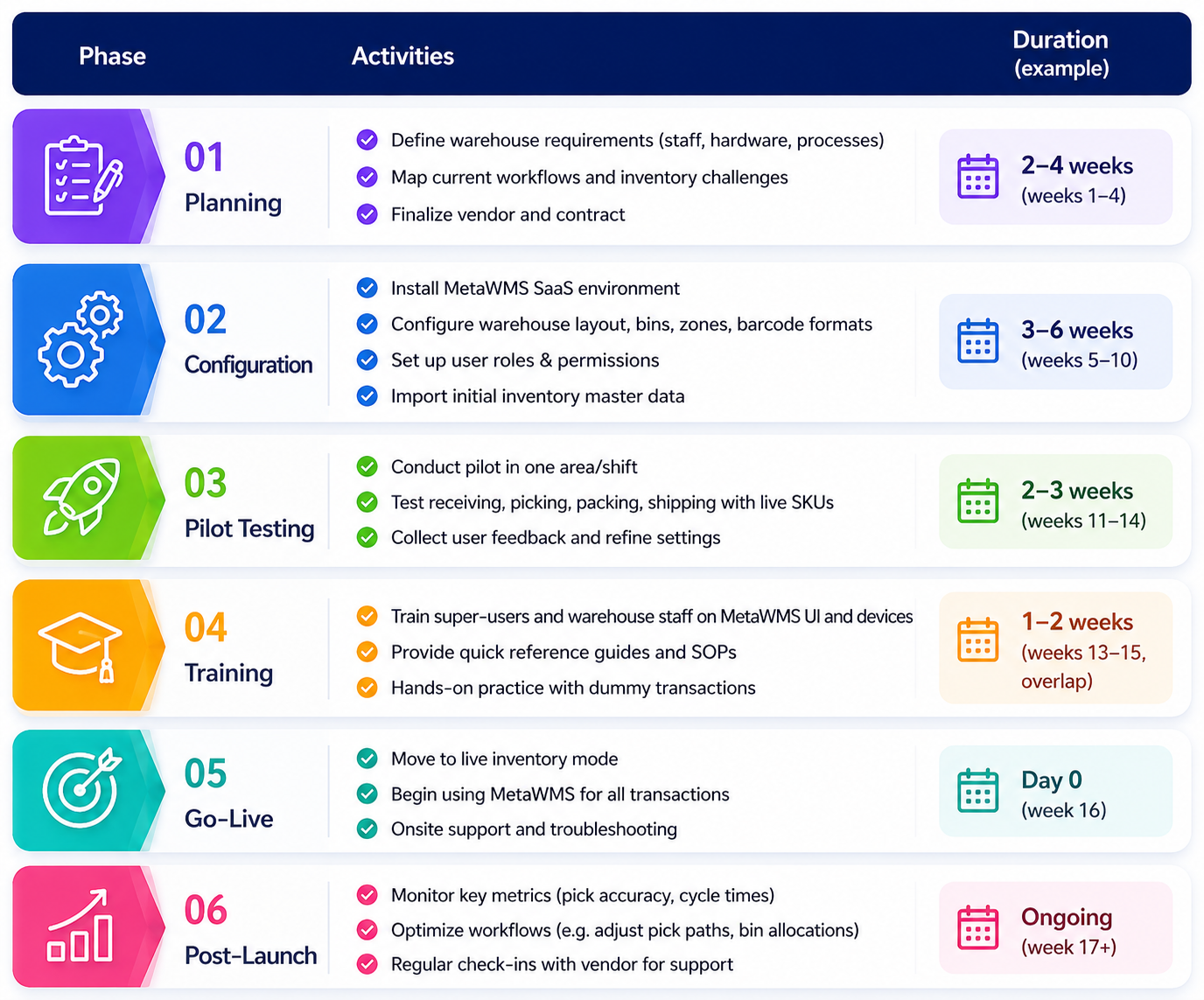
Implementation Checklist & Timeline
A typical MetaWMS rollout follows these steps. We’ve assumed a 3-6 month project (may vary by size):
Pricing Models and ROI Example
Pricing Models: Cloud WMS vendors typically offer subscription pricing. MetaWMS uses a per-user (or per-site) subscription model, often with optional flat monthly fees. For example:
*Actual prices vary by customer size and negotiation. (Placeholder figures only.)
Return on Investment (ROI): Calculate ROI by comparing annual savings to total cost. For example, suppose a mid-size warehouse yields:
- Before WMS: 85% inventory accuracy, $100K carrying costs, $50K in labor (OT/overtime), 100 orders/hr throughput.
- After MetaWMS: 98% accuracy, carrying cost $85K (15% reduction), labor $35K (30% reduction), 130 orders/hr throughput.
Over one year:
- Inventory Savings: $15,000
- Labor/Overtime Savings: $15,000
- Total Savings: $30,000
- MetaWMS Subscription + hardware: $20,000 per year
- ROI = (Savings – Cost) / Cost = ($30K – $20K) / $20K = 50% per year.
- Payback Period: ~0.67 years (less than 8 months).
A simplified ROI formula:

In practice, many companies see ROI within 6–18 months through error reduction, faster throughput, and lower inventory. You can adjust inputs (labor rate, error costs, WMS fee) in an ROI calculator to suit your business.
Case Studies & Success Scenarios
- E-Commerce Distributor: A mid-sized online retailer implemented MetaWMS to synchronize online orders with warehouse stock. They eliminated stockout errors during peak season and saw pick accuracy jump from ~90% to 99%. “The system keeps storefront inventory perfectly in sync with our DC, so we stopped overselling” (internal report).
- Third-Party Logistics (3PL): A regional 3PL with 5 warehouses adopted MetaWMS. They reported 30% faster pack-to-ship times and significantly fewer mis-picks. By optimizing pick paths and labeling, their on-time delivery rate improved and customer complaints fell by 40%.
- Food Manufacturer: With FIFO/expiry tracking in MetaWMS, a food packager reduced waste by 20% and maintained 100% compliance with regulations. The built-in barcode scanning ensured first-in-first-out, preventing expired product shipments.
- Healthcare Distributor: A medical supply company with multiple locations switched from spreadsheets to MetaWMS. Inventory inaccuracy dropped from 15% to under 2% within months, freeing up capital from excess stock. ROI was achieved within the first year via labor savings and reduced rush shipping costs.
- Hypothetical ROI Chart: If we plot cumulative ROI over 3 years (chart not shown), MetaWMS breakeven often occurs before Year 2, with steadily rising net gains as efficiencies compound. (Exact ROI curves depend on your metrics.)